

原文:JavaScript Switch Case – JS Switch Statement Example,作者:Jessica Wilkins
在 JavaScript 中,有时你可能会考虑使用 switch 语句,而不是 if else 语句。
与复杂的 if else 语句相比,switch 语句的语法更简洁。
看看下面的例子——你可以选择使用更容易阅读的 switch 语句,而不是使用这个长的 if else 语句。
const pet = "dog";

if (pet === "lizard") {
  console.log("I own a lizard");
} else if (pet === "dog") {
  console.log("I own a dog");
} else if (pet === "cat") {
  console.log("I own a cat");
} else if (pet === "snake") {
  console.log("I own a snake");
} else if (pet === "parrot") {
  console.log("I own a parrot");
} else {
  console.log("I don't own a pet");
}
const pet = "dog";
switch (pet) {
case "lizard":
console.log("I own a lizard");
break;
case "dog":
console.log("I own a dog");
break;
case "cat":
console.log("I own a cat");
break;
case "snake":
console.log("I own a snake");
break;
case "parrot":
console.log("I own a parrot");
break;
default:
console.log("I don't own a pet");
break;
}在本文中,我将解释 switch 语句是什么以及它们是如何工作的。我还将帮助你确定它们是否是在你的代码中使用的好选择。
Switch 语句简介
在编程中,switch 语句是一种控制流语句,用于针对多种情况测试表达式的值。
这是 switch 语句的基本语法:
switch (expression) {
  case 1:
   //this code will execute if the case matches the expression
    break;
  case 2:
   //this code will execute if the case matches the expression
    break;
  case 3:
   //this code will execute if the case matches the expression
    break;
  default:
    //this code will execute if none of the cases match the expression
    break;
}
计算机将运行 switch 语句并检查 case 和表达式之间是否严格相等 ===。如果其中一种情况与表达式 expression 匹配,则将执行该 case 子句中的代码。
switch (expression) {
  case 1:
   //this code will execute if the case matches the expression
    break;
  case 2:
   //this code will execute if the case matches the expression
    break;
}
如果没有任何 case 与 expression 匹配,则将执行 default 子句。
  default:
    //this code will execute if none of the cases match the expression
    break;
如果多个 case 与 switch 语句匹配,则将使用与 expression 匹配的第一个 case。
当 case 匹配时,break 语句会跳出 switch。如果不存在 break 语句,则即使找到匹配项,计算机也将继续执行 switch 语句。
如果 switch 中存在 return 语句,则不需要 break 语句。
JavaScript 中的 Switch 语句示例
在这个例子中,我们将 "oboe" 与 case 进行比较。"oboe" 将匹配第三个 case 子句,并将打印到控制台 “I play the oboe”。
switch ("oboe") {
  case "trumpet":
    console.log("I play the trumpet");
    break;
  case "flute":
    console.log("I play the flute");
    break;
  case "oboe":
    console.log("I play the oboe");
    break;
  default:
    console.log("I don't play an instrument. Sorry");
    break;
}
如果我将表达式更改为 "no instrument",则将执行 default 子句,并且打印到控制台的消息将是 “I don't play an instrument. Sorry”。
switch ("no instrument") {
  case "trumpet":
    console.log("I play the trumpet");
    break;
  case "flute":
    console.log("I play the flute");
    break;
  case "oboe":
    console.log("I play the oboe");
    break;
  default:
    console.log("I don't play an instrument. Sorry");
    break;
}
缺少 Break 语句
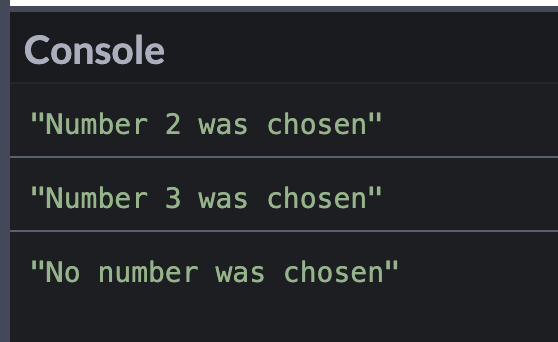
在这个例子中,匹配是 case 2。但是如果没有 break 语句,计算机将继续执行 case 3 和 default 子句。
你应该看到三个 console.log 语句,因为没有包含 break 语句。
switch (2) {
  case 1:
    console.log("Number 1 was chosen");
  case 2:
    console.log("Number 2 was chosen");
  case 3:
    console.log("Number 3 was chosen");
  default:
    console.log("No number was chosen");
}
Default 子句放在哪里
标准约定是将 default 作为最后一个子句。但是你也可以把它放在其他 case 子句之前。
const food = "nuts";

switch (food) {
  case "cake":
    console.log("I like cake");
    break;
  case "pizza":
    console.log("I like pizza");
    break;
  default:
    console.log("I like all foods");
    break;
  case "ice cream":
    console.log("I like ice cream");
    break;
}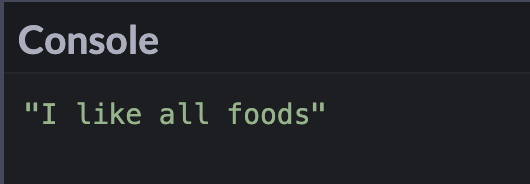
计算机仍将遍历每个 case 并找到匹配项。由于变量 food 不匹配任何情况,因此将执行 default。
一次操作多个 Case
有时你的一项操作可能对多种情况都适用。
我们可以省略 break 语句并在 case 组之后放一个单一的操作,而不是为每个 case 写出相同的 console.log。
如果 country 匹配 "France"、"Spain"、"Ireland" 或 "Poland" 中的任何一个,则将打印 “This country is in Europe.” 到控制台。
const country = "Ireland";
switch (country) {
  case "France":
  case "Spain":
  case "Ireland":
  case "Poland":
    console.log("This country is in Europe.");
    break;
  case "United States":
  default:
    console.log("This country is not in Europe.");
}
块作用域和 Switch 语句
这个例子会产生一个错误信息,因为 message 变量已经被声明,并且在同一个块作用域中不能有相同的变量名。
const errand = "Going Shopping";
switch (errand) {
  case "Going to the Dentist":
    let message = "I hate going to the dentist";
    console.log(message);
    break;
  case "Going Shopping":
    let message = "I love to shop";
    console.log(message);
    break;
  default:
    console.log("No errands");
    break;
}
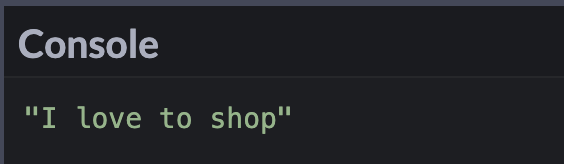
为了避免该错误消息,需要将 case 放在一组花括号中。
const errand = "Going Shopping";
switch (errand) {
  case "Going to the Dentist": {
    let message = "I hate going to the dentist";
    console.log(message);
    break;
  }
  case "Going Shopping": {
    let message = "I love to shop";
    console.log(message);
    break;
  }
  default: {
    console.log("No errand");
    break;
  }
}
总结
使用 switch 语句可以替代 if else 语句。switch 语句将 expression 的值与多种情况进行比较。
switch 语句将检查严格相等。在本例中,由于 "2"!== 2,将执行 default 子句。
switch (2) {
  case "2":
    console.log("Number 2 in a string");
    break;
  case "3":
    console.log("Number 3 in a string");
    break;
  default:
    console.log("Number not present");
    break;
}
当 case 匹配时,break 语句会跳出 switch。如果不存在 break 语句,则即使找到匹配项,计算机也将继续执行 switch 语句。
希望你喜欢这篇关于 switch 语句的文章。