

In fintech or wealthtech products, people constantly need quick market context. They need to know why a particular stock moved, what changed recently, or what they should watch next.
This usually becomes manual work. Someone pulls recent returns, checks a couple fundamentals, scans headlines, then writes a short Slack or Notion note. It works, but it doesn't scale, and everyone formats it differently.
Dashboards help when the question is predefined. Pure LLM answers are flexible, but they're not something you can trust unless the numbers are tool-backed.
In this handbook, we’ll build a market copilot MVP. Think of it as a lightweight “market note generator” for a single stock.
A stock question could be anything like: “What happened to AAPL over the last 60 days?”, “Is this move unusually risky?”, or “What changed in the news this week?” A market brief is the short, structured write-up you’d paste into Slack. It includes a snapshot, a few key metrics, and a compact interpretation backed by real data.
We'll keep the product logic separate from the UI. The engine lives in copilot.py. It fetches facts through EODHD-backed tools, which are just Python functions that call EODHD endpoints and return small, predictable outputs. The Streamlit app in app.py is only a shell that calls the engine, then renders the brief and the tool-backed metrics side by side.
One quick clarification: When I say “copilot” in this handbook, I’m not referring to GitHub Copilot. This will serve as an in-product assistant that helps generate repeatable market context by calling data tools and writing a brief from those tool outputs.
Prerequisites and Tools
You’ll get the most out of this handbook if you’re comfortable with Python basics and have built at least one small script that calls an API.
Before you start, make sure you have:
Python 3.10+ installed
An EODHD API key
An OpenAI API key
A working local environment (venv or conda is fine)
Tools used in this build:
EODHD. You'll use it as the data layer for end-of-day prices, fundamentals, and news.
OpenAI. You'll use a chat model to write the brief, but only after tools return the underlying facts.
LangChain + LangGraph. You'll use these tools and a ReAct-style agent so the model can decide which data functions to call, then compose a short brief.
Streamlit. You'll use it only as the quickest way to demo the copilot as a clickable product surface.
Table of Contents
What the MVP Does
At a high level, this MVP has one job: to turn a stock question into a short, repeatable market brief.
You give it:
A ticker (like AAPL.US)
A recent window in trading days (like 60 or 120)
A free-form query (what you actually want to know)
Optional parameters that force certain parts to be included, like fundamentals, risk, or headlines
In practice, the query drives the brief. The optional parameters are there for consistency when a team wants a standard format.
Then it returns two things:
A short brief in Markdown with a consistent structure you can read quickly.
A set of tool-backed artifacts, basically the raw metrics the UI can render without re-calling the APIs.
That second output is important. It keeps the app fast and makes the “numbers” auditable.
Non-negotiables
This MVP is designed like a product feature, not a chat demo.
Metrics are tool-first. The model doesn’t guess.
If data is missing, it says so.
No raw price dumps, no giant news lists.
It computes only what the query asked for.
The output reads like an internal note you’d paste into Slack or a weekly memo.
Once you have this pattern working, a few useful things happen.
First, you get consistent briefs that PMs, research, and sales can all reuse. You can also generate weekly market notes faster. And demos become simple. Type a query, get a brief, show the metrics next to it.
Architecture
We’ll keep this simple: two files with two clear responsibilities.
copilot.py – the engine
This file holds everything that actually makes the copilot work:
The EODHD data tools (prices, fundamentals, news, risk)
The agent setup and prompt rules
A single run_brief() function that takes inputs and returns:
the markdown brief
the structured artifacts for the UI
If you want to reuse this copilot anywhere else later, this is the file you keep.
app.py – the MVP shell
This is just the Streamlit layer:
Sidebar inputs (ticker, window, query, optional parameters)
A two-pane layout: left side shows the brief, right side shows tool-backed metrics and headlines
No data logic lives here. It only calls run_brief() and renders what comes back.
Why this split matters
If everything is mixed into one Streamlit script, you’re stuck with Streamlit forever.
With this split, you can replace Streamlit with FastAPI later without rewriting the core logic. You also keep “product logic” in one place, which makes testing and iteration much easier. And you avoid the notebook trap where UI code and data code become impossible to maintain.
copilot.py: Build the Engine
This section is where we build the backend engine. By the end of it, you’ll have a single callable function that takes a query, pulls the required facts using EODHD tools, and returns two things: a Markdown brief for humans, and a structured artifacts dictionary for the UI.
1. Import packages
We’re keeping the stack minimal. The goal is not to show off tooling – it’s to ship something that works and is easy to maintain.
import json
from datetime import datetime, timedelta
from typing import Any, Dict, List, Optional, Tuple
import numpy as np
import pandas as pd
import requests

from langchain_openai import ChatOpenAI
from langchain_core.tools import tool
from langgraph.prebuilt import create_react_agent

eodhd_api_key = 'YOUR EODHD API KEY'
openai_api_key = 'YOUR OPENAI API KEY'
Apart from importing the packages, we also define eodhd_api_key and openai_api_key at the top so the file can run as-is. In a real deployment, you’d move these to environment variables.
2. Helper Functions
Before we touch tools or the agent, we add three small helpers. None of them are “AI-related”, but they’re the difference between a demo that works once and a feature that keeps working.
def normalize_ticker(t: str) -> str:
    t = (t or "").strip().upper()
    if not t:
        return t
    if "." in t:
        return t
    return f"{t}.US"

def _safe_json_loads(x: Any) -> Optional[Any]:
    if x is None:
        return None
    if isinstance(x, (dict, list)):
        return x
    if not isinstance(x, str):
        return None
    try:
        return json.loads(x)
    except Exception:
        return None

def get_eod_prices_raw(ticker: str, start: str, end: str) -> pd.DataFrame:
    url = f"https://eodhd.com/api/eod/{ticker}"
    params = {"from": start, "to": end, "api_token": eodhd_api_key, "fmt": "json"}
    r = requests.get(url, params=params)
    data = r.json()

    if not isinstance(data, list) or not data:
        return pd.DataFrame(columns=["date", "open", "high", "low", "close", "volume", "ticker"])

    df = pd.DataFrame(data)
    keep = [c for c in ["date", "open", "high", "low", "close", "volume"] if c in df.columns]
    df = df[keep].copy()
    df["ticker"] = ticker
    df["date"] = pd.to_datetime(df["date"], errors="coerce")
    df = df.dropna(subset=["date", "close"]).sort_values("date").reset_index(drop=True)
    return df
Here’s a brief explanation of the three helper functions in the code:
normalize_ticker()fixes user input. People will type aapl, AAPL, AAPL.US with spaces sometimes. EODHD expects a consistent symbol format. This function forces that consistency before any API call._safe_json_loads()is there because when we read tool outputs from the agent messages, the payload might already be a Python dict/list, or it might be a JSON string. This helper lets us handle both without throwing errors.get_eod_prices_raw()is the base price fetcher. Every tool that needs OHLCV uses this instead of re-writing request + cleaning logic each time. It returns a cleaned DataFrame extracted using EODHD’s end-of-day historical data API, sorted by date, with missing values handled, so the rest of the tools can assume they’re working with sane data.
That’s it. Nothing fancy. It just keeps the rest of the code predictable.
3. Data tools
Before the agent, we need a reliable data layer.
If you’re building this as a product, the tools are your “internal API”. They decide what the copilot can and cannot say. The agent is just calling them and turning their outputs into a brief.
In this MVP, each tool has a narrow job and returns compact outputs. That’s intentional. You want predictable shapes for the UI. You also want to avoid dumping raw data into the model unless you genuinely need it.
@tool
def last_n_days_prices(ticker: str, n: int = 60) -> Dict[str, Any]:
    """
    Quick return window over last N trading days.
    Returns a compact summary. No raw rows.
    """
    ticker = normalize_ticker(ticker)

    end = datetime.utcnow().date().isoformat()
    start = (datetime.utcnow().date() - timedelta(days=240)).isoformat()

    df = get_eod_prices_raw(ticker, start, end)
    if df.empty:
        return {"ticker": ticker, "error": "no_price_data"}

    df = df.tail(int(n)).reset_index(drop=True)
    if df.empty:
        return {"ticker": ticker, "error": "no_price_data"}

    first_close = float(df.loc[0, "close"])
    last_close = float(df.loc[len(df) - 1, "close"])
    total_return = float((last_close / first_close) - 1.0)

    return {
        "ticker": ticker,
        "n": int(n),
        "start_date": str(df.loc[0, "date"].date()),
        "end_date": str(df.loc[len(df) - 1, "date"].date()),
        "first_close": first_close,
        "last_close": last_close,
        "total_return": total_return,
    }

@tool
def fundamentals_snapshot(ticker: str) -> Dict[str, Any]:
    """
    Lightweight fundamentals snapshot.
    Returns a flat dict.
    """
    ticker = normalize_ticker(ticker)

    url = f"https://eodhd.com/api/fundamentals/{ticker}"
    params = {"api_token": eodhd_api_key, "fmt": "json"}
    r = requests.get(url, params=params)
    data = r.json()

    if not isinstance(data, dict) or not data:
        return {"ticker": ticker, "error": "no_data"}

    highlights = data.get("Highlights", {}) or {}
    general = data.get("General", {}) or {}
    valuation = data.get("Valuation", {}) or {}
    technicals = data.get("Technicals", {}) or {}

    return {
        "ticker": ticker,
        "name": general.get("Name"),
        "sector": general.get("Sector"),
        "industry": general.get("Industry"),
        "market_cap": highlights.get("MarketCapitalization"),
        "pe": valuation.get("TrailingPE"),
        "pb": valuation.get("PriceBookMRQ"),
        "profit_margin": highlights.get("ProfitMargin"),
        "dividend_yield": highlights.get("DividendYield"),
        "beta": technicals.get("Beta"),
    }

@tool
def latest_news(ticker: str, limit: int = 5) -> List[Dict[str, Any]]:
    """
    Latest headlines for a ticker.
    Returns a compact list of dicts.
    """
    ticker = normalize_ticker(ticker)

    url = f"https://eodhd.com/api/news"
    params = {"s": ticker, "limit": int(limit), "offset": 0, "api_token": eodhd_api_key, "fmt": "json"}
    r = requests.get(url, params=params)
    data = r.json()

    if not isinstance(data, list) or not data:
        return []

    df = pd.DataFrame(data)
    keep = [c for c in ["date", "title", "link", "source"] if c in df.columns]
    df = df[keep].copy()

    if "date" in df.columns:
        df["date"] = pd.to_datetime(df["date"], errors="coerce")
        df = df.sort_values("date", ascending=False)

    out = df.head(int(limit)).reset_index(drop=True).to_dict(orient="records")
    for row in out:
        dt = row.get("date")
        if isinstance(dt, (pd.Timestamp, datetime)):
            row["date"] = dt.isoformat()
    return out

@tool
def risk_metrics(ticker: str, start: str, end: str) -> Dict[str, Any]:
    """
    Risk metrics from daily close prices over a window.
    volatility_ann: annualized vol from daily returns
    max_drawdown: max drawdown over the window
    """
    ticker = normalize_ticker(ticker)

    df = get_eod_prices_raw(ticker, start, end)
    if df.empty:
        return {"ticker": ticker, "error": "no_price_data"}

    df = df.sort_values("date").reset_index(drop=True)
    df["ret"] = df["close"].pct_change().fillna(0.0)

    vol_ann = float(df["ret"].std(ddof=0) * np.sqrt(252))

    cummax = df["close"].cummax()
    dd = (df["close"] / cummax) - 1.0
    max_dd = float(dd.min())

    first_close = float(df.loc[0, "close"])
    last_close = float(df.loc[len(df) - 1, "close"])
    total_return = float((last_close / first_close) - 1.0)

    return {
        "ticker": ticker,
        "start_date": str(df.loc[0, "date"].date()),
        "end_date": str(df.loc[len(df) - 1, "date"].date()),
        "n": int(len(df)),
        "total_return": total_return,
        "volatility_ann": vol_ann,
        "max_drawdown": max_dd,
    }

@tool
def eod_prices(ticker: str, start: str, end: str) -> List[Dict[str, Any]]:
    """
    Raw OHLCV rows. Use only for custom calculations that cannot be done with other tools.
    """
    ticker = normalize_ticker(ticker)
    df = get_eod_prices_raw(ticker, start, end)
    return json.loads(df.to_json(orient="records"))
Let’s go through the key parts of this code.
1. last_n_days_prices – Price window
Most real requests start with something like: “what happened recently?”
So this tool does one thing: it pulls enough daily bars to safely cover the last N trading days (using a buffer window), then returns a small summary:
start and end dates for the window
first and last close
total return
number of trading days used
It doesn’t return raw rows. That keeps the agent from flooding output, and it keeps the UI fast.
2. fundamentals_snapshot – Fundamentals snapshot
This tool is for quick context. You usually want a rough valuation anchor in the brief, but you don’t want to turn the MVP into a full fundamentals pipeline.
So we’ll keep it simple. It fetches the EODHD fundamentals data API once and extracts a handful of fields that are commonly useful in a brief:
PE, PB
market cap
sector and beta
a couple of optional extras like dividend yield and profit margin
If a field is missing, it just returns None for that field. No guessing.
3. latest_news – Headlines
Price moves without context aren’t helpful.
This tool pulls the latest headlines for a ticker via EODHD Financial News API, sorts them by date when available, and returns a compact list with only what we actually need in the app:
date
title
link
source
We’re not doing sentiment here. The point is simply to ground the brief in real narrative context.
4. risk_metrics – Risk metrics
Sometimes the question isn’t “what happened?”. It’s “how extreme was this move?”
That’s where volatility and drawdown are useful. This tool takes a start and end date, pulls daily closes, then calculates:
annualized volatility from daily returns
max drawdown over the window
and it also returns total return again for the same window, so everything stays consistent
In the product, this tool should only run when the user asks for risk. It’s extra compute and extra API calls.
5. eod_prices – Escape Hatch
This is the tool you keep around for later extensions.
Most of the time, the MVP doesn’t need raw OHLCV rows. But as soon as you want custom metrics (rolling indicators, ATR, custom signals, pattern detection), you’ll need raw bars.
So eod_prices returns the full daily rows as a list of dicts.
The rule is simple: don’t call it unless you have to. It’s heavier, and it’s the easiest way to accidentally blow up token usage or slow down the app.
4. Testing the Data Tools (outside copilot.py)
Before the agent writes anything, you’ll want to know that the data layer is behaving. This isn’t “testing for fun”. It’s a quick sanity check that answers three questions:
Can we fetch data for a normal ticker without errors?
Are the fields we depend on actually present?
Do the outputs look roughly reasonable, so the brief won’t be garbage?
Here’s the exact test block I ran. One call per tool. I printed the key parts and kept the code block small.
print("\n--- last_n_days_prices ---")
out_price = last_n_days_prices.invoke({"ticker": "AAPL.US", "n": 60})
print(out_price)

print("\n--- fundamentals_snapshot ---")
out_fund = fundamentals_snapshot.invoke({"ticker": "AAPL.US"})
print(out_fund)

print("\n--- latest_news ---")
out_news = latest_news.invoke({"ticker": "AAPL.US", "limit": 5})
print(f"news rows: {len(out_news)}")
print(out_news[:2])

print("\n--- risk_metrics ---")
end = datetime.utcnow().date()
start = (end - timedelta(days=180)).isoformat()
end = end.isoformat()
out_risk = risk_metrics.invoke({"ticker": "AAPL.US", "start": start, "end": end})
print(out_risk)

print("\n--- eod_prices (raw rows, small window) ---")
raw_rows = eod_prices.invoke({"ticker": "AAPL.US", "start": "2025-12-01", "end": "2026-01-15"})
print(f"rows: {len(raw_rows)}")
print(raw_rows[:2])

This output is basically confirming that the data layer works.
last_n_days_prices gave you a clean 60 trading day window (2025-10-28 to 2026-01-23) with first close 269.0, last close 248.04, and total return around -7.79%. fundamentals_snapshot also returned the key fields you want for a brief. PE 33.2048, PB 49.4443, market cap ~3.665T, beta 1.093, plus sector and industry.
latest_news returned 5 items in a consistent shape (date, title, link). risk_metrics worked too, but it used a different window (last 180 calendar days became 123 trading days), so its total return (+18.65%) won’t match the 60 day tool, which is why we later force risk metrics to use the same start and end dates as the return window.
eod_prices returned 32 raw rows as expected. The date field shows up as an epoch-style number here, which is fine since this tool is meant for internal calculations, not direct display.
5. Creating the agent
This is where the whole thing becomes a copilot instead of a bunch of loose functions. We define how the agent should behave, give it the only tools it’s allowed to use, then set up a clean way to capture tool outputs for the UI.
system_prompt = (
    "You are a market brief copilot embedded in a product.\n"
    "Rules:\n"
    "1) Use tools for facts. Never invent numbers.\n"
    "2) Do not dump raw price rows or long news lists.\n"
    "3) If the user didn't ask for something, don't compute it.\n"
    "4) Output in clean Markdown with sections.\n"
    "5) Keep it short and useful, like an internal dashboard note.\n"
    "Tool guidance:\n"
    "- Use last_n_days_prices for return windows.\n"
    "- Use fundamentals_snapshot for PE/PB/market cap/sector/beta.\n"
    "- Use latest_news for headlines.\n"
    "- Use risk_metrics only if asked for vol/drawdown.\n"
    "- Use eod_prices only if absolutely required for custom calcs.\n"
)

def _build_agent() -> Any:
    llm = ChatOpenAI(
        model='gpt-5-nano',
        temperature=0,
        api_key=openai_api_key,
    )
    tools = [last_n_days_prices, fundamentals_snapshot, latest_news, risk_metrics, eod_prices]
    return create_react_agent(model=llm, tools=tools)

AGENT = _build_agent()

def _extract_artifacts(messages: List[Any]) -> Dict[str, Any]:
    """
    Pull tool outputs from the LangGraph message list.
    This avoids calling the endpoints twice in Streamlit.
    """
    out: Dict[str, Any] = {}
    for m in messages:
        name = getattr(m, "name", None)
        content = getattr(m, "content", None)

        if not name:
            continue

        payload = _safe_json_loads(content)
        if payload is None:
            continue

        if name.endswith("last_n_days_prices"):
            out["price"] = payload
        elif name.endswith("fundamentals_snapshot"):
            out["valuation"] = payload
        elif name.endswith("risk_metrics"):
            out["risk"] = payload
        elif name.endswith("latest_news"):
            out["headlines"] = payload

    return out
The system prompt is basically a contract. If you don’t spell this out, the agent will eventually drift. It will start guessing numbers, dumping long outputs, or doing work you didn’t ask for. This prompt keeps it in the “internal brief writer” lane, and the tool guidance reduces tool misuse.
_build_agent() is just wiring. One model, a fixed toolset, and a ReAct agent that can decide when to call what. The other important piece here is _extract_artifacts(). We’re not building this just to print a nice paragraph. We also want structured outputs that the UI can render. So instead of calling the endpoints again inside Streamlit, we reuse the tool results that already happened during the agent run.
6. Turning the agent into a callable backend
Up to now, we’ve built tools and an agent. This is the piece that turns it into something your app can call like a regular backend function. One input in, one brief out, plus the structured data you need to render the UI.
def run_brief(
    ticker: str,
    n_days: int = 60,
    include_fundamentals: bool = True,
    include_risk: bool = False,
    include_news: bool = True,
    news_limit: int = 5,
) -> Tuple[str, Dict[str, Any]]:
    """
    Returns:
      - markdown brief (string)
      - artifacts dict with keys like price/valuation/risk/headlines when tools were used
    """
    t = normalize_ticker(ticker)

    request_parts = [
        f"Ticker: {t}.",
        f"Compute total return over the last {int(n_days)} trading days.",
    ]
    if include_fundamentals:
        request_parts.append("Fetch fundamentals and report PE, PB, market cap, sector, beta.")
    if include_risk:
        request_parts.append("Compute annualized volatility and max drawdown over the same window.")
        request_parts.append("Use the same start_date and end_date as the return window.")
    if include_news:
        request_parts.append(f"Pull {int(news_limit)} latest headlines and reference them briefly.")
    request_parts.append(
        "Write a short market brief with sections: Snapshot, Metrics, What it might mean, Caveats."
    )
    request_parts.append("Keep it concise. Do not paste raw rows.")

    user_prompt = " ".join(request_parts)

    response = AGENT.invoke(
        {"messages": [("system", system_prompt), ("user", user_prompt)]}
    )

    messages = response.get("messages", [])
    final_msg = messages[-1]
    brief_md = getattr(final_msg, "content", "") or ""

    artifacts = _extract_artifacts(messages)
    return brief_md, artifacts
The run_brief function is doing two jobs. First, it translates “what the user wants” into a very specific instruction set that keeps the agent on rails. That’s why it builds request_parts instead of passing the user a blank prompt and hoping for the best.
Second, it returns two outputs. brief_md is what you show on the left side of the app. artifacts is what you render on the right side. Those artifacts come from _extract_artifacts(messages), which is just a clean way to reuse the tool outputs that already happened during the run, instead of re-calling EODHD again just to populate the UI.
Demo Runs (Outside copilot.py)
Below are three runs that map to how a PM, founder, or analyst would actually use this in a product. Each demo has a short setup line, the exact code you run, the output, then a tight interpretation tied to what the output actually says.
Demo 1: Baseline brief (return + fundamentals + headlines)
This is the default “give me the situation” request. In the output, you want to see one window, one return, key valuation fields, and a short headline-backed story.
def run_agent(query: str):
    resp = AGENT.invoke({"messages": [("system", system_prompt), ("user", query)]})
    msgs = resp.get("messages", [])
    final = msgs[-1].content if msgs else ""
    print("\n" + "=" * 80)
    print("QUERY:")
    print(query)
    print("\nANSWER:")
    print(final)
    return resp

resp = run_agent(
    "Ticker: AAPL.US. Compute total return over the last 60 trading days. "
    "Fetch fundamentals and report PE, PB, market cap, sector, beta. "
    "Pull 5 latest headlines and reference them briefly. "
    "Write a short market brief with sections: Snapshot, Metrics, What it might mean, Caveats. "
    "Keep it concise. Do not paste raw rows."
)
Output:
================================================================================
QUERY:
Ticker: AAPL.US. Compute total return over the last 60 trading days. Fetch fundamentals and report PE, PB, market cap, sector, beta. Pull 5 latest headlines and reference them briefly. Write a short market brief with sections: Snapshot, Metrics, What it might mean, Caveats. Keep it concise. Do not paste raw rows.

ANSWER:
### Snapshot
- Window: last 60 trading days (2025-10-28 to 2026-01-23)
- Price path: 269.00 → 248.04
- Total return: -7.79%

### Metrics
- Sector: Technology
- Market cap: $3.665T (3,665,126,490,112)
- P/E: 33.20
- P/B: 49.44
- Beta: 1.09

### What it might mean
- The 60-day horizon shows a ~7.8% decline alongside a tech-focused mega-cap backdrop. Elevated P/B suggests high balance-sheet or growth expectations reflected in asset valuation. Macro headlines point to ongoing risk factors (Fed policy, geopolitical/economic headlines) shaping near-term moves.

Headlines reference (brief)
- IWO vs. MGK: How Small-Cap Diversification Compares to Mega-Cap Growth - context on growth tilts and diversification
- Stock Futures Are Falling Ahead of Fed Meeting as Shutdown Fears Rise - macro risk backdrop
- This founder cracked firefighting - now he's creating an AI gold mine - AI/tech narrative
- Dow Jones Futures Fall; Trump Tariffs, Government Shutdown, Big Earnings In Focus - earnings/macroe attention
- SPDR's SPTM Offers Broad Market Reach, While Vanguard's VTV Targets Value Stocks. Which Is the Better Buy? - market breadth/value debate

### Caveats
- Data reflect the latest available snapshot; updates can shift returns, multiples, and fundamentals.
- PB is unusually high here; interpret as market perception of value/assets rather than a strict earnings-based metric.
- This is not investment advice; consider broader context and your risk tolerance.
The core signal is the -7.79% move across a clearly stated window (2025–10–28 to 2026–01–23). The “Metrics” section does what we want for an internal note: it gives sector and a compact valuation context (P/E, P/B, beta, market cap) without turning into a fundamentals report.
The headlines are intentionally brief and more macro-tilted, which is useful if you just need “what’s in the air” rather than a deep Apple-only news breakdown.
Demo 2: Risk-first brief (volatility + drawdown on the same window)
This is the “tell me how ugly it got” workflow. The output should show a return, volatility, and max drawdown all computed on the same dates.
resp = run_agent(
    "Ticker: MSFT.US. Compute total return over the last 90 trading days. "
    "Compute annualized volatility and max drawdown over the same window. "
    "Use the same start_date and end_date as the return window. "
    "Write a short market brief with sections: Snapshot, Metrics, What it might mean, Caveats."
)
Output:
================================================================================
QUERY:
Ticker: MSFT.US. Compute total return over the last 90 trading days. Compute annualized volatility and max drawdown over the same window. Use the same start_date and end_date as the return window. Write a short market brief with sections: Snapshot, Metrics, What it might mean, Caveats.

ANSWER:
## Market Brief - MSFT.US

Snapshot
- Window: 2025-09-16 to 2026-01-23 (90 trading days)
- Start price: 509.04
- End price: 465.95
- Total return (price only): -8.46% over the window (dividends not included)

Metrics
- Annualized volatility: 19.30%
- Max drawdown: -18.07% (peak-to-trough during the window)

What it might mean
- The period shows meaningful downside with elevated volatility, ending the 90-day window in a weaker price regime.
- A roughly 18% drawdown alongside ~19% annualized volatility suggests higher-than-average price swings for this horizon.
- If you're evaluating risk, this window points to downside risk exposure that could matter for near-term positioning.

Caveats
- This total return reflects price movement only; dividends are not included.
- Results depend on the exact window; future performance can differ materially.
- Data as of 2026-01-23; markets and fundamentals can change quickly. If you want, I can add a quick fundamentals snapshot or news context.
The return (-8.46%) tells you direction. The drawdown (-18.07%) tells you the worst pain inside the window, which is usually what stakeholders actually care about when they say “risk”. Volatility (19.30% annualized) gives you a scale for how noisy the ride was. Also notice the window is explicitly pinned (2025–09–16 to 2026–01–23), which is what makes these metrics comparable and repeatable.
Demo 3: News-only “what changed” (no metrics unless required)
This is the “give me context fast” workflow. The output should stay narrative and not sneak in extra metrics since the query explicitly says not to.
resp = run_agent(
    "Ticker: AAPL.US. Pull 7 latest headlines. "
    "Give a short 'what changed' summary in 6-8 lines, referencing themes, not every headline. "
    "Do not compute returns unless needed."
)
Output:
================================================================================
QUERY:
Ticker: AAPL.US. Pull 7 latest headlines. Give a short 'what changed' summary in 6-8 lines, referencing themes, not every headline. Do not compute returns unless needed.

ANSWER:
## AAPL.US – 7 latest headlines: thematic quick read

What changed (themes)
- Macro risk is back in focus: futures drift lower ahead of the Fed meeting, with shutdown fears weighing sentiment.
- Policy risk remains a thread: tariffs and government shutdown headlines keep policy uncertainty front and center.
- Allocation debates persist: small-cap vs mega-cap discussions (IWO vs MGK) drive diversification talk.
- Growth vs value framing broadens: SPTM vs VTV and VOOG vs IWO highlight different exposure bets.
- Earnings season adds collateral volatility alongside macro noise.
- AI narrative gains traction: a founder profile signals growing interest in AI-enabled investment theme
This is doing the right kind of compression. It doesn’t list seven headlines and call it a day. It clusters them into themes (macro, policy, allocation, style drift, earnings, AI narrative). Also important, it respected the constraint. No return or risk metrics were pulled “just because”, which is exactly what you want if this is meant to be a quick context panel inside a product.
Build the Streamlit MVP
At this stage, the goal is not a perfect UI. It's a working product surface you can show to someone on your team.
A notebook is fine when you're the only user. The moment you want feedback from a PM, a founder, or anyone non-technical, you need something they can click through. Streamlit is the fastest way to wrap your copilot function into that kind of experience, without building a frontend stack.
UI Design: Query First, with Optional Parameters
The biggest change in the UI is making the query the primary input. That’s how people actually think. They don’t start with “60 trading days + fundamentals + headlines”. They start with a question.
So the sidebar should lead with a Query box where someone can type something like:
“Give me a 60-day brief on AAPL. Include fundamentals and 5 headlines.”
Then we keep the other controls as optional parameters. These aren’t the “main input”. They’re enforcement knobs. If your team wants every brief to always include fundamentals, you can force that. If you’re doing a risk-focused workflow, you can keep risk always on. If headlines are too noisy for your use case, you can switch them off.
Two-Pane Layout: Brief on the Left, Numbers on the Right
Once you hit “Generate”, you want the output to feel like a product screen, not a chat window.
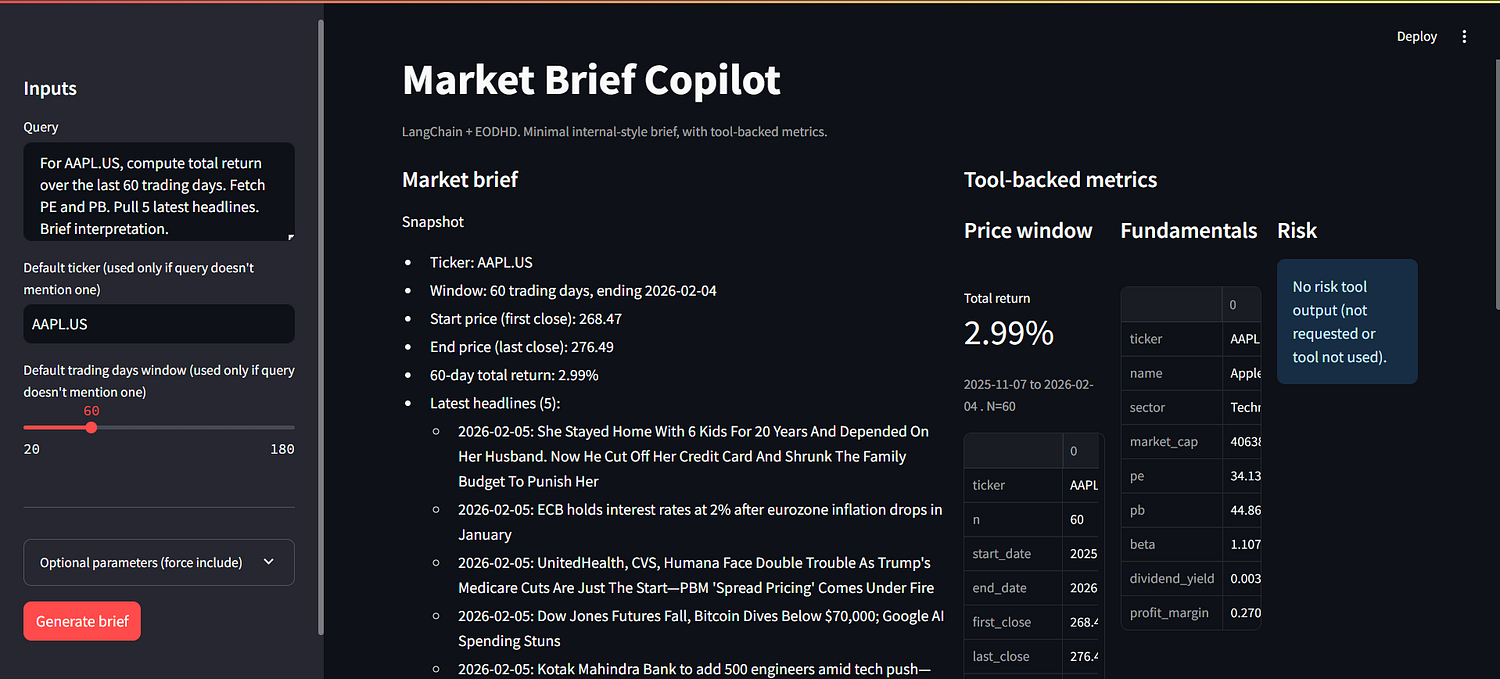
Left side is the brief. It’s the thing you’d copy into Slack or drop into a weekly memo. It’s narrative and compressed.
Right side is the tool-backed artifacts. That’s where the trust comes from. You can scan the return window, the key fundamentals, the risk metrics, and the headline list without hunting through paragraphs. It also makes it obvious what the model actually pulled from tools versus what it wrote as interpretation.
i. App Skeleton
We’re not building logic here. We’re just defining the outer shell so the app feels like a small product surface instead of a notebook cell.
import streamlit as st
import pandas as pd
from copilot import run_query

st.set_page_config(page_title="Market Brief Copilot", layout="wide")

st.title("Market Brief Copilot")
st.caption("LangChain + EODHD. Minimal internal-style brief, with tool-backed metrics.")
The important line here is from copilot import run_query. This keeps the boundary clean. Streamlit stays a UI layer, and the copilot logic stays in copilot.py. That separation is what makes this reusable later if you decide to wrap the same backend inside FastAPI or a different internal UI.
st.set_page_config(..., layout="wide") is mostly a UX decision. Since we’re going to render a brief on the left and tool-backed metrics on the right, you want the wide layout so the output doesn’t feel cramped.
ii. Inputs Panel
This is the most important part of the UI, because it defines how the copilot is used.
The whole point of moving to a query-first design is that this matches how people actually ask for market context. They don’t think in terms of “checkboxes first”. They think in terms of “here’s my question”. The ticker and window still exist, but only as defaults. They’re there as guardrails when the query doesn’t specify them.
Then we add “Optional parameters” as a forcing layer. This is not for normal usage. This is for teams that want consistency. For example, you might want fundamentals always included in every brief, even if the query forgot to ask. Same for risk, or headlines.
with st.sidebar:
    st.header("Inputs")

    query = st.text_area("Query", value="For AAPL.US, compute total return over the last 60 trading days. Fetch PE and PB. Pull 5 latest headlines. Brief interpretation.")
    default_ticker = st.text_input("Default ticker (used only if query doesn't mention one)", value="AAPL.US")
    default_n_days = st.slider("Default trading days window (used only if query doesn't mention one)", min_value=20, max_value=180, value=60, step=5)

    st.divider()

    with st.sidebar.expander("Optional parameters (force include)"):
        include_fund = st.checkbox("Fundamentals (PE, PB, etc.)", value=False)
        include_risk = st.checkbox("Risk metrics (volatility, drawdown)", value=False)
        include_news = st.checkbox("Headlines", value=False)
        news_limit = st.slider("Headline count", min_value=3, max_value=10, value=5, step=1, disabled=not include_news)

    run_btn = st.button("Generate brief", type="primary")
The query text area is the primary input. In the demo, you can literally paste the same kind of prompts you used in the agent test runs. That’s intentional. It keeps the product surface aligned with the real workflows this tool is meant for.
The default_ticker and default_n_days are secondary. They only matter when the query is vague. In a product setting, this matters more than it sounds. People will type “give me a 60-day brief” and forget to mention the ticker because they assume the context is already set. Defaults prevent the whole run from failing.
The expander is where the “team enforcement” idea lives. By keeping it collapsed by default, you’re not cluttering the UI for normal users. But the controls are still there when you want to run a consistent template, like “always include fundamentals and headlines for every brief”.
iii. Metrics Rendering
The brief is useful, but in a product you also need the numbers to be scannable and reusable.
So we treat the output as two layers:
Narrative (the markdown brief).
Structured artifacts (price window, fundamentals, risk, headlines).
The key is. We don’t want Streamlit to call EODHD again just to show metrics. The agent already called the tools once. So we extract those tool outputs from the agent messages and pass them straight to the UI.
Extracting tool outputs inside copilot.py
This helper walks through the LangGraph message list and pulls out anything that came from our tools. It gives us a single artifacts dict with consistent keys that the UI can render.
def _extract_artifacts(messages: List[Any]) -> Dict[str, Any]:
    out: Dict[str, Any] = {}
    for m in messages:
        name = getattr(m, "name", None)
        content = getattr(m, "content", None)

        if not name:
            continue

        payload = _safe_json_loads(content)
        if payload is None:
            continue

        if name.endswith("last_n_days_prices"):
            out["price"] = payload
        elif name.endswith("fundamentals_snapshot"):
            out["valuation"] = payload
        elif name.endswith("risk_metrics"):
            out["risk"] = payload
        elif name.endswith("latest_news"):
            out["headlines"] = payload

    return out
This is the bridge between “agent world” and “UI world”. run_query() just calls this at the end and returns both brief_md and artifacts.
Rendering artifacts in app.py
On the Streamlit side, we keep rendering logic in one place. _render_metrics() takes the artifacts dict and turns it into a clean right-hand panel.
def _render_metrics(artifacts: dict):
    cols = st.columns(3)

    price = artifacts.get("price")
    valuation = artifacts.get("valuation")
    risk = artifacts.get("risk")
    headlines = artifacts.get("headlines")

    with cols[0]:
        st.subheader("Price window")
        if isinstance(price, dict) and "error" not in price:
            st.metric("Total return", f"{price.get('total_return', 0.0) * 100:.2f}%")
            st.caption(f"{price.get('start_date')} to {price.get('end_date')} . N={price.get('n')}")
            st.write(
                pd.DataFrame([price]).rename(
                    columns={
                        "first_close": "first_close",
                        "last_close": "last_close",
                        "total_return": "total_return (decimal)",
                    }
                ).T
            )
        elif isinstance(price, dict) and "error" in price:
            st.warning(price["error"])
        else:
            st.info("No price tool output (not requested or tool not used).")

    with cols[1]:
        st.subheader("Fundamentals")
        if isinstance(valuation, dict) and "error" not in valuation:
            df = pd.DataFrame([valuation])
            keep = ["ticker", "name", "sector", "market_cap", "pe", "pb", "beta", "dividend_yield", "profit_margin"]
            keep = [c for c in keep if c in df.columns]
            st.write(df[keep].T)
        elif isinstance(valuation, dict) and "error" in valuation:
            st.warning(valuation["error"])
        else:
            st.info("No fundamentals tool output (not requested or tool not used).")

    with cols[2]:
        st.subheader("Risk")
        if isinstance(risk, dict) and "error" not in risk:
            st.metric("Volatility (ann.)", f"{risk.get('volatility_ann', 0.0) * 100:.2f}%")
            st.metric("Max drawdown", f"{risk.get('max_drawdown', 0.0) * 100:.2f}%")
            st.caption(f"{risk.get('start_date')} to {risk.get('end_date')} . N={risk.get('n')}")
            st.write(pd.DataFrame([risk]).T)
        elif isinstance(risk, dict) and "error" in risk:
            st.warning(risk["error"])
        else:
            st.info("No risk tool output (not requested or tool not used).")

    st.subheader("Headlines")
    if isinstance(headlines, list) and len(headlines) > 0:
        for h in headlines:
            title = h.get("title", "Untitled")
            link = h.get("link")
            src = h.get("source")
            dt = h.get("date")
            line = f"- {title}"
            if src:
                line += f" ({src})"
            if dt:
                line += f" . {dt}"
            if link:
                st.markdown(f"{line}  \n  {link}")
            else:
                st.markdown(line)
    else:
        st.info("No headlines tool output (not requested or tool not used).")
This is why the whole app feels “product-ish”. The model can write a brief, but the UI can still show hard numbers in a predictable layout. Also, we’re not re-fetching anything. We’re only rendering what the tools already returned during the agent run.
iv. Wiring the UI to the Engine
At this point, the Streamlit app shouldn’t “think”. It should just collect inputs, call one function, and render whatever comes back.
Originally, copilot.py exposed run_brief(ticker, n_days, …). Once we moved to a query-first UI, that shape stopped making sense. So we updated the backend function to run_query(query, default_ticker, default_n_days, force_..., …). The app stays simple, but the engine becomes flexible enough to handle real product-style prompts.
This is the updated run_query function on copilot.py:
def run_query(
    query: str,
    default_ticker: str = "AAPL.US",
    default_n_days: int = 60,
    force_fundamentals: bool = True,
    force_risk: bool = False,
    force_news: bool = True,
    news_limit: int = 5,
) -> Tuple[str, Dict[str, Any]]:

    q = (query or "").strip()

    if not q:
        q = f"For {default_ticker}, compute total return over the last {int(default_n_days)} trading days."

    constraints = [
        "Constraints:",
        "1) Use tools for facts. Never invent numbers.",
        "2) Do not dump raw price rows or long news lists.",
        "3) Output in clean Markdown with sections: Snapshot, Metrics, What it might mean, Caveats.",
        "4) Keep it short and useful.",
        f"5) If the query does not specify a window, assume last {int(default_n_days)} trading days.",
        f"6) If the query does not specify a ticker, assume {normalize_ticker(default_ticker)}.",
    ]

    if force_fundamentals:
        constraints.append("7) You must include fundamentals (PE, PB, market cap, sector, beta). Use fundamentals_snapshot.")
    if force_risk:
        constraints.append("8) You must include risk metrics (annualized volatility and max drawdown). Use risk_metrics.")
        constraints.append("   Use the same start_date and end_date as the return window.")
    if force_news:
        constraints.append(f"9) You must include headlines. Pull exactly {int(news_limit)}. Use latest_news.")

    user_prompt = "User query:\n" + q + "\n\n" + "\n".join(constraints)

    response = AGENT.invoke(
        {"messages": [("system", system_prompt), ("user", user_prompt)]}
    )

    messages = response.get("messages", [])
    final_msg = messages[-1] if messages else None
    brief_md = getattr(final_msg, "content", "") or ""

    artifacts = _extract_artifacts(messages)
    return brief_md, artifacts
Here’s the core wiring inside app.py. It only runs when the user clicks the button.
if run_btn:
    with st.spinner("Running tools and generating brief..."):
        brief_md, artifacts = run_query(
            query=query,
            default_ticker=default_ticker,
            default_n_days=default_n_days,
            force_fundamentals=include_fund,
            force_risk=include_risk,
            force_news=include_news,
            news_limit=news_limit,
        )

    left, right = st.columns([1.2, 1])

    with left:
        st.subheader("Market brief")
        st.markdown(brief_md)

    with right:
        st.subheader("Tool-backed metrics")
        _render_metrics(artifacts)

else:
    st.info("Set inputs on the left and click **Generate brief**.")
The call returns two things, same idea as before. brief_md is the markdown brief you show on the left. artifacts are the tool outputs you render on the right without making extra API calls.
The important change is what the engine now expects. Instead of the UI building a “request_parts” prompt itself, the UI just passes the raw query and the enforcement flags. The enforcement logic lives inside run_query(), not inside Streamlit. That’s a cleaner separation. Your UI can evolve, but the product behavior stays consistent in one place.
App Demo
This section shows a demo of the Streamlit MVP. These are example queries you can paste into the app to validate that the UI, tool calls, and brief output behave the way you expect.
Demo 1. Baseline brief (return + valuation + headlines)
This is the default “tell me what’s going on” query. It forces the copilot to combine price movement, a small fundamentals snapshot, and a few headlines to add context.
Query:
For AAPL.US, compute total return over the last 60 trading days. Fetch PE and PB. Pull 5 latest headlines. Brief interpretation.
%[https://gumlet.tv/watch/6986e2cb4db88a967f4169a0/\]
Demo 2. Risk-first workflow (volatility + drawdown, no news)
This is the “how ugly did it get?” workflow. It’s useful when someone is checking risk exposure or explaining why a position feels painful even if the end-to-end return is not extreme.
Query:
For MSFT.US, last 90 trading days. Compute annualized volatility and max drawdown. Keep it short. No headlines.
%[https://gumlet.tv/watch/6986e4b54db88a967f4190e4/\]
Demo 3. News-only context panel (themes, no extra metrics)
This is the fastest “what changed?” workflow. The point is narrative compression. It should not sneak in returns or risk metrics unless the query genuinely requires it.
Query:
For NVDA.US, pull 7 latest headlines. Summarize what changed in 6–8 lines. Reference themes, not every headline. Don’t compute returns unless needed.
%[https://gumlet.tv/watch/6986e794924a60df4b1298c9/\]
Practical Notes
Things that will break in real usage
People will type messy symbols. Some will type aapl, some will type AAPL, some will paste AAPL.US . If you don’t normalize that upfront, you’ll spend time debugging “random” API failures. That’s why normalize_ticker() exists.
You’ll also hit missing data. Some tickers won’t have news. Some fundamentals fields will be null. Sometimes the price API returns nothing for the window. The tools already return small error objects. The Streamlit UI should surface that as warnings instead of crashing or silently showing blanks.
The biggest silent killer is tool cost. eod_prices is useful, but it’s the easiest way to slow down the app and bloat what the model sees. Keep it as an escape hatch. Default to compact tools like the 60-day summary, fundamentals snapshot, and headline list.
Finally, output drift is real. If you let the agent freestyle, it will start doing extra work and the format will slowly degrade. The fix is boring but effective. Keep the prompt strict, keep the toolset small, and keep the output format consistent.
Small extensions that fit this MVP
A simple next step is multi-ticker compare. Same query pattern, but for two or three tickers, then return a short side-by-side summary.
You can also schedule briefs. Run a daily or weekly query for a watchlist and push the output to Slack or email. The core pattern stays the same.
Caching is another quick win. Cache tool results by (ticker, window) so repeated demos don’t keep hitting the APIs and the UI stays snappy.
If you want this to live inside a real product, wrap run_query() behind a FastAPI endpoint. Streamlit can stay as the demo shell, and your app can call the backend like any other internal service.
Conclusion
At this point, you have a working Market Copilot MVP. It takes a natural-language query, pulls the relevant facts through tools, and returns a short brief plus the underlying metrics that the UI can display. The main win is not the model response – it’s the repeatable workflow and the clean split between the engine and the app.
If you’re building a fintech product, this pattern maps well to a common need. Teams often already have the raw ingredients (like EODHD’s prices, fundamentals, news), but they sit across endpoints and dashboards. A small copilot layer can turn that into a consistent “market note” output that a PM, analyst, or sales team can reuse. It’s also a practical internal demo artifact because the numbers are visible and traceable, not buried behind a chat response.
From here, the best next step is to run it with real internal questions for a week and see what people keep asking for. That will tell you whether to add caching, multi-ticker comparisons, scheduled briefs, or an API wrapper. The MVP is already enough to test that loop without overbuilding.