

In programming, you'll use loops when you need to repeat a block of code multiple times.
These repetitions of the same block of code a certain number of times are called iterations. And there's a looping condition that decides the number of iterations.
The for and the while loops are widely used in almost all programming languages.
In this tutorial, you'll learn about for loops in C. In particular, you'll learn:
- the syntax to use
forloops, - how
forloops work in C, and - the possibility of an infinite
forloop.
Let's get started.
C for Loop Syntax and How it Works
In this section, you'll learn the basic syntax of for loops in C.
The general syntax to use the for loop is shown below:
for(initialize; check_condition; update)
    {
        //do this
    }
In the above syntax:
initializeis the initialization statement – the loop control variable is initialized here.check_conditionis the condition that determines if the looping should continue.
So long as
check_conditionis true, the body of the loop is executed.
- The
updatestatement updates the loop control variable after the statements in the loop body are executed.
Control Flow in C for Loops
The control flow is as follows:
- Initialize the counter – the
initializestatement is executed. This happens only once, at the beginning of the loop. - Check if the looping condition is true – the expression
check_conditionis evaluated. If the condition is true, go to step 3. If false, exit the loop. - Execute statements in the loop body.
- Update the counter – the
updatestatement is executed. - Go to step 2.
This is also illustrated below:
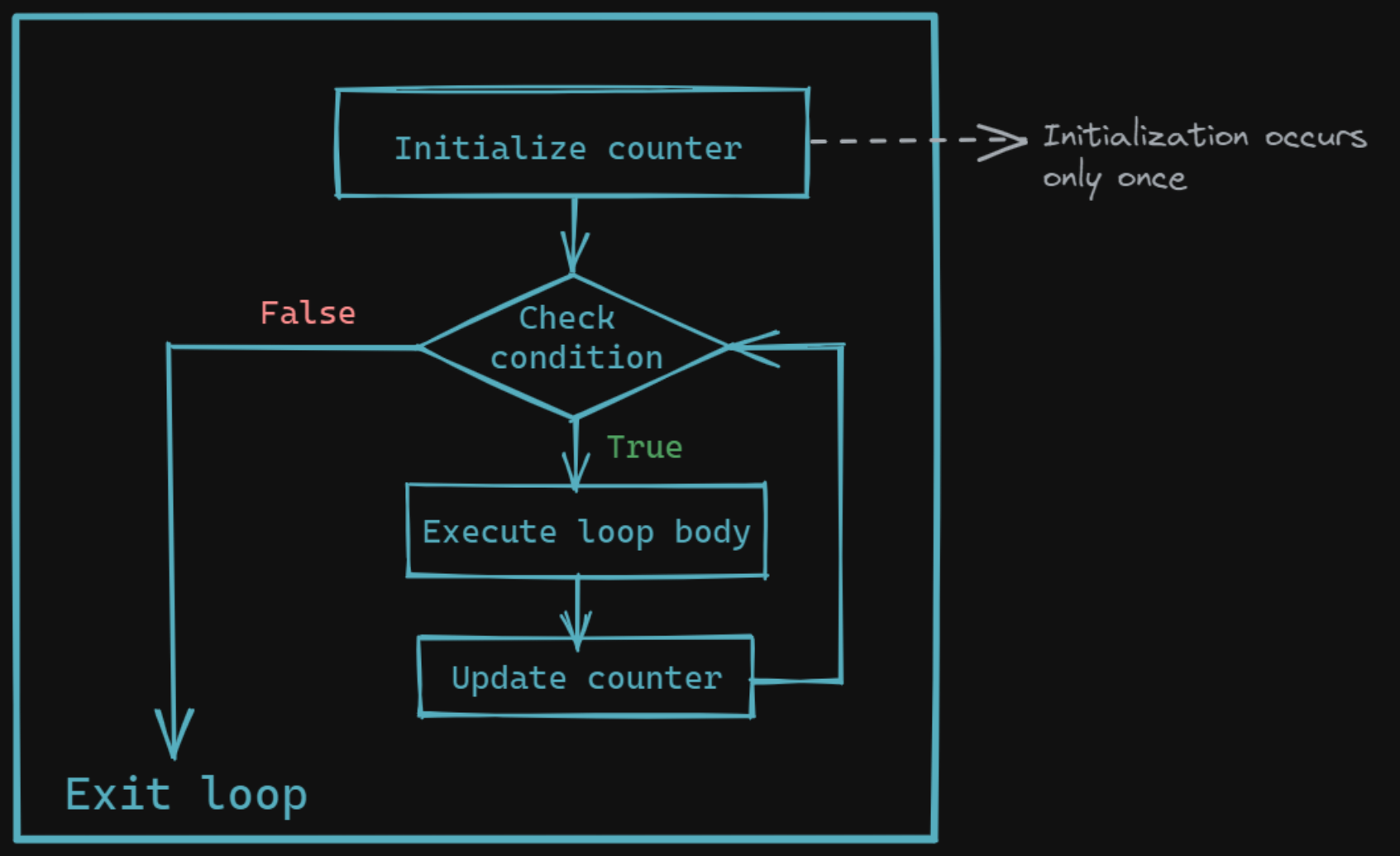 C For Loop
Now that you have an idea of how for loops work, let's take a simple example to see the for loop in action.
C for Loop Example
Let's write a simple for loop to count up to 10, and print the count value during each pass through the loop.
#include <stdio.h>

int main()
{
   for(int count = 0; count <= 10; count++)
   {
       printf("%d\n",count);
   }
   return 0;
}
In the above code snippet,
countis the counter variable, and it's initialized to0.- The test condition here is
count <= 10. Therefore,countcan be at most 10 for looping to continue. - In the body of the loop, the value of
countis printed out. - And the value of
countis increased by 1. - The control then reaches the condition
count <= 10and the looping continues if the condition evaluates to true. - In this example, the looping condition
count < = 10evaluates to false when the count value is 11 – and your loop terminates.
And here's the output:
//Output
0
1
2
3
4
5
6
7
8
9
10
When using loops, you should always make sure that your loop does terminate at some point.
You know that the looping continues so long as
check_conditionis true. And the looping stops oncecheck_conditionbecomes false. But what happens when your looping condition is always true?
Well, that's when you run into an infinite loop – your loop goes on forever, until your program crashes, or your system powers off.😢
You'll learn more about infinite loops in the next section.
Infinite for Loop
When your loop doesn't stop and keeps running forever, you'll have an infinite loop. Let's take a few examples to understand this.
▶ In the for loop construct, if you don't specify the test condition (check_condition), it's assumed to be true by default.
As a result, your condition never becomes false. And the loop will keep running forever until you force stop the program.
This is shown in the code snippet below:
#include <stdio.h>

int main()
{

    for(int i = 0; ; i++) //test condition is not mentioned
    {
        printf("%d ",i);
    }

    return 0;
}
▶ Here's another example.
You initialize the counter variable i to 10. And i increases by 1 after every iteration.
Notice how the test condition is i > 0. Won't the value of i be always greater than 0?
So you have another infinite loop, as shown:
#include <stdio.h>

int main()
{

    for(int i = 10; i > 0 ; i++) //test condition is always TRUE
    {
        printf("%d ",i);
    }

    return 0;
}
▶ In this example, your counter variable i is initialized to 0. But it decreases by 1 with every iteration.
As a result, i always less than 10. So the condition i < 10 is always true, and you'll have an infinite loop.
#include <stdio.h>

int main()
{

    for(int i = 0; i < 10 ; i--) //test condition is always TRUE
    {
        printf("%d",i);
    }

    return 0;
}
To avoid running into infinite loops, you should define the looping condition correctly.
If you're a beginner, asking yourself the following questions may help.
What do I want this loop to do?
How many times do I want the loop to run?
When should my loop stop?
And then you can go ahead and define your loop construct accordingly. 🙂
Conclusion
I hope you found this tutorial helpful.
To sum up, you've learned the syntax of for loops and how they work. You also know how to anticipate the possibility of infinite for loops and how to avoid them by defining your looping condition carefully.
See you all soon in another tutorial. Until then, happy coding!