

As a computer science instructor, I have long wished that there was a better way to guide others through my code. When I was first learning to program, I was a big fan of traditional programming books. I have shelves and shelves of 800+ page books covering different programming languages and technologies.
I have known for a while now that most learners today don't share my love of big thick books, and to be honest, I rarely read those books in their entirety. Those big books often had a lot more exposition about the code than was probably needed. As a book buyer I wanted to make sure that I was getting my money's worth so the thicker they were, the better. It is much more common these days for learners to consume blog based tutorials and videos.
If you're learning to code right now, you've probably experienced the frustration of these formats too. I want to share something I've been working on that might help.
Blogs and Videos
Blog-style tutorials mix code and the explanation of it in a top-to-bottom fashion. Scrolling through these web-based explanations feels familiar and one can copy and paste with ease. However, linking the explanation of the code and the code itself has always been less than ideal. Often I find myself jumping around the blog post wishing I could see the entire code example while working through the explanation. Instead, I am only able to see small parts of the code and it is challenging to see how those parts relate to other parts.
Video tutorials are very popular these days. They solve some of the problems associated with blog-style tutorials. Videos are great because you get two streams of information: the author's audible narrative and the code being written. A viewer can focus on the two streams simultaneously. However, videos have some problems too.
Viewing Videos
From the perspective of the viewer, videos are hard to search through and are not useful as a copy and paste source or a code reference. More importantly, though, they discourage the viewer from taking their time and reflecting on the material. Often, when I am viewing a video tutorial I don't pause and let concepts sink in before the video moves on. Yes, I could be more disciplined and pause and rewind more often but usually I don't.
Making videos
From the perspective of the video creator, it is clear that not all code being developed is interesting to watch. Some of it is not really worth showing the viewer. Not all video creators can keep the narrative interesting the whole time.
I know I struggle with the 'performance' aspect of making videos (you won't find me coding on Twitch anytime soon). Many times after I am done making a video, as I review it, I wish I had mentioned something that I forgot. It is hard to go back and edit the video without scrapping it and starting over.
Storyteller
I have created a new medium to guide viewers through code examples. It combines the best of books, blog posts, and videos. This new medium allows a developer to write code using a top-notch editor (Visual Studio Code) and then replay the development of that code in the browser.
The author can add comments at important points in the evolution of the code. The comments can include text, hand drawn pictures, screenshots, and audio and video recordings. This allows the author to add visualizations that we have in our heads but don't make it into the code itself. The tool is called Storyteller.
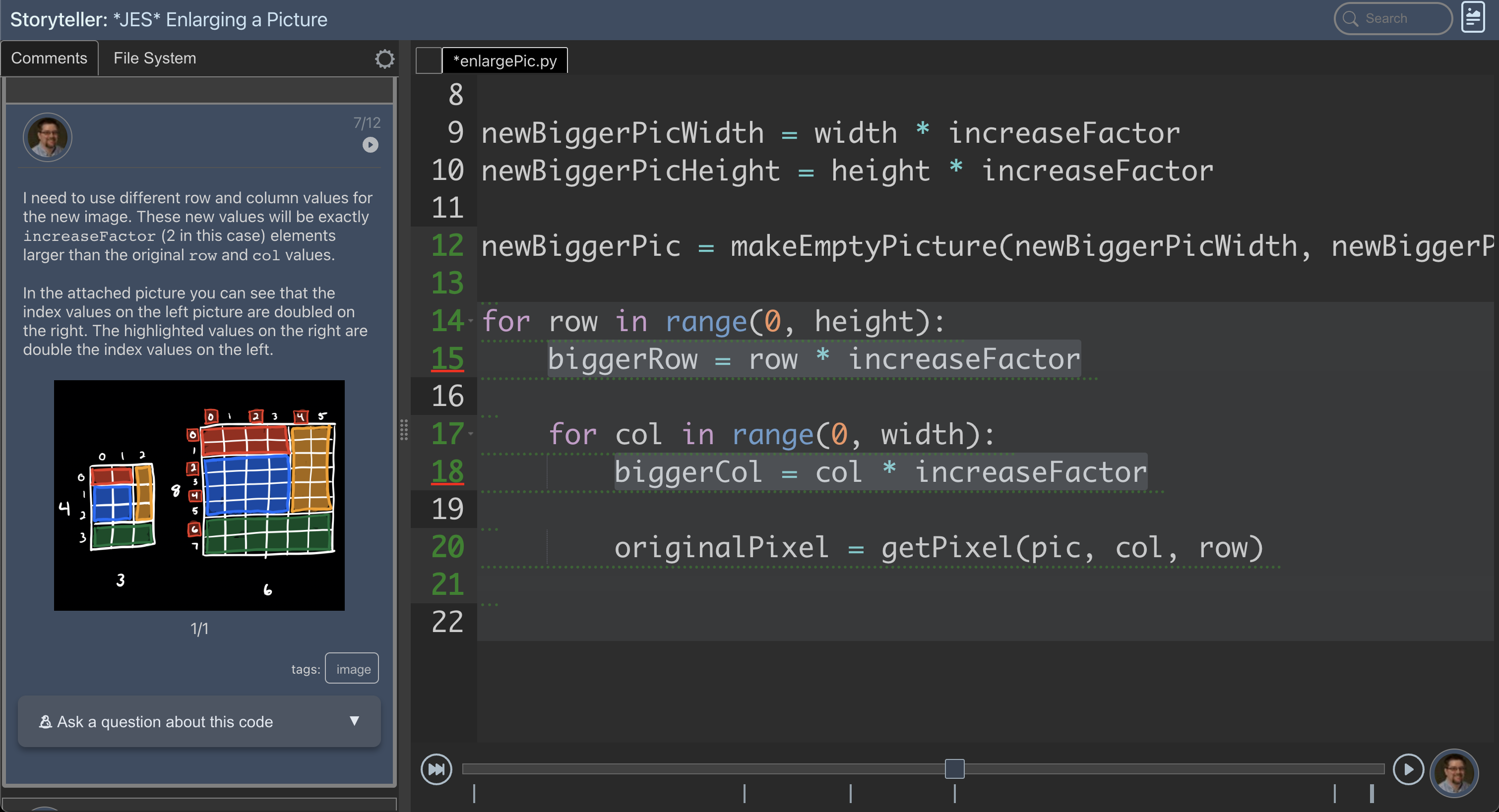
Here are a few examples of a 'playback':
These work best on a big screen. If you are viewing a playback on a small screen you can view it in 'blog' mode (there is button in the top right to switch from 'code' mode to 'blog' mode).
I have created groups of these guided code walk-throughs to help me teach different topics to my students. These are all free and hosted on a website I created called Playback Press. Here are some of the 'books' I have created so far:
I usually assign these as readings in my classes instead of using expensive textbooks. It is a lot easier for me to write several programs than it is to find a perfect textbook.
I also use them for in-class demos instead of writing code live. This makes code demos flow much faster and smoother. If I make an interesting mistake while preparing the code I can still highlight it with a comment. If I make an uninteresting or embarrassing mistake I can just ignore it and the students won't focus on it.
The Advantages of Code Playbacks:
The primary focus is on the code. It is always visible and easy to search and navigate.
Since the code is so accessible, the explanation of it tends to be short and concise.
The narrative can include whiteboard style drawings, screenshots, or videos of running code in addition to a text explanation.
As an author, I can review the code several times and add/edit comments each time I go through it. I don't have to give a perfect performance like I do with a video.
Comment points highlight when the author wants the viewer to take a moment to really think about the code and reflect on it. The playback only moves forward when the viewer is ready.
The code mentioned in a comment can be highlighted so the viewer knows exactly where they should be looking.
The code can be downloaded at any point in the playback. Then a viewer can run it, change it, and add to it.
The tool is a language independent editor plug-in and can be used to describe programs in any language.
Viewers only need a web browser to go through a playback.
Recently, I've been exploring how to make playbacks even more useful for learners.
AI as an Infinitely Patient Tutor
I have extended code playbacks to include an AI tutor. One thing I've learned in my years of teaching is that students often hesitate to ask questions. They worry about looking foolish, or they don't want to slow down the class, or they simply can't articulate what's confusing them.
What if every student had access to a patient tutor who never got frustrated with repeated questions and could explain concepts in multiple ways until something clicked?
I've integrated AI directly into the playback experience. As students work through a playback, they can ask questions about anything they're seeing. This might be a specific line of code, a concept I mentioned in a comment, or how something connects to material from earlier in the playback. The AI has full context. It can see the code, it understands where the student is in the playback, and it can provide explanations tailored to that exact moment. The AI is right there with the student, looking at the same code, understanding the same context.
The AI can also generate self-grading multiple choice questions based on the code and comments in a playback. These low-stakes quizzes make the learning experience more engaging and help learners check their understanding as they go.
Let me be clear: the AI doesn't replace me as an instructor. I still create the playbacks. I still decide what concepts to cover, what order to present them, and what examples best illustrate the ideas. The AI is an extension of my teaching, not a replacement for it.
Note: The AI features are available to registered users on Playback Press. Registration is free but logging in is required to access the AI tutor. If you want to see what this feels like, try one of the playbacks linked above and ask the AI a question about what you're seeing.
Conclusion
My goal has always been to help people learn to code. Books gave us depth but demanded commitment. Blogs gave us accessibility but fragmented the code. Videos gave us narrative but took away control. Playbacks keep the code front and center while letting learners move at their own pace and reflect when they need to. Adding AI doesn't change that philosophy, it just means there's always someone available to answer questions. Together, they get closer to the experience of having an expert sit beside you and walk you through a program. That's what I've been trying to build, and I think we're getting there.