A practical, three-tool guide to the AI-native software development life cycle (SDLC): Plan, Design, Build, Test, Deploy, Maintain, reimagined for agentic coding.
In March 2025, a small nonprofit research group called METR published a chart that made many engineering leaders sit up straighter than usual.
Working backward through six years of model releases, METR measured the length of the software task an AI agent could complete on its own, which they defined as the amount of time a skilled human professional would need for the same task, and found that number has been doubling roughly every seven months since 2019 (METR).
That curve isn't about autocomplete getting a little better: it's about agents crossing from "finishes a function" to "finishes a feature" to, on the current trajectory, "finishes a sprint."
The adoption numbers already reflect that shift. Google Cloud and DORA's 2025 State of AI-assisted Software Development Report found that 90 percent of developers now use AI at work and more than 80 percent say it has increased their productivity, even though roughly three in ten still report low trust in the code the models produce (DORA).
Stack Overflow's 2025 Developer Survey puts a similar number on habitual use: 84 percent of developers now use or plan to use AI tools, up from 76 percent the year before, and about half of professional developers reach for one daily (Stack Overflow).
AI-assisted coding skipped the novelty phase and arrived as the default way software gets written. At the same time, most teams still haven't updated the software development lifecycle they built for the previous default.
That mismatch is the subject of this piece. Anthropic's Applied AI team published a framework in 2026 called the AI-native SDLC, built around a single observation: once an agent can write and revise code faster than a human can review a pull request, the bottleneck in software delivery doesn't disappear so much as relocate (Anthropic).
This guide walks through that framework stage by stage (Plan, Design, Build, Test, Deploy, Maintain), and shows you how to implement each stage with whichever agentic coding tool you have access to: Claude Code, OpenAI Codex, or Gemini CLI. You'll see configuration files, markdown artifact templates, and CI workflows for all three tools, plus a worked example of how a single forward-deployed engineer uses this pattern to cover work that used to require a five-person team.
This guide is one framework, implemented three ways: a practitioner's playbook grounded in config files and command output.
Table of Contents
Claude Code, Codex, and Gemini CLI: One Framework, Three Vocabularies
Pre-flight Checklist Before You Go All-in on an Agentic AI-Native SDLC
Prerequisites
Before you start, make sure you have the following:
One agentic coding CLI installed: Claude Code, OpenAI Codex, or Gemini CLI. You only need one to follow along. The sections below give you the equivalent command or file for each.
Node.js 18 or later (verify with
node --version), since all three tools distribute as npm packages.Git 2.30 or later (verify with
git --version).A GitHub repository with Actions enabled, since the Deploy and Maintain sections use CI workflows.
Basic familiarity with CI/CD concepts: pull requests, branch protection, and what a build pipeline does. You don't need deep GitHub Actions expertise.
Install whichever tool you plan to use:
npm install -g @anthropic-ai/claude-code
npm install -g @openai/codex
npm install -g @google/gemini-cli
Here's what each one gives you:
claude-codeputs aclaudecommand on your path that runs an agentic session against your local repository, with permission modes, subagents, and skills.codexputs acodexcommand on your path with its own sandboxing and approval model, plus a hosted cloud-task mode.gemini-cliputs ageminicommand on your path, built around Extensions that bundle prompts, MCP servers, and slash commands into one installable unit.
You don't need all three. Pick whichever your employer already pays for, or whichever free tier fits your project, and follow that column through the rest of this guide.
What is an AI-Native SDLC?
The diagram below shows how the six phases are connected as a continuous system rather than a series of isolated steps. The following sections explain how each stage hands off a substantial named artifact to the next, with the final stage looping directly back to the beginning instead of stopping at deployment.
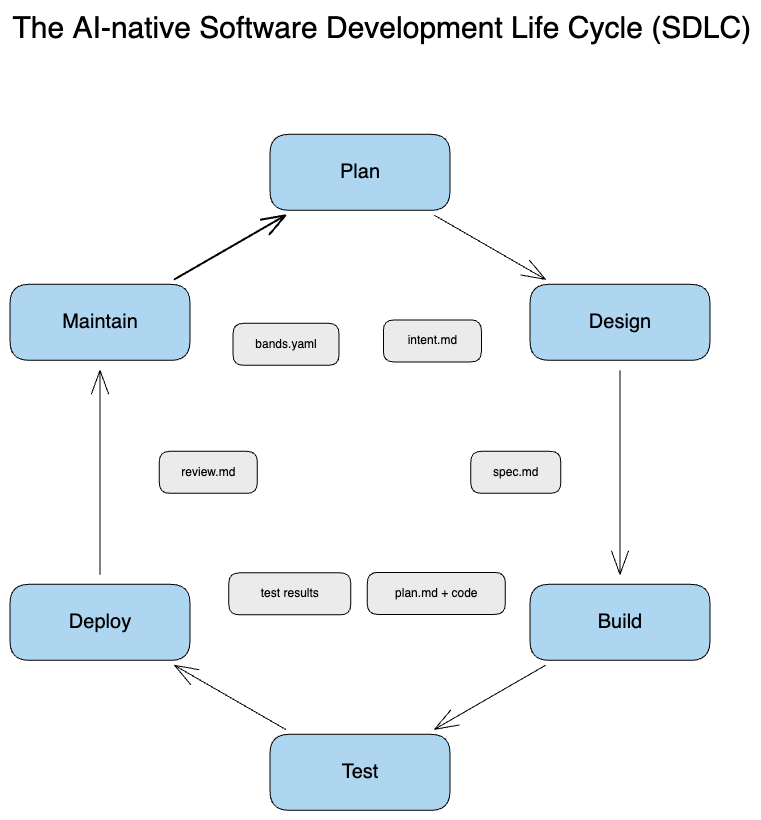
Figure 1: The AI-native Software Development Life Cycle (SDLC) drawn as a closed hexagonal loop rather than a straight pipeline. The six stages, Plan, Design, Build, Test, Deploy, Maintain, run clockwise around the outside. The artifact each stage hands to the next (intent.md, spec.md, plan.md plus code, test results, review.md, bands.yaml) sits inside the loop next to the arrow it travels on. The doubled arrow from Maintain back to Plan is the detail worth noticing first: it's what turns six individual stages into one self-triggering cycle instead of six improvements that happen to sit next to each other.
If you follow along the arrows:
Plan hands the next stage an
intent.md.Design hands Build a
spec.md.Build hands Test and Deploy a
plan.mdand eventually a diff.Deploy hands Maintain a merged pull request with its review findings attached.
Maintain when something breaks in production, write a new
intent.mdand start the loop again. That closed loop is the innovation, more than any individual stage.
A traditional SDLC diagram is usually drawn as a waterfall or a horizontal pipeline. This one is drawn as a circle because the entire point is that operational data becomes the next planning input automatically, instead of sitting in a dashboard nobody opens until the next planning offsite.
Engineers built the traditional six-stage software development lifecycle of plan, design, build, test, deploy, and maintain around an assumption that held for fifty years: writing and implementing code was the most expensive, most time-consuming part of the process.
Anthropic's Applied AI team named this assumption explicitly when it published its AI-native SDLC framework in 2026, and framed the entire model around what happens when that assumption stops being true (Anthropic). The framework keeps the same six stage names software engineers already know. What's different is how each stage produces and consumes work.
Anthropic calls the mechanism artifact-driven development. Every stage commits a durable, version-controlled, machine-readable document that the next stage reads: no meeting, no Slack thread, and no shared understanding that lives only in someone's head.
Plan produces
intent.md, a plain description of the problem in the requester's own words.Design produces
spec.md, the requirements and constraints with any open concerns flagged inline.Build produces
plan.md, an implementation plan naming the files that will change, the order of changes, and the tests that will confirm them, followed by the diff.Test and Deploy produce a pull request carrying multiple layers of automated review findings.
Maintain produces incident records that feed back into a new
intent.mdwhen something in production breaches an expected threshold.
Anthropic's own phrasing captures the design intent well:
"Every stage commits an artifact the next stage can read. Together, the intent, the spec, the plan, the diff and the review findings are the audit trail." (Anthropic)
That audit trail matters for a reason beyond compliance. When an agent can produce a working diff in minutes, what determines whether the software is good is whether the plan it worked from was good, and whether someone checked its output against a requirement before it shipped.
Artifacts make that checking possible without slowing the agent down: a spec document takes ten minutes to review and can be cached, reused, and diffed the way code is diffed. A verbal handoff can't.
Where the Bottleneck Moves Once Code Gets Cheap
Anthropic titles the relevant section of its framework, "Code is no longer the bottleneck," then explains why in the next line:
"Organizations have started using AI to write code at a speed unthinkable one year ago, yet the processes around the code haven't changed at the same pace." (Anthropic)
That observation is worth walking through slowly, because it's the part of the framework that changes how you organize your day, beyond which tool you buy. The chart below puts a number on that reallocation across a sprint's calendar time.
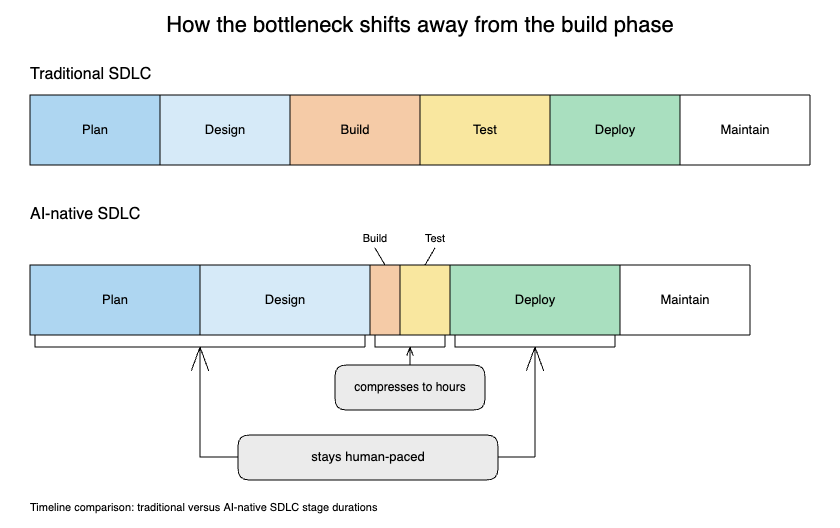
Figure 2: Two stacked timelines, drawn to the same total width, showing how a sprint's calendar time gets reallocated. The top bar, Traditional SDLC, splits time into six roughly equal segments. The bottom bar, AI-native SDLC, keeps Plan, Design, and Deploy wide (labeled "stays human-paced") while Build and Test collapse into thinner slivers (labeled "compresses to hours"). The two bars are the same overall length on purpose: the point isn't that everything gets faster. It's that the time that used to go into Build now has to go somewhere, and that somewhere is Plan and Review.
The diagram above shows the traditional SDLC's time allocation next to the AI-native one. In the traditional model, the Build bar dominates the chart: most of a sprint's calendar time goes into writing and debugging code, while Plan, Test, and Deploy are comparatively thin. In the AI-native version, Build shrinks to a sliver, an agent can produce a working implementation in the time it used to take to schedule the kickoff meeting, and the bars for Plan, Test/Review, and Deploy grow to fill the space Build used to occupy. The chart's total width barely changes. What's changing is which stages are now doing the rate-limiting work.
Anthropic's own framing names the same three stages:
"The bottleneck moves to the steps to the left and right of the build phase. This is mainly plan, review/test, and deploy, which still run at human speed." (Anthropic)
That's a specific, falsifiable claim, and it's worth taking seriously instead of writing it off as a slogan. Speed at Build breaks in three specific, avoidable ways:
Fast Build, vague Plan. Because there's now less time between "wrong" and "shipped" to notice, an agent confidently implementing the wrong thing at high speed is counterintuitively worse than a human making the same mistake slowly.
Fast Build, unscaled Test and Review. Nobody redesigned review to handle the higher volume of changes a fast agent produces, so either review quality drops or reviewers become the new queue, and the speed gain evaporates when a human has to read the diff.
Fast Build, manual Deploy. A human still has to promote a build through three environments by hand, so the agent produces work faster than the organization can absorb it.
The argument here is that the stages surrounding the agent, more than the agent itself, are where an AI-native SDLC earns its name. Agentic coding tools aren't the problem. The rest of this guide treats Plan, Design, Test, Deploy, and Maintain with the same engineering rigor teams have historically reserved for Build, because that's where the constraint lives now.
Claude Code, Codex, and Gemini CLI: One Framework, Three Vocabularies
Every stage below gives you a command or file for Claude Code, Codex, and Gemini CLI side by side: that only works once you know what each tool calls the mechanism you're about to use. All three vendors ship a genuinely capable agentic coding tool, and the right one for you is largely the one your employer licenses or the one whose free tier matches your workload.
The table below is the reference to come back to while reading the stage-by-stage sections.
| Capability | Claude Code | OpenAI Codex | Gemini CLI |
|---|---|---|---|
| Memory/context file | CLAUDE.md, at the project root, ~/.claude/, or .claude/ (Anthropic) |
AGENTS.md, walked from the Codex home directory down to the project root (OpenAI) |
GEMINI.md, concatenated across global, project, and subdirectory levels (Google) |
| Reusable prompt/extension system | Subagents (own context window, restricted tools) plus Skills, folder-based and auto-invoked (Anthropic, Anthropic) | Skills, which supersede the now-deprecated custom prompts. MCP servers handle external tool access separately.(OpenAI) | Extensions bundle prompts, MCP servers, slash commands, hooks, and subagents into one installable unit (Google) |
| Approval/sandbox model | Permission modes: Manual, Auto, and Plan mode, switched with Shift+Tab (Anthropic) | Two independent axes: sandbox mode (read-only, workspace-write, danger-full-access) and approval policy (untrusted, on-request, never) (OpenAI) | Approval modes: default, auto_edit, yolo (--yolo or Ctrl+Y), and a still-maturing plan mode (Google) |
| First-party CI action | anthropics/claude-code-action, triggered by @claude mentions or scheduled events (Anthropic) |
openai/codex-action, runs codex exec inside a CI job and can apply patches or post reviews (OpenAI) |
google-github-actions/run-gemini-cli, triggered by PR and issue events (Google) |
| Native PR code review | Code Review: a managed, multi-agent service with a local/code-review command and severity-tagged inline comments (Anthropic) |
/review in the CLI, @codex review on GitHub, or an "automatic reviews" setting that flags P0/P1 issues on every new PR (OpenAI) |
Gemini Code Assist for GitHub, configurable through a checked-in.gemini/config.yaml file across five review dimensions (Google) |
| Always-on chat surface | Claude Tag in Slack, a shared org identity that routes coding intent to Claude Code on the web (Anthropic) | An official Codex Slack app:@Codex in a channel, creates a cloud task and posts results back (Slack) |
No confirmed first-party Slack-native identity as of this writing. Only third-party bridges exist. |
A few things stand out when you lay the mechanisms side by side. All three tools now converge on the same core idea: a plain-text memory file the agent reads before doing anything else, a packaging system for reusable prompts and tools, an approval layer that decides how much autonomy the agent gets, and a first-party GitHub Action for running the agent in CI.
Once Build stops being the constraint, every vendor has to build the same surrounding infrastructure or their tool becomes fast but unmanageable.
The one place the three tools are not symmetric is the last row. Claude Code and Codex each ship an official, vendor-built Slack presence with a persistent tag identity that turns a channel mention into an asynchronous coding task. Gemini CLI doesn't have a documented equivalent as of this research (only community-built bridges connect it to Slack).
If your Maintain-stage workflow depends on an agent picking up an incident directly from a chat mention, that's a capability gap to plan around rather than a preference.
Because it undercuts the idea that you have to pick a tool and live with it forever, one more piece of interoperability is worth calling out: Claude Code's own memory documentation describes importing an existing AGENTS.md file with an @AGENTS.md reference or a symlink, so a Claude Code session can read the same conventions file a Codex session already uses (Anthropic).
AGENTS.md itself has become a cross-vendor open standard, adopted well beyond Codex, and stewarded outside any single company (OpenAI). A team that standardizes its conventions file on AGENTS.md and has Claude Code import it gets most of the benefit of a single shared memory file, regardless of which tool an individual engineer prefers that day.
How to Run the Plan Stage
The Plan stage answers one question before any code gets touched: what's the problem, in the words of the person who has it?
Anthropic's framework calls the artifact this stage produces intent.md, and it's deliberately unglamorous. It's not a Jira ticket with acceptance criteria already reverse-engineered from a solution. It's closer to a transcript: what the requester said they needed, in their own language, captured before an engineer or an agent starts interpreting it.
Here's a minimal intent.md template you can commit to a repository and reuse for every new piece of work:
# intent.md

## Requested by
Name, role, date

## What they said
Paste the raw request. Do not clean it up yet. If it came from a support
ticket, a Slack thread, or an incident, link it.

## What problem this solves
One or two sentences, written after the raw request above, translating it
into a problem statement. This is the first place interpretation is allowed.

## Why now
What triggered this request. If it came out of an incident, name the
incident record it traces back to.

## Constraints already known
Anything the requester specified: deadline, budget, systems that cannot
change, regulatory requirement.

## Explicitly out of scope
What this request does not include, stated as what it does.
Here's what's happening:
The "what they said" section is deliberately unedited, so the next stage can catch a misread request before it propagates
Separating "what they said" from "what problem this solves" forces the interpretation step to happen once, in writing, instead of inside whoever reads the request next
The "why now" field is what closes the loop from the Maintain stage: an intent that originated from a production incident should say so explicitly, linking back to the incident record that triggered it
Filled in for a request, the same template stays this short:
# intent.md

## Requested by
Maria, independent contractor and beta user, 2026-08-14

## What they said
"I have to check four different calendars every morning before I can tell
a client when I'm free. I've double-booked myself twice this month."

## What problem this solves
Contractors working across multiple clients cannot see a unified view of
their own availability without giving each client's calendar system
access to the others.

## Why now
Direct customer feedback during the private beta, not a production
incident.

## Constraints already known
Beta ships in six weeks. No budget for a dedicated calendar-sync vendor.

## Explicitly out of scope
Two-way sync or write access to any client's calendar. Read-only overlay only, for this release.
A spec written from this intent would name the technical shape: which calendar providers to support first, how the overlay handles conflicting time zones, and what happens when a provider's API is unavailable. Notice how little interpretation is left for Build to improvise. That's the entire point of writing the intent down before touching a design document, let alone code.
Each tool gives you a different mechanism for working through this stage without letting an agent jump straight to code. Claude Code's Plan mode is a dedicated, read-only permission mode built for this scenario: the agent can research the codebase and propose an approach, but it can't edit files or run commands until you switch out of it, toggled with Shift+Tab (Anthropic).
Codex separates the same idea into two independent settings rather than one mode switch: a sandbox setting that controls what the agent is technically capable of touching (read-only, workspace-write, or danger-full-access) and an approval policy that controls when it has to stop and ask (untrusted, on-request, or never) (OpenAI).
Setting the sandbox to read-only during Plan gets you the same guarantee Claude Code's Plan mode gives you, enforced at a different layer. Gemini CLI has a plan approval mode with the same read-only intent, though Google's own documentation flags it as still maturing relative to its other approval modes (Google), so treat it as directionally useful rather than a hard guarantee until you've verified its behavior against your own repository.
The output of a Plan-stage session, regardless of which tool ran it, should be the filled-in intent.md plus a short back-and-forth confirming the agent's summary of the problem matches what the requester meant. That confirmation step is the human-speed part of the stage the earlier section warned you about, and it's tempting to skip when the agent's summary already sounds right. Skipping it because the agent produced a plausible-sounding summary quickly is the failure mode the bottleneck-shift argument predicts: fast, confident, but wrong.
How to Run the Design Stage
Design is where intent.md becomes spec.md, a document that names the technical shape of the solution, the interfaces it touches, and the tradeoffs someone has to sign off on before an agent starts writing implementation code.
Anthropic's framework describes this stage as one where "requirements and design collapse into one session" (Anthropic), which is a meaningful change from a traditional process where a product spec and a technical design document are often written by different people, days apart, with a meeting in between to reconcile them.
A useful spec.md template keeps that collapse explicit rather than accidental:
# spec.md

## Source
Link to the intent.md this spec answers.

## Approach
Plain description of the technical approach: which systems change, which
stay the same, and why this approach over the obvious alternative.

## Interfaces affected
API endpoints, database schemas, public function signatures. Anything
another team or another service depends on.

## Open concerns
Anything the agent or the author is not confident about. This section
exists specifically so uncertainty gets written down instead of quietly
resolved by whichever choice was easiest to implement.

## Explicitly rejected alternatives
What else was considered and why it lost. This is what keeps the next
person from re-litigating a decision six months from now.

## Sign-off
Who reviewed this and on what date.
The "open concerns" and "explicitly rejected alternatives" sections are doing the work here. An agent asked to produce a design document will, by default, present its chosen approach as obvious. A human reviewer's job at this stage is narrow but specific: read those two sections first, because a wrong assumption is far more likely to be hiding there than in the parts of the document the agent is most confident about.
All three tools support this stage the same way they support Plan: keep the session in a read-only or plan-style mode while the spec gets drafted, and switch to a mode that can write files only after a human has read the "open concerns" section and either resolved or explicitly accepted each item. The mechanism differs (Claude Code's Plan mode, Codex's read-only sandbox, Gemini CLI's plan approval mode), but the discipline is identical across all three: nothing gets implemented from a spec until someone has reviewed its open concerns.
One practical note to build into your process: version the spec alongside the code, the same way you'd version a model card alongside the model it documents. A spec.md that lives only in a chat transcript isn't an artifact. A spec.md committed to the repository, in the same pull request as the implementation it describes, is one your Test and Deploy stages can reference later.
How to Run the Build Stage
Build is the stage everyone already associates with agentic coding tools, and it's also the stage that changes the least in this framework, because the tools were already built to do this part well.
What changes is that Build now runs from an approved plan.md, rather than from an ad hoc prompt, which is what keeps a fast agent pointed at the right target instead of an interesting-but-wrong one.
A plan.md names the specific files that will change, the order changes happen in, and the tests that confirm each change:
# plan.md

## Source
Link to spec.md this plan implements.

## Files to change, in order
1. `src/models/user.py`: add the `last_login_at` field
2. `src/api/auth.py`: update login handler to set the new field
3. `tests/test_auth.py`: add coverage for the new field
4. `migrations/0042_add_last_login.py`: schema migration

## Tests that must pass before this plan is considered done
- Existing auth test suite, unmodified tests still green
- New test: login sets last_login_at to the current UTC timestamp
- New test: last_login_at is null for a user who has never logged in

## Rollback
How to revert if this ships broken: a single migration down-step and a
git revert of the three code changes, no data backfill required.
The memory file each tool reads before touching any of this is what governs how the agent writes the code, not the plan alone. A CLAUDE.md at the root of a repository might look like this:
# CLAUDE.md

## Commands
- Run tests: `pytest tests/ -x -q`
- Run linter: `ruff check src/`
- Start local server: `python manage.py runserver`

## Codebase layout
Django monolith. Business logic lives in `src/services/`, not in views or
models. Views call services; services call models. Do not put business
logic directly in a view.

## Standards
- All new API endpoints require a corresponding entry in `openapi.yaml`
- Database migrations are one change per file, never bundled
- No new dependencies without an entry in `docs/decisions/`

## Test coverage
Every new function in `src/services/` needs a corresponding test in
`tests/services/`. Coverage below 85% fails CI.
If your project already standardized on AGENTS.md because it's the cross-vendor format, the file above is nearly a direct port: same structure, same content, different filename, and Codex will read it automatically as it walks from the Codex home directory down to your project root (OpenAI).
A GEMINI.md version is the same content again, and Gemini CLI concatenates it with any global ~/.gemini/GEMINI.md and subdirectory-level files it finds, so a monorepo can layer a company-wide convention file with per-service overrides (Google).
Whichever filename you commit to, the content (commands, architecture, conventions, testing rules) is the part that determines whether the agent's output looks like your codebase or like a generic tutorial.
Reusable behavior beyond a single memory file is where the three tools diverge more visibly. Claude Code splits this into two mechanisms: Subagents, which run in their own context window with restricted tool access for a narrow job like "review this diff for SQL injection," and Skills, folder-based packages that Claude invokes automatically when they're relevant, which absorbed what used to be custom slash commands (Anthropic, Anthropic).
Codex is mid-migration on the same idea: its older custom prompts mechanism is now explicitly deprecated in favor of Skills, which Codex can invoke implicitly and share across a team through the repository (OpenAI).
Gemini CLI takes the broadest approach of the three, packaging prompts, MCP servers, custom slash commands, hooks, and subagents into a single installable Extension, rather than keeping each mechanism as a separately configured feature (Google).
None of these are strictly better than the others. Claude Code and Codex give you finer-grained control over which mechanism does what. Gemini CLI gives you one bundle to install and share, which matters when your team's problem is getting five engineers onto the same conventions, since juggling five separately configured features invites drift.
Every one of the three tools also connects to external systems, databases, ticket trackers, and design tools, through the Model Context Protocol, which Anthropic created and open-sourced as a native, first-class part of Claude Code (Anthropic) and which has since become a genuinely cross-vendor standard. Codex supports it through its own MCP client, and Gemini CLI supports it with OAuth 2.0 for remote servers.
MCP is worth treating as infrastructure you configure once per project rather than a tool-specific feature, precisely because all three tools now speak it.
How to Run the Test Stage
Anthropic frames this stage as "continuous evals woven through implementation" (Anthropic), a deliberate contrast with a traditional model where testing is a phase that starts after Build finishes.
When an agent can produce a diff in minutes, waiting for a separate testing phase means the queue in front of testing grows faster than any team can review. The fix is to make verification a property of every commit the agent produces rather than a gate a human remembers to run afterward.
This is also the stage where the DORA report's less flattering finding becomes relevant: alongside the 90 percent adoption number, roughly three in ten developers still say they have low trust in AI-generated code (DORA). That distrust is rational when testing is a separate phase bolted on after a fast Build stage, because nobody has verified the code yet when someone has to trust it. But it becomes a solvable engineering problem rather than a standing risk once verification runs on every commit instead of waiting for a human to schedule it.
Claude Code implements this with Hooks: shell commands that fire automatically at specific lifecycle events, like right before or right after the agent edits a file or runs a command (Anthropic). A hook that runs your test suite after every file edit and blocks the agent from proceeding on failure looks like this in .claude/settings.json:
{
  "hooks": {
    "PostToolUse": [
      {
        "matcher": "Edit|Write",
        "hooks": [
          {
            "type": "command",
            "command": "pytest tests/ -x -q --timeout=60"
          }
        ]
      }
    ]
  }
}
Here's what's happening:
PostToolUsefires the hook after the agent finishes an Edit or Write tool call, not before, so it's checking changes on disk.pytest -xstops at the first failure, which keeps the feedback loop short instead of dumping a full failure report the agent has to parse.A blocking exit code from this command stops the agent from moving on to the next planned file in
plan.mduntil the test suite is green again.
Codex and Gemini CLI don't document a general-purpose local hooks framework with the same maturity as Claude Code's (and if you've come to rely on stopping an agent mid-session on your own laptop). It's less a missing feature than a different point in the pipeline: both tools build their continuous-verification story primarily around CI rather than a local lifecycle-event system, so Codex and Gemini CLI's /review and PR-triggered review products (covered below, under Deploy) catch the same class of problem once the diff reaches a pull request.
If you're running Codex or Gemini CLI locally today, the practical substitute is a pre-commit hook wired through Git itself that calls the same test command a Claude Code hook would call. This gives you most of the same guarantee at a different layer of the toolchain.
The artifact this stage should leave behind, regardless of tool, is a test result attached to the specific commit in plan.md that it verifies, so a reviewer three stages later can see which test proved which claim, rather than trusting a green checkmark that might be testing last week's code.
How to Run the Deploy Stage
Anthropic describes this stage as "layers of agentic review with human review reserved for regulated and critical code," where "governance is enforced as the AI acts, with hooks as approval gates." (Anthropic)
The word layers does work: the framework doesn't propose replacing human review with agent review. It proposes stacking automated review as an earlier, cheaper layer, so humans focus on findings that survived automated scrutiny rather than catching everything from scratch.
All three vendors now ship a first-party GitHub Action, so you don't have to hand-build a CI integration from scratch. Claude Code's anthropics/claude-code-action responds to @claude mentions in a PR or issue, or runs on any GitHub event or schedule you configure (Anthropic):
name: Claude Code Review
on:
  pull_request:
    types: [opened, synchronize]

jobs:
  claude-review:
    runs-on: ubuntu-latest
    steps:
      - uses: actions/checkout@v4
      - uses: anthropics/claude-code-action@v1
        with:
          anthropic_api_key: ${{ secrets.ANTHROPIC_API_KEY }}
          prompt: "Review this diff against spec.md and plan.md for this PR."
Codex's equivalent, openai/codex-action, runs codex exec inside the CI job itself, which means the agent has the full CLI's capability, not a stripped-down review-only mode, and can apply patches or post a review comment depending on how you configure the step (OpenAI):
name: Codex Review
on:
  pull_request:
    types: [opened, synchronize]

jobs:
  codex-review:
    runs-on: ubuntu-latest
    steps:
      - uses: actions/checkout@v4
      - uses: openai/codex-action@v1
        with:
          openai_api_key: ${{ secrets.OPENAI_API_KEY }}
          command: "review this diff against the linked spec.md and flag P0/P1 issues"
Gemini's google-github-actions/run-gemini-cli fires on the same PR and issue events and runs with full project context asynchronously, rather than as a synchronous blocking check (Google):
name: Gemini Review
on:
  pull_request:
    types: [opened, synchronize]

jobs:
  gemini-review:
    runs-on: ubuntu-latest
    steps:
      - uses: actions/checkout@v4
      - uses: google-github-actions/run-gemini-cli@v1
        with:
          gemini_api_key: ${{ secrets.GEMINI_API_KEY }}
          prompt: "Review this pull request for correctness, efficiency, and maintainability."
Beyond the raw CI action, each vendor also ships a dedicated code review product with its own configuration surface. Claude Code's Code Review is a managed service that runs multiple specialized agents against a diff in parallel. It includes a separate verification step to filter out false positives before anything reaches a human as an inline PR comment, triggered by @claude review or the local /code-review command (Anthropic).
Codex's review surface is the /review command in the CLI composer, an @codex review mention on a GitHub PR, or an "automatic reviews" setting that runs on every new PR without a mention. In GitHub mode, it deliberately restricts itself to flagging only the most severe P0 and P1 issues rather than every stylistic nit (OpenAI).
Unlike the other two, Gemini Code Assist for GitHub is configured primarily through a checked-in file, .gemini/config.yaml, a separate surface from the memory file that governs Build. It posts a summary comment plus inline comments across five review dimensions: correctness, efficiency, maintainability, security, and a miscellaneous catch-all covering testing, scalability, and error logging (Google).
The human gate belongs where these automated layers hand off to a person, and where that point sits should depend on the blast radius of the change, and is not a blanket rule. A change to a database migration, an auth flow, or anything touching payments should require human approval, no matter how clean the automated review looks.
A documentation fix or a config value bump that passed every automated layer is a reasonable candidate for auto-merge. Anthropic frames the diff itself as part of the audit trail: "the chain of commits is also the audit trail: who asked for what, what the agent produced, and who approved it" (Anthropic).
That's the useful mental model: the diff isn't done when the agent stops writing code. It's done when it has accumulated the review evidence a human needs to make a fast, informed approval decision.
How to Run the Maintain Stage
Maintain is the stage that gives artifact-driven development its name, because that's where the loop closes. Anthropic describes it as "agents monitor live deployments. Any breached control band is diagnosed and written back into the loop as a new intent.md." (Anthropic)
Without that write-back step, Maintain is just monitoring, the same dashboards teams have run for a decade. With it, a production incident becomes the direct input to the next Plan-stage session, instead of a postmortem doc that gets read once and filed away.
A practical way to encode this is a bands-style configuration that defines the acceptable range for a metric and what happens when it's breached:
# monitoring/bands.yaml

- metric: p99_latency_ms
  service: checkout-api
  band: [0, 400]
  on_breach:
    severity: high
    action: open_incident
    write_intent: true

- metric: error_rate_pct
  service: checkout-api
  band: [0, 1.0]
  on_breach:
    severity: critical
    action: page_oncall
    write_intent: true

- metric: daily_active_users
  service: onboarding-flow
  band: [800, null]
  on_breach:
    severity: medium
    action: open_incident
    write_intent: false
Here's what's happening:
Each metric has a band, an acceptable range, rather than a single threshold, which lets you catch a value that has dropped too low as easily as one that has risen too high.
write_intent: trueis the mechanism that turns a breach into the start of a new Plan-stage cycle automatically, generating a draftintent.mdthat names the breached metric, the service, and links to the incident.Not every breach should open a new intent. A dip in daily active users on a low-severity service might warrant an incident for visibility without spinning up new planning work, which is why that flag is explicit rather than assumed.
Where an agent receives the page or the mention matters here: this is the one place the three tools aren't equivalent. Claude Tag gives an organization a shared @Claude identity in Slack that works asynchronously in a channel and routes a mentioned coding task to Claude Code on the web. This makes "someone tags the bot in the incident channel with the failing metric" a workable Maintain-stage pattern out of the box (Anthropic).
OpenAI ships the direct equivalent: an official Codex Slack app where @Codex in a channel or thread creates a cloud task, works in the relevant repository, and posts results back into the same thread it was mentioned in (Slack).
As covered above, no first-party Google equivalent exists yet; only third-party and community-built bridges connect Gemini CLI to Slack today. The practical workaround for a Gemini-based Maintain stage is routing automation through your existing on-call paging tool's webhook rather than waiting on a chat mention (worth setting up before you're mid-incident and reaching for a bot that isn't there).
Trace that whole write-back mechanism from one breach to the next planning cycle, and it looks like the diagram below:
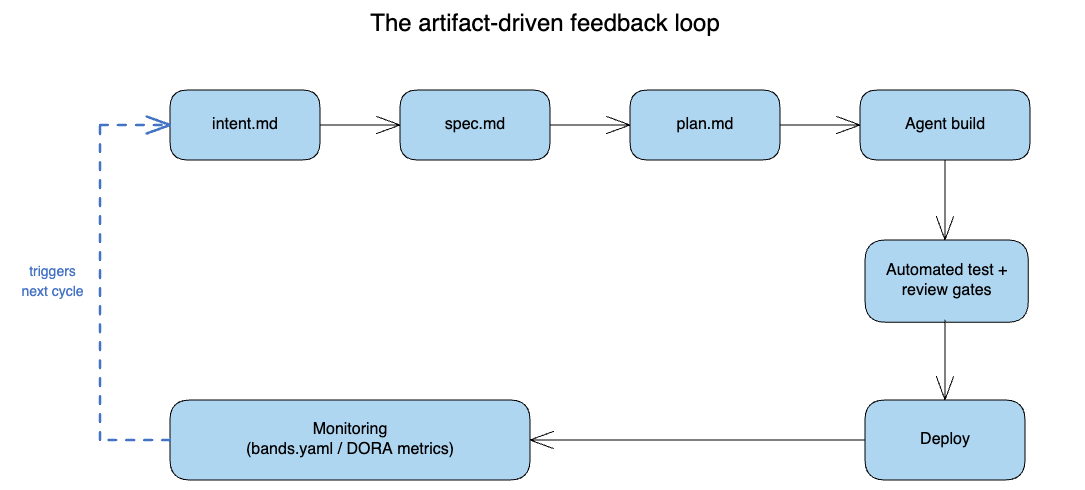
Figure 3: A one-way pipeline drawn as a closed loop instead. Reading left to right and down, intent.md feeds spec.md, spec.md feeds plan.md, plan.md feeds an agent build, which flows into automated test and review gates, then Deploy, then Monitoring. The dashed blue return arrow, labeled "triggers next cycle," is the part most teams' processes are missing: it routes a monitoring breach straight back into a freshly generated intent.md, closing the loop instead of ending at Deploy, as a traditional pipeline diagram would.
The diagram above is the payoff of everything in this section: it traces a single breach in bands.yaml through open_incident, into an incident record, into a freshly generated intent.md, and back into the Plan stage this guide started with. That arrow, from Maintain back to Plan, is the one line most teams' engineering processes are missing today, even ones that have adopted an agentic coding tool for the Build stage.
Buying a fast agent for Build without building this feedback arrow gets you fast code (and the same slow, manual incident-to-roadmap process every team already had). The arrow is what makes the six stages a cycle instead of six separate improvements that happen to sit next to each other.
How One Engineer Covers a Five-Person Team
Everything above assumes a team large enough to have a dedicated person for planning, one for review, one for release management, and one for on-call. But a growing number of the engineers reading this don't have that team.
GitHub's Octoverse 2025 report found that nearly 80 percent of developers who joined GitHub in the past year used Copilot within their first week, which suggests that AI-assisted development is more and more becoming the default entry point for a new engineer's career, rather than an advanced technique layered on top of years of experience (GitHub).
Combine that with Stack Overflow's finding that roughly half of professional developers already use an AI tool daily (Stack Overflow), and the engineers seriously considering a solo or two-person startup with this stack aren't a fringe case. It's close to the median new developer.
Here's what the six stages look like when one person, or a founding pair, runs all of them, using a worked example: a solo engineer building a scheduling tool for independent contractors, aiming to ship a paid beta in six weeks.
The Plan Stage:
Plan replaces a product manager's job of turning a customer conversation into a spec. The founder talks to three contractors about why existing scheduling tools frustrate them, pastes the raw notes into intent.md, and runs a Plan-mode session to turn three separate rambling conversations into one problem statement: contractors need to see all of their client calendars overlaid without giving each client platform admin access to the others.
That fifteen-minute session replaces what a two-person team would spend a week doing across customer interviews and a requirements doc.
The Design Stage:
Design replaces an architect's whiteboard session. The same session, still in a read-only mode, produces spec.md: a calendar-overlay service, OAuth against each client's calendar provider, a single unified view, explicitly rejecting a real-time sync in favor of a five-minute polling interval for the beta because real-time sync was the thing most likely to blow the six-week deadline. Writing "explicitly rejected: real-time sync, because of timeline" into the spec is what stops the founder from relitigating that decision under pressure in week five.
The Build Stage:
Build replaces a full engineering team. With plan.md naming the calendar integration, the auth flow, and the unified view component in order, an agentic coding tool implements each piece against a CLAUDE.md (or AGENTS.md, or GEMINI.md) that encodes the stack decisions the founder made once: which calendar library, which auth pattern, and where business logic lives. Every reader of this guide already expected this part to be fast. Whether the beta ships on time depends on the parts around it.
The Test Stage:
Test replaces a QA engineer. Because a hook runs the test suite after every file edit, the founder never debugs a week's worth of untested agent output the night before a demo. The discipline of writing the test criteria into plan.md before Build starts, rather than testing after the fact, is what a dedicated QA engineer would've insisted on.
The Deploy Stage:
Deploy replaces a release manager. A GitHub Action running an automated code review on every pull request, with a human gate specifically on anything touching the OAuth flow or billing, gives the founder the layered review Anthropic's framework describes without a second engineer to pair with. The founder still reads every diff that touches money or credentials personally.
The Maintain Stage:
Maintain replaces an SRE on-call rotation. A bands.yaml watching API error rate and polling job success rate, wired to page the founder's phone directly rather than a shared on-call tool nobody is rotating through, is the entire incident response function for a company this size. When the polling job's error rate breaches its band at 2 a.m., the resulting incident record becomes next week's first intent.md instead of a bug the founder half-remembers by Monday.
Judgment still matters as much as it always did. What disappears is the coordination overhead that used to require a team: the committed file now holds explicitly what a team of specialists used to carry implicitly in separate heads.
That's the argument for bootstrapping with an AI-native SDLC: artifact-driven development lets one person's expertise cover ground that used to require distributing it across several people's job titles.
Pre-flight Checklist Before You Go All-in on an Agentic AI-Native SDLC
Before restructuring a team's workflow around this framework, work through the following, grouped by stage:
Plan and Design
[ ] An
intent.mdtemplate exists in the repository, and every new piece of work starts from a filled-in copy of it.[ ] A
spec.mdtemplate exists with an explicit "open concerns" section that a human reads before Build starts.[ ] At least one person other than the requester confirms the agent's summary of the intent before it becomes a spec.
Build
[ ] A memory file (
CLAUDE.md,AGENTS.md, orGEMINI.md) exists, is checked into version control, and names commands, architecture, and conventions, rather than just placeholder text.[ ]
plan.mdnames the specific files, order of changes, and tests before implementation starts.
Test
[ ] A hook, pre-commit check, or equivalent local gate runs the test suite automatically and blocks progress on failure.
[ ] Test results are attached to the specific commit they verify, not just reported as a pass or fail in chat.
Deploy
[ ] A first-party CI action (Claude Code, Codex, or Gemini) runs an automated review on every pull request.
[ ] A human approval gate is explicitly required for changes touching auth, payments, migrations, or infrastructure, regardless of what the automated review found.
[ ] Auto-merge, if enabled at all, is scoped to a defined low-risk category, not the default for every green check.
Maintain
[ ] A monitoring configuration defines acceptable bands for the metrics that matter to the business, not every metric the platform happens to expose.
[ ] At least the highest-severity breach category is wired to automatically draft a new
intent.md, closing the loop back to Plan.[ ] Someone, even if it's the same person running every other stage, is responsible for reading and acting on the incidents this stage generates.
Conclusion
You now have a working mental model for restructuring a software team's lifecycle around agentic coding tools, plus three concrete implementations. The six stages (Plan, Design, Build, Test, Deploy, Maintain) haven't changed names. What changed is the artifact each stage produces and the tool that produces it.
intent.mdcaptures the problem before anyone interprets it, whether that interpretation happens in Claude Code's Plan mode, Codex's read-only sandbox, or Gemini CLI's plan approval mode.spec.mdandplan.mdturn an agent's speed into an asset instead of a liability, by giving it a target to build against that a human already reviewed.Hooks, CI actions, and native code review products replace a testing phase with continuous verification, woven into every commit rather than bolted on at the end.
Layered review puts human judgment where it still adds the most value: at the gate for changes with blast radius, rather than at every line of every diff.
A bands-style monitoring configuration closes the loop, turning a production incident directly into the next cycle's
intent.mdinstead of a postmortem nobody reopens.
The common thread across every stage in this guide is the same one METR's task-doubling curve implied at the start: the constraint on how fast software ships has already moved, whether or not your process has caught up. Teams that keep treating Build as the bottleneck will keep optimizing the one stage that stopped being the problem.
What to Explore Next
Anthropic's AI-native SDLC playbook, the primary source for the six-stage framework this guide implements
DORA's 2025 State of AI-assisted Software Development Report, for the adoption and trust data behind the opening hook
METR's research on AI task-length doubling, for the full methodology behind the seven-month doubling curve
Claude Code's documentation hub, starting from the memory file page and branching out to permission modes, hooks, and subagents
OpenAI's Codex documentation on agent approvals and security, for the full detail on the sandbox and approval-policy split
Gemini CLI's configuration reference, for the current state of its approval modes and extension system
Visit my GitHub to explore the 30+ open-source software solutions and developer tools I built and shared using the agentic AI-native engineering process.