
Tools like Lovable, Bolt, and v0 feel a bit like magic the first time you use them. Honestly, I was shocked the first time I saw something like that...and you get to do all that from a chat window! It was just wild. I had this whole existential crisis the first time I tried Lovable.
But have you ever wondered what's actually happening under the hood? Like, how is it even possible to have one app set up a whole other app that's ready to test, share, download, and so on?
Somewhere, an AI model is writing code. That's clear. But how? That code needs to be installed, built, and run. And the part I was a bit skeptical about was that nobody even seems to read that code nowadays before it runs. It could be broken, it could be slow, or it could even try to do something it shouldn't like wipe out your whole system with rm -rf. We've had such things happen from AI, so we can't be 100% sure.
That's the problem this article addresses.
Here, you'll build your own Lovable-style AI app builder. This isn't going to be a clone. Rather, we'll dive into the logic behind Lovable to see how it really works. We'll keep the UI pretty basic.
For our project, a user will be able to describe an app in plain English, and an AI agent will write the code inside an isolated cloud sandbox. The AI will fixe its own errors, and then show a live preview. From there, the user can keep building on top of it through chat, roll back to any version, and publish the finished app with a single click.
What's Covered Here:
In this tutorial, you'll build the whole thing from scratch. Here's what you'll learn along the way:
Why AI generated code needs a sandbox
How to get a fresh sandbox ready in about 4 seconds instead of 30+ using memory snapshots
How to build an agent loop that writes code, checks its own work, and fixes its own errors
How to stream what the agent is doing to the browser in real time (and not lose it on a page refresh)
How to show a live preview with hot reload through your own gateway
How to version every change with Git without ever putting a token inside the sandbox
How to put idle sandboxes to sleep, wake them up when needed, and publish the final app
This gets into some advanced concepts, but follow along and you'll learn a lot along the way. I definitely did while building it. 😉
Table of Contents
What's the Plan (the Architecture)
Before diving into the code, it helps to understand how everything fits together, because there are quite a few concepts worth understanding earlier.
The app is split into three processes and a couple of pieces of infrastructure. One thing I was very strict about from the start is that the web app should never run the AI agent itself, and the agent should never run inside the sandbox. You'll see why that matters in a bit.
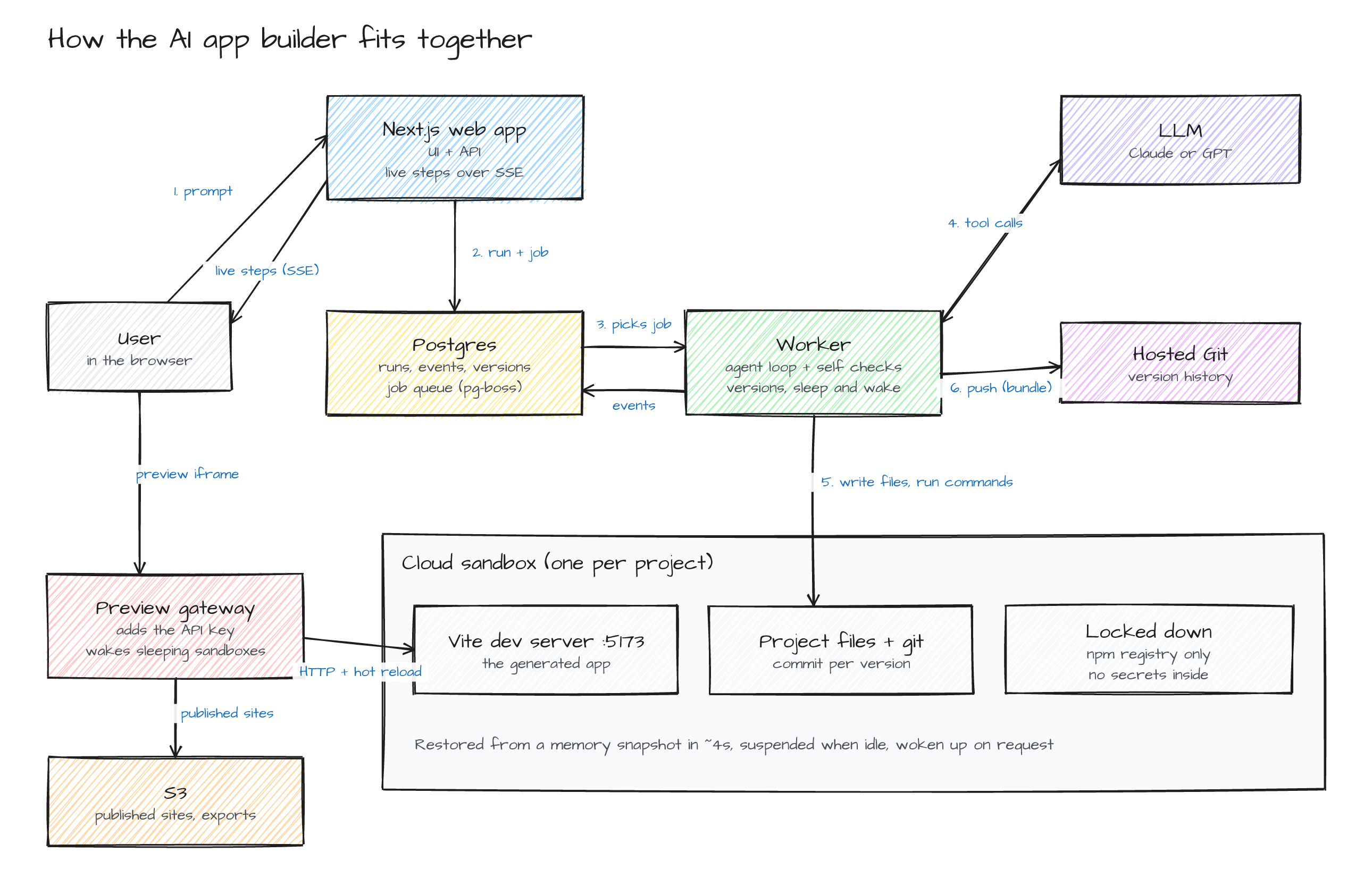
Here's the flow from start to finish:
Sending a Prompt
When a user types a prompt, the web app (Next.js) saves it, creates a "run" in Postgres, puts a job on a queue, and returns right away. So the user isn't sitting there waiting on some HTTP request while the agent does its thing.
Running the Agent
A worker process picks up that job. First it makes sure the project has a running sandbox, and then it starts the agent loop. The LLM decides what to do, and every tool call it makes (write a file, run a command, install a package and all) actually happens inside the sandbox.
Every single step is also saved to the database as an event, and that's how the browser gets them live.
Showing the Preview
The generated app runs its own Vite dev server inside the sandbox. We have a small gateway service that proxies http://<project-id>.preview.localhost:4000 to that dev server, including the WebSocket that Vite uses for hot reload.
So as the agent edits files, the preview just updates by itself, which honestly still feels kinda cool every time I see it.
Saving and Publishing
Once the agent is done, the worker commits the changes as a new version. And when the user clicks Publish, the app gets built and the static files are uploaded to S3, so the published site keeps working even when the sandbox is asleep.
That's pretty much the high level architecture of our application. To put it simply:
Next.js: UI and API layer
Worker (Node.js +
pg-boss): Agent layerGateway (Node.js proxy): Preview layer
Postgres: State and job queue layer
Cloud sandbox: Execution layer
S3 (MinIO locally): Storage layer
Any LLM of your choice (Claude or GPT in our case): Reasoning layer
Why Do We Need a Sandbox?
If you think about it, the whole product is basically "run code that nobody has reviewed." The agent writes it, npm install pulls in packages whose install scripts can run pretty much anything, and then a dev server starts executing all of it. There's no way I'm running that on my own server, and you shouldn't either.
So every project gets its own isolated sandbox, which is basically a small VM in the cloud. When I was picking a sandbox provider for this, these are the things I actually needed:
Suspend and resume: Most projects sit idle most of the time. I wanted to put them to sleep and wake them back up in a couple of seconds, with their memory intact.
Files, commands, and a terminal: The agent needs to read and write files and run commands, and it's nice to give the user a real shell too.
💁 There's much more to check on when considering using something like this on prod, but these were my only hard requirements.
For this, I'm using Tensorlake sandboxes. To be clear, there's no specific reason to use this particular one. E2B, Daytona, Modal, or even your own Firecracker setup would all work, and you're free to choose whatever you prefer. I've just been using it for a few projects already, and for sandboxes it works perfectly, especially for a use case like ours.
Note: All the sandbox code lives in a single package (packages/sandbox). So if you want to switch providers, that's pretty much the only place you need to touch. The rest of the app doesn't even know which provider it's talking to.
How to Set Up the Project
Before you start, make sure you have the following installed:
Node.js 22 or newer
pnpm
Docker (for Postgres and MinIO if you plan to test it locally first)
You'll also need API keys for your sandbox provider and for an LLM (Anthropic or OpenAI, whichever you like).
Start by cloning the repository and installing the dependencies:
git clone https://github.com/shricodev/lovable-build-tensorlake-aws.git
cd lovable-build-tensorlake-aws
pnpm install
Next, create your environment file and fill in the keys:
cp .env.example .env
# Add your sandbox and LLM keys, and generate AUTH_SECRET with:
openssl rand -base64 32
Now start the local infrastructure, create the database tables, and set up the storage bucket:
# Start Postgres and MinIO
pnpm infra:up

# Create the database tables
pnpm db:migrate

# Create the bucket and lock it down
pnpm s3:setup
Then build the base snapshot that every new project starts from (more on this in a bit). It takes about 45 seconds:
pnpm sandbox:build-base
Finally, start everything:
# web on :3000, preview gateway on :4000
pnpm dev
Open http://localhost:3000, sign in, and describe an app. That's it! 🎉
Note: The app supports GitHub sign in, but it also has a simple dev login so you can try it out before creating a GitHub OAuth app. Don't worry, the dev login is always disabled in production.
Core Components in the Application
The project is huge. Walking through every single line would turn this into an hours long read, so instead I'll focus on the core components that actually make the system work. Things like the dashboard, sign in, and the code editor are pretty standard stuff, so I'll skip those.
Note: This means that the code snippets below are trimmed down to the important parts. You can find the complete code in the repository.
Starting a Sandbox Fast
Every generated app starts from the same template: Vite, React, TypeScript, Tailwind, and a few common libraries. The naÏve way of doing it looks something like this for every new project:
Create a fresh sandbox
Upload the template
Run
npm installStart the dev server
And that works, but it took 33.4 seconds before the preview was even reachable in my tests. Most of that (about 23 seconds) was just npm install running on a single vCPU. I don't know about you, but I'm not staring at a spinner for that long every time I start a new project.
The fix is to do all of that once, and save the result as a memory snapshot. A memory snapshot captures the files, the RAM, and the running processes. So when you restore it, the dev server is already running. Nothing has to boot again.
Here's the core of the base snapshot builder:
export async function buildBaseSnapshot(log: Logger) {
  // Cold path, done once: create, upload template, npm install, git init,
  // verify it builds, start the dev server and warm up Vite's cache.
  const { ps } = await coldCreateFromTemplate({
    name: `base-${Date.now()}`,
    log,
    verify: true,
  });

  try {
    // Memory checkpoint: files + RAM + running processes.
    const snapshotId = await ps.checkpoint();
    writeBaseSnapshot({ snapshotId, createdAt: new Date().toISOString() });
  } finally {
    await ps.terminate();
  }
}
With that in place, creating a sandbox for a new project is just a restore, and then we lock it down:
static async createFromSnapshot(opts: { snapshotId: string; name: string; log: Logger }) {
  const sb = await Sandbox.create({ snapshotId: opts.snapshotId, name: opts.name, timeoutSecs: 600 });
  const ps = new ProjectSandbox(sb, opts.log);

  await sb.update({
    exposedPorts: [5173],              // the Vite dev server, reachable through the proxy
    allowUnauthenticatedAccess: false, // the port URL is never public
    network: {
      allowInternetAccess: true,
      allowOut: ["registry.npmjs.org"], // npm and nothing else
      denyOut: [],
    },
  });
  return ps;
}
A few things worth noting here:
exposedPortsmakes the dev server reachable through the provider's proxy, but only if you have our API key. We'll use that later in the gateway.The
networkblock is an allow list. OnceallowOuthas an entry in it, everything else is blocked.💁 I actually tested this with
example.com,github.com, and the cloud metadata IP, and all of them were blocked while npm still worked just fine.There are no secrets in the sandbox environment at all. No LLM keys, no database URL, no AWS keys, nothing. So even if a generated app or some prompt injection tries to steal something, there's simply nothing in there to steal.
Here are the numbers I got, measured all the way until the preview actually loads:
| Path | Time |
|---|---|
| Cold (create, install, start dev server) | 33.4s |
| Restore from the memory snapshot | 4.0s |
| Wake a sleeping sandbox | 2.4s |
That's roughly 8 times faster. How cool is that? 😎
The Agent Loop
The agent loop is the brain of the entire system. Every time a user sends a prompt, this is what runs.
The idea is simple even if the implementation isn't. You give the LLM a goal and some tools, let it call them, feed the results back, and repeat until it's done.
These are the tools the agent gets:
list_files,read_file,write_file,edit_file, anddelete_filerun_commandfor quick checks likenpx tsc --noEmitinstall_packagesfor adding npm packagesget_dev_server_logsandget_browser_errorsfor debuggingfinish, which the agent calls when it thinks it's done
Each tool is just a small file with a Zod schema and a run function. Here's edit_file for example:
export const editFile = defineTool({
  name: "edit_file",
  description:
    "Replace one exact snippet in a file. `search` must match exactly and occur exactly once.",
  schema: z.object({
    path: z.string(),
    search: z.string().min(1),
    replace: z.string(),
  }),
  async run({ path, search, replace }, { sandbox }) {
    const text = await sandbox.readFile(path);
    const count = text.split(search).length - 1;
    if (count !== 1) {
      return {
        isError: true,
        content: `search text occurs ${count} times in ${path}`,
      };
    }
    await sandbox.writeFile(
      path,
      text.replace(search, () => replace),
    );
    return { content: `Edited ${path}`, changedFiles: [path] };
  },
});
The Zod schema is doing two jobs here. It gets converted to JSON Schema for the LLM (with z.toJSONSchema), and it also validates whatever the model sends back before anything touches the sandbox. If the input is invalid, the error just goes back to the model instead of crashing the whole run.
Then the actual loop runs:
while (true) {
  if (signal.aborted) return result("cancelled");

  const res = await llm.chat({
    system: SYSTEM_PROMPT,
    messages,
    tools,
    signal,
    onText,
  });
  messages.push(res.message);

  const results = [];
  for (const call of res.message.toolCalls) {
    const out = await executeTool(call.name, call.input, ctx); // validate + run
    results.push({
      type: "tool_result",
      toolCallId: call.id,
      content: out.content,
      isError: out.isError,
    });
    if (out.finish) finishCalled = true;
  }

  if (!finishCalled) {
    messages.push({ role: "user", content: results });
    continue;
  }

  // The agent says it's done. Now we check. (next section)
}
The llm.chat call is a small wrapper I wrote that supports both Anthropic and OpenAI with the same interface, so you can switch models from a dropdown in the UI.
On the Anthropic side, prompt caching is turned on, and to be honest, it does most of the heavy lifting on cost. A typical turn reads over 120K tokens, and almost all of them come straight from the cache.
Keeping File Paths Safe
Now this one's a bit sneaky, and I only found it because I was poking around. The sandbox file API blocks paths with .. in them, but it happily follows symlinks. So if the generated code creates a leak.txt that points to /etc/passwd, reading leak.txt gives you back the password file. Not great.
So every file tool resolves the real path inside the sandbox before touching anything:
async safePath(relPath: string) {
  const abs = resolveProjectPath(relPath); // rejects "..", absolute paths, NUL bytes
  const r = await this.sb.run("realpath", { args: ["-m", "--", abs] });
  const real = r.stdout.trim();
  if (!isInsideApp(real)) throw new SandboxPathError(relPath, "resolves outside the project");
  return real;
}
realpath -m follows every symlink and tells you where the path actually points to. If that ends up outside the project folder, the call just fails.
Keeping the Context Small
Instead of replaying every past tool call on each new prompt, every turn starts a fresh conversation with:
a one line summary of each earlier turn (what the user asked, and what the agent did)
the file tree and the list of installed packages
the current
src/App.tsx
The agent reads anything else it needs with its tools. This keeps the cost of a turn pretty much flat, even after a project has had 20 prompts.
Letting the Agent Check Its Own Work
LLMs are really confident. They'll happily tell you everything works when the build is basically on fire. So when the agent calls finish, we don't just take its word for it. We run three checks inside the sandbox:
export async function runChecks(sandbox: ProjectSandbox) {
  const tsc = await sandbox.exec("npx tsc --noEmit -p . 2>&1", {
    timeoutSecs: 120,
  });
  const build = await sandbox.exec(
    "npx vite build --outDir /tmp/build --emptyOutDir --logLevel error 2>&1",
    { timeoutSecs: 180 },
  );
  const render = await renderCheck(sandbox); // renders the app once in a fake DOM

  return {
    ok: tsc.exitCode === 0 && build.exitCode === 0 && render.ok,
    typecheck: { ok: tsc.exitCode === 0, output: tsc.stdout },
    build: { ok: build.exitCode === 0, output: build.stdout },
    render,
  };
}
The first two are pretty obvious. The third one is where it gets interesting. A lot of bugs only show up at runtime, stuff like Cannot read properties of undefined (reading 'map'). The usual answer to this is a headless browser, but that's heavy and slow in a small sandbox, and I really didn't want to go down that road.
So instead, the template ships a tiny script that renders the app once with happy-dom (a fake DOM for Node.js) and Vite's ssrLoadModule:
GlobalRegistrator.register({ url: "http://localhost:5173/" });
document.body.innerHTML = '<div id="root"></div>';
console.error = (...args) => errors.push(args.join(" "));

await server.ssrLoadModule("/src/main.tsx"); // runs the real app entry
await new Promise((r) => setTimeout(r, 1500)); // let React render

const rendered = document.getElementById("root").innerHTML.trim().length > 0;
console.log(
  JSON.stringify({ ok: rendered && errors.length === 0, rendered, errors }),
);
It takes about 2 seconds, and it caught the undefined.map crash along with the exact line in App.tsx. Noiceee!
If any of the checks fail, the errors go straight back to the agent as a new message, and it gets another round to fix them:
lastCheck = await runChecks(sandbox);
if (lastCheck.ok) return result("succeeded");
if (healRounds >= maxHeal)
  return result("failed", { error: describeFailures(lastCheck) });

healRounds++;
messages.push({
  role: "user",
  content: [
    ...results,
    {
      type: "text",
      text: `Verification failed. Fix these problems, then call finish again.\n\n${describeFailures(lastCheck)}`,
    },
  ],
});
It stops after 3 rounds by default. If it's still broken after that, the user gets an honest "I couldn't finish this one" with the actual errors.
Streaming Progress to the Browser
The agent runs in the worker, but the user is looking at the browser. So somehow every step ("Wrote src/App.tsx", "Ran npx tsc --noEmit", "Checks passed" and all) has to get from one to the other as it happens.
The worker writes each step as a row in a run_events table and then fires a Postgres NOTIFY:
export async function appendEvent(
  db: Db,
  e: { projectId: string; runId?: string; type: string; payload: unknown },
) {
  const [row] = await db
    .insert(runEvents)
    .values(e)
    .returning({ id: runEvents.id });
  await db.$client.notify(
    "events",
    JSON.stringify({ projectId: e.projectId, id: row.id }),
  );
  return row.id;
}
On the web side, a Next.js route handler streams these events to the browser with Server Sent Events. When the browser connects, it first replays everything from the active run, and then it just keeps listening for new rows:
const pump = async () => {
  const rows = await db
    .select()
    .from(runEvents)
    .where(and(eq(runEvents.projectId, project.id), gt(runEvents.id, cursor)))
    .orderBy(asc(runEvents.id));

  for (const r of rows) {
    cursor = r.id;
    send(`id: ${r.id}\ndata: ${JSON.stringify(r)}\n\n`);
  }
};

bus.on(project.id, pump); // fired by a single LISTEN connection per process
pump(); // replay first
Since all the events live in the database, refreshing the page in the middle of a run doesn't lose anything. The browser reconnects, replays the run so far, and continues from where it left off. The Stop button works the same way, just in reverse. The web app sends a NOTIFY with the run ID, and whichever worker is holding that run aborts it.
Note: Streamed text from the LLM comes in token by token, and saving every token would mean hundreds of rows per turn. So the worker buffers it and writes one row every 250ms instead. I also had a small bug here where events landed out of order because each write was its own promise. Pushing every write through a single promise chain fixed it.
The Live Preview Gateway
The generated app's dev server runs inside the sandbox on port 5173, and the provider exposes it at a URL like https://5173-<sandbox-id>.sandbox.example. Now, you could just put that URL in an iframe and call it a day, but there are two problems with that:
To load it, the browser would need our sandbox API key. Yeah, that's clearly not happening.
And if we made it public instead, anyone who guessed the URL could open it, and we'd have no control over who sees what.
So we put our own small gateway in front of it. It maps <project-id>.preview.localhost:4000 to the right sandbox and adds the API key on the server side:
const proxy = createProxyServer({ changeOrigin: true, secure: true, ws: true });

const server = http.createServer(async (req, res) => {
  const projectId = HOST_RE.exec(req.headers.host ?? "")?.[1];
  const target = await resolve(projectId); // project -> sandbox, cached for a few seconds
  if (!target.sandboxId) return send(res, noPreviewPage());

  delete req.headers.cookie; // never forward the visitor's credentials
  delete req.headers.authorization;
  proxy.web(req, res, {
    target: previewUrlFor(target.sandboxId),
    headers: { authorization: `Bearer ${API_KEY}` },
  });
});

// Vite's hot reload runs over a WebSocket, so upgrades get proxied too.
server.on("upgrade", async (req, socket, head) => {
  const target = await resolve(HOST_RE.exec(req.headers.host ?? "")?.[1]);
  proxy.ws(req, socket, head, {
    target: previewUrlFor(target.sandboxId).replace(/^https/, "wss"),
    headers: { authorization: `Bearer ${API_KEY}` },
  });
});
That upgrade handler is what makes the preview feel alive. Whenever the agent edits a file, Vite pushes the change over the WebSocket, and the preview updates without a reload.
There's also another reason for having the gateway that's pretty easy to miss. The preview runs on a different origin (*.preview.localhost) than the main app (localhost:3000). So a generated app can never read the main app's cookies or call its API as the logged in user. And since *.localhost resolves to 127.0.0.1 in modern browsers, you don't even need to touch your hosts file for this.
Note: The template also injects a tiny script into the preview that listens for window.onerror, and posts them to the parent window. The workspace then forwards those to the backend, and that's where the agent's get_browser_errors tool gets real runtime errors from.
Versions with Git
Every finished prompt becomes a version. So, the user can pretty much revert to a specific "prompt", more like git reset.
For this, plain old Git inside the sandbox works great. The base snapshot already has a repo with the template as the first commit, and after each successful turn, the worker commits everything:
export async function commitAll(ps: ProjectSandbox, message: string) {
  const out = await git(
    ps,
    `git add -A
if git diff --cached --quiet; then
  echo NOCHANGE
else
  git commit -q -m "$MSG"
  git rev-parse HEAD
  git show --name-only --format= HEAD
fi`,
    { MSG: message },
  );
  if (out.trim() === "NOCHANGE") return null;
  const [sha, ...files] = out.trim().split("\n");
  return { sha, files };
}
Note: You might be wondering why there's no exit 0 in there. Commands run under bash -l, and an explicit exit in a login shell runs ~/.bash_logout, whose last command failed on this image and turned my exit code into a failure. This one honestly took me way longer to figure out. 😭
Restoring never rewrites history. It makes the files match the old commit exactly, and then commits that as a brand new version on top. So "restore version 1" creates version 5, and you can still go back to version 4 whenever you want. Nothing gets lost.
Keeping the History Durable (Without Tokens in the Sandbox)
Git inside the sandbox is great, but it only lives as long as the sandbox does. So after each version, the history also gets pushed to a hosted Git repository.
The straightforward way to do this would be to give the sandbox a Git token and just run git push. But the tokens I had access to were scoped to the whole project, not a single repo. Putting one of those inside a sandbox full of untrusted code? Yeah, no thanks.
So the sandbox never pushes anything. It creates a git bundle (basically the entire repo in a single file), the worker reads that file out, and the worker does the push itself:
export async function pushToHostedGit(
  ps: ProjectSandbox,
  repo: string,
  dataDir: string,
) {
  await git(ps, "git bundle create -q /tmp/repo.bundle main");
  const bundle = await ps.sb.readFile("/tmp/repo.bundle");

  const mirror = join(dataDir, "git", `${repo}.git`); // a bare repo on the worker
  writeFileSync(join(mirror, "incoming.bundle"), bundle);
  await run("git", [
    "-C",
    mirror,
    "fetch",
    "-q",
    "--force",
    "incoming.bundle",
    "+refs/heads/main:refs/heads/main",
  ]);

  const cred = await repos.credential(repo); // short lived token, only on the worker
  await run("git", [
    "-C",
    mirror,
    "-c",
    `http.extraHeader=Authorization: Basic ${basic(cred)}`,
    "push",
    "-q",
    "--force",
    url,
    "main",
  ]);
}
A nice side effect of this is that it also powers remix. When someone copies a shared project, the worker loads the source project's bundle from the hosted repo into a brand new sandbox, and the original sandbox doesn't even have to wake up for it.
Sleeping, Waking, and Sharing the Sandboxes
A running sandbox costs money even when nobody's working on it. So there's a small job that runs every minute and suspends any sandbox that hasn't had an agent run for 10 minutes. Suspending keeps the memory, so the dev server comes back exactly as it was.
Waking up happens in the gateway. If someone opens the preview of a sleeping project, the gateway shows a small "Waking up your app..." page that keeps refreshing itself, and resumes the sandbox in the background:
if (isPage && target.status === "suspended") {
  const outcome = wake(projectId, target, log); // deduplicated per project
  const done = await Promise.race([outcome, timeout(4000, "pending")]);
  if (done === "busy") return send(res, busyPage());
  if (done !== "running") return send(res, wakingPage()); // auto refreshes
}
In my tests, a sleeping sandbox woke up in about 3 seconds, and the app loaded right after. 🎊
Sharing a Limited Number of Sandboxes
Most sandbox providers limit how many sandboxes you can run at the same time, especially on a free plan. So I added a small concurrency checker, and it all happens in Postgres with an advisory lock, so two workers never end up making the same decision at the same time:
async function decide(db: Db, projectId: string) {
  return db.transaction(async (tx) => {
    await tx.execute(sql`select pg_advisory_xact_lock(${LOCK_KEY})`);

    const live = await runningSandboxesOldestFirst(tx);
    if (live.some((s) => s.projectId === projectId)) return { kind: "ok" };
    if (live.length < concurrencyLimit()) return { kind: "ok" };

    // Full. Free a slot by suspending the least recently used idle sandbox.
    const victim = live.find((s) => !busyProjects.has(s.projectId));
    if (victim) return { kind: "evict", sandboxId: victim.sandboxId };

    return { kind: "wait", position }; // everything is busy, just wait...
  });
}
To test this, I set the limit to 1 and sent a prompt to one project while another project's sandbox was just sitting idle. The idle one went to sleep, and the new one took its slot. Then I sent a prompt to the first project while the second was still working, and the UI showed "Waiting for a free sandbox, #1 in line" until the slot freed up. If you have a bigger plan, you just raise the limit in .env and nothing else changes.
Publishing the App
The preview is great while you're building, but you don't want your published app to depend on a sandbox that goes to sleep every 10 minutes.
So publishing builds the app once and turns it into plain static files:
export async function publish(project: Project) {
  const ps = await projectSandbox(project.id); // wakes it if needed
  const build = await ps.exec(
    "rm -rf dist && npx vite build --outDir dist --emptyOutDir 2>&1",
    { timeoutSecs: 180 },
  );
  if (build.exitCode !== 0)
    throw new HttpError(422, `The build failed:\n${build.stdout.slice(-1500)}`);

  const files = await listFiles(ps, "dist");
  const prefix = `published/${slug}/${versionId}/`;

  for (const f of files) {
    const bytes = await ps.readBytes(`dist/${f}`);
    await storage.put(prefix + f, bytes, contentTypeFor(f), cacheControlFor(f));
  }

  await savePublishedSite({ projectId: project.id, slug, s3Prefix: prefix });
  return { url: publishedUrl(slug) };
}
The gateway then serves those files from S3 at http://<slug>.app.localhost:4000. Files that Vite hashes (like assets/index-CScgwd68.js) get cached forever, and index.html always gets revalidated, so updates show up right away. Any path without a file extension falls back to index.html, so client side routing works as well.
And published sites get their own subdomain on purpose. If they lived under the main app's domain, a published app's JavaScript could call your API with the cookies of whoever is looking at it, and you really don't want that. 😺
In my tests, publishing took about 6 seconds, and the published site loaded in 4ms with the sandbox asleep, because it never touches the sandbox at all.
App Builder in Action
Here's a quick demo of the app builder in action:
I also ran a small eval out of curiosity. It sends the same three prompts (a habit tracker, a kanban board, and an expense dashboard with charts) to two different models, each in a fresh sandbox:
| Model | Passed (build + render) | Avg time |
|---|---|---|
| Claude Sonnet 5 | 3/3 | 135s |
| GPT 5.5 | 3/3 | 92s |
All six apps built and rendered on the first check, without needing a single fix round, which honestly surprised me a bit. On Claude, each app cost somewhere around $0.15 to $0.20.
Conclusion
So, what do you think of the project? This was truly one of the most fun projects I've worked on in a while since this AI stuff has taken over raw coding. 🤦♂️
When you use tools like Lovable, it's easy to think it's all about the prompt and the model. But once you build one yourself, you realize most of the work is everything around the model, like where the code runs, how fast it starts, how you show it to the user, and how you keep it from doing something it shouldn't.
If there's one thing I'd want you to take away from this, it's the sandbox part. Treat AI generated code as untrusted, give it its own small machine with no secrets and almost no network access. Memory snapshots and suspend/resume then take care of making it fast and cheap.
There's still a lot of room to extend this. You could add a small backend (like Hono and SQLite) to the template so users can build full stack apps, let users click an element in the preview to edit exactly that component, or generate a few design variations of the same prompt side by side. I'm just too exhausted to implement that right now. I'll leave it up to you. ✌️
The foundation is there. The rest is just building on top of it.
You can find the complete source code here: shricodev/lovable-build-tensorlake-aws
So, that's it for this article. Thank you so much for reading! See you next time. 🫡


