
You likely use cloud services every day. When you check Gmail, join a Zoom meeting, or message your team on Slack, you use cloud-hosted software.
But you don't manage the servers it runs on or maintain the underlying infrastructure. You simply sign in and get to work. This is called Software as a Service (SaaS), and many people use it for years without knowing the term.
SaaS is just one of three major cloud service models. The other two, Infrastructure as a Service (IaaS) and Platform as a Service (PaaS), give you different levels of control over the infrastructure and software you build. Understanding how these models differ will help you make sense of cloud engineering concepts and choose the right approach for your projects.
In this article, we'll break down IaaS, PaaS, and SaaS, explain what you manage and what the cloud provider handles in each model, and learn how to choose between them for a real project.
What You'll Learn
By the end of this article, you'll be able to:
- Explain what IaaS, PaaS, and SaaS are and what each one manages for you
- Use the shared responsibility model to see where your job starts and ends
- Recognise real products in each category
- Choose the right model for a given project
Table of Contents
- Prerequisites
- What Is Cloud Computing?
- The Shared Responsibility Model
- Infrastructure as a Service (IaaS)
- Platform as a Service (PaaS)
- Software as a Service (SaaS)
- Beyond the Big Three: CaaS, FaaS, and Serverless
- How to Choose the Right Service Model
- Conclusion
Prerequisites
You don't need any cloud experience to follow this article. If you know what a computer, a server, and the internet are, you have everything you need.
If you're new to the cloud, read my article What is the Cloud and Cloud Computing? first. It explains what the cloud is and how it differs from running your own hardware, and this article builds on that foundation.
What Is Cloud Computing?
Cloud computing is a model that lets you use computing resources, such as servers, storage, and networking, on demand over the internet. YOu pay only for what you use.
These resources sit in data centres that are owned and run by cloud service providers, or CSPs for short. The best-known CSPs are Amazon Web Services (AWS), Microsoft Azure, and Google Cloud.
This is just a short recap to make sure you understand the key concepts. My article above covers it in full if you want or need more info.
What Does On-Premises Mean?
Before the cloud, most organisations ran their systems on-premises. On-premises means the hardware sits in a building the organisation owns or rents. This could be a server room in their office, with its own staff looking after it.
In this setup, you're responsible for everything. This includes buying servers, setting up the network, installing and updating software, and keeping the room powered and cool.
For example, if a small business wanted to launch an online shop, it would need to buy a server, install the software, and pay someone to keep it running. If the shop grew faster than expected, it would need to buy more hardware.
What Changes When You Move to the Cloud?
The cloud moves some of that work to the provider. The physical servers still exist, but someone else owns and maintains them, and you rent what you need.
What differs from one cloud service to the next is how much of the work the provider takes on for you. The cloud service models describe this, and there are three main ones:
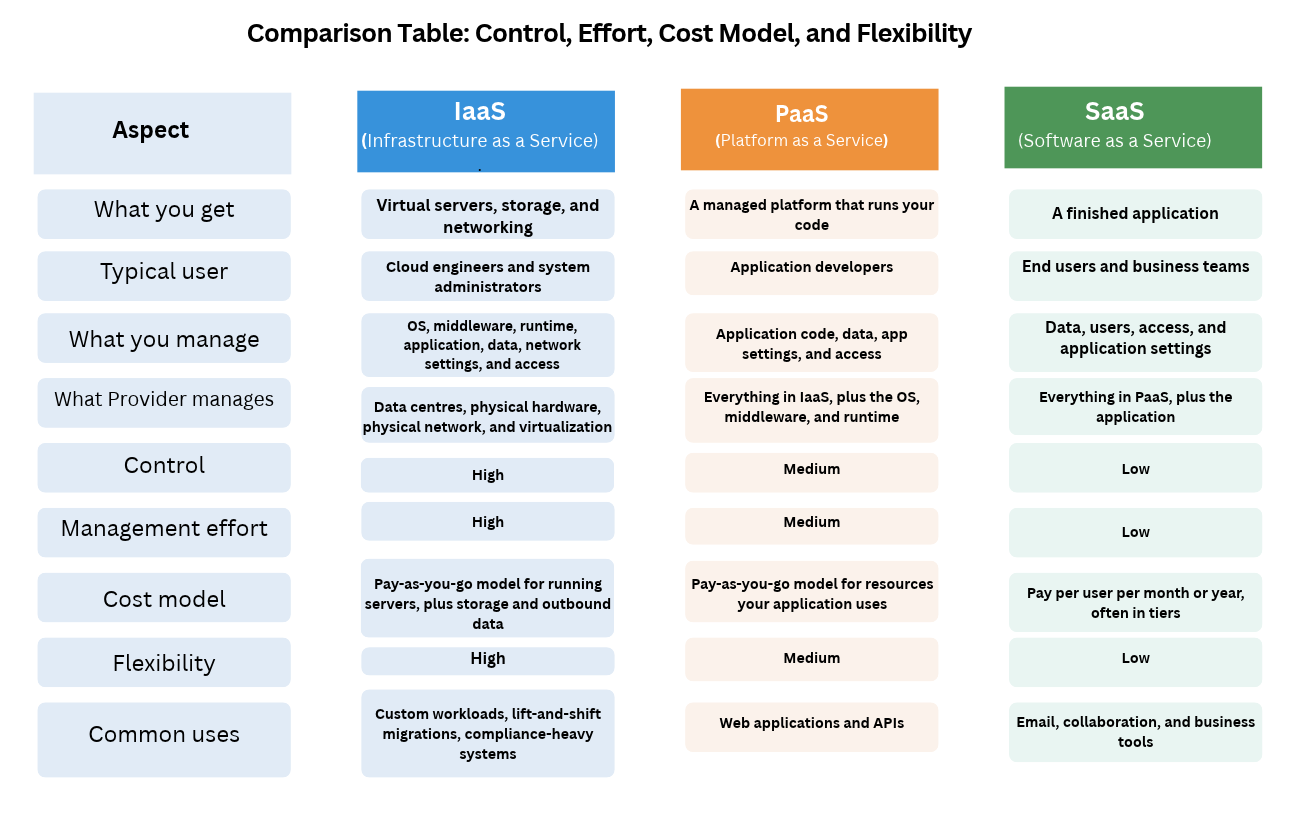
- Infrastructure as a Service (or IaaS): Here the provider gives you virtual servers, storage, and networking. Then you manage everything you put on them.
- Platform as a Service (or PaaS): Here, the provider also manages the operating system and the tools your code needs to run. You bring your application and your data.
- Software as a Service (or SaaS): In this model, the provider gives you a finished application. You sign in, use it, and manage your users and data.
So a cloud service model describes how the work is split between you, the customer, and the provider, that is which parts of the system you manage and which parts the provider manages for you.
The Shared Responsibility Model
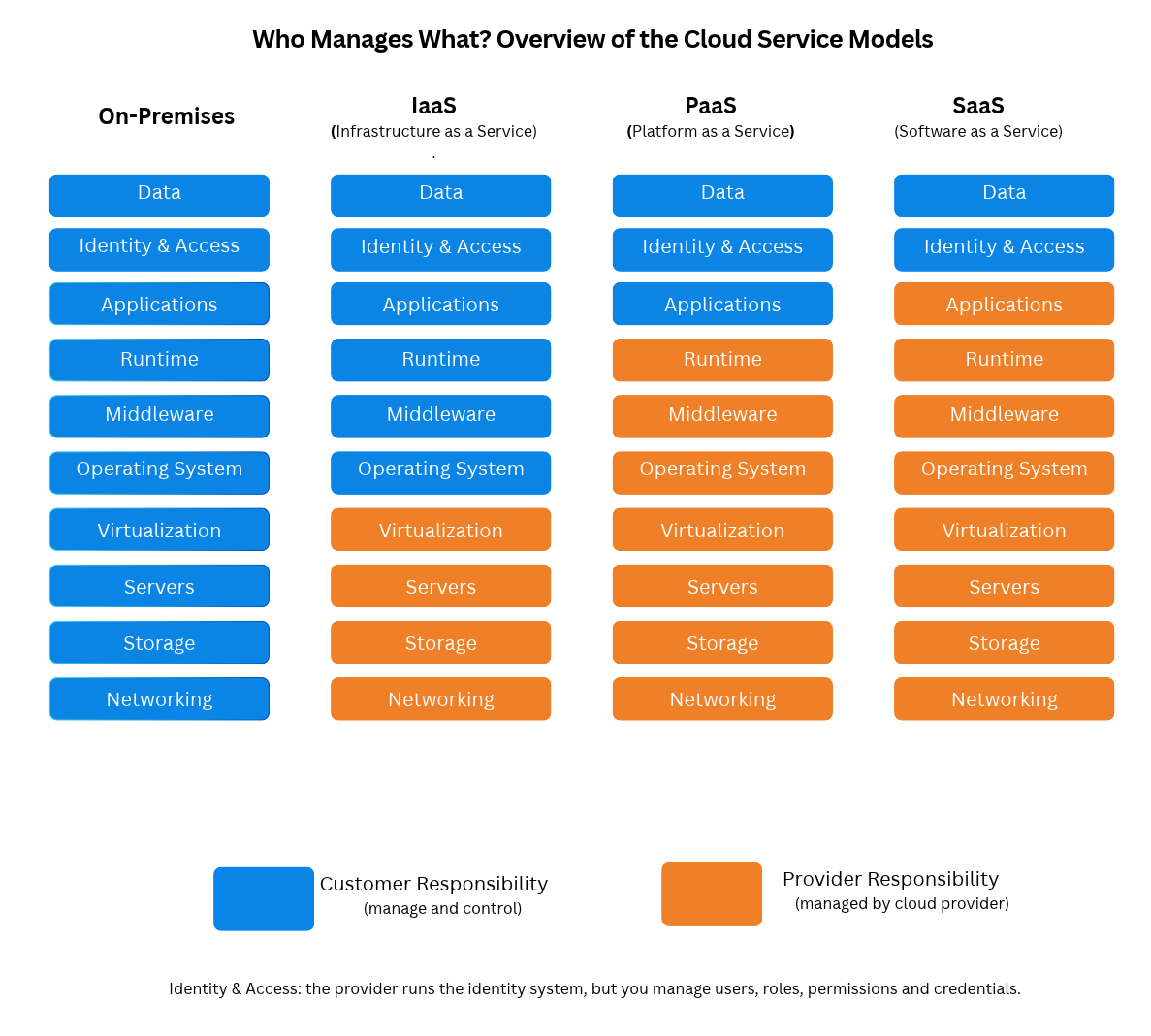
The shared responsibility model defines which parts of a cloud system the provider manages and which parts you, as the customer, manage. To understand it, you first need to see the parts that make up a running application.
The Layers of a Computing Stack
A computing stack is the set of layers that work together to run an application. Each layer depends on the ones beneath it. From the bottom up, we have:
- Networking: the physical cables, switches, and routers that connect servers to each other and to the internet.
- Storage: the physical drives where files and databases are saved.
- Servers: the physical computers that provide processing power (CPU) and memory (RAM).
- Virtualisation: software that splits one physical server into several virtual machines, or VMs for short. A VM behaves like a separate computer even though it shares hardware with other VMs.
- Operating system: the base software, such as Linux or Windows, that manages the hardware and lets other programs run.
- Middleware: software that connects your application to the outside world and to other services, such as a web server that receives requests from browsers.
- Runtime: the environment your code needs to run, such as Node.js for JavaScript or the Python interpreter for Python.
- Application: the software itself, such as an online shop or an email client.
- Data: the information the application stores and processes, such as customer records, orders, and emails.
Who Manages What in Each Model
AWS describes the split as security “of” the cloud and security “in” the cloud. The provider manages the security of the cloud. This covers the data centres, physical hardware, physical network, and the virtualisation layer.
But security in the cloud is the customer's job. It covers what you put into the cloud and how you configure it. This includes your data, your users and their permissions, and the settings of the services you use.
Infrastructure as a Service (IaaS)
Infrastructure as a Service is a cloud model where the provider gives you the basic building blocks of computing. This includes virtual servers, storage, and networking.
How IaaS Works
With IaaS, you request a virtual machine from the provider. You choose how many CPUs and how much memory it has, which operating system it runs, and which network it connects to. Within minutes, the VM is running, and you can connect to it.
From that point, the server is yours to manage. You install your software, apply operating system updates, configure the firewall, and keep your application running.
Before IaaS, getting a new server meant ordering hardware and waiting weeks for installation. With IaaS, the same server is ready in minutes, and you can delete it when you no longer need it.
Just remember: IaaS removes the hardware burden, but it doesn't remove the server burden.
With IaaS, you usually pay for each hour or second a server is running, plus the storage you keep and outbound data transfer.
Real-World Examples include:
- Amazon EC2 (Elastic Compute Cloud) on AWS
- Google Compute Engine on Google Cloud
- Azure Virtual Machines on Microsoft Azure
Each of these gives you virtual machines. They work alongside other IaaS building blocks, such as virtual disks (Amazon EBS), storage for files and backups (Amazon S3), and private networks (Amazon VPC).
When to Use IaaS
IaaS is the right choice when you need control over the operating system and everything on it, especially when:
- You need a specific operating system version or software that a managed platform doesn't support.
- You need to meet security or compliance rules that require you to configure and audit the server yourself.
- You're moving an existing application from your own servers to the cloud without rewriting it. This is often called “lift and shift”.
- You need development and test environments that you create and delete often.
Tradeoffs
As with any system, there are some tradeoffs you should be aware of before selecting this model.
First, you manage the operating system. You handle patching, security updates, and backups, and a missed update can create a security gap.
You also need to plan for scaling. The provider gives you tools to add servers automatically, but you have to set them up and test them.
In addition, you may need to acquire some new skills. Running servers well requires knowledge of Linux or Windows administration, networking, and security.
And you also pay for idle time. A server that runs all night with no traffic still costs money.
Platform as a Service (PaaS)
Platform as a Service is a cloud model where the provider gives you a ready environment to run your code. The provider manages the servers, operating system, middleware, and runtime. The customer brings the application code and data.
How PaaS Works
With IaaS, you still have to prepare a server before your application can run. This includes updating the operating system, setting up a web server, installing the right language version, and keeping it all maintained.
PaaS removes this burden. With PaaS, you tell the platform which language your application uses, then send your code, usually by pushing to Git or uploading a package. The platform builds your application, runs it on managed servers, and gives you a web address. When traffic grows, it can run more copies of your application based on rules you set.
You still decide how much memory your application gets, which settings it uses, and who can deploy it. You just no longer have to log in to servers to patch and maintain them.
With PaaS, you usually pay for the resources your application uses, such as the size and number of running instances, billed by the hour or month.
Real-World Examples include:
- Heroku
- AWS Elastic Beanstalk
- Google App Engine
- Azure App Service
There are some products that sit between categories. For example, Firebase from Google is often called a PaaS, but it's more accurately a Backend as a Service, or BaaS. A BaaS gives you ready-made backend features, such as a database, user authentication flow, and file storage, that your app calls directly. You don't deploy a whole application to it the way you would on Heroku, for example.
Another is Amazon RDS (Relational Database Service), which is a managed database. AWS runs the database software and backups, while you manage the tables, data, and access. It works like PaaS, but for databases.
When to Use PaaS
- You want to launch a web application or API quickly and focus on code.
- Your team is small and has nobody dedicated to managing servers.
- Your application uses a common language the platform supports, such as Node.js, Python, Java, or .NET.
- You want deployments, scaling, and monitoring without building them yourself.
Tradeoffs
The first tradeoff here is that you have less control. You can't install just any software you want or change operating system settings. Also, if the platform doesn't support something, you have to work around it.
You also risk vendor lock-in. Vendor lock-in means that moving to another provider becomes hard because your application depends on features only one platform offers.
Also, you may pay more at scale. As traffic grows, PaaS can cost more than running the same workload on servers you manage because you pay for the convenience.
And you need to work within platform limits, such as maximum request times or supported language versions.
Finally, you still own your code’s security, including the third-party libraries it uses (and all the risks that come with that).
Software as a Service (SaaS)
Software as a Service is a cloud model where the provider delivers a complete application over the internet. You access it through a web browser or an app, and the provider manages everything needed to keep it running.
How SaaS Works
Before SaaS, using business software meant buying a license, installing it on every computer, and updating each one for every new version. For example, if an organisation wanted its own email system, it would need its own email server, someone to run it, and a backup plan.
This is different with SaaS. The provider runs the application on its own infrastructure, and every customer uses the same centrally updated version. You create an account, add your users, and start working. New features and security fixes arrive without you installing anything.
Your work moves from running software to configuring it. You decide who gets an account, what each person can access, and how files are shared.
With SaaS, you usually pay per user per month or per year, often in tiers with more features at higher levels.
Real-World Examples include:
- Gmail and Google Workspace, for email, documents, and file storage
- Microsoft 365, for Outlook, Word, Excel, and Teams
- Slack, for team messaging
- Zoom, for video meetings
- Dropbox, for file storage and sharing
- Salesforce, for managing customers and sales
When to Use SaaS
- The software solves a common problem that many organisations share, such as email, documents, chat, or accounting.
- You don't want to build or run the software yourself.
- Your team needs access from anywhere, on any device.
- You need the tool working this week, not in six months.
For example, say a non-governmental organisation with twenty staff who need professional email, shared documents, and video calls. It has no IT team. With Google Workspace or Microsoft 365, one administrator can set up accounts for every staff member in a day, while the provider handles the servers, updates, and spam filtering.
Tradeoffs
With this option, you have the least control. You get the features the provider builds, and if you need something it doesn't offer, you wait or look elsewhere.
Also, your data lives with the provider. You depend on their security, so you need to know where your data is stored and how you can export it if you leave.
Your costs could also easily grow with your team.
Further, you depend on your internet connection. When connectivity is unreliable, a browser-based tool can become unavailable when you need it most.
And you have limited customisation options. Connecting the tool to your other systems depends on what the provider allows.
Beyond the Big Three: CaaS, FaaS, and Serverless
IaaS, PaaS, and SaaS are the main models, but there are also options like CaaS, FaaS, and serverless. Let’s look at what each means and how it works.
Containers as a Service (CaaS)
A container packages your application with everything it needs to run, including its runtime, libraries, and settings. Because everything is inside the package, a container runs the same way on your laptop as it does on a server in the cloud. Docker is the most common tool for building containers.
Containers as a Service, or CaaS, is a model where the provider runs and manages containers for you. You give it your container images, and it starts them, restarts them when they fail, and spreads them across servers. The software that makes these decisions is called a container orchestrator, and Kubernetes is the most widely used one.
CaaS sits between IaaS and PaaS. You have more control than on a PaaS, because you decide exactly what goes into each container, but the provider handles much of the work of running them.
Some common examples include:
- Amazon ECS (Elastic Container Service), which is AWS’s own orchestrator
- Amazon EKS (Elastic Kubernetes Service), which is managed Kubernetes on AWS
- Google Kubernetes Engine (GKE), which is managed Kubernetes on Google Cloud
With ECS and EKS, you may still manage the virtual machines your containers run on, unless you use AWS Fargate, which runs containers without you managing any servers.
Functions as a Service (FaaS)
Functions as a Service, or FaaS, is a model where you upload small pieces of code called functions, and the provider runs each one only when an event triggers it. An event is something that happens, such as a web request arriving, a file being uploaded, or a scheduled time being reached.
You don't keep a server running while you wait for work. When the event happens, the provider starts your function, runs it, and stops it. You pay per request and for the compute time each run uses, so you pay nothing for compute when nothing happens.
For example, say that an online shop needs to create a small thumbnail every time a seller uploads a product photo. With IaaS, you keep a server running all day to watch for uploads, even at 3 a.m. when nobody is uploading. With FaaS, the upload itself triggers a function that creates the thumbnail, and you pay only for the seconds it runs.
Some common examples include:
- AWS Lambda
- Azure Functions
- Google Cloud Run functions, previously called Google Cloud Functions
FaaS has trade-offs, too. Each run has a time limit, and an idle function can take a moment longer to start. This is called a cold start.
Where Serverless Fits
Serverless describes cloud services where you never set up or manage servers, the service scales automatically with demand, and you pay only for what you use rather than for idle capacity.
Serverless isn't a fourth model on the stack. It describes how a service is operated and billed, not which layers you manage. FaaS is serverless, but so are many other managed services, such as Amazon S3 for file storage, Amazon DynamoDB for databases, and AWS Fargate for containers.
Google Cloud Run functions, which are CaaS, also fit into the serverless category.
How to Choose the Right Service Model
No single model is best for every project. The right choice depends on what you're building, who's building it, and how much control you need.
To help you decide, you can work through these questions in order:
- Does software that does this job already exist? If yes, start with SaaS.
- Are you building your own application in a common language? If yes, look at PaaS first, or FaaS for small tasks that run in response to events.
- Is your application already packaged in containers? If yes, CaaS or a serverless container platform may suit you.
- Do you need control over the operating system, custom software, or a strict compliance setup? If yes, choose IaaS.
- Is your traffic steady or unpredictable? Unpredictable traffic often suits serverless pay-per-use pricing.
Start with the most managed model that meets your needs, and move down the stack only when you have a clear reason.
Most production systems combine multiple cloud service models, each serving a different purpose.
Wrapping Up
Each service model draws the line between your work and the provider’s at a different point on the stack. IaaS gives you virtual infrastructure, and you manage the operating system and everything above it. PaaS gives you a platform, and you manage your code and data. SaaS gives you a finished application, and you manage your users, data, and settings.
CaaS and FaaS sit between these models, and serverless describes how you operate and pay. In all of them, you (the customer) remain responsible for your data and who can access it.
Thank you for reading!