An AI receptionist may sound simple from the outside: a caller speaks, the system responds, and the conversation continues until the caller gets an answer or reaches a person.
Behind that conversation sits a pipeline of telephony infrastructure, speech recognition, language models, application logic, APIs, databases, and call routing.
The interesting part isn't just the AI model. It's how these components work together to turn an audio stream into useful business actions.
Businesses that want these capabilities have two paths.
They can buy a finished product. The market now includes dedicated AI receptionists such as XBert from Nextiva, along with tools from Goodcall, Dialzara, and others.
Or they can build one, which is what this article walks you through. Understanding the architecture helps either way: it shows what a commercial product is doing under the hood, and what a custom build needs to assemble.
A typical architecture looks something like this:
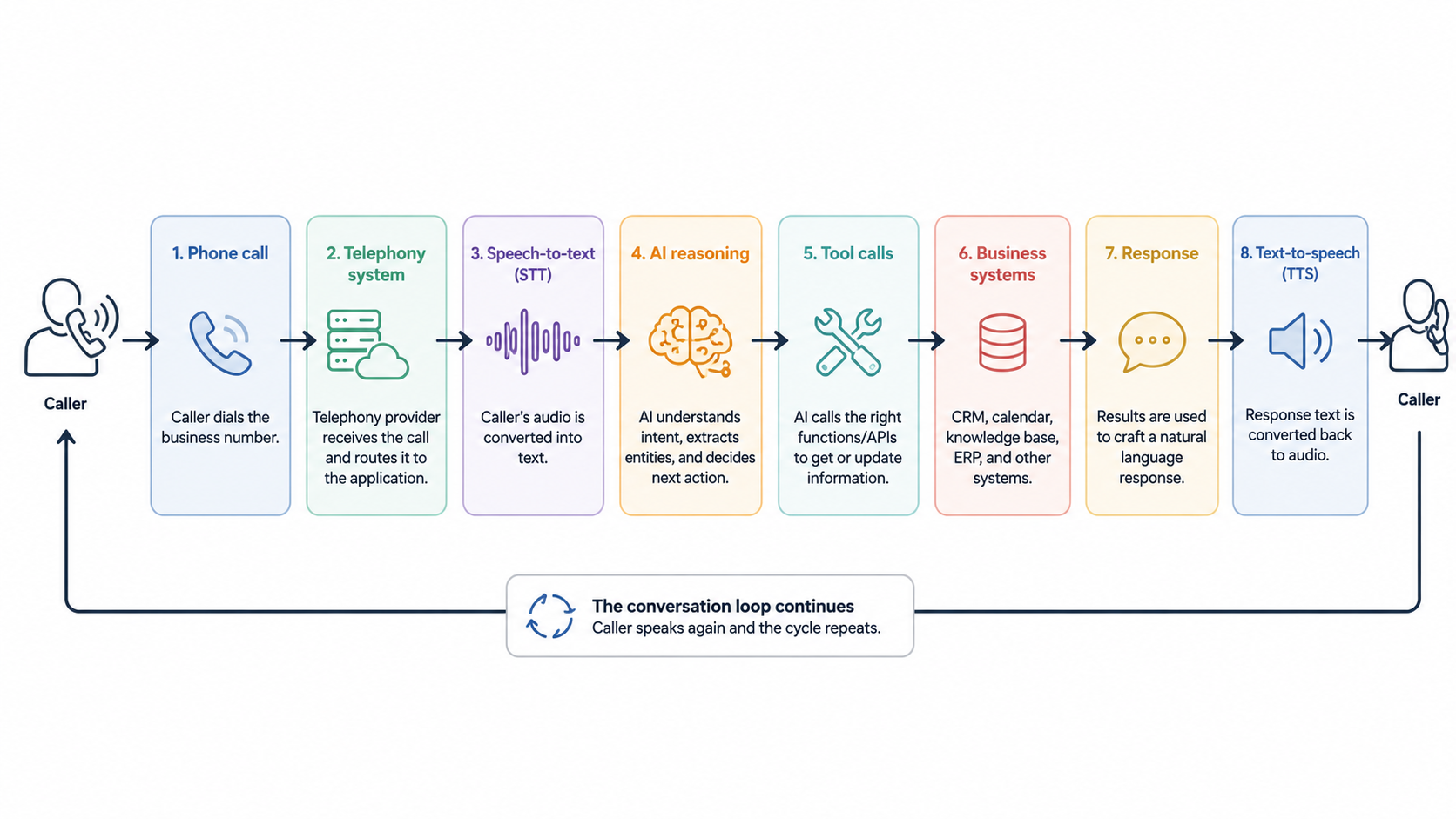
In this article, we'll walk through the architecture behind an AI phone agent, from the moment a caller dials a business number to what happens after the call ends.
You'll see how telephony systems connect calls, how speech becomes text, how AI identifies intent and maintains conversation context, and how function calls connect the agent to calendars, CRMs, and other business systems. We'll also look at how agents decide when to hand a call to a human and what information can be passed along during that handoff.
What We'll Cover:
A Phone Call Enters the System
The process starts like a regular phone call. A customer dials a business number, and the telecommunications provider receives the call.
The provider then needs to connect that call to an application capable of handling it.
One common approach is a webhook. The telephony provider sends an HTTP request to an application when an incoming call arrives. The application can then return instructions describing how the call should be handled.
The call itself needs carrier connectivity. Production systems typically use SIP trunking, which connects a voice application or phone system to the public telephone network over the internet.
Providers such as Nextiva, Twilio, and Bandwidth offer SIP trunking that supplies the numbers and call capacity an AI voice system runs on. From there, the application layer takes over.
For example, Twilio sends an HTTP request to a configured application when an incoming voice call arrives. The application can respond with TwiML instructions that control the call.
A simplified Node.js endpoint might look like this:
app.post("/incoming-call", (req, res) => {
  const response = new VoiceResponse();

  response.say("Hello. How can I help you today?");

  res.type("text/xml");
  res.send(response.toString());
});
This example doesn't contain any AI yet. It simply shows the first architectural boundary.
The phone network handles the call. The application receives an event and decides what happens next.
From here, the application needs to process the caller's audio.
Speech Becomes Text
People communicate with the system through audio, but most application logic works with structured data and text.
An automatic speech recognition system, or ASR system, converts the caller's speech into text.
For example, a caller might say:
"I need to move my appointment from Friday to Monday afternoon."
The speech recognition layer might produce:
{
  "text": "I need to move my appointment from Friday to Monday afternoon."
}
The exact response depends on the speech recognition system. Some systems can also provide timestamps, confidence information, speaker information, or partial transcripts.
The application can now pass the recognized text to its conversational layer.
This separation is useful because the AI reasoning layer doesn't need to understand raw telephone audio. It receives text and returns a decision or response.
The System Determines What the Caller Wants
The next challenge is understanding intent.
Suppose three callers say:
"I want to book a consultation."
"Can I move my appointment to next week?"
"Where is your office?"
The system needs to recognize that these requests require different workflows.
An application could represent the detected intent as structured data:
{
  "intent": "reschedule_appointment",
  "entities": {
    "current_day": "Friday",
    "requested_day": "Monday",
    "time_preference": "afternoon"
  }
}
The language model can produce this structure, or the application can derive it through another classification layer.
The important architectural point is that the application turns natural language into information that downstream systems can process.
The model might understand that the caller wants to reschedule an appointment, but it shouldn't directly modify a calendar simply because it generated that interpretation.
The application needs to control what happens next.
The Conversation Runs as a Loop
An AI phone agent doesn't normally process an entire conversation in a single request.
Instead, it operates as a loop.
The caller speaks. Speech recognition converts the audio into text. The application sends the text and relevant context to the AI system. The AI determines what it needs to say or what action it needs to perform. The application generates audio and sends it back to the caller.
Then the caller speaks again.
A simplified version looks like this:
while (callIsActive) {
  const audio = await receiveAudio();

  const text = await speechToText(audio);

  const result = await processConversation({
    text,
    context: conversationContext
  });

  conversationContext = result.updatedContext;

  const audioResponse = await textToSpeech(result.response);

  await sendAudio(audioResponse);
}
This is conceptual code, not a complete phone implementation. Real systems need to handle streaming audio, interruptions, timeouts, errors, authentication, and provider-specific protocols.
Context is also important.
If the caller says:
"I want to book an appointment."
The system might ask:
"What type of appointment do you need?"
The caller then says:
"An initial consultation."
That second statement only makes sense because the application remembers the previous exchange.
Conversation state might contain information such as:
{
  "intent": "book_appointment",
  "appointment_type": "initial_consultation",
  "customer_name": "Jane Smith",
  "preferred_date": null
}
The system can add to this state as the conversation progresses.
The AI Calls Business Systems
This is where an AI receptionist becomes more than a voice chatbot.
Suppose a caller asks:
"Do you have anything available tomorrow afternoon?"
The AI can't reliably answer that from the conversation alone. It needs current information from a calendar or scheduling system.
This is where function calling, also called tool calling, becomes useful.
The application can expose a limited set of functions to the AI:
const tools = [
  {
    name: "check_calendar",
    description: "Find available appointment slots",
    parameters: {
      date: "string",
      appointmentType: "string"
    }
  },
  {
    name: "book_appointment",
    description: "Book an available appointment",
    parameters: {
      slotId: "string",
      customerId: "string"
    }
  }
];
The model can determine that it needs check_calendar.
The application then executes the function:
const slots = await checkCalendar({
  date: "2026-08-21",
  appointmentType: "consultation"
});
The result goes back into the conversation context:
{
  "available_slots": [
    "2026-08-21T14:00:00",
    "2026-08-21T15:30:00"
  ]
}
The AI can then tell the caller which options are available.
The important architectural boundary is that the AI decides what action may be needed, while application code controls how that action is performed.
That gives developers a place to enforce permissions, validate inputs, handle failures, and control access to business systems.
Booking an Appointment
Now consider the final step.
The caller selects one of the available times.
The AI can request an appointment booking:
{
  "tool": "book_appointment",
  "arguments": {
    "slotId": "slot_123",
    "customerId": "customer_456"
  }
}
The application validates those values before calling the calendar system.
For example:
async function bookAppointment(slotId, customerId) {
  const slot = await getAvailableSlot(slotId);

  if (!slot || slot.booked) {
    throw new Error("Appointment slot is no longer available");
  }

  return calendar.createEvent({
    customerId,
    start: slot.start,
    end: slot.end
  });
}
The application then returns the actual result to the AI.
This distinction matters.
The AI shouldn't tell the caller that an appointment has been booked merely because it decided to call book_appointment.
The calendar system needs to confirm that the operation succeeded.
Calendar APIs commonly expose operations for creating events. For example, Google Calendar provides an events.insert method for creating an event.
Only after receiving a successful response should the conversational layer tell the caller that the appointment is confirmed.
Capturing Lead Information
The same architecture can capture information during a sales conversation.
A caller might provide a name, email address, company, phone number, service requirement, and preferred follow-up time.
The conversation can gradually populate a structured lead object:
{
  "name": "Jane Smith",
  "email": "jane@example.com",
  "company": "Example Corp",
  "interest": "enterprise consultation",
  "appointment_booked": true
}
The application can then send this information to a CRM.
This creates an important distinction between conversation data and business data.
The transcript represents what the caller said.
The CRM record represents the structured information that the business needs to act on.
A CRM might contain the caller's contact information, inquiry type, qualification data, appointment details, and follow-up status.
The exact fields depend on the company's CRM and sales process.
Knowing When to Involve a Human
Not every conversation should remain with an AI system.
A production system needs escalation rules.
An escalation might happen when the caller asks for a person, when the request falls outside the agent's supported workflows, or when the business has decided that a particular type of request requires human involvement.
The application can represent this decision explicitly:
if (shouldEscalate(conversation)) {
  return transferToHuman({
    callerId,
    reason,
    conversationContext
  });
}
The important part is what happens during the transfer.
A useful handoff should carry context rather than forcing the employee to start from zero.
The human agent might receive:
{
  "caller": {
    "name": "Jane Smith",
    "phone": "+1-555-0100"
  },
  "reason": "Complex billing question",
  "summary": "Caller needs help resolving an invoice discrepancy.",
  "actionsCompleted": [
    "Customer identity verified"
  ]
}
The exact handoff data depends on the system.
Telephony platforms can also support call transfers and callbacks through their voice APIs. For example, Twilio's voice documentation describes call routing and <Dial> functionality for connecting calls to another destination.
What Happens After the Call
The conversation doesn't necessarily end when the caller hangs up.
Depending on the system and its configuration, the application can retain the transcript and other call data.
A simplified call record might look like this:
{
  "callId": "call_123",
  "duration": 342,
  "customerId": "customer_456",
  "intent": "book_appointment",
  "appointmentId": "appointment_789",
  "leadCaptured": true,
  "escalated": false
}
The transcript can provide the detailed conversation, while structured fields provide information that downstream applications can query.
A call can therefore trigger several business actions.
A sales call can create a lead.
An appointment call can update a calendar.
A support call can create a ticket.
A complex conversation can result in a human handoff.
Telephony systems can also notify applications about call lifecycle events through status callbacks. Twilio, for example, sends a request to a number's StatusCallback URL when a call ends, and supports a statusCallbackEvent attribute for subscribing to lifecycle events such as initiated, ringing, answered, and completed on dialed legs.
What the Business Sees
From the employee's perspective, all of this infrastructure can be hidden behind a few business records.
An employee might see a new CRM lead with contact information and the reason for the call.
The calendar might contain a newly booked appointment.
The conversation system might contain the transcript and a summary.
If the call was transferred, the employee can receive the relevant context before speaking with the customer.
That's the main architectural idea behind AI phone agents.
The voice interface is only one layer. Underneath it is a collection of systems that convert speech into text, interpret the caller's request, maintain conversation state, call external services, validate business actions, and return results to the caller.
The language model provides the conversational reasoning. The surrounding application provides the state, tools, permissions, integrations, and business rules that turn that conversation into an actual workflow.
Hope you enjoyed this article. You can connect with me on LinkedIn.