
Many AI agent tutorials start with a language model, give it a few tools, and run a loop until it produces an answer. That's enough to demonstrate tool calling, but it leaves the interesting engineering questions unanswered.
What happens when a tool fails? Who validates the arguments? What prevents an agent from running indefinitely, executing unsafe commands, or exhausting its context window? And how do you test any of this without relying on unpredictable model responses?
These are responsibilities of the agent harness: the software that sits between a language model and the environment it operates in.
In this tutorial, we'll build a small, provider-independent harness in TypeScript, using a coding agent as our example. We'll start with a basic execution loop and progressively add tool validation, workspace isolation, execution budgets, context management, observability, and deterministic failure testing.
What We'll Cover
Prerequisites
Familiarity with TypeScript and basic knowledge of AI agents will be helpful. We'll use Node.js 24, TypeScript, and its built-in test runner, with minimal dependencies.
The complete implementation is available in the companion repository: agent-harness-from-scratch. Each section corresponds to a Git tag, so you can follow the project as it develops instead of starting with the final code.
1. Build the Basic Agent Loop
To follow along, check out the initial milestone:
git clone https://github.com/gkoos/agent-harness-from-scratch.git
cd agent-harness-from-scratch
git switch --detach 01-model-loop
npm ci
npm run typecheck
npm test
npm run demo
The detached checkout puts you at the exact snapshot discussed here without moving a branch. When you reach the next section, switch to its tag. You'll need Node.js 24 and npm installed.
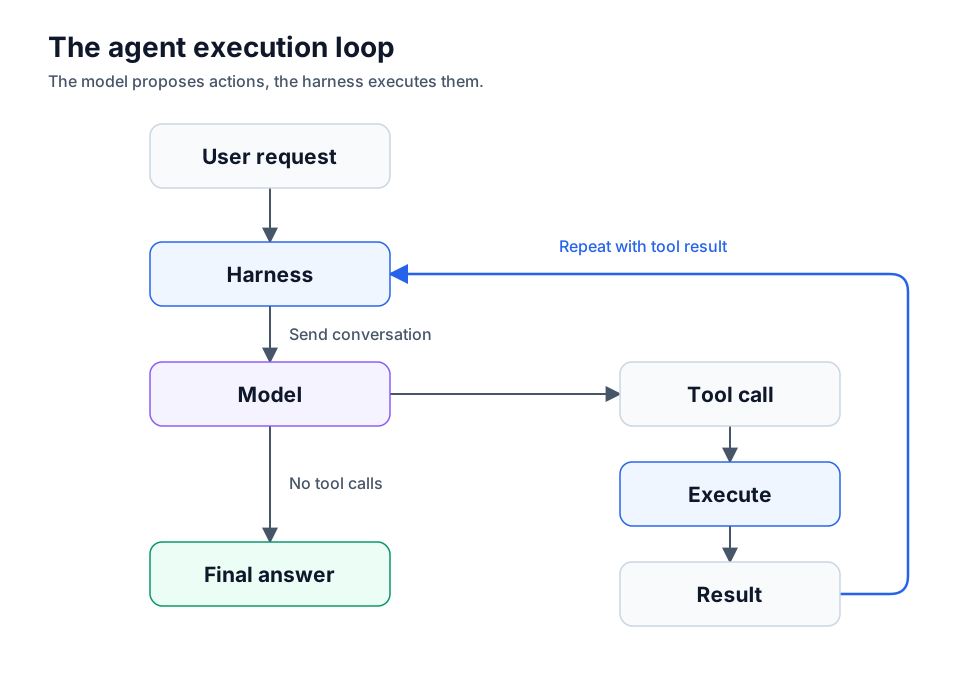
The most important architectural decision is that the model proposes actions while the harness executes them. When a model requests a tool call, it hasn't actually executed anything. It has generated a structured request containing a tool name and arguments. The harness must interpret that request, invoke the corresponding implementation, and return the result to the model.
The interaction looks like this:
We'll start by defining the contracts in src/core/types.ts.
export type ToolCall = { id: string; name: string; arguments: unknown };

export type Message =
  | { role: 'user'; content: string }
  | { role: 'assistant'; content: string; toolCalls?: ToolCall[] }
  | { role: 'tool'; callId: string; content: string; isError: boolean };

export interface ToolDefinition {
  name: string;
  description: string;
  parameters: Record<string, unknown>; // JSON Schema for the model
}

export interface Tool extends ToolDefinition {
  execute(argumentsValue: unknown, signal: AbortSignal): Promise<unknown>;
}

export interface Model {
  generate(input: {
    messages: readonly Message[];
    tools: readonly ToolDefinition[];
    signal: AbortSignal;
  }): Promise<{ content: string; toolCalls?: ToolCall[] }>;
}

export type AgentResult = {
  status: 'completed' | 'step_limit' | 'aborted';
  answer?: string;
  messages: Message[];
  steps: number;
};
The Model interface deliberately contains nothing specific to OpenAI, Anthropic, or any other provider. A provider adapter can translate between its API and these types without changing the harness.
Notice that tool arguments are unknown, not any. Model-generated data is untrusted input. We'll validate it before execution in the next section.
The agent loop in src/core/agent.ts follows a simple sequence:
Send the conversation and available tool definitions to the model.
Append the model's response to the conversation.
If it requested tools, execute them and append their results.
Repeat until the model returns a final answer or the harness reaches its step limit.
Here is the complete initial loop in src/core/agent.ts. The model receives tool definitions, while the harness retains the executable implementations:
import type { AgentResult, Message, Model, Tool } from './types.ts';

export async function runAgent(options: {
  model: Model;
  tools: readonly Tool[];
  prompt: string;
  maxSteps?: number;
  signal?: AbortSignal;
}): Promise<AgentResult> {
  const { model, tools, prompt, maxSteps = 10 } = options;
  if (!Number.isSafeInteger(maxSteps) || maxSteps < 1) {
    throw new RangeError('maxSteps must be a positive safe integer');
  }
  const signal = options.signal ?? new AbortController().signal;
  const messages: Message[] = [{ role: 'user', content: prompt }];
  const registry = new Map(tools.map(tool => [tool.name, tool]));
  if (registry.size !== tools.length) throw new Error('Duplicate tool names');
  const definitions = tools.map(({ name, description, parameters }) => ({ name, description, parameters }));

  for (let step = 0; step < maxSteps; step++) {
    if (signal.aborted) return { status: 'aborted', messages, steps: step };
    let response;
    try {
      response = await model.generate({ messages: [...messages], tools: definitions, signal });
    } catch (error) {
      if (signal.aborted) return { status: 'aborted', messages, steps: step };
      throw error;
    }
    if (signal.aborted) return { status: 'aborted', messages, steps: step };
    const calls = response.toolCalls ?? [];
    messages.push({ role: 'assistant', content: response.content, ...(calls.length ? { toolCalls: calls } : {}) });
    if (!calls.length) return { status: 'completed', answer: response.content, messages, steps: step + 1 };

    for (const call of calls) {
      if (signal.aborted) return { status: 'aborted', messages, steps: step + 1 };
      const tool = registry.get(call.name);
      if (!tool) {
        messages.push({ role: 'tool', callId: call.id, content: `Unknown tool: ${call.name}`, isError: true });
        continue;
      }
      try {
        const result = await tool.execute(call.arguments, signal);
        if (signal.aborted) return { status: 'aborted', messages, steps: step + 1 };
        messages.push({ role: 'tool', callId: call.id, content: JSON.stringify(result) ?? 'null', isError: false });
      } catch (error) {
        if (signal.aborted) return { status: 'aborted', messages, steps: step + 1 };
        messages.push({
          role: 'tool', callId: call.id,
          content: error instanceof Error ? error.message : String(error),
          isError: true
        });
      }
    }
  }
  return { status: 'step_limit', messages, steps: maxSteps };
}
A response without tool calls ends the run. Otherwise, the harness looks up each requested tool and executes it.
Tool failures don't automatically terminate the agent. Instead, the harness records an error message associated with the original call ID. This allows the model to react to a missing file or failed operation on its next turn.
We also impose a maximum number of model turns. A model can keep requesting work, but it doesn't get to decide how much execution time or how many iterations it's entitled to.
Test Without a Real Model
Rather than making nondeterministic API calls in tests (and burning tokens or GPU power), we introduce a scripted fake model in src/models/fake.ts. It returns predefined responses: first a tool request, then a final answer.
The fake model advances through an array of responses. Exhausting the script is an error, so an unexpected extra model turn won't silently pass:
// src/models/fake.ts
import type { Model } from '../core/types.ts';

export function scriptedModel(
  responses: Array<Awaited<ReturnType<Model['generate']>>>
): Model {
  let index = 0;
  return {
    async generate() {
      const response = responses[index++];
      if (!response) throw new Error('Scripted model exhausted');
      return response;
    }
  };
}
Here's a minimal test for tests/agent.test.ts. Run it with npm test:
import { test } from 'node:test';
import assert from 'node:assert/strict';
import { runAgent } from '../src/core/agent.ts';
import { scriptedModel } from '../src/models/fake.ts';

test('executes a tool and returns the final answer', async () => {
  const result = await runAgent({
    prompt: 'Say hello',
    tools: [{
      name: 'hello', description: 'Return a greeting',
      parameters: { type: 'object' },
      async execute() { return 'Hello'; }
    }],
    model: scriptedModel([
      { content: '', toolCalls: [{ id: '1', name: 'hello', arguments: {} }] },
      { content: 'Done' }
    ])
  });
  assert.equal(result.status, 'completed');
  assert.equal(result.answer, 'Done');
  assert.deepEqual(result.messages[2], {
    role: 'tool', callId: '1', content: '"Hello"', isError: false
  });
});
The companion demo uses the same pattern. Additional tests cover unknown tools, step limits, and cancellation without API keys, network access, or token costs.
At this point, we have a working agent loop, but it still trusts model-generated tool arguments and has no meaningful restrictions on what registered tools can do.
2. Validate Tool Calls Before Executing Them
Our first loop lets the model request a tool by name, then passes its arguments directly to the implementation. That works for a demo, but the tool description is only a request to the model, it isn't a guarantee that the model will return valid arguments.
For this section, check out the second milestone of the companion repository:
git switch --detach 02-tool-dispatch
This tag adds src/core/registry.ts, which handles tool registration and runtime argument validation. It also changes the failure behavior in src/core/agent.ts.
A Registry with Explicit Contracts
The ToolRegistry replaces the initial loop's plain Map. It rejects invalid or duplicate tool names and exposes only the definitions the model needs:
import type { Tool, ToolDefinition } from './types.ts';

export class ToolRegistry {
  private readonly tools = new Map<string, Tool>();
  constructor(tools: readonly Tool[]) {
    for (const tool of tools) {
      if (!/^[a-zA-Z][a-zA-Z0-9_-]*$/.test(tool.name)) throw new Error(`Invalid tool name: ${tool.name}`);
      if (this.tools.has(tool.name)) throw new Error(`Duplicate tool name: ${tool.name}`);
      this.tools.set(tool.name, tool);
    }
  }
  definitions(): ToolDefinition[] {
    return [...this.tools.values()].map(({ name, description, parameters }) => ({ name, description, parameters }));
  }
  get(name: string): Tool | undefined { return this.tools.get(name); }
}
Create it with const registry = new ToolRegistry(tools) and obtain the model-facing definitions with registry.definitions(). When a response requests a tool, validate the supplied arguments before calling execute:
const tool = registry.get(call.name);
if (!tool) {
  messages.push({
    role: 'tool', callId: call.id,
    content: `Unknown tool: ${call.name}`, isError: true
  });
  continue;
}

const validationErrors = validate(call.arguments, tool.parameters);
if (validationErrors.length) {
  messages.push({
    role: 'tool', callId: call.id,
    content: `Invalid arguments: ${validationErrors.join('; ')}`,
    isError: true
  });
  continue;
}
This is a critical boundary. arguments: unknown remains untrusted until the harness checks it. If validation fails, the tool never runs. The model instead receives an error result associated with its original call ID.
The tutorial's validate function supports a deliberately small JSON Schema subset: primitive and container type checks, object properties, required fields, additionalProperties: false, array items, and enum. It reports paths such as $.flags[0] to help identify malformed input. It's not a complete JSON Schema implementation, and it doesn't validate tool schemas at registration time.
Here's the validator used above. It first checks the declared type, then recursively checks object properties and array items:
export function validate(value: unknown, schema: Record<string, unknown>, path = '$'): string[] {
  const errors: string[] = [];
  const type = schema.type;
  if (typeof type !== 'string') return [`${path}: schema must declare a type`];
  const matches = type === 'object' ? value !== null && typeof value === 'object' && !Array.isArray(value)
    : type === 'array' ? Array.isArray(value)
    : type === 'integer' ? typeof value === 'number' && Number.isInteger(value)
    : type === 'number' ? typeof value === 'number' && Number.isFinite(value)
    : type === 'null' ? value === null
    : type === 'string' || type === 'boolean' ? typeof value === type : false;
  if (!matches) return [`${path}: expected ${type}`];
  if (Array.isArray(schema.enum) && !schema.enum.some(item => Object.is(item, value))) {
    errors.push(`${path}: not an allowed value`);
  }
  if (type === 'object') {
    const obj = value as Record<string, unknown>;
    const properties = (schema.properties ?? {}) as Record<string, Record<string, unknown>>;
    for (const key of (schema.required ?? []) as string[]) {
      if (!Object.hasOwn(obj, key)) errors.push(`${path}.${key}: required`);
    }
    for (const [key, item] of Object.entries(obj)) {
      if (Object.hasOwn(properties, key)) errors.push(...validate(item, properties[key]!, `${path}.${key}`));
      else if (schema.additionalProperties === false) errors.push(`${path}.${key}: unexpected property`);
    }
  }
  if (type === 'array' && schema.items && typeof schema.items === 'object') {
    (value as unknown[]).forEach((item, index) => {
      errors.push(...validate(
        item, schema.items as Record<string, unknown>, `${path}[${index}]`
      ));
    });
  }
  return errors;
}
Not Every Error Means the Same Thing
Milestone 2 also makes an important distinction between tool failure and model failure.
An unknown tool, invalid arguments, or an exception thrown by a tool becomes a role: 'tool' message with isError: true. The model can inspect that result and try something else on its next turn. By contrast, if model.generate() itself throws, the harness terminates with status: 'model_error' and records the error message.
This isn't just bookkeeping. A missing file might be recoverable, but an unavailable model provider means there's no model response to guide recovery. The harness shouldn't pretend these are the same situation.
In the loop's existing model.generate() catch block, replace the rethrow with a structured outcome, and add 'model_error' and an optional error?: string field to AgentResult:
if (signal.aborted) return { status: 'aborted', messages, steps: step };
return {
  status: 'model_error', messages, steps: step,
  error: error instanceof Error ? error.message : String(error)
};
The tool execution catch block still records an error message and continues the loop.
The deterministic tests make that distinction concrete. In tests/agent.test.ts, an invalid echo argument is rejected without invoking the tool, while a thrown tool exception still allows the scripted model to return a final answer. tests/registry.test.ts checks nested argument validation and unexpected properties.
3. Give the Agent Tools Without Giving It the Machine
So far, our agent can request tools and the harness validates their arguments. But validation only establishes that a request has the right shape. A valid request to read ../../secrets.txt is still a request we should refuse.
Check out Milestone 3 in the companion repository:
git switch --detach 03-workspace-tools
This milestone adds workspace file tools and a restricted command tool. Neither depends on a particular model provider.
Confine File Operations to a Workspace
A coding agent needs to read and edit files, but it shouldn't automatically receive access to the entire filesystem. The Workspace class resolves a canonical root when it's created:
const workspace = await Workspace.open('/path/to/project');
const tools = workspaceTools(workspace);
The resulting read_file and write_file tools accept paths relative to that root. Before opening a file, Workspace rejects absolute paths, paths escaping the root, and symbolic links in existing path components. Writes require the parent directory to exist. The tool doesn't create arbitrary directory trees.
These two methods inside Workspace enforce the path checks. The file imports isAbsolute, relative, and resolve from node:path, and lstat and realpath from node:fs/promises. Workspace.open() stores await realpath(root) as this.root:
private lexical(path: string): string {
    if (!path || isAbsolute(path)) throw new Error('Expected a relative workspace path');
    const full = resolve(this.root, path);
    const rel = relative(this.root, full);
    if (!rel || rel === '..' || rel.startsWith(`..${process.platform === 'win32' ? '\\' : '/'}`) || isAbsolute(rel)) {
      throw new Error('Path is outside the workspace or refers to its root');
    }
    return full;
  }

  /** Reject symlinks in every existing component, not just the final file. */
  private async check(path: string, allowMissingFinal: boolean): Promise<string> {
    const full = this.lexical(path);
    const rel = relative(this.root, full);
    const parts = rel.split(/[\\/]/);
    let current = this.root;
    for (let i = 0; i < parts.length; i++) {
      current = resolve(current, parts[i]!);
      try {
        const stat = await lstat(current);
        if (stat.isSymbolicLink()) throw new Error('Symbolic links are not permitted');
        if (i < parts.length - 1 && !stat.isDirectory()) throw new Error('Parent is not a directory');
      } catch (error) {
        if (allowMissingFinal && i === parts.length - 1 && (error as NodeJS.ErrnoException).code === 'ENOENT') break;
        throw error;
      }
    }
    return full;
  }
read calls this.check(path, false) before opening an existing file. write calls this.check(path, true), which allows only the final file to be missing. A missing parent directory or any symlink still fails the check.
The boundary is enforced by the tool implementation, not by asking the model to behave. A model can request ../secret.txt, but the workspace refuses to open it. The harness then reports the failure as a recoverable tool result, just as it did for invalid arguments in Milestone 2.
For an additional check, the implementation opens files with O_NOFOLLOW where supported, to avoid following a symbolic link at the final path component. That doesn't eliminate every race: directory components can change between checking and opening them. This is a useful educational restriction, not an OS-level sandbox.
Let the Model Choose Commands, Not Invent Them
Running commands is even more sensitive. Rather than accept a shell string generated by the model, we register named command presets:
const tool = commandTool(projectRoot, {
  test: {
    executable: process.execPath,
    args: ['--test', 'tests/example.test.js']
  }
});
The model can request { "command": "test" }, but it can't supply a different executable, extra arguments, or shell syntax. The command tool's dispatch boundary looks like this (inside its execute(value, signal) method):
signal.throwIfAborted();
const name = (value as { command: string }).command;
if (!Object.hasOwn(presets, name)) throw new Error('Command not permitted');
const preset = presets[name]!;
const timeout = preset.timeoutMs ?? 10_000;
if (!Number.isSafeInteger(timeout) || timeout < 1) {
  throw new Error('Invalid timeout');
}

// Inside the Promise that collects the command's result:
const child = spawn(preset.executable, [...preset.args], {
  cwd, shell: false, signal, windowsHide: true,
  stdio: ['ignore', 'pipe', 'pipe']
});
const timer = setTimeout(() => child.kill(), timeout);
Here spawn comes from node:child_process, cwd is the configured project root, and presets is the developer-supplied map above. The result handlers collect stdout and stderr, kill the child if either captured string exceeds 65,536 characters, and clear timer on error or close. The implementation measures JavaScript string length, rather than an exact byte count.
This reduces the number of commands the model can select, but it doesn't make the selected commands harmless. A test script can itself read files, access the network, or launch child processes. Killing a timed-out child also doesn't reliably terminate its entire process tree. Running untrusted repositories still requires process isolation, such as a properly configured container or OS sandbox.
The Milestone 3 tests cover normal reads and writes, traversal attempts, symbolic links, recoverable access failures, and rejected command names.
4. Put Limits on Execution
Our agent can now call validated tools, including workspace-aware file operations and predefined commands. But a valid operation isn't necessarily one we should allow indefinitely. A model could request hundreds of tool calls, or a command could hang while the agent waits for its result.
In this milestone, we make execution limits a harness responsibility rather than something we ask the model to respect.
Follow along with the exact repository version:
git switch --detach 04-execution-limits
If you haven't cloned the project yet, start with git clone https://github.com/gkoos/agent-harness-from-scratch.git and cd agent-harness-from-scratch.
Count Turns and Tool Calls Separately
The original maxSteps setting limits model responses, not the number of tool calls. One response can request several tools, so a turn limit alone doesn't bound the amount of work.
We extend runAgent with two additional options:
const result = await runAgent({
  model,
  tools,
  prompt: 'Check the project',
  maxSteps: 10,
  maxToolCalls: 30,
  timeoutMs: 15_000
});
Every requested call consumes the tool-call budget, including unknown tools and calls with invalid arguments. This matters because even failed requests consume harness work. Initialize let toolCalls = 0 before the loop, then increment it immediately before looking up each admitted call's tool. That placement counts rejected arguments and unknown tools too.
The model may also return multiple tool calls at once. Instead of executing the first few and then discovering that the budget has run out, the harness checks whether the entire batch fits:
if (calls.length > maxToolCalls - toolCalls) {
  return { status: 'tool_limit', messages, steps, toolCalls };
}
This prevents budget-driven partial execution. It doesn't make the batch transactional: a tool can still fail, or execution can be cancelled partway through.
Propagate Cancellation and Deadlines
A caller can supply an AbortSignal, while timeoutMs creates an internal deadline. The harness combines these through an AbortController and passes its signal to the model and tools.
The setup replaces the initial loop's directly selected signal:
const controller = new AbortController();
let timedOut = false;
const onAbort = () => controller.abort(options.signal?.reason);
if (options.signal?.aborted) onAbort();
else options.signal?.addEventListener('abort', onAbort, { once: true });
const timer = timeoutMs === undefined ? undefined : setTimeout(() => {
  timedOut = true;
  controller.abort(new Error('Agent deadline exceeded'));
}, timeoutMs);
const signal = controller.signal;
Pass this signal to model.generate() and tool.execute(), as in the original loop. Wrap the loop in try/finally so completion and early returns both release the timer and listener:
try {
  // The execution loop goes here, using controller.signal.
} finally {
  if (timer !== undefined) clearTimeout(timer);
  options.signal?.removeEventListener('abort', onAbort);
}
At execution boundaries, check signal.aborted and return timedOut ? 'timeout' : 'aborted' as the status. The result also reports steps and toolCalls, so callers can see how much work happened before termination.
This is cooperative cancellation, not forced termination. If an adapter ignores its signal, a pending operation may outlive the deadline. Likewise, killing a child process doesn't necessarily stop its descendants. A hard execution boundary requires process or container isolation.
Test the Limits Without Waiting for Real Failures
The budget tests use the scripted model to request an over-budget batch and verify that zero tools execute. Other tests check that invalid requests consume budget, a pre-aborted signal prevents model invocation, and cooperative models and tools stop on deadlines.
The result types in types.ts now distinguish completed, step_limit, tool_limit, aborted, timeout, and model_error. These outcomes are deliberately different: a run can stop correctly without completing the user's task.
5. Keep the Context Under Control
The harness now has limits on how long it can run, but its conversation keeps growing. Every model response and tool result becomes another message sent back to the model. A single file read could return thousands of lines. Several iterations can exhaust a model's context window long before the step budget is reached.
Milestone 5 introduces a distinction between the transcript we retain and the messages we send to the model. Check out the implementation:
git switch --detach 05-context
The relevant files are src/core/context.ts, src/core/agent.ts, and tests/context.test.ts.
Bound Tool Output and Model-Facing History
The new context option sets two separate limits:
const result = await runAgent({
  prompt: 'Inspect the project',
  model,
  tools,
  context: {
    maxContextChars: 32_000,
    maxToolResultChars: 8_000
  }
});
maxToolResultChars bounds each tool result before it enters the transcript. Oversized results retain their beginning and end, with an omission marker in the middle. The discarded portion isn't available later, even in result.messages.
The truncation helper reserves room for the marker, then divides the remaining space between the beginning and end:
export function boundToolResult(content: string, limit: number): string {
  if (content.length <= limit) return content;
  const marker = `\n...[${content.length - limit} or more characters omitted]...\n`;
  if (marker.length >= limit) return marker.slice(0, limit);
  const remaining = limit - marker.length;
  const front = Math.ceil(remaining / 2);
  const back = Math.floor(remaining / 2);
  return content.slice(0, front) + marker + (back ? content.slice(-back) : '');
}
Apply it when recording both successful results and error strings: content: boundToolResult(content, context.maxToolResultChars). This compact version explicitly handles a zero-length tail so slice(-0) can't accidentally retain the whole result.
maxContextChars limits the serialized message array passed to the model. The harness retains older messages in its returned transcript, but selectContext() sends the initial user request plus as many recent turns as fit. There's no summarization: omitted history is simply unavailable to the model on that turn.
These are character limits, not token limits. They measure JavaScript string length after JSON serialization, excluding tool definitions and provider-specific overhead. A real provider adapter would need token-aware accounting and space reserved for the response.
Don't Split a Tool Call From its Result
Context trimming isn't as simple as removing the oldest messages. An assistant response may request several tools, each identified by a call ID. Sending only some of their results would create an invalid or misleading conversation.
The selector therefore treats the assistant message and all results from that batch as an indivisible group. It either includes the complete group or omits it. It also rejects orphaned results and incomplete batches rather than quietly constructing inconsistent context.
Here's selectContext() from src/core/context.ts, using the Message type defined in Section 1. The first loop validates and groups the transcript. The second walks backward through whole groups until the budget is full:
import type { Message } from './types.ts';

const size = (messages: readonly Message[]) => JSON.stringify(messages).length;

export function selectContext(messages: readonly Message[], maxChars: number): Message[] {
  if (!Number.isSafeInteger(maxChars) || maxChars < 1) {
    throw new RangeError('maxContextChars must be a positive safe integer');
  }
  if (!messages.length) return [];
  const groups: Message[][] = [];
  for (let i = 0; i < messages.length;) {
    const message = messages[i]!;
    if (message.role === 'assistant' && message.toolCalls?.length) {
      const ids = new Set(message.toolCalls.map(call => call.id));
      if (ids.size !== message.toolCalls.length) throw new Error('Duplicate tool call IDs in assistant turn');
      const group: Message[] = [message];
      i++;
      while (i < messages.length && messages[i]!.role === 'tool') {
        const result = messages[i]!;
        if (result.role === 'tool' && !ids.delete(result.callId)) throw new Error('Orphan or duplicate tool result');
        group.push(result);
        i++;
      }
      if (ids.size) throw new Error('Incomplete tool result batch');
      groups.push(group);
    } else {
      if (message.role === 'tool') throw new Error('Orphan tool result');
      groups.push([message]);
      i++;
    }
  }
  const first = groups[0]!;
  if (first[0]?.role !== 'user') throw new Error('Conversation must start with a user message');
  const recent: Message[][] = [];
  for (let i = groups.length - 1; i >= 1; i--) {
    const group = groups[i]!;
    const next = [...first, ...[group, ...recent].flat()];
    if (size(next) > maxChars) {
      if (recent.length === 0) throw new Error('Context budget too small for latest turn');
      break;
    }
    recent.unshift(group);
  }
  const selected = [...first, ...recent.flat()];
  if (size(selected) > maxChars) throw new Error('Context budget too small for required messages');
  return selected;
}
Before each model call, use selectContext(messages, context.maxContextChars) as its messages input. If the initial prompt or the most recent required group can't fit, the selector throws and the harness returns context_limit. That's an execution decision, not a tool error the model can recover from.
The deterministic tests exercise batch preservation, orphan detection, output truncation, and the model-facing projection. They verify not merely that the context is smaller, but that it still represents a coherent conversation. Next, we'll make these decisions observable.
6. Make Agent Execution Observable
An agent can return a correct answer while doing something unexpected along the way: retrying a failing operation, making unnecessary model calls, or spending most of its time in one tool. A final answer alone doesn't tell us what happened. We need execution events, without turning the harness into a logging framework.
Check out this milestone in the companion repository:
git switch --detach 06-observability
The implementation lives in src/core/events.ts, with integration in src/core/agent.ts.
Emit Events at Execution Boundaries
We add an optional onEvent callback to runAgent. The harness emits model_start and model_end around model calls, tool_start and tool_end around tool dispatch, model_error when a model operation fails, and run_end when the run terminates.
Each event has a run ID, an incrementing sequence number, and a timestamp. Model and tool completion events also report duration, measured using a monotonic clock. That gives us enough information to reconstruct the order of operations and identify slow calls.
const events: AgentEvent[] = [];

const result = await runAgent({
  prompt: 'Inspect the project',
  model,
  tools,
  onEvent: event => events.push(event),
});

console.log(result.runId, events);
Import AgentEvent from src/core/events.ts. The callback is optional: callers that don't need telemetry can omit it.
One subtle requirement is that observability must not control execution. An exception in an event listener shouldn't make a successful tool call fail. The event emitter catches listener exceptions and optionally reports them through onObserverError, and failures in that handler are suppressed too. Callbacks are synchronous, though, so slow listeners still delay the agent.
The emitter creates runId once with randomUUID() from node:crypto, and initializes sequence to zero. Its emit(event) method enriches the event and isolates both callbacks:
const enriched = {
  ...event, runId, sequence: ++sequence,
  timestamp: new Date().toISOString()
};
try {
  options.onEvent?.(enriched);
} catch (error) {
  try { options.onObserverError?.(error); }
  catch { /* Observer failures cannot change the run outcome. */ }
}
At a model or tool boundary, save const start = performance.now() before execution and emit durationMs: performance.now() - start afterward. A shared finish() helper emits run_end before returning each terminal result, so early exits remain observable too.
Account for Model Usage Without Inventing it
We can also extend the model response with optional provider-reported token usage:
return {
  content: 'Done',
  usage: { inputTokens: 125, outputTokens: 20 },
};
The harness accumulates reported counts in result.usage, alongside modelCallsWithUsage. This last field matters: zero reported tokens with zero usage-reporting calls means unknown usage, not a free run. Invalid counts are rejected rather than silently corrupting totals.
The accumulator uses optional input and output counts and validates both individual values and the resulting totals:
export type Usage = { inputTokens?: number; outputTokens?: number };
export type UsageTotals = {
  inputTokens: number; outputTokens: number; modelCallsWithUsage: number
};

export function addUsage(totals: UsageTotals, usage: Usage | undefined): void {
  if (!usage) return;
  for (const value of [usage.inputTokens, usage.outputTokens]) {
    if (value !== undefined && (!Number.isSafeInteger(value) || value < 0)) {
      throw new RangeError('Model usage must contain nonnegative safe integers');
    }
  }
  if (!Number.isSafeInteger(totals.inputTokens + (usage.inputTokens ?? 0)) ||
      !Number.isSafeInteger(totals.outputTokens + (usage.outputTokens ?? 0))) {
    throw new RangeError('Accumulated model usage exceeds safe integer range');
  }
  totals.inputTokens += usage.inputTokens ?? 0;
  totals.outputTokens += usage.outputTokens ?? 0;
  totals.modelCallsWithUsage++;
}
Initialize the totals to zero at the start of the run. Add usage?: Usage to the model response contract, call addUsage(totals, response.usage) after validating each response, and include a copy of the totals in the result. Missing usage leaves the counters unchanged.
The event payloads deliberately omit prompts, tool arguments, and tool results. Error strings may still contain sensitive data, so exporting them requires care. This is lightweight, in-memory instrumentation, not distributed tracing or a durable audit log.
The tests in tests/events.test.ts verify event order, correlation, usage accounting, observer isolation, and terminal events.
7. Test the Failure Paths, Not Just the Happy Path
Our harness now has tool validation, execution limits, context management, and observability. But those mechanisms interact. A model might return malformed tool calls, cancellation might arrive halfway through a batch, or a rejected batch might leave the conversation in a state that can't be sent back to a model. The final milestone tests those boundaries directly.
Check out the final milestone in the companion repository:
git switch --detach 07-testing
The new tests are in tests/failures.test.ts. They use the same scripted model as our first milestone, so failures are reproducible without an API key.
Validate the Model Response Before Trusting it
Validating tool arguments isn't enough. A model adapter can also return a malformed response: missing content, non-array toolCalls, missing arguments, or duplicate call IDs. The new validateModelResponse() checks the response envelope before the harness records it or executes anything.
import type { Model, ToolCall } from './types.ts';

/** Validate the adapter boundary before accepting a model turn or running side effects. */
export function validateModelResponse(value: unknown): asserts value is Awaited<ReturnType<Model['generate']>> {
  if (value === null || typeof value !== 'object' || Array.isArray(value)) {
    throw new TypeError('Model response must be an object');
  }
  const response = value as Record<string, unknown>;
  if (typeof response.content !== 'string') throw new TypeError('Model response content must be a string');
  if (response.toolCalls === undefined) return;
  if (!Array.isArray(response.toolCalls)) throw new TypeError('Model toolCalls must be an array');
  const ids = new Set<string>();
  for (const call of response.toolCalls as unknown[]) {
    if (call === null || typeof call !== 'object' || Array.isArray(call)) {
      throw new TypeError('Tool call must be an object');
    }
    const item = call as Partial<ToolCall>;
    if (typeof item.id !== 'string' || !item.id.trim()) throw new TypeError('Tool call id must be a nonempty string');
    if (typeof item.name !== 'string' || !item.name.trim()) {
      throw new TypeError('Tool call name must be a nonempty string');
    }
    if (!Object.hasOwn(item, 'arguments')) throw new TypeError('Tool call arguments are missing');
    if (ids.has(item.id)) throw new TypeError(`Duplicate tool call id: ${item.id}`);
    ids.add(item.id);
  }
}
Call validateModelResponse(response) and then addUsage(usage, response.usage) inside a try block immediately after model.generate(), before appending the assistant message or running tools. If either throws, emit model_error and return finish('model_error', { error: message }), where message is the exception's message.
Malformed responses terminate as model_error, with no tool side effects. That's different from a valid tool call with invalid arguments: the latter becomes a recoverable tool error, allowing the model to try again.
Keep Rejected Batches Out of the Transcript
The tests also caught a real integration bug. Previously, the harness appended an assistant message containing tool calls before checking whether the batch exceeded maxToolCalls. Rejecting that batch left unanswered tool calls in the transcript.
The fix is small but important: check the budget before recording the assistant turn.
if (calls.length > maxToolCalls - toolCalls) {
  return finish('tool_limit');
}
messages.push({
  role: 'assistant',
  content: response.content,
  ...(calls.length ? { toolCalls: calls } : {})
});
This makes budget rejection atomic with respect to the transcript. Cancellation during an already admitted batch can still leave an incomplete terminal transcript. Resuming such a run would require reconciliation.
Use Reproducible Variation
Alongside targeted tests for malformed responses, cancellation, and observer failures, we'll run 150 seeded tool-batch scenarios with different batch sizes and budgets. A fixed pseudo-random seed generates the same sequence on every run, making failures reproducible.
The following examples belong in tests/failures.test.ts. They share a no-op tool and a helper that creates well-formed calls:
import { test } from 'node:test';
import assert from 'node:assert/strict';
import { runAgent } from '../src/core/agent.ts';
import { scriptedModel } from '../src/models/fake.ts';
import type { Tool } from '../src/core/types.ts';

const noop: Tool = {
  name: 'noop', description: 'Return a fixed result',
  parameters: { type: 'object' },
  async execute() { return 'ok'; }
};
const call = (id: string) => ({ id, name: 'noop', arguments: {} });
The first test varies budgets from 0 to 8 and batch sizes from 0 to 12. It checks execution counts, termination status, and whether rejected calls were kept out of the transcript:
test('seeded batches respect tool budgets', async () => {
  let seed = 0x12345678;
  const next = () => {
    seed ^= seed << 13;
    seed ^= seed >>> 17;
    seed ^= seed << 5;
    return seed >>> 0;
  };

  for (let i = 0; i < 150; i++) {
    const limit = next() % 9;
    const batch = next() % 13;
    let executed = 0;
    const result = await runAgent({
      prompt: 'test', maxToolCalls: limit,
      tools: [{
        ...noop,
        async execute() { executed++; return 'ok'; }
      }],
      model: scriptedModel([
        {
          content: '',
          toolCalls: Array.from({ length: batch }, (_, j) => call(`call-${j}`))
        },
        { content: 'done' }
      ])
    });

    const admitted = batch <= limit;
    assert.equal(executed, admitted ? batch : 0, `case ${i}`);
    assert.equal(result.toolCalls, admitted ? batch : 0, `case ${i}`);
    assert.equal(
      result.status, admitted ? 'completed' : 'tool_limit', `case ${i}`
    );
    if (!admitted) {
      assert.deepEqual(result.messages, [{ role: 'user', content: 'test' }]);
    }
  }
});
An admitted batch executes all requested tools, while an over-budget batch executes zero. The case labels identify which generated scenario failed, and the fixed seed lets us reproduce it.
Another 60 runs check that tool exceptions remain recoverable errors. These repeat the same failure path with different error messages. They don't use seeded variation:
test('tool exceptions remain recoverable', async () => {
  let executed = 0;
  for (let i = 0; i < 60; i++) {
    const result = await runAgent({
      prompt: 'test',
      tools: [{
        ...noop,
        async execute() {
          executed++;
          throw new Error(`failure ${i}`);
        }
      }],
      model: scriptedModel([
        { content: '', toolCalls: [call('1')] },
        { content: 'recovered' }
      ])
    });
    assert.equal(result.status, 'completed');
    assert.equal(result.answer, 'recovered');
    assert.ok(result.messages.some(message =>
      message.role === 'tool' && message.isError &&
      message.content === `failure ${i}`
    ));
  }
  assert.equal(executed, 60);
});
The seeded scenarios are property-style checks, while the exception test checks a specific recovery path repeatedly. Neither proves correctness or replaces operating-system sandboxing, but both run without a live model and give us repeatable evidence about the harness's behavior.
We've now built the harness from a simple model/tool loop into an execution layer that owns validation, permissions, limits, context, and telemetry. The model still proposes actions while the harness remains responsible for deciding what actually happens.
Run these examples with npm test. The repository includes additional targeted cases for the boundaries discussed above, alongside the complete milestone implementations.
Where to Go Next: Connect a Real Language Model
Throughout this tutorial, we've used a scripted model instead of calling a real LLM. That was intentional: deterministic responses let us test the harness, including its failure paths, without network calls, API keys, or unpredictable model behavior.
But the Model interface was designed to make providers interchangeable. Connecting OpenAI, Anthropic, or another provider doesn't require rewriting the agent loop. We just need an adapter that translates between the provider's API and our existing types.
For example, an OpenAI adapter using the Responses API could look something like this:
// src/models/openai.ts
import OpenAI from 'openai';
import type { Model } from '../core/types.ts';

export function openAIModel(client: OpenAI): Model {
  return {
    async generate({ messages, tools, signal }) {
      const response = await client.responses.create(
        {
          model: 'YOUR_MODEL',
          input: toOpenAIInput(messages),
          tools: toOpenAITools(tools),
        },
        { signal }
      );

      return {
        content: extractText(response),
        toolCalls: extractToolCalls(response),
        usage: extractUsage(response),
      };
    },
  };
}
This is an architectural sketch, not a complete adapter. The conversion functions would translate our messages and tool definitions into the provider's format, then normalize its response. In particular, they must preserve tool-call IDs, parse tool arguments, and associate tool results with the correct calls on subsequent requests.
The adapter also forwards the harness's AbortSignal, allowing cancellation to propagate to the API request. Provider errors become exceptions, which the harness already handles as model_error outcomes.
Once the adapter implements Model, the rest of the system stays unchanged. The same tool registry, argument validation, execution budgets, context management, and observability work regardless of which provider generates the next response.
There are further improvements worth exploring: provider-specific token accounting, API retry and rate-limit handling, persistent conversation history, and stronger process isolation for running untrusted code. These are substantial engineering problems in their own right, but they fit into the boundaries we've established rather than requiring a different architecture.
The complete implementation is available at the 07-testing milestone.
We've built more than a loop that sends prompts to a model and executes functions. We've built the machinery that decides which actions are permitted, how much work can happen, what context the model receives, and how failures are handled and observed.
That's the essential distinction between a language model with tools and an agent harness.


