
Four times a year, every sole trader and landlord in Making Tax Digital (MTD) for Income Tax has to send HMRC a summary of their income and expenses.
The first deadline of the 2026-27 tax year, 7 August, has already passed, and the second lands on 7 November. Each of those summaries is a single API call from software to HMRC, and getting that call right is what this tutorial is about.
You can follow it without any earlier reading. The one-time setup every MTD integration needs (a sandbox application, an OAuth 2.0 access token, and fraud prevention headers) is summarised in the quick recap below, together with the small request helper every snippet uses.
If you want that setup in depth, I walked through it step by step in a previous freeCodeCamp tutorial.
By the end, you'll know how to find the business you're filing for, work out which period is due, build a cumulative summary HMRC accepts, submit it, and read the tax calculation that follows. The code is Node and TypeScript, trimmed from the HMRC integration I built for a Making Tax Digital app.
Table of Contents
Quick Recap: The Setup This Tutorial Assumes
Before you can file anything, your application needs the same one-time setup as every MTD integration. If you already have it, skip to the next section. Otherwise, here is the short version:
Register a sandbox application on the HMRC Developer Hub and subscribe it to the four APIs used here: Business Details, Obligations, Self Employment Business, and Individual Calculations. An API you haven't subscribed to returns
403 Forbidden, which looks like an authorisation problem but is not.Create a sandbox test user with HMRC's Create Test User API. It gives you a fake taxpayer with a National Insurance number (NINO) and Government Gateway credentials.
Get an access token through HMRC's OAuth 2.0 authorization code flow, asking for the
read:self-assessmentandwrite:self-assessmentscopes and signing in as your test user on HMRC's consent screen.Send fraud prevention headers on every call. HMRC makes them mandatory and the exact set depends on how your application connects, so build them once in a
getFraudHeaders(req)function.
Every snippet in this tutorial calls one small helper. It sets the bearer token, pins the API version through the Accept header (each HMRC API has its own version, and the wrong one returns 406 Not Acceptable), and attaches your fraud prevention headers:
import axios from 'axios';

const HMRC_BASE_URL = 'https://test-api.service.hmrc.gov.uk'; // sandbox

async function request(method, path, accessToken, req, data = null, apiVersion = '2.0') {
  const headers = {
    Authorization: 'Bearer ' + accessToken,
    Accept: 'application/vnd.hmrc.' + apiVersion + '+json',
    ...getFraudHeaders(req),
  };
  // Only set a JSON Content-Type when there is a body. HMRC's edge rejects
  // a bodyless GET that carries one with a 403.
  if (data !== null && data !== undefined) {
    headers['Content-Type'] = 'application/json';
  }
  const res = await axios({ baseURL: HMRC_BASE_URL, method, url: path, headers, data });
  return res.data;
}
The req argument is your user's incoming request (an Express Request in my code), which is where the client details in the fraud prevention headers come from. With a token and this helper in place, you're ready to file.
How Quarterly Updates Work in MTD
A quarterly update isn't a tax return. It's a set of running totals: how much the business has earned and spent so far this tax year, grouped into the same categories Self Assessment already uses.
The word that matters is "so far". Each update is cumulative. It covers everything from the start of the tax year to the end of the current update period, not just the last three months. GOV.UK's guidance on sending quarterly updates sets out the standard periods and their deadlines:
| Update period | Deadline |
|---|---|
| 6 April to 5 July | 7 August |
| 6 April to 5 October | 7 November |
| 6 April to 5 January | 7 February |
| 6 April to 5 April | 7 May (the following tax year) |
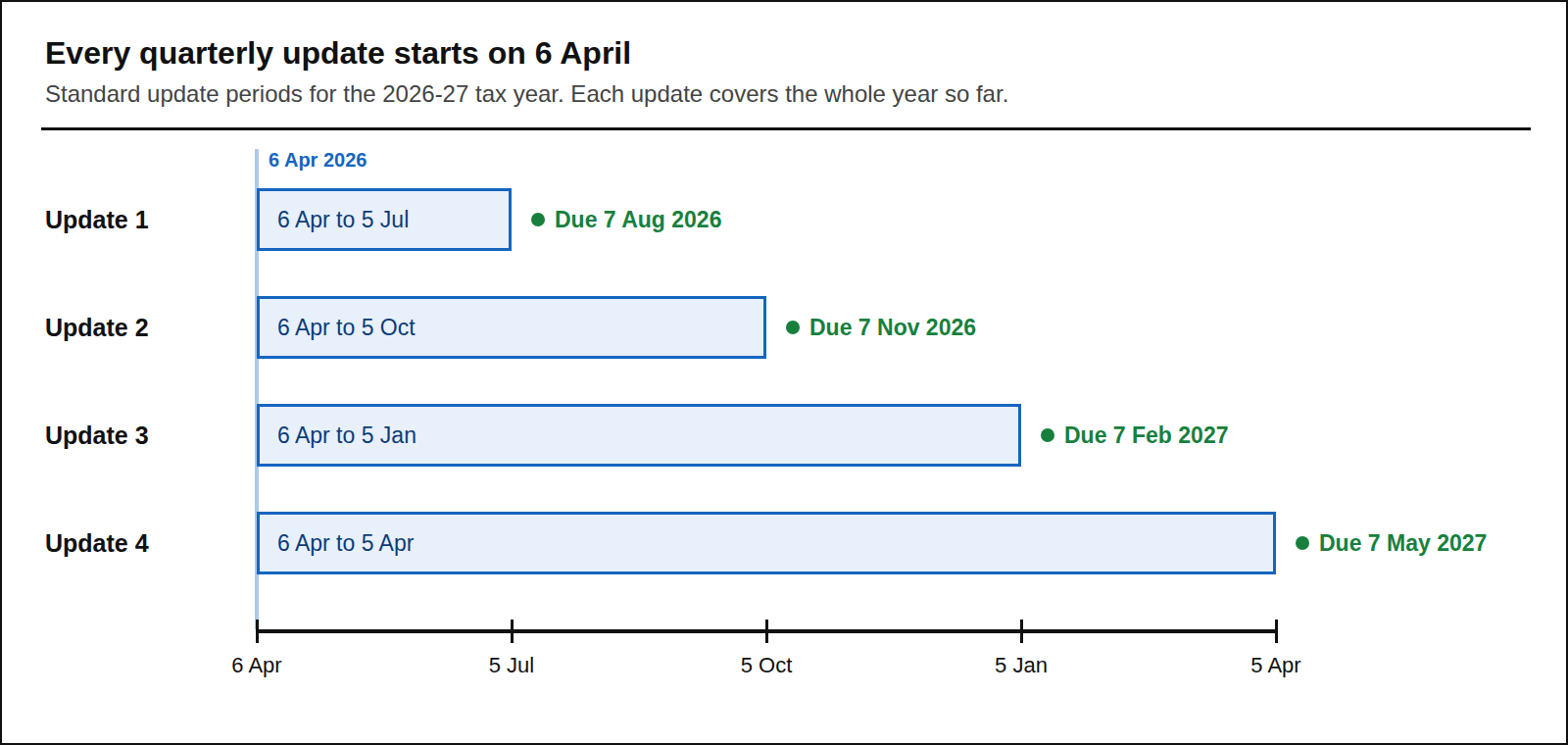
That design has a pleasant side effect: if a user spots a mistake in an earlier quarter, the next update simply carries the correction. HMRC's end-to-end service guide puts it plainly: each update invalidates the previous one, because every period starts on 6 April.
Customers whose accounting year runs from 1 April can opt into calendar periods instead (1 April to 30 June, and so on), with the same deadlines. You don't need to hardcode either set, because the Obligations API returns the exact dates.
HMRC calls each required update an "obligation": four per tax year for each self-employment or property business, plus the annual tax return.
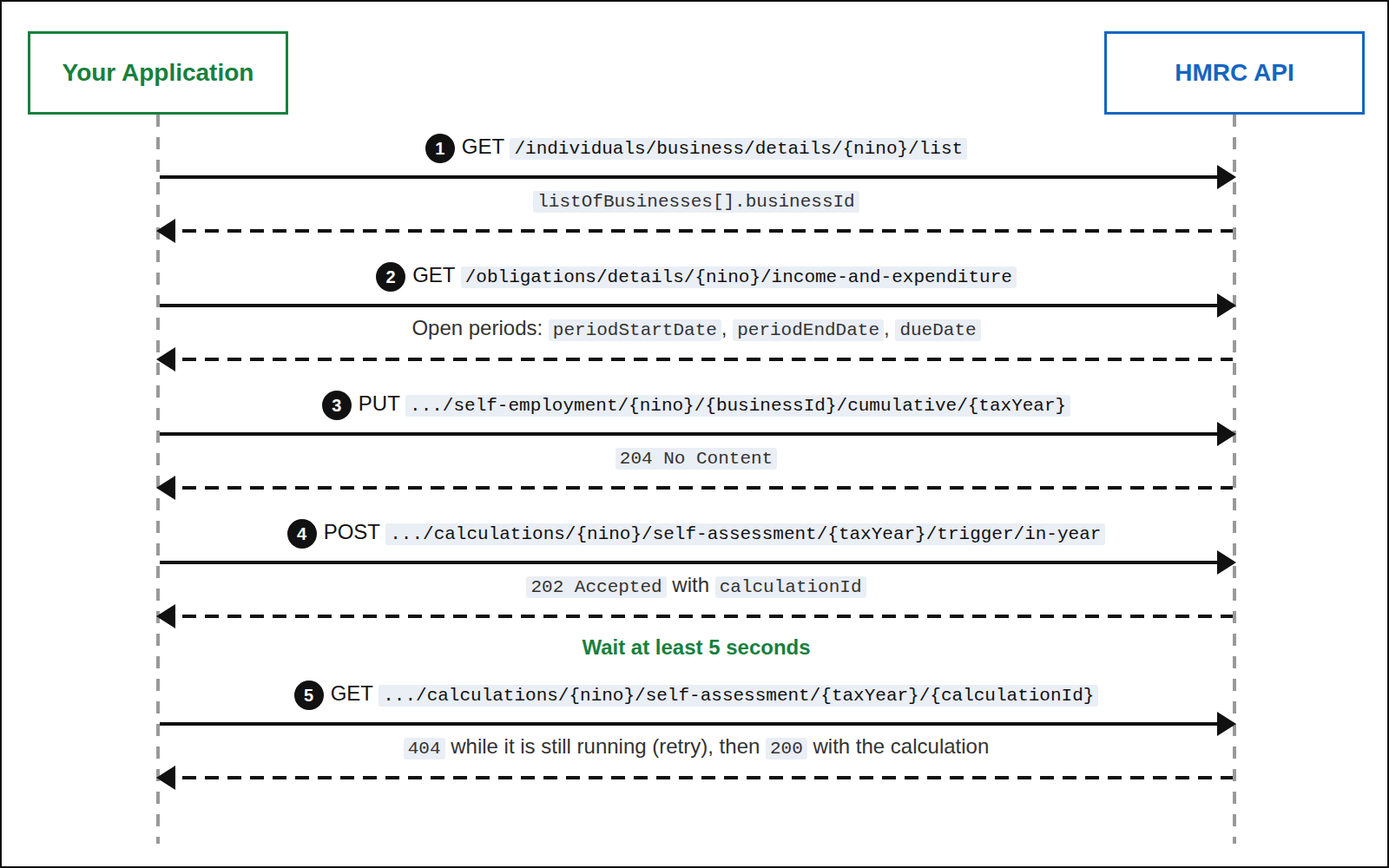
Here is the whole journey you're about to build:
Step 1: How to Find the Business ID
Every self-employment endpoint needs a businessId, HMRC's identifier for one income source. A sole trader who also lets a property has two. You get them from the Business Details API with the customer's National Insurance number (NINO):
// GET /individuals/business/details/{nino}/list  (Business Details API v2.0)
const result = await request(
  'GET',
  '/individuals/business/details/' + nino + '/list',
  accessToken,
  req,
  null,
  '2.0',
);

const businesses = result.listOfBusinesses ?? [];
const soleTrade = businesses.find((b) => b.typeOfBusiness === 'self-employment');
const businessId = soleTrade?.businessId;
The array lives under listOfBusinesses, and each entry carries a typeOfBusiness (self-employment, uk-property, foreign-property, or property-unspecified), the businessId, and optionally a tradingName. Sandbox self-employment IDs look like XBIS12345678901.
HMRC's guide recommends storing the ID rather than looking it up before every call, and I do. The list changes rarely, typically when a customer adds or ceases a business, so refresh it when they connect and when they ask.
Step 2: How to Find Out What's Due
Next, ask the Obligations API which periods are still open. This endpoint is on version 3.0:
// GET /obligations/details/{nino}/income-and-expenditure  (Obligations API v3.0)
const raw = await request(
  'GET',
  '/obligations/details/' + nino + '/income-and-expenditure?status=open',
  accessToken,
  req,
  null,
  '3.0',
);
The response groups obligations by business, with the dates nested one level down:
{
  "obligations": [
    {
      "typeOfBusiness": "self-employment",
      "businessId": "XBIS12345678901",
      "obligationDetails": [
        {
          "periodStartDate": "2026-04-06",
          "periodEndDate": "2026-10-05",
          "dueDate": "2026-11-07",
          "status": "open"
        }
      ]
    }
  ]
}
That nesting gets awkward quickly in a UI, so I flatten it into one row per obligation, lift the business fields onto each row, and pick the open one with the earliest due date:
function flattenObligations(raw, businessId) {
  return (raw.obligations ?? [])
    .filter((group) => group.businessId === businessId)
    .flatMap((group) =>
      (group.obligationDetails ?? []).map((d) => ({
        businessId: group.businessId,
        periodStartDate: d.periodStartDate,
        periodEndDate: d.periodEndDate,
        dueDate: d.dueDate,
        status: (d.status ?? '').toLowerCase() === 'fulfilled' ? 'fulfilled' : 'open',
      })),
    );
}

const next = flattenObligations(raw, businessId)
  .filter((o) => o.status === 'open')
  .sort((a, b) => a.dueDate.localeCompare(b.dueDate))[0];
Three details are worth knowing before you build a screen on this.
First, these obligations have no period key. The start and end dates identify a period, and they're exactly what you send back in step 3. If you need a stable key, derive one from the two dates.
Second, read dueDate from the response instead of calculating it. HMRC sets these dates and has changed them before, so let the API be the source of truth rather than a date rule in your code.
Third, the filters have rules. fromDate and toDate must be sent together and at most 366 days apart, and a businessId filter also requires typeOfBusiness. Fetching everything open and filtering in your own code, as above, sidesteps both.
Step 3: How to Build the Cumulative Summary
Now for the payload. The Self Employment Business API calls it a cumulative period summary, and it has four parts:
periodDates: required. The start and end of the period you're reporting, copied from the obligation.periodIncome:turnover(takings, fees, and sales),otherbusiness income, andtaxTakenOffTradingIncome.periodExpenses: either oneconsolidatedExpensesfigure or an itemised breakdown.periodDisallowableExpenses: the part of each itemised expense that can't be claimed for tax.
Here's a complete, valid body for the second quarter of 2026-27, using a single consolidated expenses figure:
{
  "periodDates": {
    "periodStartDate": "2026-04-06",
    "periodEndDate": "2026-10-05"
  },
  "periodIncome": {
    "turnover": 28450,
    "other": 0
  },
  "periodExpenses": {
    "consolidatedExpenses": 4310.45
  }
}
The itemised form swaps that figure for categories that mirror the Self Assessment boxes, such as costOfGoods, carVanTravelExpenses, adminCosts, and professionalFees. If part of an expense was personal, the disallowable portion goes in the matching field:
"periodExpenses": {
  "costOfGoods": 2100,
  "carVanTravelExpenses": 1640.2,
  "adminCosts": 185.99
},
"periodDisallowableExpenses": {
  "carVanTravelExpensesDisallowable": 410.05
}
You can't mix the two forms. Sending consolidatedExpenses alongside any itemised field returns RULE_BOTH_EXPENSES_SUPPLIED. And because each disallowable field pairs with an itemised category, disallowable expenses belong with the itemised form.
So when is the consolidated form allowed? HMRC's service guide says customers with annual turnover under £90,000 can report a single expenses total. Because every update is cumulative, the practical check is to compare year-to-date turnover with the threshold on each submission. Once it reaches £90,000, the update has to be itemised. I enforce that on the server before anything goes to HMRC:
const CONSOLIDATED_EXPENSES_TURNOVER_LIMIT = 90_000;

function checkConsolidatedExpensesLimit({ turnover, usesConsolidatedExpenses }) {
  if (!usesConsolidatedExpenses) return null;
  if ((turnover ?? 0) >= CONSOLIDATED_EXPENSES_TURNOVER_LIMIT) {
    return (
      'Consolidated expenses are not permitted once turnover reaches £90,000. ' +
      'Please enter your expenses itemised instead.'
    );
  }
  return null;
}
Finally, every amount allows at most two decimal places, so round your totals (I use Number(total.toFixed(2))) before they leave your code.
Step 4: How to Submit the Update
With the body built, the submission itself is one PUT. The tax year goes in the path in YYYY-YY form, and the period dates travel in the body, not the URL:
// PUT /individuals/business/self-employment/{nino}/{businessId}/cumulative/{taxYear}
// Self Employment Business API v5.0
await request(
  'PUT',
  '/individuals/business/self-employment/' + nino + '/' + businessId + '/cumulative/' + taxYear,
  accessToken,
  req,
  summary,
  '5.0',
);
Success is 204 No Content, with no receipt number, so keep your own audit record of what you sent, when, and the status HMRC returned. You can read HMRC's copy back at any time with a GET on the same path.
Because it's a PUT, the same call creates and amends. Resubmitting for the same tax year replaces what HMRC holds. That's the cumulative model working as designed, and also the source of the most expensive bug in this flow (see the gotchas).
This endpoint only accepts tax years from 2025-26 onwards. Older tutorials that POST to a /period endpoint describe the earlier, per-period model.
Step 5: How to Trigger and Read a Tax Calculation
After an update, customers want to know roughly how much tax they're heading for. The Individual Calculations API answers that asynchronously: you trigger a calculation, get back an ID, and fetch the result a little later. The calculation type goes at the end of the path, and in-year is the one you want after a quarterly update:
// POST /individuals/calculations/{nino}/self-assessment/{taxYear}/trigger/in-year
// Individual Calculations API v8.0. Returns 202 Accepted with a calculationId.
const { calculationId } = await request(
  'POST',
  '/individuals/calculations/' + nino + '/self-assessment/' + taxYear + '/trigger/in-year',
  accessToken,
  req,
  {}, // an empty object, not null (see the gotchas)
  '8.0',
);
HMRC's endpoint documentation recommends waiting at least five seconds before you try to retrieve the result. Until the calculation is ready, the retrieve endpoint returns 404 Not Found, so a short, bounded retry loop handles it:
const sleep = (ms) => new Promise((resolve) => setTimeout(resolve, ms));

async function waitForCalculation(nino, taxYear, calculationId, accessToken, req) {
  const path =
    '/individuals/calculations/' + nino + '/self-assessment/' + taxYear + '/' + calculationId;
  await sleep(5000); // HMRC recommends waiting at least five seconds after the trigger

  for (let attempt = 0; attempt < 5; attempt += 1) {
    try {
      return await request('GET', path, accessToken, req, null, '8.0');
    } catch (err) {
      // Only a 404 means "not ready yet". Anything else is a real error, so rethrow it.
      if (err.response?.status !== 404 || attempt === 4) throw err;
    }
    await sleep(1000 * (attempt + 1));
  }
}
The full result covers every kind of income HMRC knows about, but a quarterly update screen needs only a few fields. Here's an abridged response with illustrative figures:
{
  "metadata": {
    "calculationId": "f2fb30e5-4ab6-4a29-b3c1-c7264259ff1c",
    "taxYear": "2026-27",
    "calculationType": "in-year",
    "periodFrom": "2026-04-06",
    "periodTo": "2026-10-05"
  },
  "calculation": {
    "taxCalculation": {
      "totalIncomeTaxAndNicsDue": 3902.6
    }
  }
}
calculation.taxCalculation.totalIncomeTaxAndNicsDue is the headline number. metadata.periodTo shows how far into the year the figures run: the end of the latest submission, not the date you asked.
If the submitted data fails HMRC's checks, there's no calculation at all. Instead, messages.errors holds a list of { id, text } objects, and you should show that text to the customer so they can fix their records.
Before you show any in-year figure, HMRC's minimum functionality standards require a disclaimer. The tax calculations section of HMRC's service guide offers this wording, or you can write your own:
"This calculation is only based on information HMRC have received about your income and expenses to 20XX-XX-XX. This may change as we receive further information about you during the tax year."
Fill the date from periodTo. It also helps to say that this is an estimate: HMRC's guide is explicit that the customer doesn't need to pay anything at this point.
Common Gotchas
1. The Default Sandbox Data Is Years Out of Date
Call the Obligations API in the sandbox with no test scenario and you get static data from an old tax year, which the cumulative endpoint rejects with RULE_TAX_YEAR_NOT_SUPPORTED. Send Gov-Test-Scenario: DYNAMIC instead to get open obligations for the current year.
The cumulative endpoint isn't stateful by default either: a GET after your PUT returns canned figures. For a true round trip, use the STATEFUL scenario with a business created through the Self Assessment Test Support API.
2. A New Update Replaces the Old One
Since each PUT replaces the year's figures, a form that opens blank and submits only what the user typed can wipe out earlier quarters. Prefill it from the retrieve endpoint or your own records, so every resubmission starts from the full year-to-date totals.
3. Send Zeros, Don't Leave Fields Out
HMRC's endpoint documentation says submissions must include income and expense values even when they're zero, so a quarter with no income still sends turnover and other as 0. GOV.UK also says customers must send an update when nothing happened in the period, so don't block a submission because every figure is zero.
4. You Can't File Too Early
The cumulative endpoint rejects a submission made more than 10 days before the period ends (RULE_EARLY_DATA_SUBMISSION_NOT_ACCEPTED), and an end date earlier than one already submitted (RULE_SUBMISSION_END_DATE_CANNOT_MOVE_BACKWARDS). Show the period end date clearly and enable the submit button only when it applies.
5. "Fulfilled" Can Take an Hour
After a successful 204, HMRC can take up to an hour to mark the obligation as fulfilled, so an immediate re-read still shows it as open. Trust your own record of the submission and tell the customer the status will update shortly.
6. Trigger the Calculation With an Empty Object
In my testing, posting the trigger with a null body produced a 500 from HMRC's calculation backend, while an empty JSON object ({}) was accepted. Watch the version too: Individual Calculations 9.0 is in the sandbox, but 8.0 is the version available in production at the time of writing.
Where to Go Next
You now have the complete quarterly loop: find the business, read its open obligations, build a cumulative summary that respects the consolidated-expenses rule, submit it, then trigger, wait for, and read the calculation with the right disclaimer.
After the fourth update, the year ends in the same Individual Calculations API: you trigger an intent-to-finalise calculation instead of in-year, show the customer the result, and submit their final declaration against that calculation ID.
That deserves a tutorial of its own, and it's the one I plan to write next.
One practical note before you plan a launch: HMRC's API pages currently carry a notice that it's no longer accepting production credential requests for new 2026-27 quarterly update products. The sandbox remains open, so you can build and test everything above today, but read that notice on the Self Employment Business API page before you commit to a go-live date.
I work on TapTax, a Making Tax Digital app for UK sole traders, which is where the code in this article comes from.
About the author: Solomon Amos is the founder of TapTax and built its HMRC Making Tax Digital integration. He has spent the last three years as a lead technical architect on HMRC digital modernisation programmes, and holds a PhD in engineering, with research in machine learning. You can find him on LinkedIn.