One of the biggest misconceptions about AI-assisted development is that using AI means giving up the engineering experience you've built over the years. It doesn't.
You can take the architecture patterns you've learned, the mistakes you've made, the conventions your team follows, and the standards you've developed as a Flutter engineer and teach them to your AI coding agent through agent skills. That means you don't have to choose between your experience and AI. You can bring both together.
But almost every Flutter developer feels a specific frustration the first time they use an AI coding agent on a real project.
You ask the agent to build a profile screen. It produces something that works. But instead of creating a clean, reusable ProfileCard widget in your widgets/ folder, it writes a _buildProfileCard() private method buried inside the screen file.
Instead of separating concerns and placing the StatefulWidget and its state where your carefully designed file structure expects them, it appends both to the bottom of a file that already has ten classes.
The data model uses Map<String, dynamic> instead of your freezed-annotated classes. The imports skip your barrel files and reach directly into internal package paths. The theming ignores your design tokens and uses hardcoded hex values. The error handling uses raw strings instead of your typed failure hierarchy. The state management is Provider when your team uses Bloc.
None of this is wrong in an absolute sense. The agent didn't make mistakes because it's bad at Dart. It made mistakes because it doesn't know how your team writes Flutter code.
This is the problem that agent skills were built to solve.
Agent skills are structured Markdown files that teach an AI agent the "how" of a specific task, not just the "what." When an agent picks up a skill before generating code, it's equipped with your team's conventions, your architectural patterns, your file organization rules, your naming standards, and your quality expectations. The result is code that belongs in your project.
The Flutter team maintains an official repository of skills at github.com/flutter/agent-plugins, and the Dart team maintains a complementary set at github.com/dart-lang/skills. Together they cover responsive layouts, declarative routing, JSON serialization, unit testing, static analysis, package dependency resolution, pattern matching, and more.
But the most powerful skills are the ones you write yourself, the ones that encode your specific experiences as an engineer, your team's specific mistakes, and your project's specific patterns. A skill you write from your own production experience is worth ten generic ones, because it prevents the exact mistakes your team has actually made in the exact codebase your team maintains.
Skills work across every major AI coding agent. Whether your team uses Claude Code, Antigravity, OpenAI Codex, Cursor, GitHub Copilot CLI, or any other compatible agent, skills follow a universal standard. Write the skill once, and it works everywhere.
This handbook covers everything: what skills are, how they work internally, how to install the official Flutter and Dart skills, how to configure skills for each major agent, how to read and understand an existing skill deeply, and most importantly, how to write your own skills that genuinely improve AI output on your specific codebase.
It also covers the essential skills every Flutter team should have, the Dart skills every developer benefits from, and the advanced patterns that make skills compounding over time.
By the end, you won't just know how to use skills. You'll write them with the same intentionality you bring to writing clean Flutter code, and you'll understand why doing so is one of the highest-leverage investments you can make in your team's engineering quality.
Table of Contents
Prerequisites
Before working through this guide, you should have the following in place.
1. Flutter and Dart proficiency
You should be comfortable building multi-screen Flutter apps, working with state management patterns, and following basic clean architecture principles. You don't need to be a senior engineer, but the skill examples in this guide assume you know what a StatefulWidget is, what a repository pattern looks like, why sealed classes matter, and what json_serializable generates.
2. A working AI coding agent
Skills work with agents including Claude Code, Antigravity, OpenAI Codex, GitHub Copilot CLI, Cursor, and others. You need at least one of these installed and working. This guide covers agent-specific setup for all of them.
3. Node.js installed
The skills CLI tool (used to install official skills) is distributed through npm. Run node -v to check. If Node.js isn't installed, download it from nodejs.org.
4. A Flutter or Dart project to work with
The examples and skill exercises in this guide work best when applied to a real project rather than followed abstractly.
5. Basic Markdown familiarity
Skills are written in Markdown. You should know what a heading is (##), what a code block looks like (triple backticks), and what a YAML frontmatter block looks like (the --- enclosed block at the top of a file).
You don't need any special tools beyond these. Skills are plain text files that live in a folder in your project. There's nothing to build, compile, or install beyond the initial CLI command.
What Are Agent Skills?
Think about the difference between hiring a developer who knows Dart and hiring a developer who has worked on Flutter projects similar to yours for two years.
Both can write working Flutter code. But the experienced one knows things that aren't in any documentation: that your team always extracts widget sections into their own files rather than using private build methods, that you use a specific pattern for handling loading states, that your Bloc events are named as past-tense verbs, that you never use BuildContext inside async gaps without checking mounted, and that your team uses fpdart for Either types instead of throwing exceptions across layer boundaries.
A skill is how you give that experienced-developer knowledge to an AI agent. It's a document that describes not just what to do but how to do it, what to avoid, and why the rules exist.
Formally, agent skills provide a standardized way to give your AI agent a set of task-oriented blueprints to follow. By giving the agent actual domain expertise and repeatable workflows, you drastically reduce mistakes and can enforce consistent patterns.
The key word is task-oriented. A skill isn't a style guide. It's a set of instructions tied to a specific category of work.
The Universal Standard
Skills follow a specification maintained at agentskills.io. This specification defines the file format (Markdown with YAML frontmatter), the directory location (.agents/skills/), and the naming conventions.
Because the specification is universal, the same skill files work across Claude Code, Cursor, Antigravity, Codex, and any other agent that follows the standard.
This portability matters for teams. You don't need to write separate skills for each agent. You write one skill, commit it to your repository, and every agent your team uses benefits from it immediately.
Where Skills Live
Skills live in the .agents/skills/ directory of your project workspace. This is the standard location that all compatible agents discover automatically when they start working on a task.
your_flutter_project/
  .agents/
    skills/
      flutter-file-organization.md
      flutter-state-management-bloc.md
      flutter-testing.md
      flutter-theming.md
      flutter-error-handling.md
      flutter-navigation.md
      flutter-feature-architecture.md
      dart-unit-testing.md
      dart-static-analysis.md
      dart-pattern-matching.md
  lib/
  android/
  ios/
  pubspec.yaml
.agents/skills/ is the convention established by the agent skills specification. When an agent starts a session on your project, it discovers this directory, indexes the skill files, reads their metadata to understand what capabilities are available, and loads full skill content only when a task matches a skill's description.
What Makes Skills Different from System Prompts or Rules
A one-time prompt tells the agent what you want right now, in this session. An AI rules file (like .cursorrules or CLAUDE.md) tells the agent project-wide facts that apply to every task. A skill teaches the agent how to perform a specific category of work correctly across all future requests, loaded only when relevant.
When you write a skill for Flutter file organization, you don't need to explain your conventions in the chat every session. Every time you or a teammate asks the agent to create, split, or refactor a Flutter file, the skill loads automatically and provides the same quality guidance. When a new developer joins the team and starts using an AI agent, they get the benefit of every skill the team has written from day one, without needing to be taught the team's standards manually.
The Problem: Why AI Agents Get Flutter Wrong
To understand why skills are necessary, you need to understand the specific and predictable ways AI agents fail at Flutter and Dart without them. These failures aren't random. They trace to a handful of root causes that skills are designed to address.
The Training Data Problem
An AI agent has knowledge of Dart and Flutter from its training data. That training data includes millions of lines of Flutter code from public repositories, documentation, tutorials, and forum answers. It includes old patterns (pre-null-safety Dart), bad patterns (God-class widgets), and patterns that are correct in isolation but wrong for a specific team's standards.
When an agent generates code without a skill, it draws on all of that mixed training data. It might generate code in the style of a 2021 tutorial that uses setState everywhere, or in the style of a repository that uses ChangeNotifier when your team uses Bloc, or it might use Navigator.push when your team carefully uses GoRouter for deep-linking support.
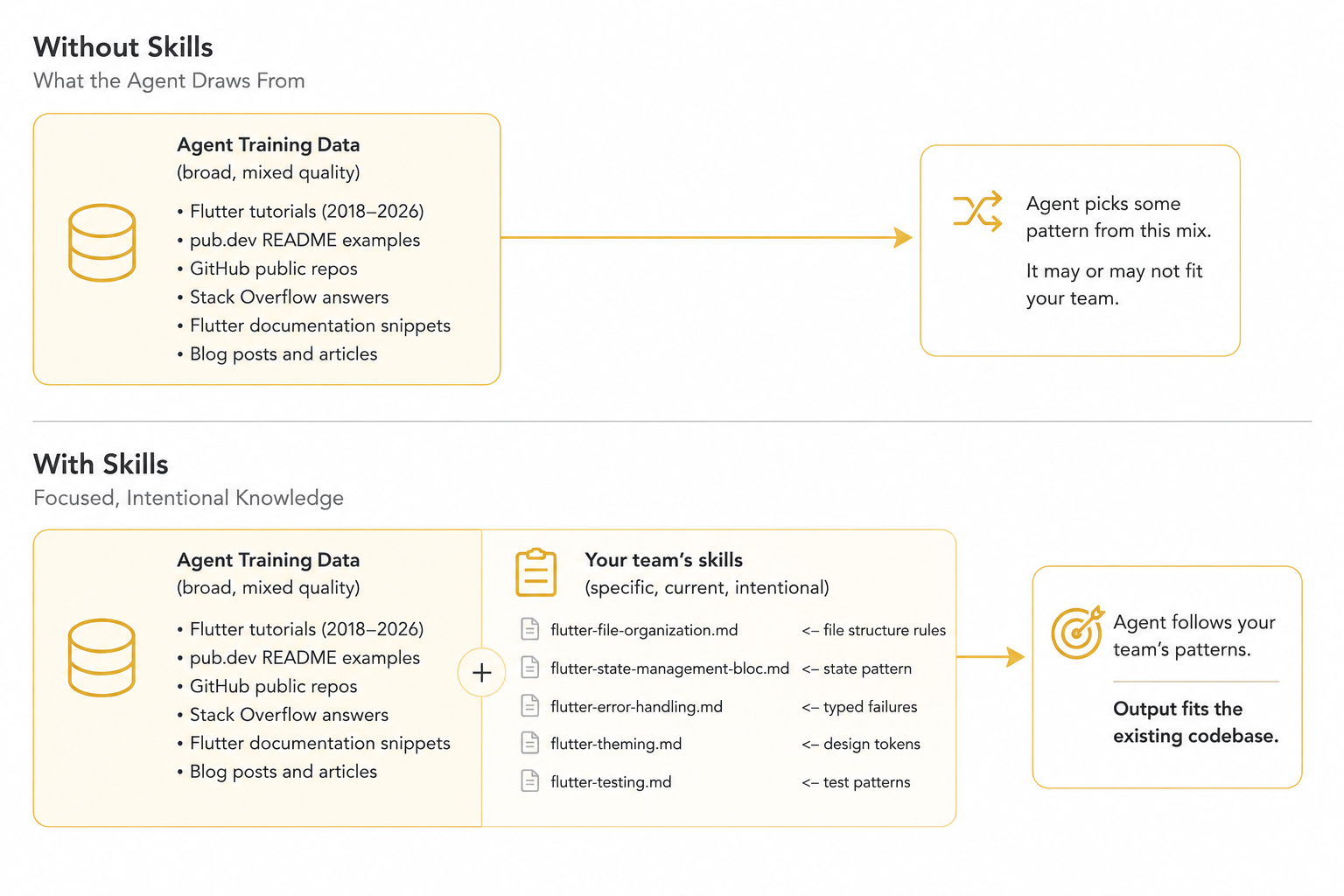
Skills don't replace the agent's existing knowledge. They give it a clear engineering context. Without skills, the agent chooses from a broad mix of patterns with varying quality. With team-defined skills, those patterns are constrained by the project's architecture, conventions, and standards, making the resulting code more consistent with the existing codebase.
The Most Common Flutter-Specific Failures
1. Private build methods instead of extracted widgets.
An agent asked to build a complex screen nests private methods like _buildHeader(), _buildStatsList(), and _buildActionBar() inside the screen class. This is valid Dart but architecturally harmful: these sections should be separate, testable, reusable widget classes in a widgets/ folder.
2. Separating StatefulWidget from State.
When splitting a large file, an agent may move the StatefulWidget class to one file and the State<T> class to another. This breaks a fundamental Flutter compilation constraint. The two must always live in the same file.
3. Ignoring your state management choice.
Without knowing your state management preference, the agent picks whatever pattern it finds most frequently in its training data. One session it generates Bloc. The next it generates Provider. The next it uses setState. All in the same codebase.
4. Using Map instead of typed models.
Without knowing your serialization conventions, an agent defaults to Map<String, dynamic>. If your team uses freezed and json_serializable, every generated model needs to be completely rewritten.
5. Hardcoded visual values.
Agents default to literal values: Color(0xFF6750A4), EdgeInsets.all(16), and BorderRadius.circular(8). If your project has a design system with theme extensions and spacing constants, the agent ignores it entirely.
6. Inline comments everywhere.
Many teams specifically avoid code comments in favor of self-documenting code with descriptive names. Agents default to adding explanatory comments because most training data includes them, requiring cleanup on every review.
7. Wrong import paths.
An agent may import from internal package paths (package:myapp/src/internal/models/user.dart) instead of going through your barrel files (package:myapp/features/profile/profile.dart), creating invisible coupling to internal APIs that should be hidden.
8. Raw exception handling.
Without knowing your error architecture, agents use try-catch with raw Exception objects everywhere, ignoring your team's typed failure hierarchy and making error handling inconsistent across the codebase.
How Skills Work: Progressive Disclosure
The mechanism behind skills is elegant and efficient. Instead of loading every instruction into the context window upfront, the agent only reads the metadata first. It pulls in the heavy, detailed instructions only when it actually needs them for the task at hand.
The Flutter documentation describes this as "progressive disclosure," analogous to deferred loading in Flutter itself.
This design solves a real problem. An AI agent's context window isn't infinite. If every skill loaded its full content for every task, the agent would be burning context budget on irrelevant information. A navigation skill doesn't need to be in context when you're asking the agent to write unit tests. A testing skill doesn't need to be in context when you're setting up routing.
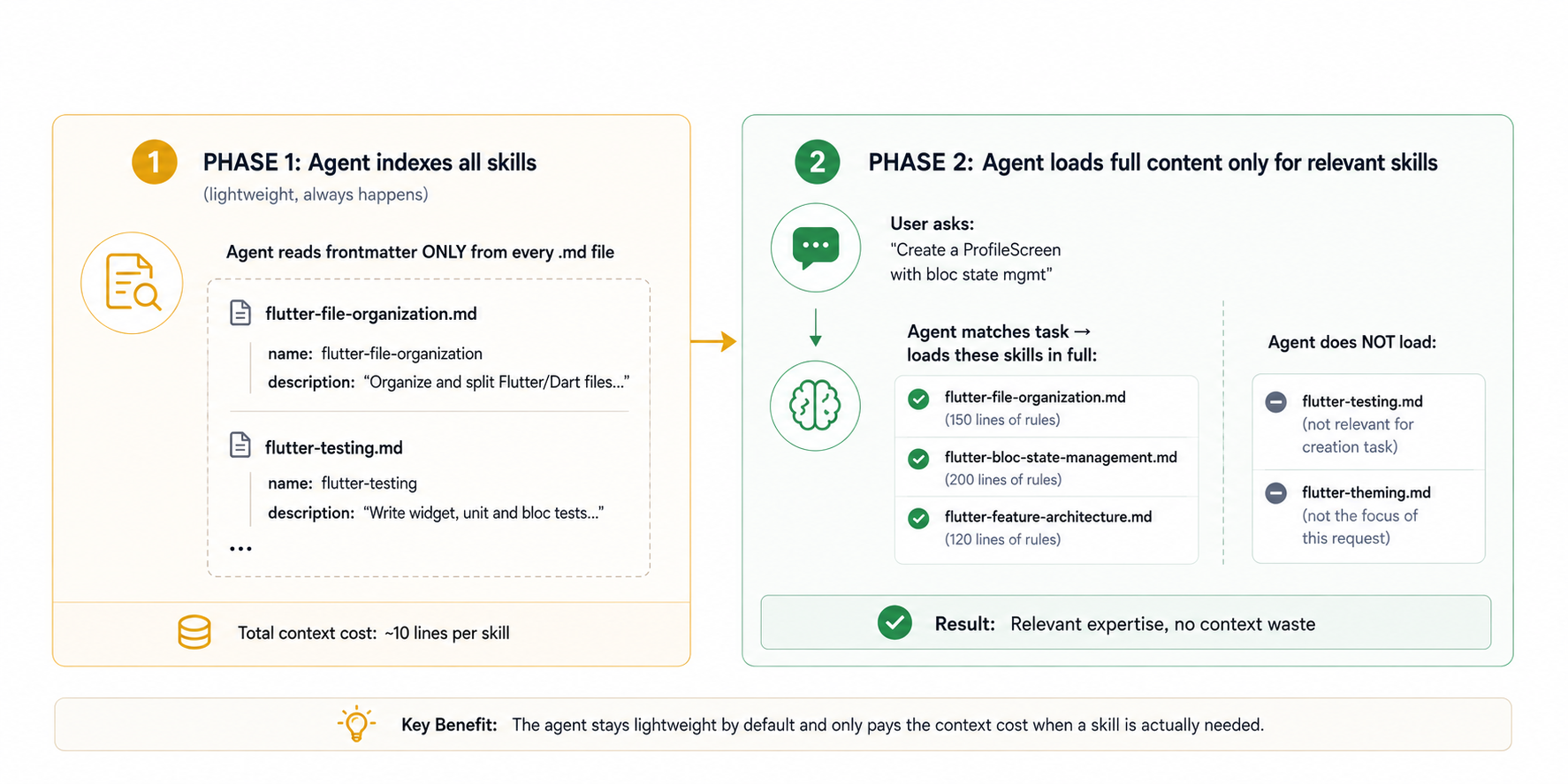
Progressive disclosure keeps the agent's context focused. First, the agent indexes the lightweight metadata of all available skills. When a task arrives, it uses those descriptions to identify which skills are relevant and loads only their full instructions. Unrelated skills remain unloaded, reducing context usage while giving the agent the detailed guidance needed for the task.
This progressive disclosure model means you can have many skills in your project without worrying about context overflow. Having twenty skills isn't twenty times more expensive than having one skill. Only the relevant subset is ever loaded for any given task.
The Anatomy of a Skill File
Every skill follows a specific structure. Understanding this structure deeply is the prerequisite for writing effective skills.
---
name: skill-name-in-kebab-case
description: A clear, specific description that answers: what does this skill cover,
when should it be applied, and what trigger words indicate this task needs this skill?
This is the ONLY part the agent reads when deciding whether this skill is relevant.
aliases: [alternative-name, another-name]
sources: [chat, code]
---

# Skill Title

Brief introduction of what this skill covers and why it exists.

## First Major Section

Content with specific, actionable rules.

## Second Major Section

More rules, examples, counterexamples.

## Code Examples

Concrete code demonstrating the patterns.
The Frontmatter Block in Detail
---
name: flutter-file-organization
description: Organize and split Flutter/Dart files while preserving StatefulWidget
and State relationships. Use when creating, refactoring, splitting, or reorganizing
Dart files and classes. Applies whenever a new screen, widget, model, or Bloc file
is being created or an existing file is being restructured.
aliases: [flutter-files, dart-organization]
sources: [chat, code]
---
name is the unique identifier for this skill across your project. It follows kebab-case convention (lowercase words separated by hyphens) and conventionally starts with the platform or domain (flutter-, dart-, react-, and so on). The name is used by the agent when referencing the skill in its reasoning and by the CLI when managing skills.
description is the most critical field in the entire file. It's the only field the agent reads during the lightweight Phase 1 indexing. A poorly written description means a perfectly written skill body never gets loaded. The description should answer three questions: what does this skill cover, when should it be triggered, and what are the specific trigger words or phrases that indicate this skill is relevant? Notice in the example how the description includes "Use when creating, refactoring, splitting, or reorganizing" along with a comprehensive list of file types. Each of those phrases is a potential trigger that helps the agent match task descriptions to this skill.
aliases provides alternative names for the skill that the agent can use to reference it. These are optional but useful when the skill might be called different things in different contexts.
sources indicates where this skill comes from. For custom team skills, this is typically [chat]. For skills coming from package authors, this might include [package].
The Skill Body Structure
The skill body is pure Markdown with a specific structural discipline that makes it most effective for agent consumption:
# Title Section (h1)
Brief context-setting paragraph. What problem does this skill solve? Why does it exist?
Keep this under three sentences.

## Core Rules (h2 sections)
Numbered or bulleted lists of specific, verifiable rules.
Each rule should be independently actionable.

## Named Sub-Pattern (h2 sections)
More specific guidance for a particular sub-domain of the skill.
Lead with the rule, then show the wrong pattern, then show the right pattern.

## Code Example (h2 sections)
Complete, runnable code that demonstrates the most important patterns.
Always show both wrong and right versions for patterns that agents commonly get wrong.
Agents navigate heading structure to understand skill organization. Clear ## headings that name the sub-topic they cover help the agent find the specific section relevant to its current sub-task within a larger request.
Installing Official Flutter and Dart Skills
The Flutter and Dart teams maintain official skill repositories that represent years of accumulated knowledge about best practices in the ecosystem. These are your starting point.
Installing Flutter Skills
npx skills add flutter/agent-plugins --skill '*' --agent universal --yes
npx skills add runs the skills CLI tool via npm without requiring a permanent installation. flutter/agent-plugins is the GitHub repository path where the official Flutter skills are maintained by the Flutter team. --skill '*' is a wildcard that installs all available skills from the repository rather than selecting specific ones. --agent universal places the skills in the .agents/skills/ directory, which is the universal location all compatible agents look in. --yes skips the interactive confirmation prompt, making this command safe to put in project setup scripts or Makefiles.
After running this command, your project gains skills for responsive layouts, declarative routing with GoRouter, JSON serialization with json_serializable, integration testing setup, widget preview setup, widget testing, architecture best practices with BLoC and Clean Architecture, Bloc state management, Bloc forms, and more.
Installing Dart Skills
npx skills add dart-lang/skills --skill '*' --agent universal --yes
The Dart team maintains a complementary set of skills focused on the Dart language itself, independent of Flutter's widget system. These skills are valuable for both Flutter apps and pure Dart projects like CLI tools, backend services, and packages.
The official Dart skills cover unit test generation, static analysis configuration, package dependency management, pattern matching and sealed classes, CLI application building, test coverage collection and analysis, runtime error fixing with the LSP, mock generation with Mockito, FFI bindings with ffigen, native assets for C and C++ integration, Dart memory optimization, and migrating from old test assertion styles to modern package:checks.
Installing Both at Once
npx skills add flutter/agent-plugins dart-lang/skills --skill '*' --agent universal --yes
Listing both repository names in a single command installs them together and runs dependency resolution once, which is slightly faster than two separate commands. This is the recommended approach for a new Flutter project setup.
Installing Skills from Your pubspec Dependencies
One of the most powerful aspects of the skills ecosystem is that package authors can ship skills alongside their packages. The skills CLI (available as a Dart package) can discover and install skills from all packages in your dependency tree:
dart pub global activate skills
skills get
dart pub global activate skills installs the skills Dart CLI tool globally on your machine. skills get reads your pubspec.yaml and pubspec.lock, finds every package in your dependency tree that ships a skills/ directory, and installs those skills into your project's .agents/skills/ directory automatically.
When you add a package to your project and run skills get, your agent immediately knows how to use that package correctly according to the package author's own instructions. This is a fundamental shift: instead of the agent guessing how a package works, the package author directly equips the agent with the correct usage patterns.
# Update skills whenever your dependencies change
flutter pub get
skills get
Running flutter pub get updates your dependencies. Running skills get immediately after updates the skills to match. Making this a two-step habit ensures your agent always has current skills for your current dependencies.
Verifying Installed Skills
ls -la .agents/skills/
ls -la .agents/skills/ lists all installed skill files with details. You should see .md files named after each installed skill. The -la flags show hidden files and detailed information including file sizes and modification dates.
Once installed, test your agent's awareness of the skills:
Which of my installed skills can help me with creating a new feature screen?
The agent responds with the skills it found that are relevant to that task, confirming they're loaded and indexed correctly. This is a good first test whenever you add skills to a project.
Using Skills with Claude Code
Claude Code is Anthropic's agentic coding assistant that runs in your terminal. It's one of the most powerful agents for complex, multi-step Flutter development tasks and has excellent support for the skills standard.
Installing the Flutter Plugin for Claude Code
The recommended approach for Claude Code is installing the full Flutter plugin, which bundles skills with MCP server configuration:
claude mcp add flutter-mcp -- dart pub global run dart_mcp_server
npx skills add flutter/agent-plugins --skill '*' --agent claude-code --yes
npx skills add dart-lang/skills --skill '*' --agent claude-code --yes
claude mcp add flutter-mcp registers the Dart MCP server with Claude Code. The MCP server gives Claude Code access to Flutter documentation, pub.dev package information, and Dart tooling directly without making web searches. --agent claude-code in the skills add command places skills in the Claude Code specific location if it differs from the universal .agents/skills/ directory, though Claude Code also reads from the universal location.
Claude Code Skills Directory
Claude Code reads skills from .agents/skills/ (the universal location) automatically. It also reads from .claude/skills/ if you prefer to keep Claude-specific skills separate from universal skills.
your_project/
  .agents/
    skills/
      flutter-file-organization.md    <- universal, works everywhere
      flutter-bloc-state-management.md
  .claude/
    skills/
      claude-specific-workflow.md     <- Claude Code only
    CLAUDE.md                         <- Claude Code rules file
Claude Code Rules vs Skills
Claude Code uses a CLAUDE.md file at the project root (or in .claude/) as a rules file: project-wide instructions that are always in context regardless of task.
Skills are loaded progressively. Use CLAUDE.md for project facts (what package this is, what SDK version, or what state management library is installed). Use skills for task-specific expertise (how to implement Bloc, how to organize files, or how to write tests).
# CLAUDE.md example

This is a Flutter app called Kopa, a personal budgeting tool.

## Technical Stack
- Flutter 3.47 with Dart 3.10
- State management: flutter_bloc ^9.0.0
- Navigation: go_router ^14.0.0
- Data layer: firebase_ai ^2.0.0 for AI features
- Serialization: freezed + json_serializable
- Testing: bloc_test, mocktail

## Package Name
com.example.kopa

## Minimum SDK
Android API 24, iOS 15

## Project Structure
Feature-first with clean architecture layers.
See the flutter-feature-architecture skill for full structure details.
CLAUDE.md contains facts about the project that never change between tasks: the app name, the packages in use, the SDK versions, and the minimum platform targets. Skills contain the expertise for how to work with those packages and structure that code correctly.
Using Skills in a Claude Code Session
Once skills are installed, Claude Code uses them automatically. You don't need to invoke them manually. When you ask:
Create a UserProfile feature with Bloc state management,
a repository that fetches from Firestore, and a screen
that shows loading, data, and error states.
Claude Code detects that this request involves multiple skill domains (feature architecture, Bloc state management, file organization, and potentially theming and error handling), loads the relevant skill files, and generates code that follows all of your team's conventions simultaneously.
You can also be explicit:
Using the flutter-bloc-state-management skill, implement
the CartBloc for the shopping cart feature.
Naming the skill explicitly tells Claude Code to load that specific skill regardless of whether it would have detected the need automatically.
Using Skills with Antigravity
Antigravity is Google's AI coding assistant, deeply integrated into the Flutter ecosystem and developed alongside the Flutter team. It has first-class support for agent skills and is one of the agents most thoroughly tested with the official Flutter skills.
Installing the Flutter Plugin for Antigravity
Open Settings in Antigravity by pressing Cmd+, (Mac) or Ctrl+, (Windows/Linux)
Click the Customizations tab
In the Build with Google Plugins section, click Customize
Click Download next to the Dart and Flutter integration
This installs the official Flutter plugin for Antigravity, which bundles skills, MCP server configuration, and rules in a single step. It's the recommended installation path because it ensures all three components (skills, MCP, and rules) are correctly configured together.
Manual Skills Installation for Antigravity
If you prefer manual installation or need to add custom team skills:
npx skills add flutter/agent-plugins --skill '*' --agent antigravity --yes
npx skills add dart-lang/skills --skill '*' --agent antigravity --yes
--agent antigravity targets the Antigravity-specific skills directory, though Antigravity also reads from the universal .agents/skills/ location.
Antigravity Workflows with Skills
Antigravity supports "workflows," which are pre-defined task sequences that can reference skills. You can create a workflow for common team tasks:
# .antigravity/workflows/new-feature.md

## Create New Feature Workflow

Apply skills: flutter-feature-architecture, flutter-bloc-state-management,
flutter-testing, flutter-file-organization

Steps:
1. Create the feature folder structure.
2. Create the domain model using Freezed.
3. Create the repository interface and implementation.
4. Create the Bloc with its events and states.
5. Create the screen widget.
6. Extract reusable component widgets.
7. Create unit tests for the repository.
8. Create `bloc_test` tests for the Bloc.
9. Create widget tests for the screen.
Workflows that reference skills ensure the agent applies the correct conventions for every step of a multi-step task. Without this explicit referencing, the agent might apply the file organization skill for step 1 but forget to apply the testing skill for steps 7 through 9.
Using Skills with OpenAI Codex
OpenAI Codex is a terminal-based agentic coding assistant similar in spirit to Claude Code. It runs in your terminal and executes multi-step tasks against your codebase.
Installing Skills for Codex
npx skills add flutter/agent-plugins --skill '*' --agent codex --yes
npx skills add dart-lang/skills --skill '*' --agent codex --yes
--agent codex targets the Codex-specific skills directory. Codex also reads from the universal .agents/skills/ directory, so the --agent universal flag works equally well.
Codex Rules File
Similar to Claude Code's CLAUDE.md, Codex reads from an AGENTS.md file at the project root. Configure this alongside your skills:
# AGENTS.md

Flutter project: Kopa budgeting app
Stack: flutter_bloc, go_router, firebase_ai, freezed
Architecture: Feature-first with clean architecture
Test framework: bloc_test + mocktail
AGENTS.md is the project-wide context file that Codex reads on every task. Keep it brief: five to fifteen lines covering the most important project facts. Detailed conventions belong in skills, not in AGENTS.md, because skills load progressively while AGENTS.md always loads.
Plugin Installation Note for Codex
Codex plugins currently can't bundle rules files automatically. This means installing the Flutter plugin from flutter/agent-plugins installs the skills but doesn't automatically create the AGENTS.md file.
Create this file manually after running the plugin installation. The official Flutter documentation provides a template for the recommended AGENTS.md content for Flutter projects.
Using Skills with Cursor
Cursor is an AI-first code editor built on VS Code. It integrates agent capabilities directly into the editing experience and supports skills through a combination of its rules system and the universal .agents/skills/ directory.
Installing Skills for Cursor
npx skills add flutter/agent-plugins --skill '*' --agent cursor --yes
npx skills add dart-lang/skills --skill '*' --agent cursor --yes
Cursor reads skills from .agents/skills/ as part of its agent context. The --agent cursor flag ensures skills are placed correctly for Cursor's discovery mechanism.
Cursor Rules Integration
Cursor uses .cursorrules (or the newer .cursor/rules/ directory in recent versions) for project-wide instructions, analogous to Claude Code's CLAUDE.md:
# .cursor/rules/flutter.mdc

---
description: Flutter project rules applied to all Dart files
globs: ["**/*.dart", "pubspec.yaml"]
alwaysApply: true
---

This is a Flutter project using flutter_bloc, go_router, and freezed.
All state management uses the Bloc pattern.
Feature-first folder structure with clean architecture.
See installed skills in .agents/skills/ for detailed conventions.
globs: ["**/*.dart"] applies this rule only when Dart files are being edited, which prevents the Flutter rules from loading during Markdown editing or YAML configuration. alwaysApply: true ensures the rule is always in context when matching files are open.
The reference to the skills directory at the bottom is intentional: it tells the agent to look at the skills for implementation details rather than making the rules file exhaustively long.
Using Composer and Chat in Cursor with Skills
In Cursor's Composer (the multi-file editing agent), skills load automatically when you describe a task. In Cursor Chat (the inline assistant), you may need to be more explicit:
@flutter-file-organization Create a new PostCard widget
extracted from the post list screen
The @ prefix in Cursor chat can reference installed skills by name in some configurations. In others, simply describing the task in enough detail is sufficient for the agent to load the relevant skill automatically.
Using Skills with Other Agents
GitHub Copilot CLI
GitHub Copilot CLI supports the universal .agents/skills/ directory when run in agent mode (gh copilot explain and gh copilot suggest):
npx skills add flutter/agent-plugins --skill '*' --agent copilot --yes
Note from the skills CLI documentation that GitHub Copilot isn't auto-detected when using skills get because the .github/ directory is commonly used for other purposes. Always use the explicit --agent copilot flag when installing skills for Copilot.
Gemini CLI
Google's Gemini CLI supports the universal skills directory:
npx skills add flutter/agent-plugins --skill '*' --agent gemini --yes
Universal Installation
If you want a single installation that works for all agents simultaneously:
npx skills add flutter/agent-plugins --skill '*' --agent universal --yes
npx skills add dart-lang/skills --skill '*' --agent universal --yes
The universal agent target places skills in .agents/skills/, which all compliant agents discover automatically. This is the recommended default for teams that use multiple agents or want to be agent-agnostic.
Verifying Agent Discovery
Regardless of which agent you use, you can verify skill discovery with a natural language question to the agent:
Summarize the capabilities of the skills you have available for this project.
A correctly configured agent responds with a list of installed skills and their descriptions, confirming that discovery is working. If the agent says it has no skills or can't find any, check that:
The
.agents/skills/directory exists at the project rootThe directory contains
.mdfiles with valid YAML frontmatterThe agent supports the universal skills specification
The Official Flutter Skills: A Deep Dive
The official Flutter skills repository (flutter/agent-plugins) contains a set of skills that represent the Flutter team's best thinking on common development patterns. Understanding what each skill covers helps you decide which to install, which to customize, and which to supplement with your own skills.
flutter-responsive-layout
This skill teaches the agent how to build layouts that adapt correctly across mobile, tablet, and desktop breakpoints. It covers AdaptiveScaffold, LayoutBuilder, MediaQuery, Breakpoints, and the patterns the Flutter Adaptive Framework recommends for handling different screen sizes.
Without this skill, agents build layouts that look fine on a single device size and break on others. With it, agents produce layouts that are responsive from the first line of code, using the correct Flutter-specific tools rather than hardcoded pixel thresholds.
flutter-declarative-routing
This skill teaches GoRouter setup, route definition patterns, nested navigation, redirect logic for authentication, deep linking configuration, and the correct way to pass typed parameters between routes.
Without this skill, agents often use Navigator.push even in codebases that carefully use GoRouter everywhere. They also commonly get deep linking wrong and struggle with the typed parameter extraction pattern GoRouter requires.
flutter-json-serialization
This skill teaches the json_serializable and freezed workflow: adding annotations, running build_runner, creating fromJson/toJson methods, handling nullable fields, and using @JsonKey for field name mapping.
Without this skill, agents manually write serialization code or use Map<String, dynamic> throughout the data layer, producing fragile code that breaks silently when field names change.
flutter-add-widget-test
This skill teaches testWidgets, WidgetTester, pump strategies (pump, pumpAndSettle, pumpWidget), widget finders (find.text, find.byType, find.byKey), gesture simulation, and how to wrap widgets in minimal but sufficient test infrastructure.
flutter-add-integration-test
This skill teaches how to set up and run end-to-end integration tests on devices, web browsers, or Firebase Test Lab. It covers test setup, the IntegrationTestWidgetsFlutterBinding, app startup sequencing, and interacting with a fully running app in test.
flutter-bloc
This skill teaches the complete Bloc workflow: defining events, states, and the Bloc class, providing the Bloc with BlocProvider, consuming it with BlocBuilder, BlocListener, and BlocConsumer, and testing with bloc_test.
flutter-apply-architecture-best-practices
This skill enforces Clean Architecture (Data, Domain, Presentation) with the BLoC pattern as the official Flutter team recommends it. It defines layer boundaries, dependency rules, and the repository pattern.
flutter-add-widget-preview
This skill teaches the Widget Previewer system introduced in Flutter 3.47, including the @Preview annotation, how to set up preview infrastructure, and how to write useful previews for complex widgets.
The Official Dart Skills: A Deep Dive
The Dart team's official skills repository (dart-lang/skills) covers the Dart language itself rather than Flutter's widget system. These skills apply to any Dart code: Flutter app logic, Dart CLI tools, Dart backend services, and Dart packages.
dart-add-unit-test
This is the most fundamental Dart skill and the one with the highest immediate impact. It teaches the agent how to write proper unit tests for any Dart class, including:
Setting up the
test/directory mirroring thelib/structureWriting
groupandtestblocks with descriptive namesUsing
setUpandtearDownfor test lifecycle managementUsing
expectwith the right matchersMocking dependencies with
mocktailTesting async code with
expectLaterand stream matchers
Without this skill, agents produce tests that test the wrong things, use incorrect assertion patterns, and structure test files in ways that don't mirror the source tree. With it, agents produce tests that follow the package:test conventions correctly from the first run.
# What dart-add-unit-test teaches the agent

## Test file placement
test/features/profile/data/profile_repository_test.dart
mirrors
lib/features/profile/data/profile_repository.dart

## Test naming
```
group('ProfileRepository', () {
  group('getProfile', () {
    test('returns ProfileLoaded when API call succeeds', () async {
      // ...
    });

    test('returns NetworkFailure when connection fails', () async {
      // ...
    });
  });
});
```

## Async testing
```
await expectLater(
  repository.getProfile('user123'),
  completion(isA<Right<AppFailure, UserProfile>>()),
);
```
dart-run-static-analysis
This skill teaches the agent how to work with Dart's static analysis infrastructure: configuring analysis_options.yaml, running dart analyze, applying dart fix --apply, understanding lint rules, suppressing false positives correctly, and enforcing strict type checks.
# What dart-run-static-analysis covers

## analysis_options.yaml configuration
include: package:flutter_lints/flutter.yaml

analyzer:
  language:
    strict-casts: true
    strict-inference: true
    strict-raw-types: true
  exclude:
    - '**/*.g.dart'
    - '**/*.freezed.dart'

linter:
  rules:
    avoid_print: true
    prefer_final_fields: true
    require_trailing_commas: true

## Correct suppression (when a lint is a false positive)
// ignore: avoid_print  <- line-level, for one occurrence
// ignore_for_file: type=lint  <- file-level, for generated files
Understanding how to configure analysis_options.yaml correctly is one of those tasks where agents frequently make mistakes without guidance: they enable the wrong rules, forget to exclude generated files, or suppress diagnostics too broadly. This skill makes those configurations correct from the start.
dart-tooling
This skill teaches how to resolve package version conflicts in pubspec.yaml, use dependency overrides correctly, understand the difference between direct and transitive dependencies, and read pubspec.lock to diagnose version resolution issues.
Package dependency management is an area where agents frequently hallucinate package versions or suggest dependency_overrides in ways that mask real conflicts. This skill corrects those behaviors.
dart-use-pattern-matching
This skill is one of the highest-value Dart skills because Dart 3's sealed classes and pattern matching represent a genuinely new coding paradigm that agents trained before Dart 3's release don't use consistently. It teaches:
Switch expressions on sealed classes with exhaustiveness
Destructuring patterns in switch cases
Guard clauses with
whenRecord patterns
List and map patterns
The correct use of
_(wildcard) in patterns
// What the agent learns to write with dart-use-pattern-matching

// Before: traditional switch on enum (old pattern)
switch (state) {
  case AppState.loading:
    return CircularProgressIndicator();
  case AppState.loaded:
    return ContentWidget(data: data);
  default:
    return ErrorWidget();
}

// After: switch expression with pattern matching (idiomatic Dart 3)
return switch (state) {
  AppStateLoading() => const CircularProgressIndicator(),
  AppStateLoaded(:final data) => ContentWidget(data: data),
  AppStateError(:final message) => ErrorWidget(message: message),
};
The destructuring pattern AppStateLoaded(:final data) is pure Dart 3 and extremely clean, but agents without this skill rarely produce it because it wasn't in the training data for older agent versions.
dart-collect-coverage
This skill teaches test coverage collection, LCOV report generation, HTML report generation, and how to filter out generated code (*.g.dart, *.freezed.dart) from coverage reports so the numbers reflect real coverage rather than being inflated by generated code that can't be meaningfully tested.
dart-generate-test-mocks
This skill teaches the mockito and build_runner workflow for generating type-safe mocks from interfaces and abstract classes. It covers adding the annotations, running dart run build_runner build, and using the generated mocks in tests.
dart-fix-runtime-errors
This is a procedural skill: it teaches the agent to use the LSP (Language Server Protocol) to fetch the current stack trace, locate the failing line, apply a fix, and verify resolution using hot reload. This is the correct workflow for fixing runtime errors in a live Flutter app rather than guessing at the cause.
dart-genkit
This skill teaches how to build AI-powered workflows and agents using the Genkit Dart SDK. It's specifically relevant for Flutter developers building AI features, covering flow definition, tool calling, model selection, and streaming.
dart-migrate-to-checks-package
This skill teaches how to migrate from the older package:matcher assertion style to the newer package:checks style, which produces better error messages and is more composable.
// Old style (package:matcher)
expect(result, isA<Right<AppFailure, UserProfile>>());
expect(result.getOrElse(() => null)?.name, equals('Ade'));

// New style (package:checks)
check(result).isA<Right<AppFailure, UserProfile>>();
check(result.getOrElse(() => null)?.name).equals('Ade');
dart-memory
This skill teaches how to prevent memory leaks and reduce garbage collection pressure in Flutter and Dart apps, covering StreamController disposal, AnimationController disposal, closure capture patterns that prevent garbage collection, and how to use DevTools to identify memory issues.
dart-build-cli-app
For Flutter developers who also write Dart CLI tools, backend scripts, or deployment automation in Dart, this skill covers entrypoint structure, argument parsing with package:args, exit codes, subprocess handling, and cross-platform script patterns.
dart-logic-patterns
This skill covers algorithms, data structures, and Dart-specific patterns for organizing business logic: using Iterable methods correctly, choosing between List, Set, and Map for different use cases, implementing efficient search and sort, and using Dart's collection literals productively.
The flutter-file-organization Skill: A Complete Walkthrough
The file organization skill is the most universally applicable Flutter skill and an excellent teaching example for how skills should be structured. Reading it carefully reveals the principles behind every effective skill.
---
name: flutter-file-organization
description: Organize and split Flutter/Dart files while preserving StatefulWidget and State relationships. Use when creating, refactoring, splitting, or reorganizing Dart files and classes.
---

# Flutter File Organization

When creating, splitting, refactoring, or reorganizing Flutter/Dart files, follow these rules.

## Core Rules

1. Inspect the existing file before modifying it.
2. Identify all classes, enums, extensions, mixins, typedefs, and top-level declarations.
3. Identify relationships and dependencies between declarations before splitting them.
4. Keep each independent primary class in its own file.
5. Treat tightly coupled declarations as a single implementation unit and keep them together.
6. Never separate a `StatefulWidget` from its corresponding `State<T>` class.
7. Update all imports and references after moving declarations.
8. Do not introduce unnecessary private helper classes or methods.
9. Preserve existing application behavior. File organization must not change functionality.
10. Run `dart format` on modified Dart files.
11. Run the project's analyzer and relevant tests.
Rule 1 ("Inspect the existing file before modifying it") prevents one of the most common and costly agent mistakes: making assumptions about file contents without reading them.
An agent that skips inspection may duplicate declarations, break dependencies, or introduce naming conflicts with things that already exist. Making inspection an explicit first rule ensures the agent always starts from a complete picture of the current state.
Rules 2 and 3 ("Identify all classes" and "Identify relationships") are mandatory pre-flight checks. Before the agent touches a single byte of a file, it must map everything that exists and how the pieces depend on each other.
This is the equivalent of "measure twice, cut once" applied to code refactoring, and it prevents the most frustrating class of bug: refactors that break things that were working.
Rule 6 ("Never separate a StatefulWidget from its corresponding State class") encodes Flutter-specific compilation knowledge. A developer who knows Dart deeply but doesn't know Flutter could reasonably split a file by moving every class to its own file. They would hit a compile error because _ProfilePageState references the ProfilePage widget through widget, which has a type that State<T> establishes at the class level. The two classes form a single compilation unit that can't be separated. This rule prevents a compile error that no amount of general Dart knowledge would avoid.
Rules 10 and 11 ("Run dart format" and "Run the project's analyzer") close the task-completion loop. Without these rules, an agent declares success after generating files, leaving formatting inconsistencies and possible analyzer warnings for you to discover later. With them, the agent runs both tools before reporting completion, catching issues immediately.
## Widget Extraction

Do not create private `_build...()` methods as a way of extracting substantial widget UI.

For example, do not do this:

```
Widget _buildUserCard() {
  return Container(
    ...
  );
}
```

Instead separate this into a class that is public and place it inside the widgets folder or the components folder.
The Widget Extraction section does four things that every good skill rule should do: states the rule clearly, explains the prohibited pattern precisely (not just vaguely), shows a concrete code example of what not to do so there's no ambiguity, and tells the agent what to do instead.
The _build...() pattern is very common in training data (tutorials often use it for simplicity), which means saying "avoid it" without a concrete example risks not overriding the learned behavior.
Showing the exact code pattern to avoid and contrasting it with the alternative makes the instruction maximally clear.
## Component Extraction

Do not place large amounts of UI inside a single widget.

Extract logical sections into reusable components whenever appropriate.

Examples include:

- Header sections
- Statistics cards
- Filter bars
- Search bars
- Lists
- Table rows
- Buttons
- Empty states
- Loading views
- Form sections
- Dialog content

Favor small, reusable widgets over large build methods.
The example list in the Component Extraction section is drawn from real experience. These are the actual UI sections that accumulate inside screen widgets in production Flutter apps. An agent reading this list will recognize these patterns in the code it examines and know to extract them.
Without the list, "extract logical sections" is too vague for reliable behavior: the agent needs to know concretely what counts as a "logical section."
## Code Comments

Do not write code comments.

This rule applies everywhere and to every layer.
The code comments rule is brief because it's absolute. The phrase "applies everywhere and to every layer" is deliberate. Without this scope qualifier, an agent might interpret the rule as applying only to the current file organization task and revert to adding comments in other files it creates or modifies. The explicit scope removes ambiguity and makes the rule's intent clear across all contexts.
Writing Your Own Skills: The Complete Guide
The official skills are your foundation. But your most valuable skills are often the ones you write yourself, encoding the specific patterns, mistakes, and standards of your own projects.
The Right Mindset for Writing Skills
Writing a skill is not the same as writing documentation for humans. Documentation for humans relies on shared context, implicit understanding, and the ability to ask questions. Skills for agents must be explicit, precise, and assume no knowledge beyond what the skill file contains.
The best skills come from real experience with your codebase. Keep a running list of every time you manually fix AI-generated code. Every fix is a skill rule. When you explain a convention to a new team member, that explanation is skill content. When you catch the same mistake in code review three times in a row, that mistake needs a skill.
Ask yourself before writing any rule: "Would an agent that doesn't know my codebase know to do this?" If the answer is no, the rule belongs in a skill.
The Description: The Most Important Twenty Words
The description field is the gatekeeper. Write it last, after the skill body is complete, so it accurately describes what the skill actually covers. A good description passes this test: if an agent reads only the description, it knows whether this skill is relevant for a given task.
# Poor: too vague, no trigger phrases
description: How to handle state in Flutter apps.

# Better: specific, multiple trigger phrases, clear scope
description: Implement state management using flutter_bloc in Flutter applications.
Use when adding state management to screens, creating new features that have loading
or error states, fetching data from APIs, handling user interactions that change
UI state, or implementing BlocProvider, BlocBuilder, BlocListener, or BlocConsumer.
Applies when you see references to bloc, cubit, state, event, or stream in a task.
The second description is better for several specific reasons. It lists specific trigger scenarios ("creating new features that have loading or error states") that are more likely to match actual task descriptions than the vague "handle state." It includes the API surface of the relevant package (BlocProvider, BlocBuilder) which are likely to appear in task descriptions. And it lists the conceptual keywords (bloc, cubit, state, and event) that serve as signals.
Writing Rules That Change Agent Behavior
Not all rules are equal. Rules that tell an agent to do something it was already doing provide no value. Rules that change what the agent does are the valuable ones. To write rules that change behavior, start from observation: what did the agent actually produce that was wrong, and what rule would have prevented that?
## Rules That Work vs Rules That Do Not

DO NOT WORK (agent was already trying to do these):
- Write clean, readable code.
- Follow Flutter best practices.
- Use appropriate state management.
- Keep the codebase maintainable.

WORK (these change specific agent behavior):
- Extract any widget build section exceeding 30 lines into a separate class in widgets/.
- Never call setState inside a widget that has a corresponding BlocBuilder.
- Name Bloc events as past-tense verbs: ProfileLoadRequested, not LoadProfile.
- Place all Bloc files (bloc, event, state) in a bloc/ subdirectory inside the feature.
- The state class uses sealed keyword: sealed class ProfileState {}.
- Provide super.key in every widget constructor: const MyWidget({super.key}).
- Check mounted before calling setState in any async method.
Notice that working rules contain specific numbers (30 lines), specific folder names (widgets/, bloc/), specific naming patterns with examples, and specific code patterns. Vague rules like "write clean code" describe something the agent already tries to do by default. Specific rules like "name Bloc events as past-tense verbs with concrete examples" change actual output.
The Counterexample Pattern
For rules that address patterns that are common in training data, showing the wrong pattern alongside the right one is significantly more effective than describing the rule in text alone. The agent has seen the wrong pattern thousands of times in training. A text rule may not be strong enough to override that learned behavior. A visual contrast makes the intention unmistakable.
## Error State Naming

Do not name error states with the word "Error" alone at the end.

Do not do this:

```
final class ProfileError extends ProfileState {
  const ProfileError();
}
Include the error context:
final class ProfileLoadFailure extends ProfileState {
  const ProfileLoadFailure({required this.message});
  final String message;
}
Including the action name (Load) makes the error state specific to the operation that failed. This is important when a single Bloc handles multiple operations that can fail independently. ProfileLoadFailure and ProfileUpdateFailure can coexist meaningfully. ProfileError and ProfileError2 can't.
The explanation after the counterexample ("Including the action name...") connects the rule to the reason, which helps the agent apply the rule correctly in edge cases rather than just following the letter of the rule.
Essential Flutter Skills Every Team Should Have
Based on the most common areas where AI agents produce incorrect Flutter output, here are the essential skills every Flutter team should write and maintain. Each is presented in full, ready to be adapted to your specific conventions.
The Bloc State Management Skill
---
name: flutter-bloc-state-management
description: Implement state management using flutter_bloc. Use when creating new features,
adding state to screens, fetching data from APIs, handling user interactions that produce
loading or error states, using BlocProvider, BlocBuilder, BlocListener, BlocConsumer,
adding a Cubit, or any task involving state transitions in Flutter.
---

# Flutter Bloc State Management

This project uses flutter_bloc for all state management. Do not use setState, ChangeNotifier,
Provider, or Riverpod unless explicitly instructed.

## File Structure

Every feature that requires state management has three Bloc files in a bloc/ subdirectory:
lib/
  features/
    profile/
      bloc/
        profile_bloc.dart      <- Bloc class and handler methods
        profile_event.dart     <- All events as sealed class hierarchy
        profile_state.dart     <- All states as sealed class hierarchy
      screens/
        profile_screen.dart
      widgets/
        profile_card.dart
      profile.dart              <- barrel export
Sealed Classes
Events and states use Dart's sealed class system for exhaustive handling:
// profile_event.dart
sealed class ProfileEvent {}

final class ProfileLoadRequested extends ProfileEvent {
  const ProfileLoadRequested({required this.userId});
  final String userId;
}

final class ProfileUsernameUpdated extends ProfileEvent {
  const ProfileUsernameUpdated({required this.newUsername});
  final String newUsername;
}
// profile_state.dart
sealed class ProfileState {}

final class ProfileInitial extends ProfileState {}

final class ProfileLoading extends ProfileState {}

final class ProfileLoaded extends ProfileState {
  const ProfileLoaded({required this.profile});
  final UserProfile profile;
}

final class ProfileLoadFailure extends ProfileState {
  const ProfileLoadFailure({required this.message});
  final String message;
}
sealed class makes the hierarchy exhaustive: Dart's compiler can verify that every possible state is handled in a switch statement. final class on concrete implementations prevents unintended subclassing. Every state and event is final and sealed.
Naming Conventions
The Bloc class should use the feature name followed by Bloc, such as ProfileBloc, AuthBloc, or CartBloc. Events should use a past-tense verb phrase followed by the feature name and the Event suffix, such as ProfileLoadRequested or AuthLoginAttempted. States should use the feature name followed by a descriptive noun or adjective, such as ProfileInitial, ProfileLoading, ProfileLoaded, or ProfileLoadFailure.
Don't name events as commands (not LoadProfile, but ProfileLoadRequested). Don't name error states simply as ProfileError. Include the operation: ProfileLoadFailure, ProfileUpdateFailure.
The Bloc Class
// profile_bloc.dart
class ProfileBloc extends Bloc<ProfileEvent, ProfileState> {
  final ProfileRepository _repository;

  ProfileBloc({required ProfileRepository repository})
      : _repository = repository,
        super(ProfileInitial()) {
    on<ProfileLoadRequested>(_onProfileLoadRequested);
    on<ProfileUsernameUpdated>(_onProfileUsernameUpdated);
  }

  Future<void> _onProfileLoadRequested(
    ProfileLoadRequested event,
    Emitter<ProfileState> emit,
  ) async {
    emit(ProfileLoading());

    final result = await _repository.getProfile(event.userId);

    result.fold(
      (failure) => emit(ProfileLoadFailure(message: _mapFailure(failure))),
      (profile) => emit(ProfileLoaded(profile: profile)),
    );
  }

  String _mapFailure(AppFailure failure) => switch (failure) {
    NetworkFailure(:final message) => message,
    ServerFailure(:final message) => message,
    NotFoundFailure() => 'Profile not found',
    UnauthorizedFailure() => 'Please sign in again',
    _ => 'An unexpected error occurred',
  };
}
Each event handler is a private method named _on + EventClassName. The pattern is consistent across all Blocs. Every handler emits a loading state before the async operation and emits either a success or failure state after. No handler returns data directly. All communication is through emitted states.
Widget Integration
class ProfileScreen extends StatelessWidget {
  const ProfileScreen({super.key, required this.userId});
  final String userId;

  @override
  Widget build(BuildContext context) {
    return BlocProvider(
      create: (context) => ProfileBloc(
        repository: context.read<ProfileRepository>(),
      )..add(ProfileLoadRequested(userId: userId)),
      child: BlocConsumer<ProfileBloc, ProfileState>(
        listener: (context, state) {
          if (state is ProfileLoadFailure) {
            ScaffoldMessenger.of(context).showSnackBar(
              SnackBar(content: Text(state.message)),
            );
          }
        },
        builder: (context, state) => switch (state) {
          ProfileInitial() => const SizedBox.shrink(),
          ProfileLoading() => const Center(child: CircularProgressIndicator()),
          ProfileLoaded(:final profile) => ProfileContent(profile: profile),
          ProfileLoadFailure(:final message) => ProfileErrorView(message: message),
        },
      ),
    );
  }
}
BlocConsumer combines listener (side effects) and builder (UI). The switch expression on sealed states is exhaustive: the compiler enforces that every state has a corresponding UI.
Prohibited Patterns
Don't use setState in any widget that has a corresponding Bloc. Don't call context.read<SomeBloc>().add(event) from inside initState without deferring with addPostFrameCallback. Don't access BuildContext after an await without checking mounted. Don't create a Bloc inside a StatelessWidget.build method (it is recreated on every rebuild).
The Feature Architecture Skill
---
name: flutter-feature-architecture
description: Structure Flutter features using clean architecture with repository, service,
and presentation layers. Use when creating new features, adding screens, implementing
data fetching, organizing existing code, deciding where a new file belongs, or any task
that involves folder structure, layer boundaries, or the project's directory organization.
---

# Flutter Feature Architecture

This project uses feature-first folder structure with clean architecture layers.
Top-Level Structure
lib/
  core/
    constants/     <- app-wide constants, not feature-specific
    errors/         <- AppFailure sealed class hierarchy
    extensions/     <- Dart extension methods
    theme/          <- theme extensions, color tokens, typography
    utils/          <- pure utility functions
  features/
    auth/
    profile/
    home/
    settings/
  shared/
    widgets/        <- widgets used in 3+ features
    models/         <- models shared between features
    services/       <- services used by multiple features
  app.dart          <- MaterialApp setup
  main.dart         <- entry point
Feature Folder Structure
Every feature follows this internal structure:
features/
  profile/
    bloc/
      profile_bloc.dart
      profile_event.dart
      profile_state.dart
    data/
      profile_repository.dart          <- interface
      profile_repository_impl.dart     <- implementation
      profile_remote_data_source.dart
      profile_local_data_source.dart
    domain/
      profile_model.dart                <- freezed domain model
    screens/
      profile_screen.dart
      edit_profile_screen.dart
    widgets/
      profile_card.dart
      profile_header.dart
      profile_stats_row.dart
    profile.dart                         <- barrel export
Layer Dependency Rules
The presentation layer (screens and widgets) depends only on Bloc and domain models. The Bloc depends only on the repository interface (not the implementation). The repository implementation depends on data sources. Data sources depend on external packages (Firebase, HTTP, SharedPreferences).
Never import across layers in the wrong direction. The data layer never imports from the presentation layer. The domain layer imports from nothing in the project.
The Barrel Export File
Every feature has a barrel file that exports only the public API of the feature:
// features/profile/profile.dart
export 'domain/profile_model.dart';
export 'screens/profile_screen.dart';
export 'screens/edit_profile_screen.dart';
export 'bloc/profile_bloc.dart';
export 'bloc/profile_event.dart';
export 'bloc/profile_state.dart';
Internal implementation files (data sources, repository implementation) aren't exported. Consuming code imports package:myapp/features/profile/profile.dart, never deep paths.
The Core Folder Rule
A file belongs in core/ only if it's used by three or more features. If used by only one or two features, it belongs inside those features' folders. Don't preemptively move things to core/ based on where they might be used in the future.
The Error Handling Skill
---
name: flutter-error-handling
description: Implement error handling using typed AppFailure classes and Either return types.
Use when handling errors from API calls, repository methods, Bloc error states, catching
exceptions in data sources, showing error UI, implementing try-catch, or any task that
involves failure, exception, error state, or error message handling.
---

# Flutter Error Handling

This project uses a typed failure system. Raw exceptions do not cross layer boundaries.
The AppFailure Hierarchy
// core/errors/app_failure.dart
sealed class AppFailure {
  const AppFailure();
}

final class NetworkFailure extends AppFailure {
  const NetworkFailure({required this.message});
  final String message;
}

final class ServerFailure extends AppFailure {
  const ServerFailure({required this.statusCode, required this.message});
  final int statusCode;
  final String message;
}

final class CacheFailure extends AppFailure {
  const CacheFailure({required this.message});
  final String message;
}

final class NotFoundFailure extends AppFailure {
  const NotFoundFailure();
}

final class UnauthorizedFailure extends AppFailure {
  const UnauthorizedFailure();
}

final class ValidationFailure extends AppFailure {
  const ValidationFailure({required this.field, required this.message});
  final String field;
  final String message;
}
sealed class AppFailure makes the hierarchy exhaustive. New failure types are added as final class subclasses. The compiler enforces that switch statements on AppFailure handle every possible subtype.
Repository Return Types
Repository methods return Either<AppFailure, T> from the fpdart package:
abstract class ProfileRepository {
  Future<Either<AppFailure, UserProfile>> getProfile(String userId);
  Future<Either<AppFailure, Unit>> updateUsername(String userId, String username);
}
Returning Either makes failure possible-but-explicit at the type level. Consumers of the repository can't accidentally ignore the possibility of failure because the return type forces them to handle both branches.
Data Source Exception Handling
Data sources are the only layer that uses try-catch. They catch raw exceptions and convert them to AppFailure objects:
class ProfileRemoteDataSource {
  Future<Either<AppFailure, UserProfileDto>> getProfile(String userId) async {
    try {
      final doc = await _firestore.collection('users').doc(userId).get();

      if (!doc.exists) return left(const NotFoundFailure());

      return right(UserProfileDto.fromJson(doc.data()!));
    } on FirebaseException catch (e) {
      return switch (e.code) {
        'permission-denied' => left(const UnauthorizedFailure()),
        'unavailable' => left(NetworkFailure(message: e.message ?? 'Network error')),
        _ => left(ServerFailure(statusCode: 0, message: e.message ?? 'Server error')),
      };
    } catch (e) {
      return left(NetworkFailure(message: e.toString()));
    }
  }
}
Prohibited Patterns
Don't use try-catch in Blocs, repositories, or presentation layer code. Don't throw exceptions from repository methods. Don't use String as an error message type in state classes. Use the typed failure. Don't pass raw exception messages to the UI. Map failures to user-friendly messages in the Bloc.
The Theming Skill
---
name: flutter-theming
description: Apply colors, typography, spacing, and visual styling using the project's
theme extension system. Use whenever writing code that involves colors, text styles,
padding, margin, border radius, shadows, or any visual appearance of UI components.
Apply when you see requests involving styling, colors, fonts, spacing, or visual design.
---

# Flutter Theming

This project uses theme extensions for all visual styling. Hardcoded visual values are not permitted anywhere in the codebase.
Color Access
// Do not do this
color: const Color(0xFF6750A4)
color: Colors.deepPurple
backgroundColor: Theme.of(context).colorScheme.primary

// Do this
color: context.appColors.primary
backgroundColor: context.appColors.surface
context.appColors is an extension on BuildContext defined in core/theme/app_colors_extension.dart. It provides typed access to the full color palette with names that communicate intent.
Available colors: use the semantic colors provided through context.appColors.
For branding and surfaces, use context.appColors.primary for the main brand color, context.appColors.secondary for secondary accents, context.appColors.surface for card and container backgrounds, and context.appColors.background for screen backgrounds.
For states, use context.appColors.error for error states and context.appColors.success for success states.
For text, use context.appColors.textPrimary for primary readable text, context.appColors.textSecondary for captions, labels, and secondary information, and context.appColors.textDisabled for disabled controls and text.
Spacing
// Do not do this
padding: const EdgeInsets.all(16)
margin: const EdgeInsets.symmetric(horizontal: 24, vertical: 8)

// Do this
padding: const EdgeInsets.all(AppSpacing.md)
margin: const EdgeInsets.symmetric(
  horizontal: AppSpacing.lg,
  vertical: AppSpacing.sm,
)
AppSpacing is defined in core/constants/app_spacing.dart and provides the following spacing values:
xs: 4 · sm: 8 · md: 16 · lg: 24 · xl: 32 · xxl: 48
Typography
// Do not do this
style: const TextStyle(fontSize: 16, fontWeight: FontWeight.w600)

// Do this
style: context.appTypography.bodyMedium
style: context.appTypography.headlineLarge.copyWith(
  color: context.appColors.textPrimary,
)
context.appTypography is an extension on BuildContext providing the full type scale.
Border Radius
// Do not do this
borderRadius: BorderRadius.circular(8)

// Do this
borderRadius: BorderRadius.circular(AppRadius.sm)
AppRadius constants: xs (4), sm (8), md (12), lg (16), xl (24), round (999).
The Navigation Skill
---
name: flutter-navigation
description: Implement navigation using GoRouter. Use when adding routes, navigating
between screens, implementing deep links, setting up route guards or redirects,
handling authentication-gated routes, working with nested navigation or shell routes,
or any task involving navigation, routing, back button, browser URL, or deep link.
---

# Flutter Navigation

This project uses GoRouter for all navigation. Do not use Navigator.push, Navigator.pushNamed, Navigator.pop (only via GoRouter), or any Navigator API that bypasses GoRouter.
Route Constants
All route paths are constants in core/router/routes.dart:
abstract class Routes {
  static const splash = '/';
  static const login = '/auth/login';
  static const register = '/auth/register';
  static const home = '/home';
  static const profile = '/home/profile/:userId';
  static const editProfile = '/home/profile/:userId/edit';
  static const settings = '/settings';
}
Never use string literals for navigation. Always use Routes.home, not '/home'.
Navigation Methods
// Replace the current location (no back button to previous)
context.go(Routes.home);

// Push on top (back button returns to previous location)
context.push(Routes.profile.replaceAll(':userId', userId));

// Pop (go back)
context.pop();

// Pop with a result
context.pop(result);
Never use Navigator.of(context).push(...). It bypasses GoRouter and breaks deep links.
Router Definition
All routes are defined in core/router/app_router.dart:
final router = GoRouter(
  initialLocation: Routes.splash,
  redirect: _redirectLogic,
  routes: [
    GoRoute(
      path: Routes.home,
      pageBuilder: (context, state) => NoTransitionPage(
        child: const HomeScreen(),
      ),
    ),
    GoRoute(
      path: Routes.profile,
      builder: (context, state) {
        final userId = state.pathParameters['userId']!;
        return ProfileScreen(userId: userId);
      },
    ),
  ],
);
Typed Parameters
Extract path parameters from state.pathParameters, and query parameters from state.uri.queryParameters. Never parse the path string manually.
Essential Dart Skills Every Developer Should Write
Beyond Flutter-specific skills, pure Dart development benefits enormously from team-level skills. These apply to any Dart code: business logic, data processing, testing, or CLI tools.
The Dart Model and Freezed Skill
---
name: dart-models-freezed
description: Create immutable data models using the freezed package with json_serializable
for serialization. Use when creating new data models, DTOs, request or response objects,
value objects, or any Dart class that represents structured data. Applies when working
with JSON parsing, API response mapping, or defining data structures.
---

# Dart Models with Freezed

All data models use the freezed package for immutability and code generation.
Model Definition
import 'package:freezed_annotation/freezed_annotation.dart';

part 'user_profile.freezed.dart';
part 'user_profile.g.dart';

@freezed
class UserProfile with _$UserProfile {
  const factory UserProfile({
    required String id,
    required String name,
    required String email,
    String? avatarUrl,
    @Default(false) bool isVerified,
    required DateTime createdAt,
  }) = _UserProfile;

  factory UserProfile.fromJson(Map<String, dynamic> json) =>
      _$UserProfileFromJson(json);
}
@freezed triggers code generation that produces an immutable class with a named constructor, copyWith for creating modified copies, == and hashCode based on all fields, toString for debugging, and fromJson/toJson via json_serializable.
The part directives are mandatory and must match the filename. user_profile.dart generates user_profile.freezed.dart and user_profile.g.dart.
Field Rules
Use required for fields that must always be present. Use String? (nullable) for optional fields. Use @Default(value) for fields with a sensible default that avoids nullability. And use @JsonKey(name: 'field_name') when the JSON field name differs from the Dart field name.
After Adding or Modifying a Model
Always run:
dart run build_runner build --delete-conflicting-outputs
Never manually edit .freezed.dart or .g.dart files. They're generated and will be overwritten on the next build.
DTOs vs Domain Models
Data Transfer Objects (DTOs) live in data/ and map directly to API shapes. Domain models live in domain/ and represent the app's internal data model.
A DTO may have fields like created_at (snake_case from API). The domain model has createdAt (camelCase). The repository maps from DTO to domain model.
The Dart Pattern Matching Skill
---
name: dart-pattern-matching-idiomatic
description: Use Dart 3 pattern matching, switch expressions, and sealed class hierarchies
for exhaustive control flow. Use when working with sealed classes, enums, discriminated
unions, conditional logic on types, or any switch statement that could be a switch
expression. Applies when refactoring if-else chains, handling multiple subtypes, or
implementing business logic that branches on type.
---

# Dart Pattern Matching

Use Dart 3 pattern matching for all control flow that involves type discrimination, sealed class hierarchies, or structural decomposition of data.
Switch Expressions Over Switch Statements
// Do not do this (switch statement is an imperative flow)
switch (state) {
  case ProfileLoading():
    return const CircularProgressIndicator();
  case ProfileLoaded():
    return ProfileContent(profile: state.profile);
  case ProfileLoadFailure():
    return ErrorView(message: state.message);
  default:
    return const SizedBox.shrink();
}

// Do this (switch expression is a value, works in build methods)
return switch (state) {
  ProfileInitial() => const SizedBox.shrink(),
  ProfileLoading() => const CircularProgressIndicator(),
  ProfileLoaded(:final profile) => ProfileContent(profile: profile),
  ProfileLoadFailure(:final message) => ErrorView(message: message),
};
Switch expressions are values, not statements. They work naturally as the argument to return or as the value of a variable. Sealed class hierarchies make them exhaustive: if you add a new state, the compiler tells you every switch expression that needs to handle it.
Destructuring in Patterns
// Access fields directly in the pattern
case ProfileLoaded(:final profile) => ProfileContent(profile: profile),
// Equivalent to:
case ProfileLoaded() => ProfileContent(profile: state.profile),
The :final field syntax inside a pattern binds the field's value directly in the case branch. This eliminates the need to access state.profile separately and makes the code more concise.
Guard Clauses
return switch (state) {
  ProfileLoaded(:final profile) when profile.isVerified => VerifiedProfileView(profile: profile),
  ProfileLoaded(:final profile) => UnverifiedProfileView(profile: profile),
  _ => const LoadingView(),
};
when adds a guard clause to a pattern. The case only matches when both the pattern matches and the guard condition is true. Guards allow fine-grained branching within a single type.
Record Patterns
// Matching on records
final (name, age) = getUserInfo();

// In switch expressions
final description = switch ((user.name, user.isAdmin)) {
  (final name, true) => '$name (Admin)',
  (final name, false) => name,
};
Records are structural tuples. Pattern matching on records extracts the components directly without named accessors.
Converting If-Else Chains
When you see an if-else chain that branches on type or value, convert it to a switch expression:
// Do not do this
String label;
if (priority == Priority.high) {
  label = 'Urgent';
} else if (priority == Priority.medium) {
  label = 'Normal';
} else {
  label = 'Low';
}

// Do this
final label = switch (priority) {
  Priority.high => 'Urgent',
  Priority.medium => 'Normal',
  Priority.low => 'Low',
};
The Dart Testing Conventions Skill
---
name: dart-testing-conventions
description: Write Dart unit tests following package:test conventions with mocktail mocks,
descriptive group/test naming, and correct async testing patterns. Use when writing any test
file, adding tests to existing files, mocking dependencies, testing async functions,
or verifying error handling behavior.
---

# Dart Testing Conventions
Test File Structure
import 'package:flutter_test/flutter_test.dart';
import 'package:mocktail/mocktail.dart';
import 'package:myapp/features/profile/data/profile_repository_impl.dart';
import 'package:myapp/core/errors/app_failure.dart';

class MockProfileRemoteDataSource extends Mock
    implements ProfileRemoteDataSource {}

class MockProfileLocalDataSource extends Mock
    implements ProfileLocalDataSource {}

void main() {
  late MockProfileRemoteDataSource mockRemote;
  late MockProfileLocalDataSource mockLocal;
  late ProfileRepositoryImpl repository;

  setUp(() {
    mockRemote = MockProfileRemoteDataSource();
    mockLocal = MockProfileLocalDataSource();
    repository = ProfileRepositoryImpl(
      remote: mockRemote,
      local: mockLocal,
    );
  });

  group('ProfileRepositoryImpl', () {
    group('getProfile', () {
      test(
        'returns Right(profile) when remote data source succeeds',
        () async {
          when(() => mockRemote.getProfile(any()))
              .thenAnswer((_) async => right(fakeProfileDto));

          final result = await repository.getProfile('user123');

          expect(result.isRight(), isTrue);
          expect(result.getOrElse(() => null)?.id, equals('user123'));
        },
      );

      test(
        'returns Left(NetworkFailure) when remote throws network error',
        () async {
          when(() => mockRemote.getProfile(any()))
              .thenAnswer((_) async => left(NetworkFailure(message: 'No internet')));

          final result = await repository.getProfile('user123');

          expect(result.isLeft(), isTrue);
          expect(result.fold((f) => f, (_) => null), isA<NetworkFailure>());
        },
      );
    });
  });
}
Test Naming
Use descriptive test names that follow the pattern "does X when Y" or "returns X when Y".
Examples: returns Right(profile) when remote data source succeeds, returns Left(NetworkFailure) when connection fails, and calls local data source when remote fails.
Avoid using "test" or "should" in test names. For example, use returns profile when repository call succeeds instead of test that profile is returned correctly or should return profile when called.
Mock Setup
Create fresh mocks in setUp, not at the top level of main. This ensures state from one test can't leak into another.
Use registerFallbackValue in setUpAll for any custom types passed to any():
setUpAll(() {
  registerFallbackValue(const ProfileLoadRequested(userId: ''));
  registerFallbackValue(left<AppFailure, UserProfile>(const NotFoundFailure()));
});
Async Testing
// For Future results
final result = await repository.getProfile('user123');
expect(result.isRight(), isTrue);

// For Stream results
expectLater(
  bloc.stream,
  emitsInOrder([ProfileLoading(), ProfileLoaded(profile: fakeProfile)]),
);
Always use await for Futures. Use expectLater with emitsInOrder for Streams. Don't use await Future.delayed(...) in tests. Use pump() for widget tests or mock the async behavior with thenAnswer.
Skills for Architecture and Large Codebases
As your Flutter project grows, the complexity of architectural decisions increases. These skills are designed for larger codebases where consistent architecture is especially important.
The Performance Skill
---
name: flutter-performance
description: Apply Flutter performance best practices including const widgets, selective
rebuilds, lazy loading, and proper use of keys. Use when optimizing screens, implementing
lists, adding animations, working with images, or any task where rendering performance,
jank, frame rate, or memory usage is relevant.
---

# Flutter Performance
Const Widgets
Every widget that can be const must be const. Every constructor that can be const must have a const constructor:
// Do not do this
class UserAvatar extends StatelessWidget {
  UserAvatar({super.key, required this.url}); // Missing const
  final String url;

  @override
  Widget build(BuildContext context) {
    return CircleAvatar(  // Missing const where possible
      backgroundImage: NetworkImage(url),
    );
  }
}

// Do this
class UserAvatar extends StatelessWidget {
  const UserAvatar({super.key, required this.url});
  final String url;

  @override
  Widget build(BuildContext context) {
    return CircleAvatar(
      backgroundImage: NetworkImage(url),
    );
  }
}
List Performance
Use ListView.builder for lists with unknown or large item counts. Never use ListView with children for lists that could grow beyond 20 items.
// Do not do this for variable-length lists
ListView(
  children: items.map((item) => ItemCard(item: item)).toList(),
)

// Do this
ListView.builder(
  itemCount: items.length,
  itemBuilder: (context, index) => ItemCard(item: items[index]),
)
Selective Rebuilds with BlocSelector
When only part of a widget tree depends on part of a state, use BlocSelector to rebuild only the dependent widget:
// Do not do this (entire subtree rebuilds on any state change)
BlocBuilder<CartBloc, CartState>(
  builder: (context, state) => CartBadge(count: state is CartLoaded ? state.itemCount : 0),
)

// Do this (rebuilds only when item count changes)
BlocSelector<CartBloc, CartState, int>(
  selector: (state) => state is CartLoaded ? state.itemCount : 0,
  builder: (context, count) => CartBadge(count: count),
)
Image Optimization
Use cached_network_image for network images. Never use Image.network directly. Use cacheWidth and cacheHeight to resize images at decode time for list items. Use WebP format on Android and HEIC/WebP on iOS for significantly smaller file sizes.
The Accessibility Skill
---
name: flutter-accessibility
description: Implement accessibility features including semantic labels, focus management,
contrast requirements, and screen reader support. Use when creating interactive widgets,
images, icons, form fields, or any element that needs to be usable by people with
disabilities. Apply when working with Semantics, ExcludeSemantics, Focus, or FocusNode.
---

# Flutter Accessibility
Semantic Labels on Interactive Elements
Every IconButton, FloatingActionButton, and GestureDetector that performs a meaningful action must have a semantic label:
// Do not do this
IconButton(
  onPressed: _onShare,
  icon: const Icon(Icons.share),
)

// Do this
IconButton(
  onPressed: _onShare,
  icon: const Icon(Icons.share),
  tooltip: 'Share post', // Used as semantic label on mobile
)
Images and Decorative Icons
Purely decorative icons and images must be marked as such so screen readers skip them:
// Decorative icon (no semantic value)
Icon(
  Icons.star,
  semanticLabel: '', // Empty label marks it as decorative
)

// Informative icon (has semantic value)
Icon(
  Icons.warning,
  semanticLabel: 'Warning: action cannot be undone',
)
Form Accessibility
All form fields must have labels that screen readers announce. Never rely solely on placeholder text for field identification:
TextFormField(
  decoration: const InputDecoration(
    labelText: 'Email address',    // Screen readers announce this
    hintText: 'name@example.com', // Only visible when empty
  ),
)
Minimum Touch Target Size
All interactive elements must be at least 48x48 dp. If the visual size is smaller, use SizedBox or Padding to expand the hit area:
SizedBox(
  width: 48,
  height: 48,
  child: IconButton(
    iconSize: 20,
    onPressed: _onClose,
    icon: const Icon(Icons.close),
  ),
)
Advanced Skill Patterns
Teaching Tool Usage as Part of Task Completion
Skills can make specific commands part of the definition of "task complete." This is one of the most powerful patterns because it closes the quality loop automatically:
## Required Verification Steps

After any code generation or modification task, always:

1. Run `dart format .` to format all Dart files
2. Run `flutter analyze` to check for analyzer errors and warnings
3. Run `flutter test` to verify no tests are broken by the changes
4. If any of the above produce errors, fix them before reporting the task as complete

Do not report a task complete if any of these commands fail.
This pattern transforms the skill from a code generation guide into a full quality assurance workflow. The agent doesn't just write code: it validates the code against your quality bar before saying it's finished.
Conditional Rules Based on Context
Some rules apply only in certain circumstances. Express these with conditional phrasing that helps the agent apply them correctly:
## Context-Dependent Rules

When a widget initiates a network request:
- Disable all interactive elements while the request is in flight
- Show a loading indicator appropriate to the UI scope
- Handle errors with a user-readable message
- Re-enable interactive elements when the request completes (success or failure)

When a Bloc handles multiple independent operations:
- Create separate error states for each operation (not a single generic Error state)
- Name each error state after the operation: ProfileLoadFailure, ProfileUpdateFailure

When creating a widget that appears in a ListView:
- Always provide a key
- Use const constructors wherever possible
- Consider using ListView.builder at the list level if the list may exceed 50 items
Cross-Referencing Skills
Complex tasks may require multiple skills working together. Reference related skills explicitly in your skill body so the agent knows to load them:
## Related Skills

When this skill's rules result in widget extraction, also apply the
flutter-file-organization skill to determine the correct file location.

When the extracted component requires state management, apply the
flutter-bloc-state-management skill to determine whether it needs its own Bloc.

When writing tests for code created using this skill, apply the
dart-testing-conventions skill for test naming and structure.
Skills That Encode Hard-Won Production Lessons
Some of the most valuable skill content comes from specific production incidents. Document the lesson from the incident as a skill rule with enough context that anyone (and any agent) understands why it exists:
BuildContext After Async Gaps (Learned from Production)
Always check mounted before using BuildContext after any await:
Future<void> _onSubmit() async {
  final result = await _repository.save(formData);

  // WRONG: context may be stale if widget was disposed during the await
  ScaffoldMessenger.of(context).showSnackBar(...);

  // CORRECT: check mounted first
  if (!mounted) return;
  ScaffoldMessenger.of(context).showSnackBar(...);
}
This error is silent in development (the widget is usually still mounted by the time the async operation completes) but causes "FlutterError (looking up a deactivated widget's ancestor)" crashes in production where network latency is higher and users navigate away while operations are in flight.
Package-Level Skills: Teaching the Agent Your Libraries
The skills CLI tool (available as a Dart package at pub.dev/packages/skills) enables a powerful pattern: installing skills directly from your project's package dependencies.
# Install the Dart skills CLI globally
dart pub global activate skills

# Install skills from all packages in your project that ship skills
skills get
When you add a package to your pubspec.yaml and run skills get, the CLI searches each package in your dependency tree for a skills/ directory and installs those skills automatically. This means package authors can ship their own usage instructions directly to agent users.
Why This Matters
Before package-level skills, adding a new package to a Flutter project meant the agent knew the package existed (from its training data) but might not know the current API, preferred usage patterns, or common mistakes. This led to agents hallucinating method names, using deprecated APIs, or missing the idiomatic usage pattern the package author intended.
With package-level skills, the agent receives authoritative usage instructions directly from the people who wrote the package. When go_router ships a skills/go-router-navigation.md file, every Flutter team that runs skills get after adding GoRouter gets a skill that teaches the agent exactly how GoRouter works, from the GoRouter team.
Writing Skills for Your Own Packages
If you maintain internal Dart or Flutter packages that your team uses, shipping skills with them is a high-value investment:
my_design_system/
  lib/
    src/
      components/
    my_design_system.dart
  skills/
    my-design-system-components.md    <- teaches agents how to use your components
    my-design-system-theming.md       <- teaches agents your theming system
  pubspec.yaml
  README.md
---
name: my-design-system-components
description: Use the MyDesignSystem component library for UI elements. Use when creating
any UI elements including buttons, cards, form fields, navigation elements, or any visual
component. Apply instead of raw Material or Cupertino widgets wherever a design system
component exists.
---

# MyDesignSystem Component Usage

Always use MyDesignSystem components instead of raw Flutter widgets where equivalents exist.

## Available Components

DsButton replaces ElevatedButton, TextButton, and OutlinedButton.
DsCard replaces Card.
DsTextField replaces TextFormField.
DsAvatar replaces CircleAvatar.
DsChip replaces Chip.
DsBottomSheet replaces showModalBottomSheet.

## DsButton Usage
Do not do this: ElevatedButton( onPressed: _onSubmit, child: const Text('Submit'), ).
Do this: DsButton( label: 'Submit', onPressed: _onSubmit, variant: DsButtonVariant.primary, ).
`DsButton.variant` accepts `primary`, `secondary`, `destructive`, and `ghost`. When loading, pass `isLoading: true` to show the button's built-in loading state.
When a developer on your team runs skills get, this skill installs automatically alongside any official Flutter or Dart skills, giving the agent complete knowledge of your internal component library.
Skills vs Rules vs MCP: Knowing the Difference
Agent skills exist alongside two other agent customization mechanisms: AI rules files and MCP servers. Understanding the distinct role of each helps you put knowledge in the right place.
Three Customization Mechanisms
1. AI rules (always in context, project-wide facts).
CLAUDE.md, AGENTS.md, and .cursorrules should contain facts about the project that are always true. These files are loaded for every task and every session.
They're best used for information such as the project name and package identifier, Flutter and Dart SDK versions, core packages like flutter_bloc and go_router, minimum platform versions such as Android API 24 and iOS 15, and the project's architecture style such as feature-first or clean architecture. Detailed how-to instructions shouldn't be placed here because those belong in skills.
2. Skills (.agents/skills/*.md, loaded progressively).
Skills should contain instructions for how to perform a specific category of work. They're loaded only when the agent detects that they are relevant to the current task.
They're best used for instructions such as how to organize Flutter files, how to implement BLoC state management, how to write tests, how to handle errors, and other task-specific patterns that aren't always relevant. Project-wide facts shouldn't be placed in skills because those belong in the project rules.
3. MCP servers (extend the agent's capabilities with tools).
MCP servers are configured through the agent-specific MCP configuration and are used to extend the agent's capabilities by providing access to tools and external data. Their tools are available throughout the session.
They're best used for tasks such as looking up Flutter documentation through a Dart MCP server, retrieving package information from pub.dev, running Flutter commands in the project, reading logs from a connected device, and searching for code across the repository. Instructions, conventions, and project-specific rules shouldn't be placed in MCP servers because those belong in the rules and skills.
A useful heuristic: if the information would be in a README, it probably belongs in a rules file or skill. If the information requires a network call or executing a program, it belongs in an MCP server. If the information is only relevant for a specific type of task, it belongs in a skill rather than a rules file.
Another heuristic: context budget. Rules files are always in context, so they consume context budget on every task regardless of relevance. Keep rules files short (under 50 lines) and factual. Skills amortize their context cost because they are only loaded when relevant. MCP servers have their own cost model based on tool calls.
Organizing Skills in a Team
Skills as Shared Team Knowledge
The .agents/skills/ directory must be committed to your Git repository. When you commit a skill, every developer on the team gets it on their next git pull. When a new developer joins, they clone the repo and immediately have the accumulated skill knowledge the team has built. When someone writes a skill from a production incident, that lesson is preserved in the repository alongside the code it protects.
This makes skills a living institutional knowledge system: the skill file is simultaneously the instruction for the AI agent and the documentation of the standard itself. Unlike a wiki page or a Confluence article, a skill is read by the tooling that actually generates code, not just by developers who may or may not remember to apply it.
Skill Review Process
Changes to skill files should go through the same pull request review process as code changes. A skill that encodes a wrong convention or expresses a rule too vaguely can produce incorrect output across the entire team's agent usage until it's corrected.
Here's a skill review checklist, to check before merging a skill change:
The description correctly and completely describes when this skill applies.
Every rule is specific enough to change agent behavior and isn't vague guidance.
Counterexamples are provided for patterns that are common in training data.
Code examples compile correctly in isolation.
The skill doesn't duplicate content in another skill.
The skill was tested by asking the agent to perform the relevant task and verifying that the output follows the skill's rules.
The skill has been reviewed by at least one other team member who would use it in their daily work.
Keeping Skills Current
Skills become outdated when your team's conventions change: when you migrate from one navigation library to another, adopt a new testing framework, update your design system, or refactor your error handling approach. An outdated skill is worse than no skill because it actively steers the agent toward patterns you no longer use.
Treat dependency upgrades as skill review triggers. When you upgrade go_router to a new major version, review the navigation skill to ensure it reflects the current API. When you adopt a new pattern from a team retrospective, update the relevant skill in the same PR.
Skill Discoverability Within Your Team
As your skill library grows, developers need to be able to find the right skill for their task. Use consistent naming conventions and consider maintaining a brief skills index:
# .agents/skills/README.md (not a skill, just an index)

## Flutter Skills
flutter-feature-architecture      -- Feature folder structure and layer rules
flutter-bloc-state-management     -- Bloc events, states, and widget integration
flutter-file-organization         -- File splitting, extraction, and naming
flutter-error-handling            -- Typed failures and Either return types
flutter-navigation                -- GoRouter routes, navigation methods, deep links
flutter-theming                   -- Design tokens, color extensions, spacing constants
flutter-testing                   -- Widget tests, Bloc tests, and test naming
flutter-accessibility             -- Semantic labels, focus, and touch targets
flutter-performance               -- Const widgets, selective rebuilds, list optimization

## Dart Skills
dart-models-freezed               -- Freezed models, json_serializable, DTOs
dart-testing-conventions          -- package:test conventions, mocktail, async testing
dart-pattern-matching-idiomatic   -- Switch expressions, sealed classes, destructuring
dart-run-static-analysis          -- analysis_options.yaml, dart analyze, dart fix
This index isn't read by agents (it's a README.md, not a skill file). It's for developers who are new to the project and want to know what skills exist before asking the agent to perform tasks.
Best Practices for Writing Skills
Start from Real Mistakes, Not Ideal Patterns
The most effective skills come from observing AI-generated code that was wrong in a specific, reproducible way. The mistake is evidence that the agent's default behavior needs correction for your project. Every time you manually fix AI output, that fix is a skill rule.
Ideal-pattern skills ("here is how Bloc should work in theory") are less effective than mistake-correction skills ("the agent always produces X but we need Y, so the rule is Z"). The mistake tells you where the training data diverges from your conventions. The rule corrects it.
Test Skills Before Committing
After writing a skill, test it by asking your agent to perform the task the skill covers. Ask the agent to create a new screen with Bloc state management, or split a large file, or write unit tests for a repository. Then verify that the output follows every rule in your skill.
Rules that aren't being followed need to be either more explicit, given a counterexample, or combined with a more specific description that helps the agent recognize when to load the skill.
One Skill per Domain of Expertise
Resist the temptation to write one large skill that covers everything. A skill per domain (file organization, state management, testing, theming, navigation, error handling) is easier to maintain, loads progressively (so each skill is only in context when relevant), and is easier to share with other teams or publish as a community resource.
Write the Description with Trigger-Word Richness
The description is the only part of a skill that is always read. Pack it with the specific trigger words and phrases that indicate the skill is relevant:
# Trigger-poor description
description: How to set up navigation in Flutter.

# Trigger-rich description
description: Implement navigation using GoRouter in Flutter apps. Use when adding routes,
navigating between screens, setting up deep links, handling authentication redirects,
configuring nested navigation, working with ShellRoutes, or any task involving
Navigator, route, path, deep link, URL, back button, or go_router package.
The trigger-rich description will match a much wider range of task descriptions, ensuring the skill loads when it is relevant rather than only on exact phrase matches.
Common Mistakes When Writing Skills
Rules That Are Too Vague to Change Behavior
# These change nothing: the agent was already trying to do these
- Write clean, maintainable code.
- Follow Flutter best practices.
- Use the appropriate state management solution.
- Organize files logically.

# These change specific behavior: the agent was doing something different
- Place every extracted widget class in the widgets/ subdirectory of its feature folder.
- Name BlocEvent subclasses as past-tense verb phrases: ProfileLoadRequested, not LoadProfile.
- Never use Navigator.push; use context.go() or context.push() from GoRouter.
- Mark every widget constructor parameter with required unless it has a default value.
Vague rules describe aspirations. Specific rules describe concrete, verifiable behaviors. Every rule in a skill should answer the question: "What would an agent do differently after reading this rule compared to before?"
Missing the Counterexample for High-Frequency Wrong Patterns
Some wrong patterns appear millions of times in training data. An agent that has learned _buildHeaderSection() as a valid Flutter pattern from thousands of examples may not abandon it based on a text rule alone.
Show the exact code the agent would produce and contrast it with the code you want. This is effective because the agent recognizes the specific code pattern, and the contrast communicates the rule at the code level, not just the text level.
Descriptions That Don't Trigger on the Right Tasks
A skill about Bloc state management that has a description saying "implement state management" won't load when someone asks "add a loading state to the checkout screen." The description needs to include "loading state" as a trigger phrase.
Test your descriptions by thinking about the variety of ways someone would describe tasks that need this skill, and ensure the description includes trigger phrases from all of those ways.
Not Committing Skills to Version Control
Skills left on a single developer's machine are personal notes, not team knowledge. Committed skills are institutional knowledge that new hires get from day one, that agent users across the team benefit from without separate setup, and that can be reviewed, improved, and maintained like code. Always commit .agents/skills/ to Git.
Writing Skills That Are Too Prescriptive
A skill should encode conventions, not dictate every possible implementation decision. If your skill specifies the exact pixel dimensions of a widget, the exact color of a specific loading indicator, or the exact parameter order of a constructor, you're over-specifying in ways that prevent the agent from making reasonable decisions in novel situations.
Skills should capture the structural and architectural patterns that are genuinely inconsistent without guidance. Implementation details that have many equally valid choices shouldn't be in skills.
Conclusion
The shift to agentic development in Flutter isn't about replacing developers. It's about multiplying what developers can accomplish.
An AI agent with strong skills can draft a complete, architecture-correct feature implementation that follows your team's exact conventions in minutes. A senior developer reviews it, adjusts, and ships. The skill is what bridges the gap between the agent's general knowledge and your team's specific standards.
What makes skills genuinely powerful is that they're the only part of the AI development workflow that contains knowledge the model wasn't trained on. The model has learned from millions of lines of public Flutter and Dart code. But it has never seen your codebase. It has never made a mistake in your project and been corrected. It has never attended your team's architecture discussions or retrospectives. It doesn't know that your team tried one pattern, found it painful, and deliberately chose a different one. Your skills are the container for all of that knowledge.
The official Flutter skills from github.com/flutter/agent-plugins and the official Dart skills from github.com/dart-lang/skills give you a production-quality starting point that covers the most common Flutter and Dart development patterns. The skills CLI tool makes installing them as simple as a single npm command. The package-level skills system means your dependencies can ship their own usage instructions and update them as the package evolves.
But the skills you write yourself, drawn from your own production incidents, your own code review feedback, and your own architectural decisions, are the ones with the highest leverage. They encode knowledge that's irreplaceable because it can't be found in any public repository.
A rule like "never separate a StatefulWidget from its State class" comes from understanding Flutter's compilation model at a level that most training data does not communicate. A rule like "use sealed class hierarchies with final concrete classes for all Bloc events and states" comes from understanding both Dart 3's type system and the real-world benefits of exhaustive switching. A rule like "check mounted before using BuildContext after any await" comes from seeing the specific crash that happens in production when this rule is violated.
These rules, drawn from your experience, documented as skills, and committed to your repository, transform your AI agent from a generalist Flutter developer into a developer who knows your project. That transformation is worth every minute spent writing the skills.
References
Agent skills for Flutter and Dart (Flutter Documentation): Comprehensive guide to agent skills including the progressive disclosure model, official repositories, and universal installation commands. https://docs.flutter.dev/ai/agent-skills
Get Started with AI in Flutter (Flutter Documentation): Step-by-step setup guide for Claude Code, Antigravity, Codex, Cursor, and other agents including the official Flutter plugin installation instructions for each tool. https://docs.flutter.dev/ai/get-started
Flutter Agent Plugins Repository (GitHub): The official repository of Flutter agent skills maintained by the Flutter team, covering responsive layouts, GoRouter navigation, JSON serialization, widget testing, integration testing, BLoC patterns, and more. https://github.com/flutter/agent-plugins
Dart Skills Repository (GitHub): The official repository of Dart agent skills maintained by the Dart team, covering unit testing, static analysis, package tooling, pattern matching, CLI apps, native assets, and more. https://github.com/dart-lang/skills
Flutter AI Rules Documentation (Flutter Documentation): Documentation for project-wide AI rules files (CLAUDE.md, AGENTS.md, .cursorrules) and how they complement skills. https://docs.flutter.dev/ai/ai-rules
The Agent Skills Specification: The specification site that defines the universal SKILL.md format, directory conventions, and agent compatibility requirements. The source of truth for the skills standard. https://agentskills.io
skills Dart Package (pub.dev): The Dart CLI tool for installing agent skills from project dependencies. Enables package authors to ship skills alongside their packages and teams to install them automatically. https://pub.dev/packages/skills
skills CLI (npm): The npm-distributed CLI for installing agent skills from GitHub repositories. Used for the canonical npx skills add flutter/agent-plugins installation command. https://www.npmjs.com/package/skills
skills-registry Serverpod: A collection of agent skills for popular Dart and Flutter packages that do not yet ship their own skills, including Riverpod, flutter-shadcn-ui, and others. Maintained by the Serverpod team. https://github.com/serverpod/skills-registry
dhruvanbhalara/skills Premium Flutter Skills Documentation: An extensive documentation project covering the full list of available Flutter agent skills with detailed descriptions of what each skill covers and teaches. https://github.com/dhruvanbhalara/skills