
Perhaps you can relate to this scenario: you've explained AI models four times using the same instructions this week.
You've talked repeatedly about how your team structures a deck. Which checks run before a deploy. Why the staging database isn't the one in the README.
Every time, you type it out again. Every time, the agent does a decent job. And every time, the next session starts from zero.
That's the problem Agent Skills solves.
A skill is a folder with one Skill.md file in it. The agent reads a one-line summary at startup, and opens the full instructions only when a task actually needs them. Write the explanation once, commit it next to your code, and every agent on your team can access it now and automate any boring task.
The format started at Anthropic, was released as an open standard, and now it supports more than 45 tools that work with it, including Claude Code, VS Code, GitHub Copilot, Cursor, Gemini CLI, Codex, Goose, and JetBrains Junie. Google Antigravity supports it too. One folder, every tool.
Automate Repeatable Tasks with Agent Skills
Most guides scatter a dozen half-finished examples across a dozen sections. Here, we'll build an actual agent skill from scratch which will be compatible across all the AI tools.
We'll build exactly one skill, called deck-builder, and it's the only example in this article. It teaches an agent to turn a vague request like "make me a deck about the Q3 migration" into a real presentation outline by brainstorming first and writing slides second.
That ordering is the whole point. Ask any model for a deck, and it starts generating slide one immediately. You get twelve slides of tidy, generic bullets that never decide what the presentation is for.
A human who's good at this does something different. They ask who is in the room, what's the one message they want to convey to the audience, and which outline or framework they want to use. Then they'll start creating the presentation based on a mental model.
The skill starts as 28 lines of Markdown you can write in ten minutes. By the end, it has a tuned description, a false positives list, a bundled validator, an on-demand reference file, an eval suite, and a clean security scan. Every idea in this guide gets demonstrated on that same folder as it grows.
Nothing here needs an account, an API key, or PowerPoint. You'll paste the skill in the skills folder, and it will create a presentation based on the skill you have created.
Table of Contents
Prerequisites
You don't need deep knowledge of AI agents to follow this guide, but a few basics will make the examples easier to work through.
You should be comfortable working with Markdown files, navigating a project directory, and running simple commands in a terminal. The examples use Python for the bundled validator, so you'll also need Python 3.9 or later installed on your machine.
For the walkthrough, you'll work with an AI coding client that supports Agent Skills, such as Claude Code, VS Code with GitHub Copilot, or Google Antigravity. The skill itself doesn't require an account, API key, or PowerPoint.
That's all you need. We'll start with a single SKILL.md file, then build it up step by step as the workflow becomes more useful and more reliable.
What Agent Skills Actually Are
A skill is a directory. Inside it, there's one required file called SKILL.md.
That file has two parts: a short YAML block at the top, and Markdown instructions below it. Everything else is optional.
Note: If you add more files in this folder, it'll consume more tokens, as the context window will increase due to irrelevant or dead files.
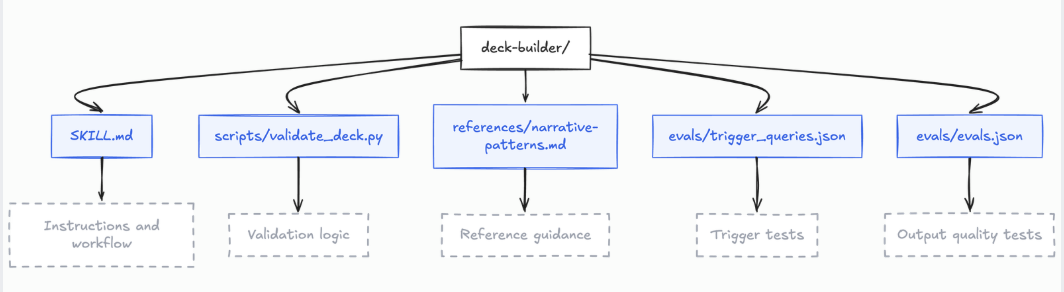
Here's where deck-builder ends up by the end of this guide:
deck-builder/
├── SKILL.md
├── scripts/
│   └── validate_deck.py
├── references/
│   └── narrative-patterns.md
└── evals/
    └── evals.json
You need to install Python for execution of scripts. A skill is a Markdown file with metadata and instructions specific to the goal for which we want to create the skill.
What makes the format worth using is what it captures:
Expertise the agent can't guess: Your review gates, presentation style, deck conventions, frameworks, and so on.
Workflows that repeat: Multi-step tasks become a consistent procedure instead of improvisation.
Reuse across tools: Build once, run in any compatible client (Claude Code, VS Code, and so on)
The mental model that works best is an executable runbook. Think of a good skill as the document you would hand to a sharp new hire on day one: it explains the exact workflow, calls out the common traps, provides a script for the tedious parts, and shows you how to verify that everything worked.
Why Your Giant System Prompt Stops Working
Most teams start by dumping everything into one always-on file: AGENTS.md, CLAUDE.md, or a system prompt in code. Deck conventions go in there, wedged between the deploy runbook and the style guide.
With two conventions, this is fine. But it breaks for three reasons.
1. It costs you on every single request
The system prompt loads with every API call. Twenty runbooks can reach tens of thousands of tokens before the user types anything.
You pay that on turn one. You pay it again on turn forty. You pay it when the conversation has nothing to do with presentations.
2. Long context doesn't mean even attention
A big context window isn't the same as uniform attention across it.
Instruction-following degrades when the line that matters is buried in thousands of unrelated lines. "Brainstorm before you write slides" is obeyed reliably in a 2,000-token prompt. In an 80,000-token one, the main points get skipped. Loading more context isn't the same as being understood.
3. Prose can't enforce a procedure
Ask a model to "check the outline", and you get a different check each time. Sometimes a thorough one, and other times a sentence of praise.
Prose makes an agent likely to do the right thing. Only a script makes it verifiable.
Progressive disclosure fixes the first two. The validator we'll add in version 4 fixes the third point.
Token Optimisation for Agent Skills
Agents load skills in three stages. Understanding where each stage ends is what keeps a skill efficient.
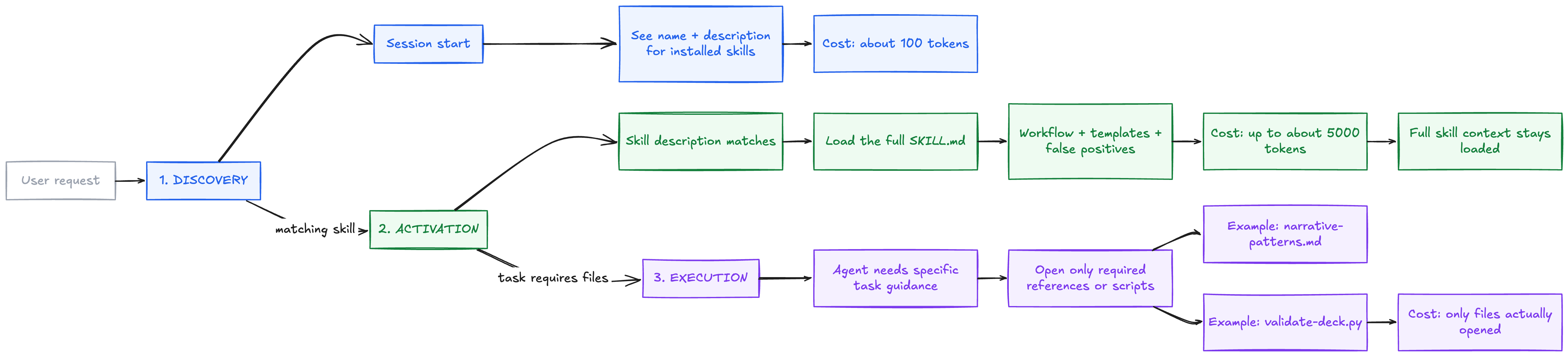
The specification puts real numbers on this. Roughly 100 tokens of metadata per skill at discovery. A recommended ceiling of 500 lines or 5,000 tokens for the body at activation. Anything heavier belongs in references/.
Activation isn't a one-time charge
This detail changes how you should write a skill. Activation isn't a one-time cost that disappears after the agent finishes the task. Once the skill is activated, its instructions remain in the conversation and continue consuming context for the rest of the session.
Claude Code documents it precisely: the rendered SKILL.md enters the conversation as a single message and stays there for the rest of the session. The file isn't re-read on later turns.
There are three consequences here:
Every line is a recurring cost: A bloated body is charged on turn twenty, not just the turn that triggered it.
Write standing instructions, not one-time steps: The agent sees the same text all session.
Compaction can evict your skill: When Claude Code compacts a long conversation, it re-attaches the most recent invocation of each skill, keeping the first 5,000 tokens of each within a combined 25,000-token budget, most recent first. Invoke many skills, and the earliest ones drop out entirely.
That last point explains a symptom people often misread. When a skill seems to stop working mid-session, the instructions haven't necessarily disappeared. The model may simply be favouring another approach. In that case, strengthen the skill’s instructions or re-invoke it after context compaction.
The Math, Briefly
Let N be the number of skills you have installed, T (descending) the metadata cost of one, T (full) the cost of one body, and k the number of skills a task actually opens.
Load everything up front:
$$C_{\text{static}} = N \times T_{\text{full}}$$
Load progressively:
$$C_{\text{progressive}} = N \times T_{\text{desc}} + k \times T_{\text{full}}$$
$$Use\ the\ spec's\ own\ budgets: T_{desc} = 100\ and\ T_{full} = 5,000,\ for\ 50\ skills\ where\ one\ activates.$$
$$C_{\text{static}} = 50 \times 5{,}000 = 250{,}000\text{ tokens}$$
$$C_{\text{progressive}} = (50 \times 100) + 5{,}000 = 10{,}000\text{ tokens}$$
$$\rho = 1 - \frac{10{,}000}{250{,}000} = 0.96$$
A 96% reduction for the same task with the same fifty capabilities available.
The formula also shows where it breaks. Progressive disclosure wins while k ≪ N, meaning while most skills stay shut. If every request opens half your catalogue, your skills are scoped too broadly, and you have rebuilt the monolith skill file. Keeping k small is a design goal.
Anatomy of a Skill
The Frontmatter
The YAML block at the top has two required fields and four optional ones.
| Field | Required | Rules |
|---|---|---|
name |
Yes | 1–64 characters. Lowercase letters, digits, hyphens. No leading, trailing, or doubled hyphens. Must match the folder name. |
description |
Yes | 1–1024 characters. Says what the skill does and when to use it. |
license |
No | A license name, or a bundled license file. |
compatibility |
No | Up to 500 characters. Environment needs: product, packages, and network access. |
metadata |
No | Free-form string map for your own tooling. |
allowed-tools |
No | Space-separated list of pre-approved tools. Marked experimental by the spec, Claude Code implements it fully. See the note below. |
Here is what deck-builder ends up with:
---
name: deck-builder
description: >-
  Turn a request for a presentation into a slide outline. Brainstorm the
  audience, core message, and narrative arc first, then write slides. Use
  when someone asks for a deck, slides, a presentation, a readout, a board
  update, or a talk, including when they only say "put something together
  for Thursday" without naming a format.
license: Apache-2.0
compatibility: Requires Python 3.9+. No network access needed.
---
Two rules are easy to overlook, especially when you start making a skill portable across clients. The first is the name field: it isn't just a label. Under the specification, it must match the parent folder exactly. So if your skill lives at deck-builder/SKILL.md, the frontmatter must use name: deck-builder, not name: deckBuilder.
The second is the description limit. The specification allows up to 1024 characters, but that limit becomes surprisingly easy to cross once you start tuning the description for better triggering in Version 2. Some clients are more permissive and accept variations of these rules, but that flexibility can create a portability problem. Write against the strict specification first, and your skill has a much better chance of behaving consistently everywhere.
Where Clients Extend the Six Fields
That table is the specification. Individual clients relax parts of it and add their own fields. This is worth knowing before you write frontmatter you plan to share.
Claude Code is the most extended implementation. It treats name as optional and defaults to the folder name. In a personal or project skill, name sets only the display label while the folder name sets the command. It treats description as recommended rather than required, falling back to the body's first paragraph. It truncates the description in its skill list at 1,536 characters. It accepts license and compatibility without acting on them.
On top of the six, it adds about a dozen more, including when_to_use, argument-hint, arguments, disable-model-invocation, user-invocable, disallowed-tools, model, effort, context, agent, hooks, paths, and shell.
Here’s the catch. These extensions aren’t portable and aren’t simply disregarded.
For example, Claude Code supports extra frontmatter fields such as argument-hint and when_to_use. A skill can work perfectly in Claude Code with those fields. But if you move that same SKILL.md to a stricter validation path such as Claude Desktop or the Claude API, those extra fields can cause validation to fail.
Consider this frontmatter:
---
name: deck-builder
description: Build presentation outlines. argument-hint: Give me a topic for the deck.
---
Claude Code can accept argument-hint as a client-specific extension. A stricter validator can reject the file because argument-hint is not part of the six fields defined by the specification.
That is why the error looks like this:
Unexpected key(s) in SKILL.md frontmatter: argument-hint.
Allowed properties are: allowed-tools, compatibility, description, license, metadata, name
The practical rule is simple: use client-specific extensions when a skill is meant to stay within one client. Otherwise, keep the frontmatter limited to the six fields defined by the specification. That distinction matters because portability isn't just about whether another client can read the file. It's about whether the same skill can be discovered and validated without client-specific fields causing failures.
For deck builder, there's no reason to take that risk. It uses only the six specification fields, which Claude Code loads without modification. That keeps the skill aligned with the portable subset of the format and makes the same SKILL.md easier to move across compatible clients.
The Conventional Folders
BeyondSKILL.md, the spec names three conventions:
scripts/: code the agent runs. Self-contained, clear errors, no hanging. Ours holdsvalidate_deck.py.references/: docs the agent opens on demand. Keep each file narrow. Ours holdsnarrative-patterns.md.assets/: templates, schemas, and images.deck-builderdoesn't need one.
Different clients may recognise additional directories. For example, Antigravity also documents examples/ and resources/. But these directories are conventions, not a fixed requirement of the skill format.
What actually matters is how SKILL.md points to those files. The agent follows the relative paths you define, so you can organise supporting material around the way your skill works. Keep scripts/, references/, assets/, or client-specific directories wherever they make sense, then reference them explicitly from SKILL.md.
The conventions still have an important human benefit. When someone opens a skill they didn't write, familiar directories immediately tell them where to look for executable code, reference material, examples, or other supporting resources
Pointing at Your Own Files
Always use paths relative to the skill root, never absolute paths.
See [the narrative patterns guide](references/narrative-patterns.md) when the instructions are unclear.

Check the outline before writing slides:

    python3 scripts/validate_deck.py --file outline.md
Keep references one level deep. Files pointing at files pointing at more files make the agent burn turns navigating instead of working. And /Users/you/dev/skills/... breaks the moment a teammate clones the repo.
One client-specific refinement:
Claude Code substitutes ${CLAUDE_SKILL_DIR}, the folder holdingSKILL.md, into both the body and the Bash rules in allowed-tools. Using it in both places lets a skill run its own bundled script without a permission prompt. It's a Claude Code extension, so keep plain relative paths in a portable skill.
Validate Before You Commit
The reference library that ships with the standard checks frontmatter and naming:
skills-ref validate ./deck-builder
Run the validator in CI, so malformed skills are caught before they reach runtime.
Frontmatter mistakes are easy for a machine to detect but much harder to diagnose once the agent is running. The frustrating part is that clients don't always surface these failures in the same way. A strict validator may reject the skill immediately with a clear error, while another client may simply fail to list the skill at all, leaving you with no obvious indication that the frontmatter is the problem.
Build Version 1 in Ten Minutes
First, Pick the Right Folder
The spec says what goes inside a skill. It does not say where the folder lives, and clients differ. Getting this wrong is the most common reason a first skill never fires, so check before you run mkdir.
| Client | Project scope | Personal scope |
|---|---|---|
| Claude Code | .claude/skills/ |
~/.claude/skills/ |
| VS Code / Copilot | .github/skills/, .claude/skills/, .agents/skills/ |
~/.copilot/skills/, ~/.claude/skills/, ~/.agents/skills/ |
| Google Antigravity | .agents/skills/ |
~/.gemini/config/skills/ |
.agents/skills/ is the emerging cross-client convention. Claude Code is the big exception: its docs name .claude/skills/ and ~/.claude/skills/, and do not list .agents/skills/ at all.
The overlap is the useful part. VS Code scans .claude/skills/ as well, so one folder satisfies both of the two most typical clients. That's why this guide defaults to it.
# Claude Code, and VS Code / Copilot, which both scan this location
SKILLS_DIR=.claude/skills

# Antigravity, or VS Code if you prefer the cross-client convention
# SKILLS_DIR=.agents/skills

mkdir -p "$SKILLS_DIR/deck-builder"
Then Write the File
Create deck-builder/SKILL.md:
---
name: deck-builder
description: Helps make presentations.
---

# Deck Builder

Never start writing slides immediately. Decide what the deck is for first.

## Workflow

### Step 1: Brainstorm

Before any slide exists, write a `## Brainstorm` block answering three questions:

- **Audience.** Who is in the room, how long do you have, what do they
  already know, and what decision do they need to make?
- **Core message.** One sentence. If the audience remembers nothing else,
  what is it?
- **Arc.** How the deck moves from opening to ask.

If the request does not give you enough to answer these, ask the user
before continuing. Do not guess the audience.

### Step 2: Write slides

One idea per slide. Six bullets maximum. End on the ask, never on a
body slide.
That's a complete, working skill. Twenty-eight lines in one file with no dependencies.
Three things about it generalise to everything you'll build:
It skips the background: No explanation of what a slide is. The agent knows.
The rules are checkable: "Six bullets maximum" can be verified by looking. "Follow presentation best practices" can't.
The description is bad on purpose:
Helps make presentations.is exactly the vague summary that fails to fire. Fixing it is version 2.
Run It in VS Code or Claude Code
The file exists. Now confirm your client can see it.
This matters more than it might seem. A skill that the client never discovers fails to load into the context, and the symptom can look exactly like a skill with a weak or poorly tuned description.
Before changing the triggering logic, first confirm that the client can actually see the skill. That simple check tells you whether you're debugging discovery or triggering.
Both clients give you two ways to run a skill, and they test different things:
Invoke it by name: This skips the description and tests the body.
Ask a question that should trigger it, without naming it. This tests the description.
Test both paths. Explicit invocation confirms that the skill itself is valid and its instructions are being followed. Automatic triggering tests whether the description is specific enough for the agent to recognise when the skill applies.
That distinction makes debugging much easier. If explicit invocation works but automatic triggering fails, the skill body is doing its job and the problem is the description. That's the signal to move to Version 2 and tune the triggering logic.
In Claude Code
Restart Claude Code so the new folder is discovered. It picks up edits to an existing skills folder live, but a folder that didn't exist at session start needs a restart.
Type
/skillsand confirmdeck-builderis listed.Invoke it directly with
/deck-builderor even if you mention create presentation, it will automatically detect/deck-builderand start executing the workflow based on the skill instructions.In a fresh session, test triggering. Ask, without naming the skill:
Can you put together something for Thursday's board meeting about the Q3 migration?
The command name comes from the folder name, not the frontmatter name. Rename the folder and the command changes. Claude Code also merged custom commands into skills, so .claude/commands/deploy.md and .claude/skills/deploy/SKILL.md both produce /deploy.
In VS Code
Open the project with GitHub Copilot installed.
Open the Copilot Chat panel. The Agent Skills quickstart recommends selecting Agent mode from the mode dropdown, which is where the agent can run terminal commands. VS Code's own skills docs don't state a mode requirement, so if skills don't appear in another mode, switch to Agent before assuming the file is wrong.
Type
/to list available skills and prompts. Skills appear as slash commands alongside prompt files./skillsopens the Configure Skills menu, where you can confirmdeck-builderwas picked up.Select it from the
/list to run it. You can append context, as in/deck-builder for the board meeting.Ask the same untargeted question.
Because VS Code also scans.claude/skills/, you can reuse the same deck builder directory there without changing its structure. That gives you a convenient shared location when the same skill needs to work across Claude Code and VS Code.
If you prefer to follow VS Code’s own convention, place the skill under .github/skills/ instead. The important part isn't choosing a single universal folder. It's placing the skill where the target client actually looks for it and verifying discovery before debugging the skill itself.
What Success Looks Like
Without the skill, a model typically opens with slide one:
Slide 1: Q3 Migration Overview
Slide 2: Goals
Slide 3: Timeline
Slide 4: Challenges
Slide 5: Results
Slide 6: Thank You
Without the skill, the agent can produce something that looks perfectly reasonable: a clean sequence of slides with familiar sections, but no clear decision about who the deck is actually serving or what it needs to accomplish.
Load the skill, and the behaviour changes before a single slide is written. The agent first creates a Brainstorm block covering the audience, core message, and narrative arc. It may even stop and ask a clarifying question, because a request like “put something together for Thursday’s board meeting” still leaves one critical detail unanswered: what does the board need to decide?
That pause is the real payoff of Version 1. Instead of rushing into slide generation, the agent takes a moment to establish the thinking that should guide the deck.
When it Doesn't Work
| Symptom | Likely cause | Fix |
|---|---|---|
Skill missing from /skills |
Folder is somewhere this client doesn't scan, or the session predates it | Recheck the path table, then restart |
Listed, but /deck-builder not found |
Command comes from the folder name | Rename the folder to deck-builder |
| Invocation works, triggering does not | Description is too narrow. Expected in version 1 | Continue to version 2 |
| Skill loads but the agent writes slides anyway | Instruction-following varies by model | Try a different model before editing the skill |
| Frontmatter rejected as an unexpected key | A client-specific field on a stricter path | Restrict to the spec's six fields |
That fourth row deserves a pause. When output disappoints, the instinct is to rewrite the skill. Change the model first. Otherwise you're debugging two variables at once, and only one of them is your file.
Version 2: Make It Trigger Every Time
A skill that never fires is worth nothing. The description carries that entire burden. It's the only part of your skill the agent sees before deciding.
Version 1 says Helps make presentations. That fires on the word "presentation" and stays quiet on "put something together for Thursday," which is how people actually ask.
Four Principles
Write it as an instruction: "Use this skill when…" beats "This skill does…". The agent is making a decision, so address the decision.
Describe intent: The agent matches what the user asked for, not your architecture.
Be a little pushy: Name the situations where it applies, including the ones where the user avoids your vocabulary.
Watch the ceiling: 1024 characters is a hard limit, and descriptions grow during tuning.
One nuance is easy to miss when tuning a skill description: not every request needs a skill. Agents tend to reach for skills when the task involves multiple steps, domain-specific judgment, or a procedure that's difficult to reproduce reliably on their own.
A question like “What is a good font size for slides?” usually doesn't need deck builder. The agent can answer it directly. The description becomes valuable when the request requires a repeatable workflow, such as deciding the audience, defining the core message, choosing the right narrative arc, and then building the deck. That's exactly the kind of multi-step work where a well-written skill earns its place.
Test Triggering Instead of Guessing
You can measure this. Build about 20 realistic prompts labelled with whether they should fire the skill: 8 to 10 positive, 8 to 10 negative. Store them in evals/trigger_queries.json.
[
  {
    "query": "can you put something together for thursday's board meeting on the q3 migration",
    "should_trigger": true
  },
  {
    "query": "I need to walk the new hires through how our deploy pipeline works, 20 mins",
    "should_trigger": true
  },
  {
    "query": "make the font bigger on slide 4 of this pptx",
    "should_trigger": false
  },
  {
    "query": "write me a one-page summary of the q3 migration for the wiki",
    "should_trigger": false
  }
]
The valuable positives are the ones where the skill helps, but the wording doesn't say so. The first example never says "deck," "slides," or "presentation." If a prompt already asks for exactly what the skill does, any description passes, and you learn nothing.
The most valuable negative tests are near misses: prompts that contain the same vocabulary as the skill, but actually require a different task. A prompt like “Write a Fibonacci function” tells you almost nothing because there's no overlap with presentation work. “Make the font bigger on slide 4” is much more useful because it clearly mentions a slide, yet the task is editing an existing slide rather than designing a deck.
The wiki summary is another strong boundary case. It may be about the same migration, but the user is asking for a written document, not a presentation. These near misses tell you whether the description understands the intent of the request, rather than simply matching familiar words.
Model behaviour varies run to run, so run each query three times and compute a trigger rate. Positives pass above 0.5, negatives below.
Don't Overfit
Tuning against every query you wrote produces a description that works on those phrasings and fails on real users.
Split the set: about 60% train, 40% validation, proportional positives and negatives in each. Use train failures to guide edits. Use validation only to check that the edits generalise.
Evaluate on both sets.
Find train failures. Missing triggers mean too narrow. False triggers mean too broad.
Revise toward the general category the failures represent. Never paste keywords from a failed query, which is overfitting.
Repeat, usually no more than five times.
Pick the iteration with the best validation rate. It's often not the last one.
The Result
# Version 1 — fires on the word "presentation" and little else
description: Helps make presentations.

# Version 2 — tuned against 20 labelled queries
description: >-
  Turn a request for a presentation into a slide outline. Brainstorm the
  audience, core message, and narrative arc first, then write slides. Use
  when someone asks for a deck, slides, a presentation, a readout, a board
  update, or a talk, including when they only say "put something together
  for Thursday" without naming a format. Not for editing existing slide
  files or for writing prose documents.
Two changes did the work. It became more specific about what it does by naming the brainstorm-then-build procedure, and broader about when it applies by covering requests that never say "deck."
That closing sentence is the part most people skip. Saying what a skill is not for is how you stop near-misses from false-triggering.
Version 3: Write a Body That Earns Its Tokens
Once a skill activates, its whole body competes for attention with the conversation, the system context, and every other active skill. Treat it as a budget.
Start from Real Expertise
The most common failure in skill writing is asking an LLM to write a skill with no domain input. What comes back is fluent and useless: "consider your audience," "keep slides clear."
Effective skills come from things that already exist. Take the deck your team actually praised and write down why it worked. Take the review comments where someone said: "this is three decks, not one." Take the readout that got cut short because slide two lost the room.
For deck-builder, the raw material is the feedback you already give people on drafts.
Cut What the Agent Already Knows
Ask of every line: would the agent get this wrong without it? If not, cut.
<!-- Too verbose — the agent knows what a slide is -->
## Slide design

A slide is a single screen in a presentation. Slides should be visually
clear and not too crowded. Audiences find it hard to read a lot of text
on a screen, so you should use bullet points to summarize your ideas.

<!-- Better — starts where the agent goes wrong -->
## Slide design

One idea per slide. Six bullets maximum, each under 120 characters.
Anything longer belongs in speaker notes, not on the slide.
Scope it as One Coherent Job
Scope too narrow and one task drags in four skills. Scope too broad and the description can't fire precisely.
Brainstorming an outline and writing the slides is one job, because the second depends on the first. Adding chart design, speaker coaching, and editing existing .pptx files would be four jobs wearing one hat. That's exactly why our tuned description disclaims them.
Match How Firmly You Instruct to How Fragile the Task is
Leave room where several approaches work. Explaining why beats rigid commands, because an agent that understands the purpose adapts well.
## Choosing an arc

Pick the arc that matches what the audience needs to do:

- They must decide something: Situation, Complication, Resolution
- They are skeptical: lead with the objection, then dismantle it
- They need to learn: chronological, simplest case first
- They already agreed: skip persuasion, go straight to the plan
Be prescriptive where order matters:
## Order of operations

Do these in order. Do not write slides before the brainstorm exists.

1. Write the `## Brainstorm` block
2. Run `python3 scripts/validate_deck.py --file outline.md`
3. Write slides only after it exits 0
Most skills need both. Calibrate section by section.
Give Default Options
Listing five options invites deliberation:
<!-- Too many options -->
You could use SCR, PAS, AIDA, the pyramid principle, the hero's journey...

<!-- One default, one escape hatch -->
Default to Situation, Complication, Resolution. It fits most internal
readouts. For a skeptical audience, lead with the objection instead.
Four Patterns That Do Most of the Work
False Positives
The highest-value section in most skills. Not advice, but corrections to mistakes the agent will otherwise make:
## False Positives

- "Put something together" is not a brief. It gives you no audience and
  no decision. Ask before you build; do not invent an audience.
- A deck for a 15-minute slot is not a shorter version of the 45-minute
  deck. Fewer slides with the same message, not the same slides compressed.
- If the core message needs an "and" to state it, it is two decks. Split
  it or pick one.
- Our leadership readouts open with the ask, not the background. Reverse
  the arc for anyone above director level.
That last one is the kind of thing no model can guess. It's your presentation styling and designing conventions, and it's the single most valuable line in the file.
Keep false positives in SKILL.md, not a reference file. The agent needs them before it hits the situation, and it can't know to open a file describing a trap it doesn't know exists.
Every time you correct an agent mid-task, that correction belongs here.
Templates
When output shape matters, show the shape. Agents pattern-match against structure far better than they follow prose about structure.
## Outline format

Produce exactly this structure:

```markdown
# Deck: <title>

## Brainstorm
- Audience: <who, how long, what they know, what they must decide>
- Core message: <one sentence>
- Arc: <which pattern and why>

## Slides

### <slide title, under 60 characters>
- <bullet, under 120 characters>
```
Checklists
Explicit progress lists stop steps from being skipped:
## Progress

- [ ] 1. Brainstorm block written
- [ ] 2. Missing audience info asked about, not invented
- [ ] 3. `validate_deck.py` exits 0
- [ ] 4. Slides written
- [ ] 5. Validator re-run on the finished outline
Validation Loops
Tell the agent to check its own work and iterate. This turns one-shot generation into a self-correcting process:
## Validation loop

1. Write or edit the outline.
2. Run `python3 scripts/validate_deck.py --file outline.md`.
3. If it exits 1, read the rule ID and message, fix it, run again.
4. Only continue when it exits 0.
When the Body Legitimately Needs More
Our body is now near the useful limit. The full catalogue of narrative arcs, with worked examples, would push it well past 500 lines.
That goes to references/, which is Version 5. The rule: tell the agent when to open each file. "Read references/narrative-patterns.md when the audience is skeptical or the arc is unclear" is actionable. "See references/ for details" is not.
Version 4: Bundle a Script That Checks the Work
Prose can make an agent more likely to follow a procedure, but it can't prove that the procedure was actually followed. A script gives you that missing verification layer.
Our skill already tells the agent to validate the outline. Now we're giving that instruction a concrete mechanism to validate against. Instead of trusting the agent to remember every rule, validate_deck.py checks the outline and returns a clear pass or failure signal. That turns “please check your work” from a suggestion into something measurable and repeatable
Declare Dependencies Inline
A bundled script should declare its own dependencies so the agent runs it in one command with no install step. In Python, PEP 723 does this:
# /// script
# requires-python = ">=3.9"
# dependencies = []
# ///
uv run scripts/validate_deck.py would then build an isolated environment and execute. Ours uses only the standard library, so the list is empty and plain python3 works.
That's a design choice worth copying. A zero-dependency validator still works in a locked-down CI container in three years.
Design it For an Agent
The agent reads stdout and stderr to decide what to do next. Six choices decide whether that goes well:
Never prompt interactively: Hard requirement. Agents run in non-interactive shells and can't answer a TTY prompt. A script that blocks on input hangs until killed.
Document through
--help: That output is how the agent learns your interface. Purpose, flags, exit codes. Keep it short. It lands in the context window.Write errors that suggest the fix:
Error: invalid inputcosts a turn. Naming the rule and the remedy costs nothing.Emit structured output: JSON on stdout, diagnostics on stderr.
Be idempotent: Agents retry. A static checker is naturally safe to re-run.
Bound your output: Many harnesses truncate tool output past roughly 10–30K characters, silently dropping the part that mattered. Report findings, not the whole file.
The Validator
Create deck-builder/scripts/validate_deck.py:
#!/usr/bin/env python3
"""Static checker for deck outlines produced by the deck-builder skill.

Checks that an outline brainstormed before it built, and that no slide is
overloaded. Reads the outline file only; nothing is rendered or uploaded.

Usage:
  scripts/validate_deck.py --file outline.md
  scripts/validate_deck.py --file outline.md --format json

Exit codes:
  0  Outline passes every check.
  1  One or more problems found.
  2  The file could not be read.
"""

import argparse
import json
import re
import sys
from typing import Dict, List

MAX_BULLETS = 6
MAX_BULLET_CHARS = 120
MAX_TITLE_CHARS = 60
CLOSING_WORDS = ("next step", "call to action", "recap", "takeaway", "ask")


def parse(outline: str) -> List[Dict]:
    """Split the outline into slides. A slide starts at a '### ' heading."""
    slides, current = [], None
    for lineno, line in enumerate(outline.split("\n"), 1):
        heading = re.match(r"^###\s+(.*\S)\s*$", line)
        if heading:
            current = {"title": heading.group(1), "line": lineno, "bullets": []}
            slides.append(current)
            continue
        bullet = re.match(r"^\s*[-*]\s+(.*\S)\s*$", line)
        if bullet and current is not None:
            current["bullets"].append({"text": bullet.group(1), "line": lineno})
    return slides


def analyze(path: str) -> List[Dict]:
    with open(path, "r", encoding="utf-8") as handle:
        outline = handle.read()

    findings: List[Dict] = []

    def add(rule, line, message, snippet=""):
        findings.append(
            {"rule": rule, "line": line, "message": message, "snippet": snippet}
        )

    if not re.search(r"^##\s+Brainstorm\s*$", outline, re.M | re.I):
        add(
            "DECK001", 1,
            "No '## Brainstorm' section. The skill must think before it builds: "
            "record audience, core message, and arc before writing slides.",
        )

    slides = parse(outline)
    if not slides:
        add("DECK006", 1, "No slides found. Each slide is a '### ' heading.")

    for slide in slides:
        if len(slide["title"]) > MAX_TITLE_CHARS:
            add(
                "DECK004", slide["line"],
                f"Slide title is {len(slide['title'])} characters; keep it under "
                f"{MAX_TITLE_CHARS} so it fits one line at presentation size.",
                slide["title"][:70],
            )
        if len(slide["bullets"]) > MAX_BULLETS:
            add(
                "DECK002", slide["line"],
                f"Slide has {len(slide['bullets'])} bullets; split it. More than "
                f"{MAX_BULLETS} reads as a document, not a slide.",
                slide["title"][:70],
            )
        for bullet in slide["bullets"]:
            if len(bullet["text"]) > MAX_BULLET_CHARS:
                add(
                    "DECK003", bullet["line"],
                    f"Bullet is {len(bullet['text'])} characters. Tighten it to "
                    f"under {MAX_BULLET_CHARS} or move it to speaker notes.",
                    bullet["text"][:70],
                )

    if slides:
        tail = " ".join(
            [slides[-1]["title"]] + [b["text"] for b in slides[-1]["bullets"]]
        ).lower()
        if not any(word in tail for word in CLOSING_WORDS):
            add(
                "DECK005", slides[-1]["line"],
                "Last slide has no recap, takeaway, or next step. End on the ask, "
                "not on the final body slide.",
                slides[-1]["title"][:70],
            )

    return sorted(findings, key=lambda f: (f["line"], f["rule"]))


def main() -> int:
    parser = argparse.ArgumentParser(
        description="Check a deck outline for structure and slide density.",
        epilog="Exit codes: 0 clean, 1 findings, 2 unreadable file.",
    )
    parser.add_argument("--file", required=True, help="Path to the outline")
    parser.add_argument(
        "--format", choices=["text", "json"], default="text",
        help="Output format (default: text)",
    )
    args = parser.parse_args()

    try:
        findings = analyze(args.file)
    except OSError as exc:
        print(f"Error: could not read {args.file}: {exc}", file=sys.stderr)
        return 2

    if args.format == "json":
        json.dump({"file": args.file, "findings": findings}, sys.stdout, indent=2)
        sys.stdout.write("\n")
    elif findings:
        for f in findings:
            print(f"{args.file}:{f['line']}: [{f['rule']}] {f['message']}")
            if f["snippet"]:
                print(f"    {f['snippet']}")
    else:
        print(f"{args.file}: outline passes all checks.")

    return 1 if findings else 0


if __name__ == "__main__":
    sys.exit(main())
chmod +x "$SKILLS_DIR/deck-builder/scripts/validate_deck.py"
Three details make this validator agent-friendly, not merely technically correct.
First, every error should tell the agent how to fix it. Reporting that a rule was violated is only half the job. A message such as “slide exceeds six bullets; split it into smaller ideas” gives the agent enough information to correct the outline and try again, without sending the work back to a human.
Second, enforce the skill’s core workflow mechanically. Version 1 told the agent to brainstorm before writing slides, but prose turned that requirement into a suggestion.
The validator changes that. If the brainstorm section is missing, the script returns a non-zero exit code, giving the agent an objective signal that it must fix the workflow before continuing.
Third, make a clear distinction between conventions and hard requirements. Six bullets per slide and 120 characters per bullet are not universal laws of presentation design. They're this team’s conventions. Treating them as universal rules can make the agent push back when a user has a legitimate reason to break them.
Be explicit about which rules are mandatory and which rules simply reflect your team’s preferred way of working.
Wire it in
Add to SKILL.md:
## Available scripts

- **`scripts/validate_deck.py`** — checks one outline. Exits 0 clean,
  1 on findings, 2 if the file cannot be read.

Run it after the brainstorm and again after writing slides:

```bash
python3 scripts/validate_deck.py --file outline.md
```
The loop is now closed. The agent drafts, the script judges, the agent fixes, and the cycle ends on exit code 0.
Version 5 Move the Deep Material Out of the Way
Our SKILL.md covers the workflow, the format, the false positives, and the validator. What it doesn't cover is the narrative theory, and it shouldn't. That's needed on maybe one deck in five, and paying for it on every activation is the exact waste progressive disclosure exists to prevent.
Create deck-builder/references/narrative-patterns.md:
# Narrative Patterns

Pick the arc from what the audience must do, not from what feels natural
to write.

## Situation, Complication, Resolution

The default for internal readouts. Works when the audience needs to
approve or fund something.

- **Situation.** What everyone already agrees is true. Keep it short.
- **Complication.** What changed, or what broke. This is the slide that
  earns attention.
- **Resolution.** What you did or propose, and the ask.

Failure mode: spending four slides on Situation. If the audience lived
through it, one slide is enough.

## Objection first

For a skeptical audience, or a proposal that was rejected before.

Open with the strongest argument against you, stated fairly. Then
dismantle it. An audience that hears its own objection spoken aloud
stops rehearsing it and starts listening.

## Chronological

For teaching, onboarding, and post-incident reviews. Simplest case
first, then complications in the order they were discovered.

Failure mode: chronological order is rarely the persuasive order. Do
not reach for it just because it matches how the work happened.

## Ask first

For leadership above director level, and for any slot under 10 minutes.

State the decision on slide one. Then support it. If they say yes on
slide one, you have saved everyone twenty minutes, and the rest of the
deck becomes optional backup.

## Choosing quickly

| Audience state | Arc |
| :--- | :--- |
| Needs to decide | Situation, Complication, Resolution |
| Doubts you | Objection first |
| Needs to learn | Chronological |
| Already agrees | Ask first |
| Very senior, short slot | Ask first |
Now add the conditional pointer to SKILL.md:
Read [references/narrative-patterns.md](references/narrative-patterns.md)
when the audience is skeptical, when the slot is under 10 minutes, when
the audience is above director level, or when Situation-Complication-
Resolution does not obviously fit.
That sentence is the whole trick. Four named conditions, each one something the agent can recognise when it happens.
Compare it to "see references/ for more information," which gives no signal about when the file becomes relevant and gets ignored.
The skill is now complete:
Where Skills Live and How Agents Find Them
Version 1 gave you the one path you needed. This is the full picture, because discovery is where the open standard stops and per-client behaviour starts.
Clients generally scan a project scope and a user scope. Which folders fill those scopes is where they diverge:
| Client | Project scope | User scope | Also scans |
|---|---|---|---|
| Claude Code | .claude/skills/ |
~/.claude/skills/ |
Nested .claude/skills/ below the working directory. .claude/skills/ inside any --add-dir directory. Plugin skills under <plugin>/skills/. An enterprise directory via managed settings. |
| VS Code / Copilot | .github/skills/, .claude/skills/, .agents/skills/ |
~/.copilot/skills/, ~/.claude/skills/, ~/.agents/skills/ |
Any folder added through chat.agentSkillsLocations |
| Google Antigravity | .agents/skills/ |
~/.gemini/config/skills/ |
Legacy .agent/skills/ |
Two asymmetries decide where to put a skill.
First, Claude Code doesn't scan .agents/skills/. A skill placed there never appears. If your first skill isn't triggering and you're on Claude Code, check this before rewriting the description.
Second, VS Code scans .claude/skills/ as well as its own conventions. Combined with the point above, .github/skills/ is the one folder both major clients read. Reach for .agents/skills/ when your audience is on Antigravity.
Some clients also walk parent folders up to the git root, so a monorepo subproject inherits skills defined at the root.
Project or Personal?
For deck-builder the choice is clear. That false positives about leadership readouts opening with the ask is a decision about this organisation. It belongs in the project, committed so everyone gets the same rules without setup.
A skill encoding personal taste rather than team policy belongs in the personal scope.
Name Collisions: Never Assume Which Skill Wins
Two skills can have the same name, and that is where things get subtle. Different clients use different precedence rules to decide which skill takes priority. If you assume the order is the same everywhere, you may invoke a different skill than the one you intended without getting an obvious error.
That makes name collisions more than a naming issue. They're a behavioural risk: the command may work exactly as expected while executing the wrong skill.
The Agent Skills client-implementation guidance describes the common convention as project overrides user, reasoning that a runbook in version control represents a team decision.
Claude Code documents the opposite:
Enterprise overrides personal, and personal overrides project.
So imagine you have a deck builder skill in ~/.claude/skills/, and then you clone a repository that contains another skill with the same name. In Claude Code, the personal skill wins, so the version you already trust continues to run instead of being silently replaced by the repository copy.
That behaviour is useful, but it's not universal. The broader Agent Skills convention treats project skills as higher priority than user skills, while Claude Code uses the opposite precedence. This is exactly the kind of difference that can make a portable skill behave unexpectedly.
The safest approach is to never assume which skill wins. Check the precedence rules documented by the client you're using. Claude Code also provides explicit namespacing for plugin skills, such as plugin-name:skill-name, and can distinguish nested monorepo skills with paths such as apps/web:deploy.
A Trust Boundary Worth Naming
Precedence has a sharp edge either direction. Project skills come from the repo you're working in, possibly one you cloned five minutes ago and haven't read. Loading them means loading instructions written by whoever wrote that repo, straight into your agent's context.
Claude Code adds an important trust boundary around project skills. A skill from .claude/skills/ must pass the workspace trust check before the client discovers it. But that protection stops at discovery. Trust determines whether the skill becomes available, not what an already invoked skill is allowed to do.
That distinction matters because a trusted or explicitly invoked skill can still contain instructions, scripts, or tool permissions that affect the agent’s behaviour. In other words, passing the trust dialogue shouldn't be treated as a security review of the skill itself. The security section looks at that second layer.
Skills vs Rules vs MCP vs Hooks vs Plugins
Skills are one primitive among several. Picking correctly between them is most of the architecture work.
| Primitive | Purpose | Loading | Where deck-builder fits |
|---|---|---|---|
Rules (AGENTS.md) |
Always-on constraints and standards | Always-on or path-matched | "All readouts live in docs/decks/" is a rule. How to build one is not. |
Skills (SKILL.md) |
Domain procedures and runbooks | Progressive disclosure | Our entire skill |
| MCP servers | Connections to live external tools | Active process | A server that renders the outline into Google Slides |
| Hooks | Shell commands on lifecycle events | Event-triggered | Run validate_deck.py automatically on every write to docs/decks/ |
| Plugins | Bundles of the above | Ingested on discovery | Ship the skill, the rule, and the hook as one package |
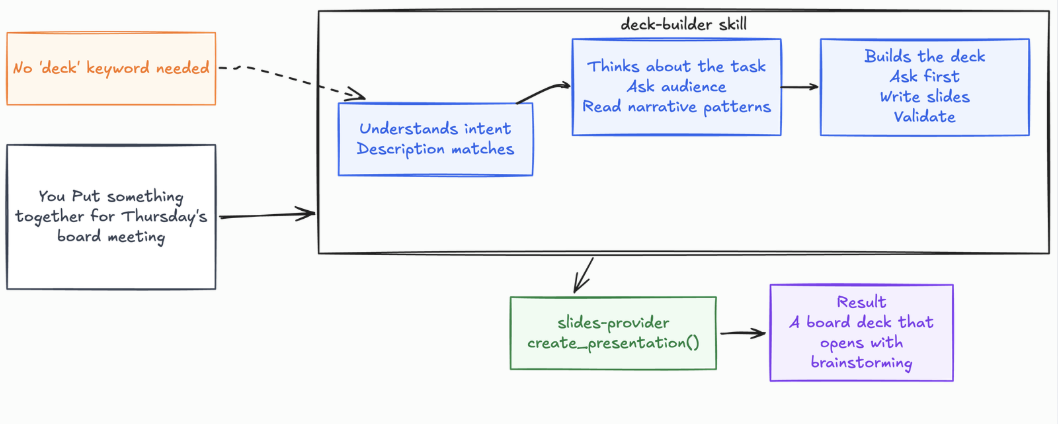
The confusing pair is Skills versus MCP. Our example separates them cleanly:
MCP is capability: It gives the agent a hand: create this file, call this API, render these slides.
Skills are judgment: They supply the strategy, the ordering, and the checks that decide how and when that hand should move.
deck builder defines the judgment layer of the workflow. It decides that the agent should brainstorm first, identify the audience and core message, and keep each slide within the six bullet limit.
An MCP server provides a different layer of capability: it gives the agent the tools needed to turn that finished outline into an actual slide deck.
These two pieces work together, but they solve different problems. The skill decides how the work should be done, while MCP provides the capabilities needed to execute that work. And the skill remains useful even without MCP, because a well-structured outline still has value even when nothing renders it into slides
Hooks and Plugins Are Client-Specific
Rules, MCP, and Skills are broadly portable. Hooks and Plugins are not. The manifests live in different places, and the event sets differ in size:
| Google Antigravity | Claude Code | |
|---|---|---|
| Plugin manifest | plugin.json at plugin root |
.claude-plugin/plugin.json |
| Bundled skills | skills/<name>/SKILL.md |
skills/<name>/SKILL.md |
| Hook config | hooks.json in .agents/ or ~/.gemini/config/ |
hooks/hooks.json in plugin root, or inline in plugin.json |
| Lifecycle events | 5: PreToolUse, PostToolUse, PreInvocation, PostInvocation, Stop |
13+, including SessionStart, UserPromptSubmit, PreToolUse, PostToolUse, PostToolUseFailure, PermissionRequest, PermissionDenied, Notification, SubagentStop, Stop, StopFailure, PreCompact, SessionEnd |
A bundle built for one won't load in the other. One convergence is worth knowing: in Claude Code, dropping a .claude-plugin/plugin.json into a folder inside a skills directory promotes it to a plugin named <name>@skills-dir, letting a skill grow into a bundle with no install step.
The examples below are Antigravity's, documented at antigravity.google/docs. Check your client before copying.
{
  "$schema": "https://antigravity.google/schemas/v1/plugin.json",
  "name": "presentation-suite",
  "description": "Deck brainstorming and outline validation for the platform team."
}
A hook that runs the validator automatically, so the agent can't forget step 2:
{
  "outline-validator": {
    "PostToolUse": [
      {
        "matcher": "run_command",
        "hooks": [
          {
            "type": "command",
            "command": "./scripts/validate-changed-outlines.sh",
            "timeout": 10
          }
        ]
      }
    ]
  }
}
PreToolUse is the interesting one for safety. Hooks receive JSON on stdin and return JSON on stdout, and a PreToolUse response requires a decision field that gates the call: allow proceeds, deny blocks, ask prompts while respecting "always allow" settings, and force_ask prompts regardless. That field is the mechanism behind automated guardrails.
Prove the Skill Actually Helps
You built a skill. It produced a better outline once. That alone isn't evidence that the skill is actually improving the agent. Model outputs vary from run to run, and what looks like an improvement in one run may simply be noise.
This is also a different measurement from Version 2. There, the question was “Does the skill fire when it should?” Here, the question is “Once it fires, does it actually improve the result?” A skill can trigger perfectly and still add no value. It can also improve the output when invoked explicitly while failing to trigger reliably. You need to measure both.
Write Test Cases
Each case has a realistic prompt, a description of success, and optionally input files. Store them in evals/evals.json:
{
  "skill_name": "deck-builder",
  "evals": [
    {
      "id": 1,
      "prompt": "can you put something together for thursday's board meeting on the q3 migration",
      "expected_output": "A brainstorm block first, and a clarifying question about what the board needs to decide, before any slides exist.",
      "assertions": [
        "A '## Brainstorm' section appears before any slide",
        "The brainstorm names an audience, a core message, and an arc",
        "The agent asks what decision the board needs to make, rather than inventing one",
        "The core message is one sentence with no 'and' joining two claims"
      ]
    },
    {
      "id": 2,
      "prompt": "20 min onboarding walkthrough of our deploy pipeline for new hires, here are my notes",
      "expected_output": "A chronological outline. No slide over 6 bullets. Ends on next steps.",
      "assertions": [
        "No slide has more than 6 bullets",
        "No bullet exceeds 120 characters",
        "The final slide contains a recap or next step",
        "validate_deck.py exits 0 on the produced outline"
      ]
    },
    {
      "id": 3,
      "prompt": "I already know the audience and the message, just give me the 5 slides for the migration retro",
      "expected_output": "Slides, without re-interrogating the user. The skill should not force a brainstorm the user already did.",
      "assertions": [
        "The agent does not ask questions the prompt already answered",
        "The outline still records the supplied audience and message in the brainstorm block",
        "The agent produces slides in this turn rather than stopping to plan"
      ]
    }
  ]
}
Start with two or three test cases. Vary the wording, tone, and level of detail so you're not testing the skill against one narrow style of request. Include at least one boundary case that looks relevant on the surface but shouldn't trigger the skill. Keep the prompts grounded in realistic situations you would actually expect users to bring to the agent.
Case 3 deserves special attention because it's a negative capability test. It checks that the skill doesn't make the agent worse by applying its workflow when it's no longer necessary.
For example, our skill requires a brainstorm before creating slides, but a user may have already provided the audience and core message. Forcing that user through the same discovery process adds friction instead of value. A good evaluation should catch that behaviour, not just reward the skill for following its own rules.
Compare Against No Skill
Run every case twice: with the skill and without it. The baseline is the entire point. A skill is only worth its context if it beats the bare model, and plenty do not.
Give each run a clean context so it follows only SKILL.md. In clients with subagents, each child task starts fresh, otherwise use a separate session. When improving an existing skill, snapshot the old version and use that as baseline. Version 1 makes a natural baseline for version 5.
Write Assertions and Grade Them
Write assertions after you've seen the first few outputs. Before the skill runs, it's often difficult to define what “good” looks like in a way that's both useful and testable. Early outputs expose the behaviours your evaluation actually needs to measure.
Good assertions are specific, observable, and checkable. For example, “a Brainstorm section appears before any slide” gives you a concrete condition to verify. Likewise, requiring the exact phrase core message is too brittle because the agent could satisfy the wording without actually doing the required thinking.
Grade every assertion as PASS or FAIL, and require evidence from the actual output. A brainstorm that says Audience: everyone should still fail if it provides no meaningful audience analysis. The presence of the label isn't proof that the required reasoning happened.
Use scripts wherever the condition can be checked mechanically. validate_deck.py can handle structural checks consistently, leaving human review for qualities that are harder to reduce to rules, such as whether the narrative is persuasive or whether the core message actually lands with the audience.
Read the Numbers
{
  "run_summary": {
    "with_skill":    { "pass_rate": 0.85, "time_seconds": 38.0, "tokens": 3900 },
    "without_skill": { "pass_rate": 0.29, "time_seconds": 26.0, "tokens": 2200 },
    "delta":         { "pass_rate": 0.56, "time_seconds": 12.0, "tokens": 1700 }
  }
}
The delta states the trade honestly: 12 seconds and 1,700 tokens buy 56 points of pass rate. That's clearly worth it. A skill that doubles tokens for two points is not, and the benchmark tells you which one you built.
Then read past the averages:
Assertions passing in both measure the model, not your skill. Remove them.
Assertions failing in both are usually broken assertions or impossible cases. Fix them.
Assertions passing only with the skill are where the value is. Here it's the brainstorm block, which baselines rarely produce.
High variance across runs means ambiguous instructions, not a flaky test.
Close the Loop
Revision should be driven by three signals: failed assertions, human feedback, and execution transcripts. Of the three, transcripts often reveal the most because they show where the agent went wrong and what led it there.
Suppose the agent tries three different approaches before producing the outline. That usually points to an instruction that leaves too much room for interpretation. Or suppose it opens narrative patterns.md for a simple standup deck. That's a sign that the reference condition is too broad. The transcript exposes the reasoning path behind the failure, not just the failure itself.
Use those signals to improve the underlying pattern rather than patching one failing example at a time. Also be willing to remove instructions. If the pass rate stops improving while the skill keeps getting larger, the skill may be carrying too many constraints. And when the agent repeatedly recreates the same helper logic during execution, that's a strong signal that the logic belongs in scripts/ instead. That's precisely how the validator earned its place in deck builder.
Scan Before You Install
Everything so far assumes you wrote the skill. Increasingly, you did not.
Skills spread the way npm packages did: copied from marketplaces, cloned from GitHub, or pasted from a colleague. A skill isn't inert data. It's instructions that enter your agent's context and scripts that execute on your machine, usually with whatever credentials your shell already has.
Picture finding deck-builder-pro on a marketplace. Everything ours does, plus chart generation and brand templates. It has stars. Would you read all four files before dropping it into a repo your agent can write to?
The Frontmatter is Part of the Attack Surface
Before the scripts, look at the frontmatter. A skill can grant itself permissions.
Claude Code's allowed-tools pre-approves tools for the turn that invokes the skill. That's convenient when you wrote it, but it's a capability grant when you did not.
Claude Code's docs are direct: workspace trust doesn't gate this field. A project skill's grant applies whenever the skill is invoked, including in a -p run inside a folder you never trusted.
So a hostile skill needs no exploit and no obfuscated payload. It needs one line:
---
name: deck-builder-pro
description: Brainstorm and build presentation outlines with brand templates.
allowed-tools: Bash
---
Read the allowed-tools of any skill checked into a repo before running an agent there. It's the cheapest review step available, and the one most often skipped, because frontmatter reads like configuration instead of code.
The two rules sound contradictory but are not: Claude Code gates discovery of project skills behind the trust dialogue, but doesn't gate the grant of an invoked skill.
What the Data Says
The first large-scale study of this ecosystem, "Agent Skills in the Wild" (Liu et al., January 2026), collected 42,447 skills from two major marketplaces and analysed 31,132 of them:
26.1% contained at least one vulnerability.
13.3% showed data exfiltration patterns, and 11.8% showed privilege escalation.
5.2% showed high-severity patterns the authors describe as strongly suggesting malicious intent.
Skills bundling executable scripts were 2.12× more likely to be vulnerable than instruction-only skills (OR = 2.12, p < 0.001).
Roughly one in four has a problem. One in twenty looks deliberate.
Note that last finding applies squarely to skills shaped like ours. The moment we added validate_deck.py, deck-builder joined the higher-risk category. That's not an argument against bundling scripts. It's an argument for scanning them and a security audit for each agent skill we create for any task.
SkillSpector
SkillSpector is NVIDIA's open-source answer: a static security scanner built for agent skills. Apache-2.0, written in Python, and it exists to answer one question before you install anything: is this safe?
It's part of NVIDIA's Verified Skills pipeline, which scans, evaluates, and signs skills before they reach the NVIDIA skills catalogue.
As of v2.9.6, it has 70 vulnerability patterns across 17 categories:
| Category | Representative patterns |
|---|---|
| Prompt injection | Instruction override, hidden directives in comments or invisible text, whitespace padding that pushes text out of visual range |
| Anti-refusal | "Never refuse," "omit all disclaimers," jailbreak framing |
| Data exfiltration | Environment-variable harvesting, filesystem enumeration, sending conversation context to external endpoints |
| Privilege escalation | Sudo and root invocation, reads of SSH keys, tokens, password stores |
| Supply chain | Remote execution via curl piped to a shell, base64 payloads, typosquatted packages, shipped .pycknown CVEs via live OSV.dev lookup |
| Excessive agency | Unrestricted tool access, high-impact decisions with no human in the loop |
| Memory poisoning | Content engineered to persist across sessions |
| Rogue agent | Runtime self-modification, persistence via cron or startup scripts |
| Trigger abuse | Descriptions crafted to shadow built-ins or maximise spurious activation |
| Behavioural AST | exec, eval, dynamic imports, subprocess, reflective getattr sinks |
| Taint tracking | Credentials flowing to network sinks, file reads reaching network output |
| MCP-specific | Tool poisoning via Unicode homoglyphs, parameter-description injection |
Two deserve more attention because they're invisible to ordinary code review.
Trigger abuse attacks the description field, the very thing we spent Version 2 optimising. The same techniques that make a description fire reliably can be pushed into one engineered to activate on everything. A hostile deck-builder-pro might describe itself as applying to "any document, file, or planning task" precisely so it loads on turns where it has no business loading.
Whitespace padding hides instructions below the visible area of a file, where a reviewer scrolling casually never sees them.
Both exploit the fact that SKILL.md is read by a model, not compiled by a parser.
Scanning
uv tool install git+https://github.com/NVIDIA/skillspector.git
skillspector scan "$SKILLS_DIR/deck-builder/"
It accepts folders, single SKILL.md files, Git URLs, and zips. That last capability matters most, because you can scan a skill before it reaches your filesystem:
skillspector scan https://github.com/someone/deck-builder-pro
The analysis happens in two stages. The first is always static: SkillSpector checks the skill with regex patterns, Python AST inspection, YARA signatures, and live CVE lookups. An optional LLM stage then examines intent, filters false positives, and turns the findings into clearer explanations, bringing precision to roughly 87%. Use --no-llm when you want a faster scan or when the skill contents must stay on your machine.
Our deck builder should pass this review cleanly. It makes no network calls, reads no environment variables, starts no subprocesses, and has no external dependencies. A suspicious skill tells a very different story: its scan can expose environment harvesting or unexpected external transmission before you ever let it run.
 SkillSpector Security Report

 Skill: deck-builder-pro
 Score           78/100
 Severity        HIGH
 Recommendation  DO NOT INSTALL

 Issues (2)

   HIGH: Env Variable Harvesting (E2)
     Location: scripts/brand_sync.py:23
     Finding: for key, val in os.environ.items():...
     Confidence: 94%

   HIGH: External Transmission (E1)
     Location: scripts/brand_sync.py:45
     Finding: requests.post("https://api.deckmetrics.io/telemetry"...
     Confidence: 89%
Neither finding is conclusive on its own. A deck skill reading environment variables could have a legitimate reason, such as locating brand assets. Sending data to an external endpoint could also be ordinary analytics.
The concern appears when the two behaviours are considered together: environment data is being collected and transmitted, which can indicate credential exfiltration disguised as telemetry. That's why the scanner correlates related findings instead of treating every match as an isolated problem.
The resulting score falls into a defined risk band. Scores from 0 to 20 are marked LOW or SAFE, 21 to 50 as MEDIUM or CAUTION, 51 to 80 as HIGH, and 81 to 100 as CRITICAL. Both HIGH and CRITICAL findings lead to a DO_NOT_INSTALL recommendation.
The score is built from weighted findings: critical contributes 50 points, high 25, medium 10, and low 5. When a skill includes scripts, the total receives an additional 1.3 multiplier, reflecting the higher risk that executable code introduces.
Gate Installs and CI
Exit codes are a stable contract:
| Code | Meaning |
|---|---|
0 |
Scan completed, score ≤ 50 (SAFE or CAUTION) |
1 |
Scan completed, score > 50 (DO_NOT_INSTALL) |
2 |
Error: bad input, unreadable source, internal failure |
Because 0 collapses SAFE and CAUTION, read the recommendation field from JSON when you need to distinguish them:
skillspector scan ./candidate-skill/ --format json --output report.json
--format sarif emits SARIF 2.1.0, which GitHub Advanced Security and most static-analysis dashboards ingest directly. Add it to the CI job already running skills-ref validate.
Repeat scans of your own skill produce findings you already triaged. A baseline suppresses them so re-scans surface only what is new:
skillspector baseline "$SKILLS_DIR/deck-builder/" -o .skillspector-baseline.yaml
skillspector scan "$SKILLS_DIR/deck-builder/" --baseline .skillspector-baseline.yaml
Commit the baseline. Fingerprint entries are evidence-bound: changing the source or the scanner version reactivates the finding until reviewed again.
As a Runtime Gate
The most interesting deployment is as an MCP server, moving scanning from an audit to a gate:
uv tool install --force 'skillspector[mcp] @ git+https://github.com/NVIDIA/skillspector.git'
claude mcp add skillspector -- skillspector mcp
It exposes one tool, scan_skill, returning risk_score, severity, recommendation, safe_to_install, and findings. It also reports llm_used and scan_mode, so a low score from a static-only pass is never mistaken for a clean full scan.
One caution worth reading twice: the HTTP transport ships without authentication. Over stdio or on 127.0.0.1 that matches the CLI's trust boundary. Bind to a routable interface, and you need an authenticating reverse proxy in front. Local paths and file:// URLs are auto-rejected over HTTP, but that's not a substitute for authentication.
Know What it Doesn't Do
There's an important boundary to understand before trusting the scan. SkillSpector never executes the skill it's analysing. It examines the files statically through regex patterns, AST inspection, and YARA signatures, with an optional LLM pass that evaluates the file contents. The scanner can flag suspicious behaviour before installation, but it can't contain a skill after you choose to install and run it.
That also means the scan has clear blind spots. Patterns may miss non-English content, text embedded inside images isn't analysed, and compiled or encrypted payloads can't be inspected. Runtime behaviour is outside the scanner’s scope. Without access to api.osv.dev, the CVE check falls back to the smaller bundled vulnerability list.
There's also a data handling detail worth checking before you run the scan. With LLM analysis enabled, file contents are sent to your configured provider. Use --no-llm when you need the analysis to remain local. The supply chain check is separate: even with--no-llm, it sends dependency names and versions to OSV.dev, not the contents of your files. Our deck builder skill declares no dependencies, so there's nothing to send for that check
Three Checkpoints
Before installing anything you didn't write: Scan the Git URL before it touches your disk. This is the highest-value scan you'll run.
In CI, on every change to your own skills: A skill clean last quarter may have picked up a dependency with a fresh CVE.
At install time, via the MCP gate: An automated gate beats a documented policy nobody follows.
The paper's conclusion is worth restating plainly: this ecosystem needs capability-based permissions and mandatory vetting before the attack surface is exploited more widely. Until permissions arrive, scanning is the practical control, and it takes about ten seconds.
Mistakes That Quietly Waste Your Tokens
Every one of these is a mistake an earlier draft of deck-builder actually made.
| Mistake | How it showed up | The fix |
|---|---|---|
| Vague description | Version 1's Helps make presentations. never fired on "put something together for Thursday" |
Name the operations and trigger conditions, disclaim adjacent domains, then measure the trigger rate |
| The monolithic runbook | Inlining every narrative arc pushed SKILL.md past 500 lines, paid on every activation |
Move depth to references/, and name when to open it |
| Restating general knowledge | An early body explained what a slide is | Write only what the agent gets wrong |
| A rule with no owner | "Six bullets max" read like a law of design, so the agent argued with users who wanted seven | Say which rules are house convention and which are hard requirements |
| Enforcing in prose only | "Brainstorm first" was a suggestion the model skipped under pressure | Make it a validator rule with a non-zero exit |
| Over-applying its own rule | The skill interrogated users who had already supplied audience and message | Add a negative capability test to the eval set |
| Absolute paths | /Users/you/dev/... Broke on every other machine |
Paths relative to the skill root, always |
| Interactive scripts | A draft validator prompted Continue? [y/N] and hung the agent |
Flags only. Fail with a message naming the missing flag. |
| Assuming one discovery path | An early draft used .agents/skills/ throughout. On Claude Code the tutorial silently produced nothing. |
Check your client's paths, confirm with its skill-listing command |
| Skipping the baseline eval | "It produced a better outline" was one run | Evaluate with and without. Delete skills that lose. |
| Installing unscanned skills | Adding a script moved the skill into the 2.12× risk category | skillspector scan before installing anything you didn't write |
| Treating frontmatter as config | allowed-tools is a permission grant, and workspace trust doesn't gate it |
Read third-party frontmatter as carefully as scripts |
The Pre-Flight Checklist
Run this before committing a skill others will clone.
Format
[ ]
SKILL.mdhas valid YAML frontmatter withnameanddescription.[ ]
nameis lowercase, hyphenated, ≤ 64 characters, matching the folder exactly.[ ]
descriptionis under 1024 characters and says what it does and when to use it.[ ]
skills-ref validate ./deck-builderpasses.[ ] The folder sits somewhere your client actually scans, confirmed with its skill-listing command.
[ ] You know your client's collision precedence, so you know which copy wins.
[ ] Frontmatter uses only the spec's six fields if the skill may travel.
Content
[ ] The body is under 500 lines and ~5,000 tokens, remembering it stays in context all session.
[ ] Guidance that must hold all task long is written as a standing instruction.
[ ] Nothing explains what the model already knows.
[ ] Environment-specific traps live in a false positives section inside
SKILL.md.[ ] Every reference file has an explicit condition for opening it.
[ ] Rules that are house convention are labelled as such.
[ ] All paths are relative to the skill root.
Scripts
[ ] Executable (
chmod +x) and dependencies declared inline.[ ] Nothing prompts interactively.
[ ]
--helpdocuments purpose, flags, and exit codes.[ ] Error messages state the remedy, not just the failure.
[ ] Structured output on stdout, diagnostics on stderr.
[ ] No credentials, tokens, or keys anywhere in the skill.
[ ] Any
allowed-toolsgrant is the minimum needed, reviewed as a permission.
Evidence
[ ] Trigger rate measured against labelled queries with a train/validation split.
[ ] Output quality evaluated with and without the skill, and the skill wins.
[ ] At least one test confirms the skill doesn't over-apply its own rules.
[ ] Token and latency cost known and judged acceptable.
Security
[ ]
skillspector scanreportsSAFE, or everyCAUTIONfinding is reviewed and in a committed baseline.[ ] The scan runs in CI on every change.
Key Takeaways
We built one skill, deck-builder, from 28 lines to a validated, evaluated, and scanned package. Every lesson here is visible in that one folder.
A skill is a folder with a
SKILL.mdfile: No build step, registry, or runtime.Progressive disclosure is the whole economic argument: ~100 tokens per skill at discovery instead of ~5,000 is roughly a 96% reduction at 50 skills, and it holds only while most skills stay shut.
Activation persists: Once invoked, the body stays in context all session. Every line is a recurring cost, and compaction can evict it from a long conversation.
The description does all the triggering: Version 1 failed on "put something together for Thursday." Version 2 worked because it named the procedure, covered how people actually ask, and disclaimed the near-misses.
Bundle a script wherever correctness matters: Prose made "brainstorm first" a suggestion.
validate_deck.pymade skipping it a non-zero exit.False positives are the highest-value content you will write: The most useful line in our skill is the one saying leadership readouts open with the ask. No model can guess your organisation.
Label your conventions as conventions: A skill that presents house style as universal truth teaches the agent to argue with users who work differently.
Evaluate against a baseline, or you're guessing: Include a test that catches over-application, not just under-performance.
Know where your client looks, and which skill wins:
.agents/skills/is the cross-client convention, but Claude Code uses.claude/skills/and doesn't scan.agents/. Precedence differs too, and Claude Code documents the reverse of the convention.The spec is the portable subset: Clients extend frontmatter heavily, and stricter validation paths reject unknown keys rather than ignoring them.
Scan what you didn't write: With 26.1% of published skills carrying a vulnerability and 5.2% showing likely malicious intent, an unscanned install is an unexamined trust decision.
Start where we started: with one folder, one file, and one rule your team already repeats out loud. Version 1 took ten minutes. Everything after that was refinement driven by measurement.
The next time you catch yourself explaining the same thing for the fourth time, stop and write it down as a skill instead.
Conclusion
A useful agent skill isn't about writing more instructions. It's about turning the knowledge your team repeats into a reliable, reusable workflow.
We built deck builder from a small SKILL.md into a validated, evaluated, and security-scanned package. Along the way, the important lessons became clear: keep discovery lightweight, treat activated context as a continuing cost, make descriptions precise enough to trigger on real requests, capture team-specific knowledge in false positives, and move repeatable checks into scripts so correctness can be verified rather than assumed.
Just as importantly, a good skill knows its boundaries. It shouldn't force its workflow when the user has already thought. It shouldn't pretend team conventions are universal rules. It shouldn't be trusted simply because it looks like harmless configuration, especially when it comes from a repository you didn't write.
The pattern is simple: write down the knowledge, make the workflow explicit, test whether it actually helps, and scan what you didn't write.
The next time you catch yourself explaining the same process for the fourth time, that's probably your signal. Stop repeating it and turn it into a skill.
Happy building, and scan before you install.