
![Python in Marketing: A Practical Guide to Marketing Analytics, Automation, and Data-Driven Growth [Full Book]](https://cdn.hashnode.com/uploads/covers/5e1e335a7a1d3fcc59028c64/edbaff87-7932-42b2-8c28-61bb67972244.png)
Marketing has always involved wrangling lots of data. Before digital marketing, businesses had to track sales, customer purchases, coupon redemptions, store traffic, and survey responses to understand what their customers wanted.
And while digital marketing didn't invent marketing analytics, it dramatically increased the amount of information out there.
Today, almost every interaction can produce data. A person might see an advertisement, click it, visit a website, read an article, subscribe to an email list, open several emails, add a product to a shopping cart, leave the website, return through a search engine, and eventually make a purchase. And every one of those interactions can potentially become a data point.
For a marketer, this creates an incredible opportunity. It also creates a problem: having more data doesn't automatically result in better decisions.
A company can have hundreds of thousands of customer records and still not know which customers are most valuable. A marketing team can have dozens of dashboards and still struggle to answer a simple question such as, "Which campaign should we invest more money into?"
This is where programming becomes useful. Python gives marketers a way to work with data programmatically. Instead of manually opening spreadsheets, copying formulas, filtering rows, and creating the same report every week, you can build reusable processes that perform those tasks automatically.
More importantly, Python allows you to go beyond simple reporting. You can use it to investigate customer behavior, discover patterns, perform statistical analysis, create predictive models, automate workflows, and build systems that continuously transform raw marketing data into useful information.
That doesn't mean every marketer needs to become a software engineer. It just means that programming can become another tool in a marketer's toolbox and this tutorial explains how.
Prerequisites
You don't need to be an experienced programmer or marketer to use this book, but a few basics will make the examples easier to follow.
- A computer with Python installed: Use a recent Python 3 version. If you're new to Python, an editor such as VS Code or PyCharm can help you run the examples.
- Basic computer and file skills: You should be comfortable opening files, creating folders, and working with CSV or Excel spreadsheets.
- A willingness to learn Python fundamentals: Part I starts with variables, strings, numbers, conditions, loops, and functions, so prior Python experience is helpful but not required.
- A little familiarity with marketing concepts: Terms such as campaign, conversion, revenue, clicks, and advertising spend will appear throughout. You can learn the metrics as you go. The book explains key terms where they're introduced.
- The ability to install packages: Later chapters use libraries such as pandas, NumPy, Matplotlib, scikit-learn, and requests. Examples show how to install them.
You can follow the book using sample data. You don't need access to a company's private customer data or paid marketing APIs. If you use real data, make sure you have permission to access it and avoid exposing personal or confidential information.
What This Book Will Teach You
This book focuses on three major ideas:
- Marketing analytics: using data to understand what happened and why.
- Marketing automation: using Python to perform repetitive marketing tasks more efficiently.
- Marketing intelligence: combining data, analytics, automation, and predictive techniques to support better decisions.
You'll begin with Python fundamentals and gradually move into more advanced applications.
By the end, you'll build a marketing intelligence system that combines many of these concepts into one project.
Here's What We'll Cover:
- Part I: Python Fundamentals for Marketers
- Part II: Working With Marketing Data
- Part III: Data Cleaning and Analysis With pandas
- Part IV: Marketing Visualization
- Part V: Customer and Campaign Analytics
- Part VI: Marketing Automation
- Part VII: Machine Learning for Marketing
- Part VIII: Building a Marketing Intelligence System
- Capstone Project: Build a Python Marketing Intelligence Platform
- Conclusion / Next Steps
The Philosophy of This Book
There's an important difference between learning Python and learning to use Python.
Learning Python means understanding syntax, data types, functions, loops, libraries, and other programming concepts. Using Python means taking those concepts and applying them to an actual problem.
This book focuses heavily on the second approach.
You'll still learn Python fundamentals, but the examples will consistently connect those fundamentals to marketing.
Instead of simply writing:
x = 10
y = 20
print(x + y)
we'll work with things like:
campaign_budget = 10000
campaign_spend = 7350

remaining_budget = campaign_budget - campaign_spend

print(remaining_budget)
The programming concept is the same, but the context is different.
That context is what makes the skill useful.
Part I: Python Fundamentals for Marketers
Python doesn't know what a campaign is or what a customer is. And it doesn't know whether an advertisement is successful. Python simply processes the instructions you give it.
That means your first job is learning how to communicate with the computer.
Fortunately, you don't need to learn everything about Python before you can start working with marketing data. But you do need a practical foundation.
Thinking Like a Programmer
Programming can initially seem intimidating because computers are extremely literal.
If you tell a person: "Calculate how much money we have left from the campaign budget," they can probably figure out what you mean.
A computer needs explicit instructions. You need to tell it which values to use and which operation to perform.
For example:
budget = 10000
spent = 7350

remaining = budget - spent

print(remaining)
The output is:
2650
The computer didn't need to understand marketing. It simply followed the instructions.
This is the basic relationship between you and a programming language.
You provide instructions, and Python translates those instructions into operations the computer can perform.
Breaking Problems Into Steps
One of the most important programming skills is learning to break a large problem into smaller steps.
Imagine a marketing manager asks: "Can you tell me which campaigns are performing poorly?"
That sounds simple, but it actually contains several smaller questions.
What does "poorly" mean?
Is it:
- Low revenue?
- Low conversion rate?
- High CPA?
- Low ROAS?
- Low engagement?
- Low profit?
You'll need to know what data you need, where that data is stored, how you should clean it, how to calculate the relevant metrics, and what threshold should determine whether a campaign is considered weak.
Once you break the problem apart, the programming becomes much easier.
For example:
Load campaign data.
Clean the data.
Calculate ROAS.
Calculate conversion rate.
Filter campaigns below the chosen thresholds.
Display the results.
Python can then turn those steps into code.
This way of thinking is called decomposition. You'll use it constantly throughout this book.
Chapter 1: Learning and Implementing the Basics
Variables
Variables allow you to store information under a name.
campaign = "Back to School"
budget = 5000
clicks = 1250
conversions = 84
Now Python knows that:
campaigncontains text.budgetcontains a number.clickscontains a number.conversionscontains a number.
You can use those variables later.
print(campaign)
print(budget)
print(clicks)
print(conversions)
You can also change their values.
budget = 5000

budget = 7500

print(budget)
The final value is:
7500
Variables are useful because marketing programs constantly work with changing values.
Today's revenue is different from yesterday's revenue. This month's advertising budget is different from last month's. A customer's order count changes as they make purchases. And a campaign's performance changes over time.
Variables allow your program to represent those values.
Naming Variables Clearly
You could technically write:
x = 5000
But what does x mean? You would have to look elsewhere to find out.
A better approach is:
campaign_budget = 5000
The name immediately communicates its purpose.
Similarly:
total_revenue = 25000
total_cost = 8000
total_conversions = 450
Clear variable names make your code easier to understand. This becomes increasingly important as your programs grow.
Strings
Strings represent text.
campaign_name = "Holiday Sale"
channel = "Email"
customer_name = "Ava"
You can combine strings, for example:
message = "Welcome, " + customer_name

print(message)
The result is:
Welcome, Ava
But f-strings are usually easier to read.
message = f"Welcome, {customer_name}"

print(message)
You can include multiple variables:
customer_name = "Ava"
discount = 20

message = (
    f"Hi {customer_name}, "
    f"you have a {discount}% discount."
)

print(message)
This becomes particularly useful when generating personalized marketing messages.
Numbers
Python supports integers and floating-point numbers.
An integer is a whole number:
customers = 1500
A float contains a decimal:
conversion_rate = 4.75
You can perform mathematical operations:
revenue = 15000
cost = 5000

profit = revenue - cost

print(profit)
You can multiply:
average_order_value = 75
orders = 120

revenue = average_order_value * orders

print(revenue)
And divide:
revenue = 12000
orders = 150

average_order_value = revenue / orders

print(average_order_value)
These basic operations form the foundation for many marketing metrics.
Percentages
Marketing analytics uses percentages everywhere.
Suppose 500 people clicked an advertisement out of 10,000 impressions.
The click-through rate is:
clicks = 500
impressions = 10000

ctr = clicks / impressions * 100

print(ctr)
The result is:
5.0
You could format it like this:
print(f"CTR: {ctr:.2f}%")
The .2f tells Python to display two decimal places.
Boolean Values
Boolean values represent two states:
True
False
For example:
campaign_active = True
You can use Booleans with conditions.
campaign_active = True

if campaign_active:
    print("Campaign is currently running.")
Booleans become particularly useful when your program needs to make decisions.
Comparison Operators
In marketing, one metric you'll often compare is return on ad spend (ROAS). ROAS measures the revenue attributed to advertising relative to the amount spent on that advertising:
ROAS = Revenue Attributed to Ads ÷ Advertising Cost
For example, if a campaign generates $4,000 in attributed revenue from $1,000 in ad spend, its ROAS is 4.0, often described as 4:1: the campaign generated $4 in revenue for every $1 spent on ads.
ROAS isn't the same as profit because it doesn't automatically subtract product costs, agency fees, or other business expenses. The right target depends on the company's margins and goals.
Using Python, you can compare the values of ROAS using this simple line of code:
roas = 4.2

print(roas > 3)
The result is:
True
Other comparisons include:
roas == 3
roas != 3
roas >= 3
roas <= 3
These comparisons allow you to build rules.
if roas >= 3:
    print("Campaign is performing well.")
Combining Conditions
Marketing decisions often involve multiple conditions.
Suppose a campaign is considered promising when both ROAS is above 3 and conversion rate is above 4 percent.
roas = 3.8
conversion_rate = 5.2

if roas >= 3 and conversion_rate >= 4:
    print("Campaign meets performance criteria.")
The and operator requires both conditions to be true.
You can also use or:
if roas >= 4 or conversion_rate >= 6:
    print("Campaign has at least one strong performance signal.")
These simple logical operators become extremely useful when creating automated marketing rules.
Lists
A list stores multiple values.
channels = [
    "Email",
    "Search",
    "Social Media",
    "Display"
]
You can access an item using its position, like this:
print(channels[0])
The result is:
Email
Python uses zero-based indexing, meaning the first item is at position 0.
You can add an item:
channels.append("Affiliate")
You can see how many items are in the list:
print(len(channels))
Lists are useful for storing collections of marketing information.
Dictionaries
Dictionaries store information as key-value pairs.
campaign = {
    "name": "Holiday Sale",
    "channel": "Email",
    "budget": 5000,
    "conversions": 125
}
You can retrieve a value:
print(campaign["channel"])
You can also update a value:
campaign["budget"] = 7500
Dictionaries are particularly useful when representing a single customer, campaign, product, or marketing event.
For example:
customer = {
    "name": "Ava",
    "age": 24,
    "orders": 7,
    "total_spent": 850
}
You could access:
print(customer["total_spent"])
Lists of Dictionaries
Things become much more interesting when you combine lists and dictionaries.
campaigns = [
    {
        "name": "Spring Sale",
        "channel": "Email",
        "revenue": 8500
    },
    {
        "name": "Summer Sale",
        "channel": "Social Media",
        "revenue": 6200
    },
    {
        "name": "Holiday Sale",
        "channel": "Search",
        "revenue": 12000
    }
]
Now you have a simple representation of multiple campaigns.
You can loop through them:
for campaign in campaigns:
    print(campaign["name"])
This produces:
Spring Sale
Summer Sale
Holiday Sale
This is the beginning of working with collections of structured data.
Loops
A loop repeats an operation.
channels = [
    "Email",
    "Search",
    "Social Media",
    "Display"
]

for channel in channels:
    print(channel)
You could also perform calculations:
revenues = [5000, 7500, 9000, 6200]

for revenue in revenues:
    print(revenue * 0.1)
The loop processes each value.
Imagine having 10,000 customers. You wouldn't want to manually write the same operation 10,000 times.
A loop gives Python instructions for handling each record. Later in this book, you'll see how pandas can make this kind of work even more powerful and efficient.
Conditional Logic Inside Loops
You can combine loops and conditions.
campaigns = [
    {"name": "Spring Sale", "roas": 2.5},
    {"name": "Summer Sale", "roas": 4.8},
    {"name": "Holiday Sale", "roas": 1.2}
]

for campaign in campaigns:
    if campaign["roas"] >= 3:
        print(
            f"{campaign['name']} is performing well."
        )
Only the campaigns meeting the condition are printed.
This is conceptually similar to filtering a marketing dataset.
Functions
Functions package reusable logic.
Suppose you repeatedly need to calculate ROAS. Instead of writing:
roas = revenue / cost
every time, create a function.
def calculate_roas(revenue, cost):
    return revenue / cost
Then:
roas = calculate_roas(
    15000,
    5000
)

print(roas)
You can reuse the same function:
campaign_one = calculate_roas(12000, 3000)
campaign_two = calculate_roas(8000, 4000)
campaign_three = calculate_roas(15000, 2500)
This is much cleaner.
Adding Validation to Functions
A good function should account for problematic inputs.
Consider:
def calculate_roas(revenue, cost):
    return revenue / cost
What happens if cost is zero?
Python will raise an error because division by zero is undefined.
A safer version is:
def calculate_roas(revenue, cost):
    if cost == 0:
        return None

    return revenue / cost
Now:
print(calculate_roas(10000, 0))
returns:
None
rather than crashing.
This idea of protecting your code from unexpected input becomes increasingly important when we begin working with real datasets.
Returning Multiple Values
A function can return multiple results.
def campaign_metrics(
    revenue,
    cost,
    clicks,
    conversions
):
    if cost == 0:
        roas = None
    else:
        roas = revenue / cost

    if clicks == 0:
        conversion_rate = None
    else:
        conversion_rate = (
            conversions / clicks * 100
        )

    return roas, conversion_rate
You can use it like this:
roas, conversion_rate = campaign_metrics(
    12000,
    4000,
    1000,
    80
)

print(roas)
print(conversion_rate)
Later, we'll replace or integrate functions like into reusable analytics modules.
Chapter 2: Libraries in Python
Importing Libraries
Python's built-in functionality is useful, but marketing analytics requires additional tools.
Libraries provide pre-built functionality.
For example:
import pandas as pd
The as pd part gives pandas a shorter alias.
Now you can use:
pd.read_csv()
rather than:
pandas.read_csv()
You'll see this convention throughout data analysis projects.
NumPy is commonly imported as:
import numpy as np
Matplotlib's plotting module is commonly imported as:
import matplotlib.pyplot as plt
Installing Libraries
If a library isn't already installed, use pip.
pip install pandas
For several libraries:
pip install pandas numpy matplotlib scikit-learn requests openpyxl
The exact installation process can vary depending on your Python environment.
If you use a virtual environment, it's a good practice to install project dependencies inside that environment rather than globally.
Virtual Environments
Suppose one project requires one version of a library and another project requires a different version. Installing everything globally can create conflicts.
A virtual environment gives a project its own isolated Python environment.
You can create one like this:
python -m venv marketing-env
And then activate it like this on Windows:
marketing-env\Scripts\activate
Or like this on macOS or Linux:
source marketing-env/bin/activate
Then install your packages:
pip install pandas numpy matplotlib scikit-learn
You can save your dependencies:
pip freeze > requirements.txt
Another developer can then install them with:
pip install -r requirements.txt
This becomes useful when you turn your capstone into a shareable project.
Part II: Working With Marketing Data
Marketing data rarely arrives in the exact format you want. That's one of the first realities you need to accept.
A spreadsheet might contain missing values, an exported report might have inconsistent capitalization, a CRM might use one customer ID format while an advertising platform uses another, dates might appear in different formats, or numbers might be stored as strings.
A dataset can look perfectly normal while containing subtle problems that produce incorrect analysis.
Before you calculate anything, understand what you're working with.
Understanding the Marketing Data Lifecycle
A useful way to think about marketing analytics is as a lifecycle.
- Data is first collected.
- Then it's stored.
- Then it's cleaned.
- Then it's transformed.
- Then it's analyzed.
- Then the findings are communicated.
- Finally, someone uses those findings to make a decision.
Python can participate in almost every stage.
For example, Python can retrieve information from an API, store it in a DataFrame, clean it with pandas, calculate KPIs, create visualizations, train a machine learning model, and export a report.
That's why Python becomes more valuable as your marketing workflow becomes more complex.
Structured and Unstructured Data
Structured data is information organized into predictable fields.
A spreadsheet containing:
customer_id
date
campaign
channel
revenue
is structured data.
Each row represents a record, and each column represents a variable. This is the kind of data pandas handles particularly well.
Unstructured data is different. Examples include:
- Social media posts
- Customer reviews
- Email text
- Survey responses
- Images
- Videos
Python can also work with unstructured data, but that often requires additional techniques such as natural language processing or computer vision.
This book primarily focuses on structured marketing data because it provides a strong foundation for analytics, automation, and machine learning.
Rows and Columns
Suppose your dataset contains:
customer_id | channel | clicks | conversions | revenue
101         | Email   | 500    | 40          | 3200
102         | Search  | 800    | 65          | 5100
103         | Social  | 300    | 18          | 1400
Each row represents an observation, while each column represents an attribute.
Understanding this distinction is important because many pandas operations operate either across rows, across columns, or across groups of rows.
The Unit of Analysis
One concept that deserves special attention is the unit of analysis.
Ask: What does one row represent? Does it represent:
- A customer?
- A purchase?
- A campaign?
- An advertisement?
- A website session?
- An email?
- A day?
This matters enormously.
Imagine you have a dataset where every row represents a purchase. A customer who made ten purchases will appear ten times.
If you count rows and call that the number of customers, your analysis will be wrong.
You would instead need the number of unique customer IDs.
df["customer_id"].nunique()
The unit of analysis should always be understood before calculating metrics.
Marketing Metrics Are Context-Dependent
Suppose Campaign A has a 10 percent conversion rate.
That sounds excellent, but what if it generated only ten visitors and one conversion?
Now suppose Campaign B has a 4 percent conversion rate but generated 100,000 visitors and 4,000 conversions.
The percentage alone doesn't tell the complete story.
This is why good marketing analytics considers other factors, like:
- Volume
- Rate
- Cost
- Revenue
- Profitability
- Customer quality
- Time period
- Business objective
A metric isn't an answer by itself. It's evidence.
Chapter 3: Working With CSV Data
CSV stands for Comma-Separated Values, and it's one of the simplest and most common ways of exchanging tabular data.
Suppose campaigns.csv contains:
campaign,channel,impressions,clicks,conversions,cost,revenue
Spring Sale,Email,10000,850,120,500,6000
Summer Sale,Social Media,25000,1100,75,1200,4200
Holiday Sale,Search,18000,1400,180,2000,9500
Load it:
import pandas as pd

df = pd.read_csv("campaigns.csv")
Inspect the first five rows:
df.head()
You can see more rows if you want:
df.head(10)
Or the last five:
df.tail()
Understanding DataFrame Shape
Use:
df.shape
You might receive:
(1000, 8)
That means the DataFrame contains 1,000 rows and 8 columns.
This is one of the quickest ways to understand the size of your dataset.
Viewing Column Names
df.columns
You might see:
Index([
    'campaign',
    'channel',
    'impressions',
    'clicks',
    'conversions',
    'cost',
    'revenue'
], dtype='object')
If you're writing reusable code, knowing the exact column names is important.
Selecting a Column
Select one column:
df["revenue"]
Or select multiple columns:
df[
    [
        "campaign",
        "revenue",
        "cost"
    ]
]
This lets you create smaller views of your dataset.
Selecting Rows
You can select rows using conditions.
df[df["revenue"] > 5000]
This returns campaigns where revenue is greater than $5,000.
You can combine conditions:
df[
    (df["revenue"] > 5000) &
    (df["cost"] < 3000)
]
Parentheses are important when combining pandas conditions because each comparison needs to be evaluated as a complete condition before pandas combines the results. Operators such as & and | have different precedence rules from Python's ordinary and and or, so leaving out parentheses can cause an error or an unintended expression.
Put each condition in its own parentheses, and use & for AND and | for OR when filtering a DataFrame.
For example:
# Select campaigns with more than 1,000 clicks
# and a conversion rate above 2%
filtered_campaigns = df[
    (df["clicks"] > 1000) &
    (df["conversion_rate"] > 0.02)
]
Here, both conditions must be true for a row to be included in filtered_campaigns.Sorting Data
Sort by revenue:
df.sort_values(
    "revenue",
    ascending=False
)
This places the highest-revenue campaigns first.
Sort by cost:
df.sort_values(
    "cost",
    ascending=True
)
You can sort by multiple columns:
df.sort_values(
    ["channel", "revenue"],
    ascending=[True, False]
)
This first groups the results by channel and then orders revenue within each channel.
Chapter 4: Working With Excel
Many marketing departments still rely heavily on Excel.
Fortunately, pandas makes it relatively easy to work with Excel files.
df = pd.read_excel(
    "marketing_data.xlsx"
)
You can specify a worksheet:
df = pd.read_excel(
    "marketing_data.xlsx",
    sheet_name="Campaigns"
)
You can inspect available sheets using:
excel_file = pd.ExcelFile(
    "marketing_data.xlsx"
)

print(excel_file.sheet_names)
This is useful when working with large workbooks.
Exporting Data to Excel
You can export a DataFrame:
df.to_excel(
    "marketing_report.xlsx",
    index=False
)
You can create multiple worksheets:
with pd.ExcelWriter(
    "marketing_report.xlsx"
) as writer:

    df.to_excel(
        writer,
        sheet_name="Data",
        index=False
    )

    channel_summary.to_excel(
        writer,
        sheet_name="Channels"
    )
This capability will become important in the capstone because the final system will produce a structured marketing report.
Chapter 5: Dates and Time
Marketing performance is highly dependent on time.
A campaign that generated $20,000 in revenue over six months is very different from one that generated $20,000 in revenue over two days.
Start by converting date columns:
df["date"] = pd.to_datetime(
    df["date"]
)
Now you can extract components.
df["year"] = df["date"].dt.year
df["month"] = df["date"].dt.month
df["day"] = df["date"].dt.day
You can extract the month name:
df["month_name"] = (
    df["date"]
    .dt.month_name()
)
And weekday:
df["weekday"] = (
    df["date"]
    .dt.day_name()
)
Time-Based Marketing Questions
Once dates are properly formatted, you can answer questions such as:
- Which month generated the most revenue?
- Which weekday has the highest conversion rate?
- Did campaign performance improve after a specific change?
- Is there seasonal behavior?
- Are customer purchases becoming less frequent?
For example:
monthly_revenue = (
    df.groupby(
        df["date"].dt.to_period("M")
    )["revenue"]
    .sum()
)
This produces monthly revenue totals.
Chapter 6: Working With Marketing APIs
A file is useful when someone manually exports data. But what if you want your marketing intelligence system to collect data automatically?
This is where APIs become important.
An API, or Application Programming Interface, provides a structured way for one program to communicate with another.
For example, a platform might expose an endpoint that returns campaign information.
Python can send a request:
import requests

response = requests.get(
    "https://example.com/api/campaigns"
)

print(response.status_code)
A successful response commonly has a status code such as:
200
You can inspect the response body:
print(response.text)
If the response contains JSON:
data = response.json()
You can inspect it:
print(data)
API Authentication
Real APIs often require authentication.
For example:
api_key = "your-api-key"
But you should not place actual secret keys directly inside code that you intend to share publicly.
Instead, use environment variables.
import os

api_key = os.getenv(
    "MARKETING_API_KEY"
)
You can then construct headers:
headers = {
    "Authorization": f"Bearer {api_key}"
}
And make the request:
response = requests.get(
    "https://example.com/api/campaigns",
    headers=headers
)
The exact authentication system depends on the API.
API Errors
Your program shouldn't assume that every request succeeds.
response = requests.get(
    api_url,
    timeout=30
)

if response.status_code == 200:
    data = response.json()
else:
    print(
        f"Request failed: "
        f"{response.status_code}"
    )
When you send an API request, receiving a response doesn't necessarily mean the request succeeded. The server might return an error status, such as 404 Not Found or 500 Internal Server Error.
The raise_for_status() method checks the HTTP response status. If the response indicates an unsuccessful request, it raises an exception instead of allowing your program to continue as if everything worked.
A try block lets you handle that exception:
import requests

try:
    response = requests.get(
        "https://example.com/api/campaigns",
        timeout=30
    )
    response.raise_for_status()
    campaigns = response.json()

except requests.exceptions.RequestException as error:
    print(f"Could not retrieve campaign data: {error}")
Here, requests.get() sends the request, timeout=30 prevents the program from waiting indefinitely, and raise_for_status() raises an exception for an unsuccessful HTTP response. The except block catches request-related errors and displays a message.
In a production workflow, you should also log the error and decide whether the process should retry, skip the failed source, or stop report generation. Avoid silently treating a failed request as an empty dataset because that could produce misleading marketing reports.
This becomes especially important when your system runs automatically. If an API goes down at 3 AM, you want the program to report the problem rather than silently producing an empty marketing report.
API Pagination
Some APIs return only a limited number of records per request. If an account contains thousands of campaign records, for example, the API might return the first 100 and provide a link or token for retrieving the next group. This process is called pagination.
The pagination method depends on the API. Some services use page numbers, others use offsets, and some provide a continuation token or a URL for the next page. Always check the API's documentation before implementing pagination.
The following example demonstrates an API that returns a results list and a next URL:
import requests

def fetch_all_campaigns(api_url, headers):
    all_campaigns = []
    next_url = api_url

    while next_url:
        response = requests.get(
            next_url,
            headers=headers,
            timeout=30
        )
        response.raise_for_status()
        payload = response.json()

        all_campaigns.extend(payload["results"])
        next_url = payload.get("next")

    return all_campaigns
The function starts with the initial API URL and continues requesting pages while next_url contains a URL. The extend() method adds the records from each page to the same list. When the API returns no next-page URL, the loop stops.
This is an illustrative pattern, not a universal solution. Your API might use different field names or require a different pagination method. For a real integration, follow the service's documentation and consider safeguards such as retry limits and maximum page counts.
API Rate Limits
APIs often limit how many requests a client can make within a particular period. These restrictions are called rate limits. For example, a service might allow only a certain number of requests per minute.
If your marketing automation script sends too many requests, the API may return an HTTP 429 Too Many Requests response. Instead of repeatedly sending requests immediately, your program should pause and try again according to the service's rules.
Some APIs provide a Retry-After response header that indicates how long the client should wait. Here's a simplified example:
import time
import requests

def get_with_rate_limit(url, headers, max_retries=5):
    for attempt in range(max_retries):
        response = requests.get(
            url,
            headers=headers,
            timeout=30
        )

        if response.status_code == 429:
            retry_after = response.headers.get(
                "Retry-After", "2"
            )
            time.sleep(float(retry_after))
            continue

        response.raise_for_status()
        return response

    raise RuntimeError(
        "API request failed after repeated rate-limit responses."
    )
This function retries a limited number of times when the API returns a 429 response. If the response includes a Retry-After header, the function uses that value to determine how long to wait. If the header is absent, it waits for two seconds.
This is a starting point rather than a complete production retry system. Some APIs use different retry rules, and production systems should also consider temporary server errors, logging, exponential backoff, and safeguards against excessive retries. Always follow the API provider's documentation.
Rate-limit handling is particularly important when automating reports across multiple campaigns or accounts. Respecting these limits makes your integration more reliable and reduces the chance of interrupted data collection.
Part III: Data Cleaning and Analysis with Pandas
The first rule of marketing analytics should be simple: Don't trust your dataset until you've inspected it.
That doesn't mean your data is bad. It just means you should verify it before analyzing it and making decisions based off of it.
A dataset can contain millions of perfectly formatted rows and still represent the wrong thing.
Chapter 7: Inspecting Data Quality
Start with:
df.info()
This provides information about:
- Number of rows
- Column names
- Missing values
- Data types
- Memory usage
You can also use:
df.describe()
This gives statistical information for numerical columns.
For example, you might discover that:
revenue
count    1000
mean     5820
min      -250
max      85000
The negative minimum should immediately make you investigate.
A negative revenue value might be legitimate if it represents a refund, or it could indicate a data-entry error.
The number alone doesn't tell you which.
Missing Values
Check for missing values with:
df.isnull().sum()
You might see:
customer_id       0
campaign          3
channel           0
revenue          12
cost              4
Now you know exactly where missing information exists.
Why Missing Data Matters
Suppose you calculate average revenue:
df["revenue"].mean()
pandas generally excludes missing values from the calculation.
That may be convenient, but you still need to understand why the values are missing.
If the missing values are random, one approach may work. If all missing revenue values come from one specific sales channel, simply ignoring them could bias your conclusions.
Missing data isn't merely a technical problem. It can change the conclusions you draw from your marketing analysis.
Imagine that several campaign records have no revenue value. If you replace every missing value with zero, you're assuming those campaigns generated no revenue. But a missing value could mean that revenue tracking failed, the data hasn't arrived yet, or the purchase information is stored somewhere else.
Those situations aren't equivalent.
Before filling or removing missing values, ask yourself:
- Why is the value missing?
- Does a missing value genuinely mean zero, or is the information unknown?
- How many records are affected?
- Could removing those records bias the analysis?
For example, filling missing advertising costs with zero could cause a campaign's return on ad spend to become misleading or undefined. Similarly, removing every row with a missing customer attribute could exclude an important group of customers from your analysis.
Use fillna() or dropna() only after deciding what the missing values mean in the context of your dataset. Document important assumptions so that other people can understand how the results were produced.
Duplicate Records
Check duplicates like this:
df.duplicated().sum()
If the result is 25, you have 25 rows that are exact duplicates.
You can remove them like this:
df = df.drop_duplicates()
But remember the unit of analysis.
Two rows with the same customer ID aren't necessarily duplicates, as a customer can make multiple purchases.
Two rows with the same campaign name aren't necessarily duplicates, as a campaign may have data recorded across multiple days.
Never delete records merely because they share one or two values. Always check those values first.
Chapter 8: Cleaning Text Data
Marketing datasets often contain inconsistent text.
You may find:
Email
email
EMAIL
Email Marketing
Python treats these as different values.
Start by standardizing case:
df["channel"] = (
    df["channel"]
    .str.lower()
)
Then remove unnecessary whitespace:
df["channel"] = (
    df["channel"]
    .str.strip()
)
Now this:
Email
email
EMAIL
will all become standardized to this:
email
You can also standardize specific labels:
df["channel"] = df["channel"].replace({
    "email marketing": "email",
    "paid social": "social media",
    "social": "social media"
})
Why Standardization Matters
Imagine you calculate revenue by channel before cleaning the data.
You might get:
email            $20,000
Email            $15,000
EMAIL             $8,000
The business may actually have generated $43,000 from one channel, but if you haven't standardized, your analysis would incorrectly treat those as separate channels.
This is a small example of how data quality can affect business decisions.
Chapter 9: Cleaning Numeric Data
Numbers sometimes arrive in a dataset as text instead of as numerical values. This is especially common when working with marketing reports exported from spreadsheets, advertising platforms, or customer relationship management (CRM) systems.
For example, a revenue column might contain these values:
"$5,000"
"$7,500"
"$2,300"
Although these values represent money, Python may store them as strings because they contain characters such as dollar signs and commas. A string is a sequence of characters, not a number that Python can directly use in mathematical calculations.
For example, Python can't reliably calculate a total or average from strings containing currency symbols. Before calculating marketing metrics, you need to clean these values and convert them into an appropriate numeric type.
Removing Currency Symbols and Separators
The first step is to remove characters that prevent Python from interpreting the values as numbers.
df["revenue"] = (
    df["revenue"]
    .str.replace("$", "", regex=False)
    .str.replace(",", "", regex=False)
)
Here, “remove symbols” means removing formatting characters such as $ and , from the text. The code transforms "$5,000" into "5000". Notice that the result is still a string. Cleaning the text doesn't automatically turn it into a numeric value.
Converting the Cleaned Values Into Numbers
After removing the formatting characters, convert the cleaned strings into numeric values:
df["revenue"] = pd.to_numeric(
    df["revenue"],
    errors="coerce"
)
In this example, convert means changing the cleaned text into a numeric data type that Python can use for addition, subtraction, multiplication, division, and statistical calculations.
The errors="coerce" argument tells pandas to replace values it can't interpret as numbers with NaN, which represents a missing or unavailable numeric value. This prevents invalid text from silently being treated as a valid number, but it also means you should investigate any values that become NaN.
You can identify the affected records like this:
df[df["revenue"].isna()]
If the original column might contain missing values, save a copy before cleaning so you can distinguish values that were already missing from values that became invalid during conversion.
original_revenue = df["revenue"].copy()

cleaned_revenue = (
    original_revenue
    .str.replace("$", "", regex=False)
    .str.replace(",", "", regex=False)
)

numeric_revenue = pd.to_numeric(
    cleaned_revenue,
    errors="coerce"
)

invalid_revenue = (
    cleaned_revenue.notna()
    & numeric_revenue.isna()
)

df["revenue"] = numeric_revenue

print(df.loc[invalid_revenue, "revenue"])
For more detailed investigations, keep the original values in a separate column before replacing them.
Checking for Invalid Values
Converting text into numbers doesn't guarantee that the resulting values make sense. A dataset might contain negative conversion rates or unusually large percentages.
For example:
conversion_rate
5.2
4.8
-17
250
A conversion rate of 250% is suspicious if the metric represents conversions divided by clicks and each click can produce no more than one conversion. But it might be valid under a different definition, such as when the metric counts multiple conversion events per click. A negative conversion rate would generally require investigation.
You can find values outside the usual range for a conventional conversion rate with:
df[
    (df["conversion_rate"] < 0)
    | (df["conversion_rate"] > 100)
]
This code identifies records for review. It doesn't automatically determine whether they're errors. Check the metric definition, source data, and business context before correcting or removing any records.
So remember: clean formatting characters, convert the cleaned values into the correct data type, and validate the results before using them in marketing calculations.
Chapter 10: Creating Marketing Metrics With pandas
Raw marketing data tells you what happened, but calculated metrics help you evaluate performance. With pandas, you can create new columns that measure how efficiently campaigns turn impressions into clicks, clicks into conversions, and advertising spending into revenue.
Before calculating these metrics, make sure the columns contain numeric values and that the data uses consistent units.
Calculating Common Marketing Metrics
Click-through rate (CTR) measures the percentage of impressions that resulted in clicks.
df["ctr"] = (
    df["clicks"]
    .div(df["impressions"])
    .mul(100)
)
Conversion rate measures the percentage of clicks that resulted in conversions.
df["conversion_rate"] = (
    df["conversions"]
    .div(df["clicks"])
    .mul(100)
)
Cost per click (CPC) measures the average advertising cost for each click.
df["cpc"] = (
    df["cost"]
    .div(df["clicks"])
)
Cost per acquisition (CPA) measures the average cost of generating a conversion or acquisition, depending on how the business defines an acquisition.
df["cpa"] = (
    df["cost"]
    .div(df["conversions"])
)
Return on advertising spend (ROAS) measures the revenue attributed to advertising relative to the advertising cost.
You can calculate ROAS in pandas like this (as we covered before):
df["roas"] = (
    df["revenue"]
    .div(df["cost"])
)
The correct interpretation of each metric depends on the definitions used in your dataset. For example, a conversion might represent a purchase, a signup, a qualified lead, or another desired action.
Protecting Against Zero Values
Marketing datasets can contain campaigns with zero clicks, zero conversions, or zero advertising cost. These values require careful handling because division by zero is undefined.
Consider this calculation:
df["conversion_rate"] = (
    df["conversions"]
    .div(df["clicks"])
    .mul(100)
)
If a campaign has zero clicks, the conversion-rate calculation has a denominator of zero. That means there's no valid click-based rate to calculate for that campaign. Similarly, CPA can't be calculated when there are zero conversions, and ROAS can't be calculated when advertising cost is zero.
A safer approach is to replace zero denominators with missing values before performing the division:
df["conversion_rate"] = (
    df["conversions"]
    .div(df["clicks"].replace(0, float("nan")))
    .mul(100)
)

df["cpa"] = (
    df["cost"]
    .div(df["conversions"].replace(0, float("nan")))
)

df["roas"] = (
    df["revenue"]
    .div(df["cost"].replace(0, float("nan")))
)
This approach is safer because it avoids presenting an undefined calculation as a meaningful result. When clicks are zero, the conversion rate becomes missing rather than being reported as a valid percentage. When conversions are zero, CPA is unavailable rather than a finite cost per acquisition. When cost is zero, ROAS is unavailable rather than being treated as a valid ratio.
A missing value doesn't mean the metric is zero. For example:
- Zero conversions with 100 clicks: the conversion rate is 0%.
- Zero clicks: the click-based conversion rate can't be calculated.
- Zero advertising cost: ROAS can't be calculated using revenue divided by cost.
These situations have different business meanings and shouldn't be treated as interchangeable.
You can check which records have unavailable metrics:
df[
    df[
        ["conversion_rate", "cpa", "roas"]
    ].isna().any(axis=1)
]
Investigate these records before using the metrics in reports or making campaign decisions.
Interpreting the Results
Creating metrics is only the beginning. A high CTR doesn't necessarily mean a campaign generates valuable customers, and a high ROAS doesn't automatically mean the campaign is profitable.
Use multiple metrics together. CTR can help evaluate engagement, conversion rate can help evaluate how effectively clicks lead to the desired action, CPA can help evaluate acquisition efficiency, and ROAS can help evaluate attributed revenue relative to advertising cost.
The goal isn't just maximizing every metric independently. You want to understand how the metrics work together and whether they support the business objective.
Chapter 11: Filtering Data
Filtering allows you to ask targeted questions. You could specifically search for:
Campaigns with ROAS above 3:
high_roas = df[
    df["roas"] > 3
]
Campaigns with high conversion rates:
high_conversion = df[
    df["conversion_rate"] > 5
]
Campaigns that satisfy both:
strong_campaigns = df[
    (df["roas"] > 3) &
    (df["conversion_rate"] > 5)
]
Campaigns that satisfy either:
promising_campaigns = df[
    (df["roas"] > 4) |
    (df["conversion_rate"] > 7)
]
Filtering by Text
Email campaigns:
email = df[
    df["channel"] == "email"
]
You can search for text:
holiday = df[
    df["campaign"]
    .str.contains(
        "holiday",
        case=False,
        na=False
    )
]
This is useful when campaign names follow patterns.
Chapter 12: GroupBy, The Core of Marketing Analysis
One of the most useful pandas operations for marketing analytics is groupby(). It allows you to organize rows into groups that share a value and calculate summaries for each group.
Imagine that your dataset contains campaign results from several marketing channels, including email, search, social media, and display advertising. Looking at every campaign separately can make it difficult to understand which channels contribute the most revenue or generate the most conversions.
With groupby(), you can combine the campaign records by channel and calculate metrics for each channel.
Grouping Campaigns by Channel
Suppose your dataset contains a column named channel and another named revenue. You can calculate total revenue for each channel:
channel_revenue = (
    df.groupby("channel")["revenue"]
    .sum()
)

print(channel_revenue)
The code groups all rows with the same channel name, selects the revenue column, and adds the revenue values within each group.
You can use the same approach to calculate average revenue:
channel_average = (
    df.groupby("channel")["revenue"]
    .mean()
)
Count the number of campaign records in each channel:
campaign_count = (
    df.groupby("channel")
    .size()
)
Or calculate total conversions:
channel_conversions = (
    df.groupby("channel")["conversions"]
    .sum()
)
Each result answers a different question. Total revenue measures the revenue associated with a channel, average revenue describes the average revenue per record, campaign count indicates how many records are present, and total conversions measures the number of conversions attributed to the channel.
Creating a Complete Marketing Report
Marketing decisions usually require more than one metric. Instead of calculating each summary separately, you can use agg() to calculate multiple totals in one operation.
channel_summary = (
    df.groupby("channel")
    .agg({
        "impressions": "sum",
        "clicks": "sum",
        "conversions": "sum",
        "cost": "sum",
        "revenue": "sum"
    })
)
This creates a table with one row per channel and a column for each total. You can then calculate ROAS and CPA using those totals:
channel_summary["roas"] = (
    channel_summary["revenue"]
    .div(channel_summary["cost"].replace(0, float("nan")))
)

channel_summary["cpa"] = (
    channel_summary["cost"]
    .div(
        channel_summary["conversions"].replace(
            0, float("nan")
        )
    )
)

print(channel_summary.round(2))
For example, imagine that your data produces the following illustrative report:
| Channel | Impressions | Clicks | Conversions | Cost | Revenue | ROAS | CPA |
|---|---|---|---|---|---|---|---|
| 50,000 | 4,000 | 500 | $2,000 | $10,000 | 5.00 | $4.00 | |
| Search | 80,000 | 6,000 | 300 | $3,000 | $9,000 | 3.00 | $10.00 |
| Social Media | 100,000 | 5,000 | 250 | $2,500 | $7,500 | 3.00 | $10.00 |
Illustrative data shown to demonstrate the report structure.
This table is more useful than a list of isolated totals because it allows you to compare reach, engagement, conversions, cost, and attributed revenue in one place.
In this example, email has the highest ROAS and the lowest CPA among the three channels. Social media has the most impressions, but that reach doesn't translate into the highest revenue or conversion total. These results suggest questions to investigate, but they don't automatically prove why one channel performs better than another.
Why Calculate Ratios From Totals?
When calculating an overall channel ROAS, divide total attributed revenue by total advertising cost. When calculating CPA, divide total cost by total conversions.
Don't simply average the individual campaign ROAS or CPA values if you want the overall channel metric. Campaigns may have very different budgets and conversion volumes, so a simple average can give small campaigns the same weight as large campaigns.
The key lesson here is this: groupby() helps turn individual campaign records into summaries that support channel comparisons and reporting. The results become more meaningful when you calculate the relevant metrics from the grouped totals and interpret them in context.
Chapter 13: Exploratory Data Analysis
Exploratory data analysis, commonly called EDA, is the process of examining a dataset to understand its structure, quality, patterns, and possible relationships before drawing conclusions or building a predictive model.
The purpose of EDA is both to generate statistics as well as to answer practical questions about the data:
- What information does the dataset contain?
- Are any values missing, duplicated, or incorrectly formatted?
- Which campaigns or channels appear to perform differently?
- Are there unusual values that need investigation?
- Do variables appear to move together?
- Are there patterns that could help explain marketing performance?
EDA helps you discover what the data can support and what still needs to be investigated. It can also reveal data-quality problems that would otherwise lead to misleading reports or unreliable machine learning models.
Step 1: Understand the Dataset
Start by checking the number of rows and columns, previewing records, and examining data types.
print(df.shape)
print(df.head())
print(df.info())
df.shape shows the dataset's dimensions. df.head() displays the first few rows, while df.info() summarizes the columns, data types, and non-missing values.
These checks can reveal problems such as a revenue column stored as text or a column containing fewer non-missing records than expected.
Step 2: Examine Summary Statistics
print(df.describe())
For numeric columns, describe() reports statistics such as count, mean, standard deviation, minimum, quartiles, and maximum.
These values help you understand typical values and identify possible anomalies. For example, a campaign with unusually high advertising cost may be legitimate, or it may indicate a data-entry error. The summary alone can't determine which explanation is correct.
Step 3: Check Missing and Duplicate Records
print(df.isnull().sum())
print(df.duplicated().sum())
Missing values can affect calculations and models. Duplicate rows may indicate repeated exports or duplicated records, although repeated values aren't automatically duplicates. Before removing records, determine whether they represent genuinely repeated observations or valid separate events.
Step 4: Examine Categories
Marketing data often contains categories such as channel, campaign, region, audience, or device type.
print(df["channel"].value_counts())
print(df["campaign"].value_counts())
These summaries show how many records belong to each category. If a channel appears only once while another appears hundreds of times, that imbalance may affect how you interpret comparisons.
Step 5: Explore Distributions and Relationships
You can summarize the distribution of revenue:
print(df["revenue"].describe())
You can also examine correlations between numeric variables:
numeric_columns = [
    "impressions",
    "clicks",
    "conversions",
    "cost",
    "revenue"
]

print(df[numeric_columns].corr())
Correlation describes how two numeric variables vary together. A positive correlation means higher values of one variable tend to occur alongside higher values of the other; a negative correlation means higher values of one tend to occur alongside lower values of the other.
For example, advertising cost and revenue may be positively correlated because campaigns with larger budgets also generate more revenue. That doesn't prove that increasing spending caused the revenue increase. Campaign quality, audience size, seasonality, product demand, and other factors may also contribute.
What Insights Can EDA Produce?
EDA can help you identify:
- Data-quality issues: missing values, invalid data types, duplicate records, or suspicious measurements.
- Performance differences: channels or campaigns with higher or lower revenue, conversions, or costs.
- Distribution patterns: whether most orders have similar values or whether a few unusually large orders affect the average.
- Potential relationships: variables that appear to change together and deserve further analysis.
- Questions for further investigation: unexpected results that need business context, a visualization, or a statistical test.
EDA doesn't automatically establish cause and effect. Instead, it provides a better understanding of the dataset and helps you decide which analyses should come next.
Chapter 14: Cohort Analysis
Customer behavior becomes more interesting when you analyze it over time.
A cohort groups customers based on a shared starting point. For example, you might group customers based on the month they first purchased.
Suppose one customer first purchased in January and another first purchased in March. They belong to different acquisition cohorts.
First, identify each customer's first purchase:
df["purchase_date"] = pd.to_datetime(
    df["purchase_date"]
)

first_purchase = (
    df.groupby("customer_id")[
        "purchase_date"
    ].min()
)
You can attach that information to the dataset:
df["first_purchase"] = (
    df["customer_id"]
    .map(first_purchase)
)
Then extract the cohort month:
df["cohort_month"] = (
    df["first_purchase"]
    .dt.to_period("M")
)
Now you can compare customer behavior across acquisition periods.
Cohort analysis is particularly useful for understanding retention. A company might discover that customers acquired during one campaign remain active much longer than customers acquired through another campaign.
That insight can be much more valuable than simply knowing which campaign generated the most initial conversions.
Chapter 15: Retention Analysis
Acquiring a customer is only one part of marketing. Keeping that customer matters, too.
Suppose a company acquires 1,000 customers in January. If only 50 return in February, the business may have a retention problem.
You can calculate returning customers like this:
monthly_customers = (
    df.groupby(
        df["purchase_date"].dt.to_period("M")
    )["customer_id"]
    .nunique()
)
More detailed retention analysis requires defining exactly what counts as an active customer.
For an e-commerce company, activity might mean a purchase. For a SaaS product, it might mean logging in. And for an email campaign, it might mean opening or clicking.
The definition should match the business model.
Part IV: Marketing Visualization
Once you've cleaned and analyzed your data, the next challenge is communication.
A marketing analyst might understand a dataset perfectly, while a marketing manager might not want to look at 50,000 rows of data.
Visualization provides a bridge.
Chapter 16: Visualization as Communication
A visualization should answer a question. For example:
- Which channel generates the most revenue? In this case, a bar chart makes sense.
- How is revenue changing over time? Here, a line chart makes sense.
- Is advertising spend associated with revenue? And for this, a scatter plot can help investigate the relationship.
And while charts certainly do look professional, that's not the only goal here. Our true goal is to make the important information easier to understand.
How to Choose the Right Chart
So how do you know which type of chart to use?
You should use line charts for trends over time, bar charts for category comparisons, scatter plots for relationships between numerical variables, histograms for distributions, and tables when exact values matter.
A visualization should match the question.
Chapter 17: Revenue Over Time
Revenue is more informative when you examine how it changes over time instead of looking at a single total. A company might generate substantial revenue in one month but experience a decline in the following months. Another company might have lower total revenue but show steady growth.
Analyzing revenue over time helps you investigate trends, recurring seasonal patterns, sudden changes, and periods that may require additional attention.
Before plotting revenue, make sure the dataset contains a valid date column and a numeric revenue column. The example below assumes the dataset has a purchase_date column and that each row represents a revenue event or transaction.
Preparing Monthly Revenue
First, convert the date column to a datetime format:
import pandas as pd
import matplotlib.pyplot as plt

df["purchase_date"] = pd.to_datetime(
    df["purchase_date"],
    errors="coerce"
)

df = df.dropna(
    subset=["purchase_date", "revenue"]
)
Next, group the revenue by month:
monthly_revenue = (
    df.set_index("purchase_date")["revenue"]
    .resample("MS")
    .sum()
)
The "MS" frequency groups the data by month, with each period labeled by the start of the month. The sum() operation adds the revenue values within each month.
This calculation assumes that each row represents a revenue amount that should be added. If the dataset already contains monthly revenue totals, don't sum repeated monthly totals without checking the structure, because doing so could double-count revenue.
Visualizing the Trend
monthly_revenue.plot(
    kind="line",
    marker="o"
)

plt.title("Illustrative Monthly Marketing Revenue")
plt.xlabel("Month")
plt.ylabel("Revenue ($)")
plt.grid(True, alpha=0.3)
plt.tight_layout()
plt.show()
A line chart makes changes over time easier to see. The horizontal axis represents time, and the vertical axis represents revenue. Each point represents the total revenue for a month, while the connecting lines make the overall pattern easier to follow.
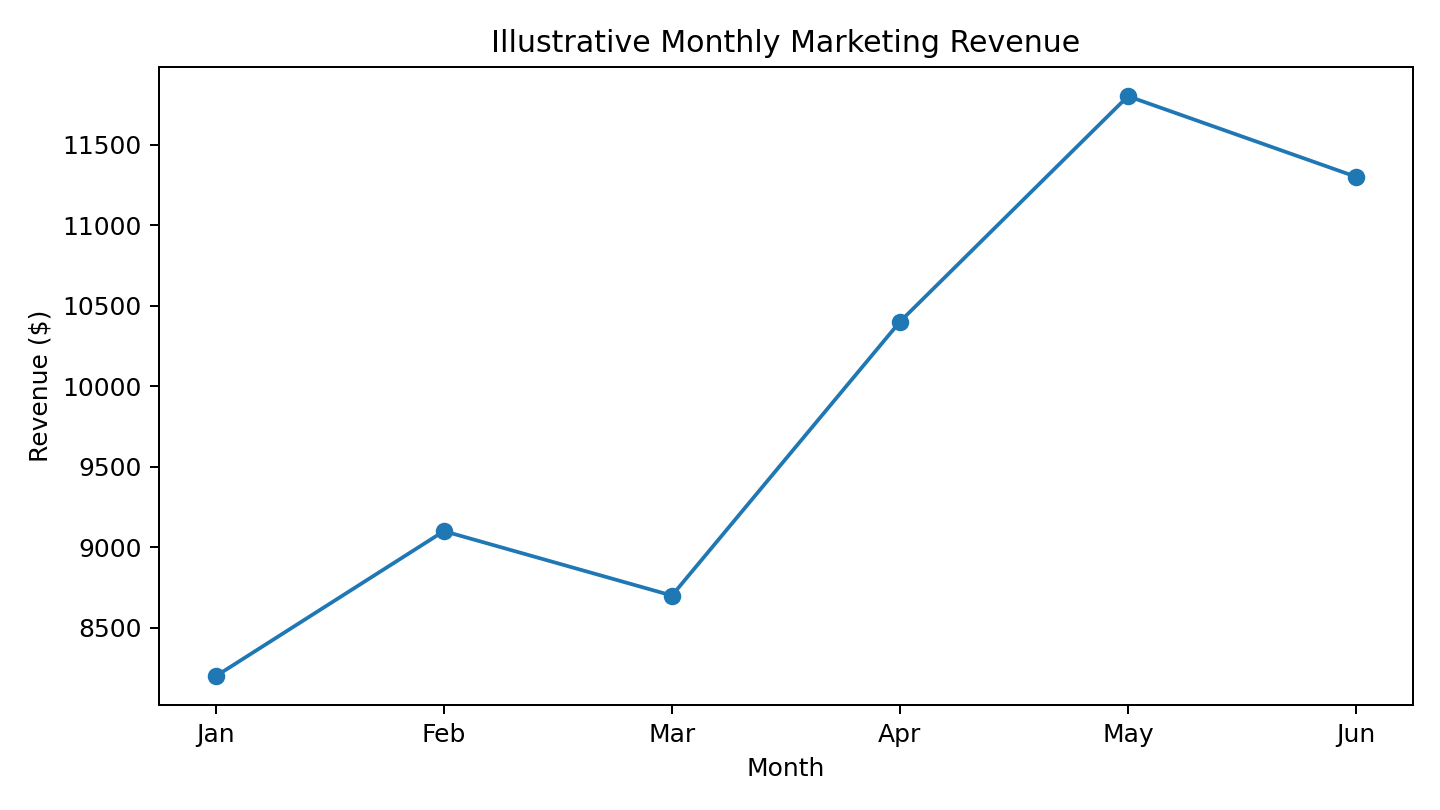
Illustrative data for learning purposes
Interpreting the Chart
When examining the graph, ask these questions:
- Is revenue generally increasing, decreasing, or staying stable?
- Are there sudden increases or decreases?
- Do similar changes appear during the same season each year?
- Could a campaign launch, price change, promotion, or product release help explain a change?
- Are the periods being compared complete and measured consistently?
A rising line doesn't automatically mean a marketing campaign caused revenue to increase. Other factors, including seasonality, pricing, product availability, and changes in customer demand, may contribute.
If the dataset contains only a few months, you may not have enough history to identify a reliable seasonal pattern. Use the chart to identify questions, then compare the pattern with campaign activity and other business information.
So remember: a revenue-over-time chart shows how performance changes, giving you a starting point for investigating trends and understanding what may be driving them.
Chapter 18: Channel Comparisons
Marketing teams often use several channels at the same time. Email, search advertising, social media, and display advertising can each contribute to revenue, but they may perform differently in terms of reach, conversions, and cost.
Channel comparisons help answer questions such as:
- Which channels generate the most revenue?
- Which channels produce the most conversions?
- Which channels use the advertising budget most efficiently?
- Are high-reach channels also generating meaningful results?
A visualization makes these comparisons easier to understand, especially when the report contains several channels.
Comparing Revenue by Channel
Start by grouping revenue by channel:
channel_revenue = (
    df.groupby("channel")["revenue"]
    .sum()
    .sort_values(ascending=False)
)
Then create a bar chart:
import matplotlib.pyplot as plt

channel_revenue.plot(
    kind="bar"
)

plt.title("Illustrative Revenue by Marketing Channel")
plt.xlabel("Marketing Channel")
plt.ylabel("Revenue ($)")
plt.xticks(rotation=45, ha="right")
plt.tight_layout()
plt.show()
Each bar represents the total revenue associated with one channel. Sorting the values from highest to lowest makes it easier to identify which channels contribute the most revenue in the dataset.
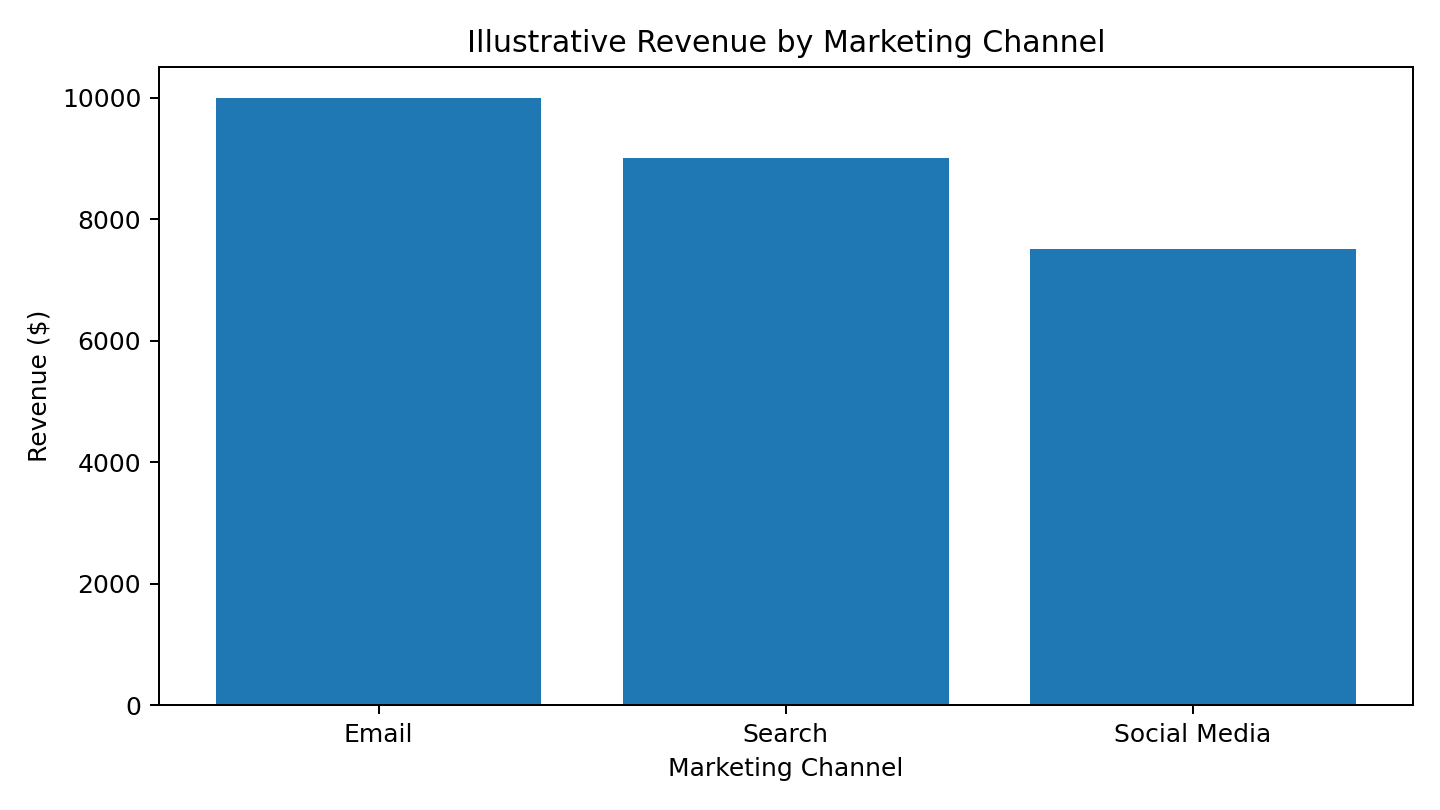
Illustrative data for learning purposes
Comparing Conversions by Channel
Revenue doesn't tell the whole story. A channel might generate fewer dollars but produce a large number of signups, leads, or purchases, depending on the business objective.
channel_conversions = (
    df.groupby("channel")["conversions"]
    .sum()
    .sort_values(ascending=False)
)

channel_conversions.plot(
    kind="bar"
)

plt.title("Illustrative Conversions by Marketing Channel")
plt.xlabel("Marketing Channel")
plt.ylabel("Conversions")
plt.xticks(rotation=45, ha="right")
plt.tight_layout()
plt.show()
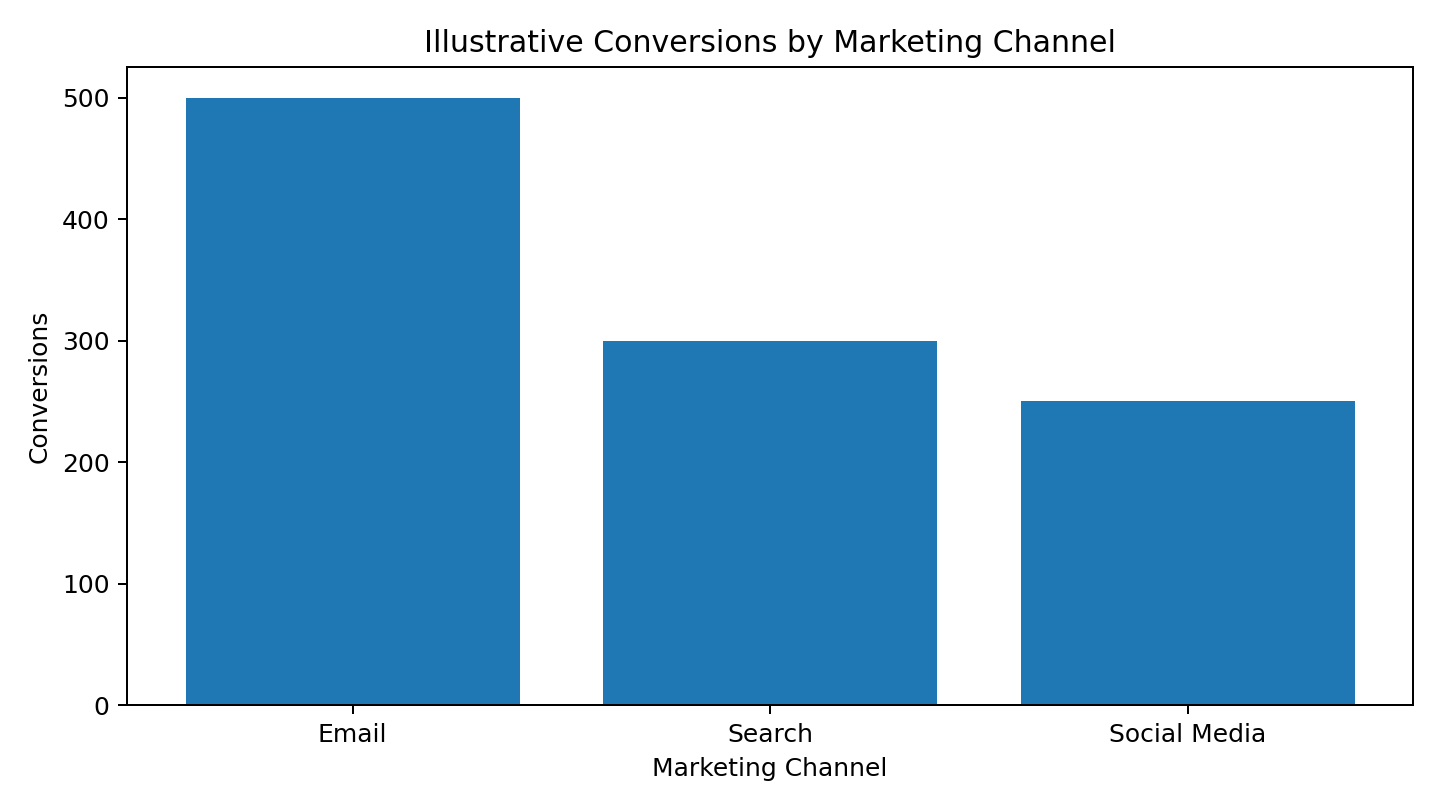
Illustrative data for learning purposes
The first chart compares revenue volume, while the second compares conversion volume. Together, they provide more context than either chart alone.
Why One Metric Isn't Enough
Imagine the following results:
| Channel | Revenue | Conversions | Advertising Cost |
|---|---|---|---|
| $50,000 | 1,000 | $40,000 | |
| Search | $45,000 | 300 | $5,000 |
Email generates more revenue and more conversions. But search generates $45,000 in revenue with only $5,000 in advertising cost, while email spends $40,000 to generate $50,000 in revenue.
Their ROAS values are:
- Email: $50,000 ÷ $40,000 = 1.25
- Search: $45,000 ÷ $5,000 = 9.00
Search has the higher ROAS in this example, even though email generates more total revenue. Remember that ROAS measures attributed revenue relative to advertising cost. It's not the same as profit.
These numbers illustrate why you should compare related metrics rather than automatically choosing the channel with the tallest revenue bar.
Chapter 19: Scatter Plots
Suppose you want to explore whether advertising spend and revenue are related.
plt.scatter(
    df["cost"],
    df["revenue"]
)

plt.title(
    "Advertising Cost vs Revenue"
)

plt.xlabel("Advertising Cost")
plt.ylabel("Revenue")

plt.tight_layout()
plt.show()
The resulting pattern can help you investigate relationships.
But don't immediately conclude that spending more causes revenue to increase.
The relationship could be affected by:
- Campaign quality
- Audience size
- Seasonality
- Product demand
- Brand recognition
- Existing customer behavior
- Other marketing channels
Visualization helps you ask better questions, but it doesn't replace the actual analysis of the data.
Chapter 20: Distribution Analysis
Distribution analysis examines how values are spread across a dataset. Instead of focusing only on a total or average, it helps you understand which values occur frequently, how much variation exists, and whether a small number of unusually high or low observations influence the results.
In marketing, distribution analysis can help you understand customer order values, campaign costs, website sessions, conversion rates, and other numeric measurements.
This is different from simply analyzing older values. Historical analysis compares measurements across time, while distribution analysis examines the spread and frequency of values within a dataset or a selected period. You can use both approaches together, but they answer different questions.
For example, historical analysis asks whether average order value increased from one month to the next. Distribution analysis asks whether most orders have similar values or whether a few unusually large orders pull the average upward.
Examining Order Values
Suppose your dataset contains an order_value column. Begin by examining its summary statistics:
print(df["order_value"].describe())
The output includes the count, mean, standard deviation, minimum, quartiles, and maximum.
The mean is the arithmetic average: add all order values and divide by the number of orders. The median is the middle value when the orders are sorted. The median is less affected by a small number of extremely large purchases.
For example, consider these five order values:
$20, $25, $30, $35, $390
The mean is $100, but the median is $30. The $390 purchase raises the mean substantially, even though four of the five orders are below $40.
This is why the mean doesn't always describe a typical customer's order particularly well. If order values are strongly skewed, the median and the distribution itself may provide a more representative picture.
Visualizing the Distribution
A histogram groups numeric values into ranges called bins and shows how many observations fall into each range.
import pandas as pd
import matplotlib.pyplot as plt

df = pd.DataFrame({
    "order_id": range(1, 11),
    "order_value": [20, 25, 30, 35, 390, 28, 32, 40, 45, 50]
})

plt.figure(figsize=(9, 5))

plt.hist(
    df["order_value"],
    bins=8,
    edgecolor="black"
)

plt.title("Illustrative Distribution of Customer Order Values")
plt.xlabel("Order Value ($)")
plt.ylabel("Number of Orders")
plt.grid(axis="y", alpha=0.3)
plt.tight_layout()
plt.show()
Each bar represents a range of order values, and the height indicates how many orders fall within that range.
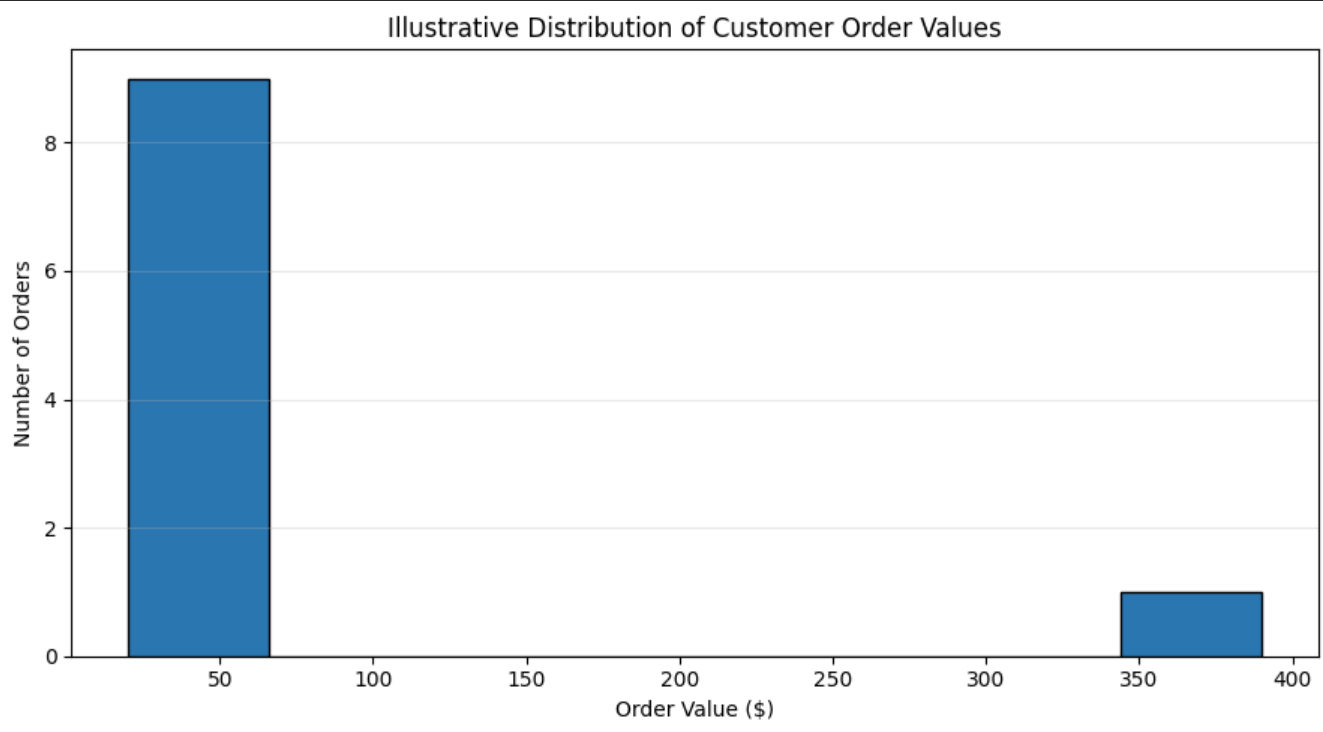
A histogram can reveal whether most orders cluster around a particular range, whether the distribution has a long tail of high-value purchases, or whether multiple groups of order values appear to exist.
What Should You Look For?
When interpreting a distribution, consider:
- Center: Where do the values tend to fall? The mean and median can help describe the center.
- Spread: How much do values vary? A wide distribution indicates more variation than a tightly clustered one.
- Skew: Are values concentrated toward one end with a longer tail on the other?
- Outliers: Are some values unusually far from the rest?
- Multiple groups: Does the distribution suggest different types of customers or transactions?
An unusual value isn't necessarily an error. A very large order could be a legitimate purchase from a valuable customer. Check the source and business context before removing or changing it.
Why Distribution Analysis Matters
Suppose average order value rises substantially in a particular month. Looking only at the mean might lead you to assume that customers generally began spending more. But the increase could be caused by a handful of unusually large purchases while most customers continue to spend the same amount.
Comparing the mean, median, histogram, and historical trends can help distinguish these possibilities.
The key lesson is this: distribution analysis helps you understand what's typical, how much values vary, and whether extreme observations affect the story told by a summary statistic.
Part V: Customer and Campaign Analytics
Marketing analytics becomes significantly more interesting when you stop asking only "How did our campaign perform?" and start asking "Who responded, why did they respond, and what should we do next?"
Chapter 21: Customer Segmentation
Customer segmentation is the process of dividing customers into groups based on shared characteristics or behaviors. Rather than treating every customer as identical, a business can identify groups that may respond differently to marketing campaigns.
For example, some customers purchase frequently, some make only one purchase, and others have not purchased for several months. A business may want to reward frequent customers, encourage one-time buyers to return, or reconnect with customers who have become inactive.
Segmentation helps marketers develop more relevant strategies for different customer groups. It doesn't automatically tell you what each customer wants, but it provides a structured way to understand patterns in customer behavior.
RFM Analysis
One common approach is RFM analysis, which uses three measurements:
- Recency: How recently did the customer make a purchase?
- Frequency: How many purchases has the customer made during the period being analyzed?
- Monetary value: How much money has the customer spent during that period?
These measurements provide different perspectives on customer activity. A customer with low recency in days has purchased recently, while a customer with high recency in days hasn't purchased for longer. Higher frequency indicates more purchases, and higher monetary value indicates greater recorded spending.
Suppose a dataset contains customer_id, purchase_date, and order_value. First, convert the purchase dates to datetime values:
df["purchase_date"] = pd.to_datetime(
    df["purchase_date"],
    errors="coerce"
)
Choose an analysis date and calculate each customer's last purchase, purchase frequency, and total recorded spending:
analysis_date = pd.Timestamp("2026-09-05")

customer_rfm = (
    df.groupby("customer_id")
    .agg(
        last_purchase=("purchase_date", "max"),
        frequency=("purchase_date", "count"),
        monetary=("order_value", "sum")
    )
)

customer_rfm["recency"] = (
    analysis_date - customer_rfm["last_purchase"]
).dt.days

customer_rfm = customer_rfm[
    ["recency", "frequency", "monetary"]
]

print(customer_rfm)
This example assumes that each row represents one purchase and that order_value contains the value of that purchase. If your data has multiple rows per order, use a unique order identifier to count orders correctly. Choose an analysis date that matches the reporting period you're studying.
Understanding the RFM Table
The following illustrative table shows what an RFM summary might look like:
| Customer ID | Recency (days) | Frequency (orders) | Monetary Value |
|---|---|---|---|
| C001 | 8 | 12 | $960 |
| C002 | 75 | 4 | $240 |
| C003 | 180 | 1 | $45 |
| C004 | 20 | 7 | $525 |
Illustrative values for learning purposes.
Customer C001 purchased recently, has placed many orders, and has spent the most in this example. Customer C003 hasn't purchased for a much longer period, has placed only one order, and has the lowest recorded spending.
These differences may suggest different marketing approaches. A business might consider a loyalty offer for a frequent customer, a follow-up offer for a one-time buyer, or a re-engagement campaign for a customer who has been inactive.
But RFM values should be interpreted in context. A customer with low frequency might be perfectly normal for a product that's purchased only once a year. The length of the observation period also matters because a customer who has been active for two months has had less time to accumulate purchases than a customer who has been active for two years.
Chapter 22: Customer Lifetime Value
Customer lifetime value estimates how much value a customer generates over their relationship with the business.
A simple historical measure is:
customer_ltv = (
    df.groupby("customer_id")[
        "order_value"
    ].sum()
)
This tells you how much each customer has spent historically.
A more sophisticated model might estimate future value.
For example, a conceptual lifetime value formula could consider:
Average Order Value
× Purchase Frequency
× Expected Customer Lifespan
But real lifetime value calculations can become much more complex.
They may need to consider:
- Gross margin
- Retention
- Churn
- Discounting
- Acquisition cost
- Product category
- Customer behavior
The important lesson is that LTV is an estimate, not an unquestionable truth.
Chapter 23: Customer Acquisition Cost
Customer acquisition cost, or CAC, estimates how much it costs to acquire a customer.
A simple formula is:
cac = total_marketing_cost / new_customers
Suppose:
marketing_cost = 20000
new_customers = 400

cac = marketing_cost / new_customers

print(cac)
The result is:
50.0
That means the average acquisition cost was $50 per customer.
Comparing CAC with customer value can help determine whether acquisition is economically sustainable.
CAC and LTV Together
Suppose:
CAC = $50
LTV = $300
That looks potentially healthy.
Now suppose:
CAC = $250
LTV = $180
The business may be acquiring customers for more than they're worth.
These metrics should still be interpreted carefully. LTV may be estimated, and CAC may vary substantially by channel.
Some acquisition costs may be excluded from a simple calculation. But together, they provide a useful framework for thinking about marketing economics.
Chapter 24: Funnel Analysis
A marketing funnel represents the stages a customer moves through before completing a desired action, such as making a purchase, signing up for a service, or submitting a lead form.
A typical online shopping funnel might include:
- Visiting a website
- Viewing a product
- Adding the product to a cart
- Starting checkout
- Completing a purchase
At each stage, some people continue while others leave. Funnel analysis measures how many people progress from one stage to the next and helps you identify where additional investigation may be useful.
Calculating Stage Conversion Rates
Suppose a website records the following counts during the same reporting period:
visitors = 50000
product_views = 30000
cart_adds = 8000
checkouts = 4000
purchases = 2500
A stage conversion rate is the percentage of people who reach one stage and then progress to the next stage.
Stage Conversion Rate = Number Reaching the Next Stage ÷ Number Reaching the Previous Stage × 100
For example, the product-view rate is calculated by dividing product views by visitors:
product_view_rate = (
    product_views / visitors * 100
)

cart_rate = (
    cart_adds / product_views * 100
)

checkout_rate = (
    checkouts / cart_adds * 100
)

purchase_rate = (
    purchases / checkouts * 100
)

print(f"Visitor to product view: {product_view_rate:.1f}%")
print(f"Product view to cart: {cart_rate:.1f}%")
print(f"Cart to checkout: {checkout_rate:.1f}%")
print(f"Checkout to purchase: {purchase_rate:.1f}%")
With these illustrative values, 60% of visitors view a product, about 26.7% of product viewers add an item to their cart, 50% of cart additions progress to checkout, and 62.5% of checkouts result in a purchase.
Each percentage describes a specific transition. Don't confuse these stage conversion rates with the overall purchase rate, which would compare purchases directly with visitors.
These calculations also assume that the stage counts are defined consistently and refer to comparable users or sessions within the same reporting period. If the counts represent different populations or use different tracking rules, the rates may not accurately describe customer progression.
Investigating Customer Experience
A low stage conversion rate tells you where people are dropping out, but it doesn't explain why they're leaving. The next step is to investigate the customer experience at that stage.
For example, if many customers abandon checkout, possible issues to examine include:
- Unexpected shipping fees or taxes
- A checkout process that requires too many steps
- Forms that are difficult to complete on a mobile device
- Limited payment options
- Slow-loading pages or technical errors
- Confusing delivery or return information
- A mismatch between the advertisement and the landing page
You can investigate these possibilities using analytics events, device-level comparisons, customer support feedback, usability testing, and error logs. These sources help you identify potential explanations rather than assuming the funnel rate itself proves the cause.
If the evidence suggests that a checkout change might help, you could test a simpler checkout flow or clearer pricing information. This connects funnel analysis to A/B testing: funnel analysis identifies where to investigate, while an experiment can help assess whether a proposed change improves the outcome.
Funnel analysis shows where customers stop progressing. Investigating the customer experience helps you develop explanations and determine which changes are worth testing.
Chapter 25: A/B Testing
A/B testing is a controlled experiment used to compare two versions of a marketing experience. A business might compare two landing pages, email subject lines, advertisements, checkout designs, or calls to action to find out which version performs better for a defined objective.
Version A is the control or existing version, while Version B is the alternative being tested. Ideally, eligible users are randomly assigned to one version so that the comparison is less likely to be distorted by differences between the groups.
Calculating Conversion Rates
Suppose you're testing two landing pages and measuring whether visitors complete a desired action.
visitors_a = 5000
conversions_a = 240

visitors_b = 5000
conversions_b = 290
Calculate each conversion rate:
rate_a = (
    conversions_a / visitors_a
)

rate_b = (
    conversions_b / visitors_b
)

print(f"Version A: {rate_a:.2%}")
print(f"Version B: {rate_b:.2%}")
In this example, Version A has a conversion rate of 4.8%, while Version B has a conversion rate of 5.8%. The observed difference is one percentage point.
But an observed difference doesn't automatically prove that Version B is genuinely better. Results can vary because of random chance, even when two versions perform similarly in the wider population.
Understanding Statistical Uncertainty
An A/B test uses a sample of visitors to estimate how the versions might perform across a larger population. Because the test doesn't usually include every possible customer, the measured conversion rates are estimates rather than perfectly known population values.
Statistical uncertainty describes the fact that these estimates can vary from sample to sample. A different group of visitors might produce a slightly different result, even if the underlying performance of the two versions hasn't changed.
Several factors influence the uncertainty of an experiment:
- Sample size: smaller samples generally produce less precise estimates than larger samples.
- Conversion frequency: when the desired action is rare, more observations may be needed to estimate the conversion rate precisely.
- Random variation: individual visitor behavior isn't perfectly predictable.
- Experimental design: uneven assignment, tracking problems, or changes made during the test can undermine the comparison.
A small observed difference in a small sample may be due to random variation. A larger, well-designed experiment can provide stronger evidence, but sample size alone doesn't fix problems such as biased assignment or incorrect tracking.
Statistical Significance and Business Significance
Statistical significance addresses whether the observed result would be unusual under a specified statistical model in which there's no true difference between the versions. It doesn't directly tell you how valuable the difference is to the business, nor does it prove that the result will repeat in every future setting.
Business significance concerns whether the size of the improvement is worth acting on. For example, a small conversion-rate improvement might generate meaningful additional revenue for a high-traffic website but very little additional value for a low-traffic site. The costs and risks of implementing the change also matter.
A responsible A/B testing process should:
- Define the primary outcome before the test begins.
- Randomly assign eligible visitors when appropriate.
- Make sure conversion tracking works consistently for both versions.
- Decide how much data and what test duration are appropriate before evaluating the result.
- Consider statistical uncertainty and the practical size of the observed difference.
- Avoid repeatedly checking results and stopping as soon as one version looks better unless the testing method explicitly accounts for sequential monitoring.
- Document the result, limitations, and decision.
A/B testing isn't simply a matter of choosing whichever version has the larger percentage. The goal is to gather reliable evidence about whether a change improves a meaningful outcome.
The key lesson here is this: statistical uncertainty matters because sample results can differ from the true underlying performance. Understanding that uncertainty helps you avoid making expensive marketing decisions based on random fluctuations.
Part VI: Marketing Automation
Marketing teams often spend enormous amounts of time repeating processes that follow predictable rules.
That makes automation one of the strongest applications of Python.
Chapter 26: Identifying Automation Opportunities
A good candidate for automation usually has several characteristics:
- It happens repeatedly
- It follows predictable steps
- It uses structured data
- It requires little subjective judgment
- Mistakes are common when performed manually
- Automating it saves meaningful time
For example:
"Every Monday, download campaign data, calculate ROAS, identify campaigns below a threshold, and generate a report."
That's an excellent automation candidate.
Chapter 27: Building a Reporting Function
Instead of manually running every step, create a function.
def generate_campaign_report(
    input_file,
    output_file
):
    df = pd.read_csv(input_file)

    df["roas"] = (
        df["revenue"] /
        df["cost"]
    )

    df["conversion_rate"] = (
        df["conversions"] /
        df["clicks"] *
        100
    )

    df.to_csv(
        output_file,
        index=False
    )
Then:
generate_campaign_report(
    "campaigns.csv",
    "campaign_report.csv"
)
Now the workflow can be repeated.
Chapter 28: Logging
When a script runs automatically, print() statements are often not enough.
Logging provides a more structured approach.
import logging

logging.basicConfig(
    level=logging.INFO
)

logging.info(
    "Marketing report started."
)
Then:
logging.info(
    "Campaign data loaded successfully."
)
If an error occurs:
logging.error(
    "Unable to load campaign data."
)
Logging becomes particularly useful when a scheduled job runs without someone watching it.
Chapter 29: Scheduling
Once your script works, you can schedule it.
For example, you might configure your operating system to run the reporting program every Monday morning.
The scheduling system itself depends on your environment. On Windows, Task Scheduler can execute Python programs. On macOS and Linux, cron is a common option. Cloud platforms can also run scheduled jobs.
The important concept is that automation isn't complete until the process can run reliably without someone manually starting it.
Chapter 30: Automated Alerts
A marketing system shouldn't always wait for someone to open a report.
It can identify important conditions.
if overall_roas < 1:
    alert = (
        "Warning: overall ROAS is below 1."
    )
Or:
if conversion_rate < previous_rate * 0.8:
    alert = (
        "Conversion rate has fallen "
        "significantly compared with the "
        "previous period."
    )
The alert can eventually be connected to email, Slack, Microsoft Teams, or another notification system.
The important thing is that the system identifies situations requiring attention.
Chapter 31: Responsible Automation
Automation can make marketing work faster and more consistent, but it can also repeat mistakes at scale. A script that calculates an incorrect metric once can produce the same incorrect result every time it runs. If the report feeds into campaign decisions or automated customer communications, the consequences can grow quickly.
Suppose a report accidentally labels customers as eligible for a promotion when they don't meet the eligibility rules. A manual review might catch the problem. An automated system without validation could distribute the incorrect list repeatedly.
For this reason, production automation should include input validation, error handling, logging, testing, and monitoring. Important actions may also require human approval.
A Simple Production-Ready Workflow
A basic marketing-report automation workflow can follow these steps:
- Load the source data: Read the latest campaign export or approved input file.
- Validate the data: Check that required columns exist, numeric fields contain valid values, and unexpected records are flagged.
- Calculate the metrics: Generate conversion rate, CPA, and ROAS while handling zero denominators appropriately.
- Save the report: Write the results to a designated output location.
- Log the outcome: Record whether the report succeeded or failed so someone can investigate problems.
- Schedule and monitor the process: Use an operating-system scheduler or an approved orchestration tool, and check that the expected output is produced.
The following example demonstrates a simple workflow for a campaign report. It assumes the input CSV contains one row per campaign and includes campaign, clicks, conversions, cost, and revenue columns.
import logging
from pathlib import Path

import pandas as pd

logging.basicConfig(
    level=logging.INFO,
    format="%(asctime)s %(levelname)s: %(message)s"
)

REQUIRED_COLUMNS = {
    "campaign",
    "clicks",
    "conversions",
    "cost",
    "revenue"
}


def generate_report(input_file, output_file):
    input_path = Path(input_file)
    output_path = Path(output_file)

    try:
        if not input_path.exists():
            raise FileNotFoundError(
                f"Input file not found: {input_path}"
            )

        df = pd.read_csv(input_path)

        missing = REQUIRED_COLUMNS - set(df.columns)
        if missing:
            raise ValueError(
                f"Missing required columns: {sorted(missing)}"
            )

        numeric_columns = [
            "clicks",
            "conversions",
            "cost",
            "revenue"
        ]

        for column in numeric_columns:
            df[column] = pd.to_numeric(
                df[column],
                errors="coerce"
            )

        if df[numeric_columns].isna().any().any():
            raise ValueError(
                "Required numeric fields contain missing "
                "or invalid values."
            )

        if (df[numeric_columns] < 0).any().any():
            raise ValueError(
                "Negative values were found in metrics "
                "that should not be negative."
            )

        if (df["conversions"] > df["clicks"]).any():
            logging.warning(
                "Some campaigns have more conversions "
                "than clicks. Check the metric definitions."
            )

        df["conversion_rate"] = (
            df["conversions"]
            .div(df["clicks"].replace(0, float("nan")))
            .mul(100)
        )

        df["cpa"] = (
            df["cost"]
            .div(
                df["conversions"].replace(
                    0, float("nan")
                )
            )
        )

        df["roas"] = (
            df["revenue"]
            .div(df["cost"].replace(0, float("nan")))
        )

        output_path.parent.mkdir(
            parents=True,
            exist_ok=True
        )

        df.to_csv(output_path, index=False)

        logging.info(
            "Report saved successfully to %s",
            output_path
        )

    except Exception:
        logging.exception(
            "Marketing report generation failed"
        )
        raise


if __name__ == "__main__":
    generate_report(
        "campaigns.csv",
        "reports/campaign_report.csv"
    )
What Makes This Workflow Safer?
The script checks that the input file exists and that required columns are present. It attempts to convert metric columns into numeric values and stops if required fields contain missing or invalid data. It also flags negative values in metrics that shouldn't normally be negative.
When conversions exceed clicks, the example logs a warning rather than automatically changing the data. Depending on the business's definition of a conversion, that result may be possible, so it should be investigated rather than silently corrected.
The calculated rates use missing values for zero denominators. This prevents undefined ratios from being reported as valid numbers. The script also creates the output directory if necessary, records successful completion, and logs failures before raising the error so that a scheduler or monitoring system can detect the failure.
This is a practical starting point, not a complete monitoring platform. A real deployment should also consider data freshness, duplicate imports, expected row counts, access permissions, secure storage, backups, alerting, and whether a human should approve the report before it influences a campaign.
Scheduling the Workflow
The script can be run manually while it's being tested. Once it works reliably, it can be scheduled using a tool such as Windows Task Scheduler or cron on Linux and macOS. The scheduler determines when the script runs. The Python code determines what the script does.
Before scheduling it, test the workflow using sample data and deliberately introduce problems such as a missing column or an invalid numeric value. Confirm that the script fails clearly rather than producing a misleading report.
The key lesson over here: reliable automation isn't just about running code without human involvement. You also need to worry about about validating inputs, handling failures, documenting results, and ensuring that the automated output can be trusted.
Part VII: Machine Learning for Marketing
Machine learning becomes useful when you want to move from describing what happened to estimating what might happen next.
Chapter 32: From Analytics to Prediction
Traditional analytics might answer a question like, "Which customers purchased last month?"
Machine learning, on the other hand, might answer: "Which customers are most likely to purchase next month?"
Traditional analytics asks "Which leads converted?"
Machine learning asks "Which leads are most likely to convert?"
Traditional analytics asks "Which customers churned?"
Machine learning asks "Which customers appear most likely to churn?"
This distinction is important: Machine learning doesn't replace analytics. It builds on it.
Chapter 33: Features and Targets
A machine learning model typically needs input variables called features.
Suppose you want to predict customer churn. Features might include:
purchase_frequency
total_spend
days_since_last_purchase
email_opens
website_sessions
The target might be:
churned
In Python:
features = [
    "purchase_frequency",
    "total_spend",
    "days_since_last_purchase",
    "email_opens",
    "website_sessions"
]

X = df[features]
y = df["churned"]
Here:
X contains information used for prediction.
y contains the outcome you want to predict.
Chapter 34: Splitting Data
Before training a machine learning model, you need to separate the data used to teach the model from the data used to evaluate it.
This is important because a model can perform well on examples it has already seen without performing equally well on new examples. If you evaluate a model using the same records it learned from, the evaluation may give an overly optimistic impression of how well the model will perform in practice.
A common approach is to create a training set and a test set:
- Training set: the records the model uses to learn patterns.
- Test set: records held back until evaluation to estimate how the trained model performs on data it didn't use for learning.
For example, an 80/20 split allocates approximately 80% of the records to training and 20% to testing. This is a common starting point, not a universal rule. The appropriate split depends on the dataset size, the prediction task, and how the model will be used.
Creating the Split With scikit-learn
Assume that X contains the model's input features and y contains the target you want to predict.
from sklearn.model_selection import train_test_split

X_train, X_test, y_train, y_test = train_test_split(
    X,
    y,
    test_size=0.2,
    random_state=42
)
Here, test_size=0.2 reserves 20% of the records for testing. random_state=42 makes the random split reproducible, so you can obtain the same split again when the dataset and code remain unchanged.
For a classification problem, you may also want to preserve the approximate proportion of each class in both sets:
X_train, X_test, y_train, y_test = train_test_split(
    X,
    y,
    test_size=0.2,
    random_state=42,
    stratify=y
)
Using stratify=y is often helpful when the target classes are imbalanced. But stratification requires enough examples in each class and isn't appropriate for every task.
Avoiding Time-Related Leakage
Random splitting isn't always suitable for marketing data. If you're predicting future purchases or future churn, the records have a time order. Training on later observations and testing on earlier observations can allow information from the future to influence the evaluation.
For time-dependent predictions, consider training on an earlier period and testing on a later period. The split should reflect the information that would actually have been available when the prediction was made.
Also remember that splitting data does not, by itself, prevent data leakage. Any preprocessing steps that learn information from the dataset (like imputing missing values or scaling features) should generally be fitted using the training data only and then applied to the test data.
Remember: data splitting helps estimate how a model may perform on unseen data, but the split must reflect the way the model will be used in the real world.
Chapter 35: Classification
Classification is a machine learning task in which a model predicts a category or class. Marketing examples include predicting whether a customer will churn, whether a lead will convert, whether an email is likely to be marked as spam, or whether a customer will purchase within a defined period.
Classification differs from regression. Classification predicts categories, while regression predicts a numeric value such as expected revenue or customer lifetime value.
A classification model learns patterns from historical examples in which the correct outcomes are already known. It then uses those patterns to predict outcomes for new records. The model's predictions are estimates, not guarantees.
Preparing the Features and Target
Suppose you want to predict whether a customer will churn. Your dataset might include features such as:
purchase_frequency
total_spend
days_since_last_purchase
email_opens
website_sessions
The target might be a column named churned, where each record is labeled to indicate whether the customer churned during a clearly defined period.
In Python:
features = [
    "purchase_frequency",
    "total_spend",
    "days_since_last_purchase",
    "email_opens",
    "website_sessions"
]

X = df[features]
y = df["churned"]
Here, X contains the information used to make predictions, and y contains the outcome the model is supposed to predict. The features should only include information that would genuinely be available at the time the prediction is made.
Before fitting the model, handle missing values and categorical variables as appropriate, and split the dataset into training and test sets as described in the previous chapter.
Training a Logistic Regression Classifier
Logistic regression is a common starting point for binary classification, such as predicting one of two outcomes: churn or no churn.
from sklearn.linear_model import LogisticRegression

model = LogisticRegression(
    max_iter=1000
)

model.fit(
    X_train,
    y_train
)
The fit() method trains the model using the training features and their known target labels. The model learns relationships between the input variables and the outcome.
Use the trained model to predict classes for the held-back test features:
predictions = model.predict(
    X_test
)
The predict() method produces predicted class labels. For a binary churn model, those labels might indicate churn or no churn.
You can evaluate the predictions with a classification report:
from sklearn.metrics import classification_report

print(
    classification_report(
        y_test,
        predictions,
        zero_division=0
    )
)
This report summarizes metrics such as precision, recall, and F1 score for each class.
Other Classification Models
Logistic regression isn't the only option. Depending on the data and problem, you might also investigate:
- Decision trees: learn a series of decision rules based on feature values.
- Random forests: combine predictions from multiple decision trees.
- Gradient boosting: build a sequence of models that aims to improve predictive performance.
- Support vector machines: identify decision boundaries that separate classes.
- Naive Bayes: use probabilistic assumptions to estimate class membership.
Different models have different strengths, computational requirements, and interpretability. A more complex model isn't automatically better. Compare suitable models using the same data split and evaluation criteria, and avoid choosing a model based only on training performance.
So remember: Classification models learn from labeled historical examples to predict categories for new records. Their usefulness depends on the quality of the data, the timing of the features, the model choice, and how well the predictions are evaluated.
Chapter 36: Why Accuracy Can Be Misleading
Accuracy measures the proportion of predictions a classification model gets correct. It's easy to understand, but it can be misleading when the classes are imbalanced or when different mistakes have different business costs.
Suppose only 1% of customers churn. A model that predicts “not churned” for every customer would achieve approximately 99% accuracy. But it would fail to identify any of the customers who actually churn.
That model has high accuracy but may be practically useless if the purpose is to identify customers who need retention efforts.
To evaluate classification models more effectively, consider precision, recall, F1 score, ROC-AUC, and the confusion matrix.
The Confusion Matrix
A confusion matrix compares predicted labels with the actual labels. For a binary classifier, it contains four outcomes:
- True positives (TP): the model predicts the positive class, and the actual class is positive.
- True negatives (TN): the model predicts the negative class, and the actual class is negative.
- False positives (FP): the model predicts the positive class, but the actual class is negative.
- False negatives (FN): the model predicts the negative class, but the actual class is positive.
For a churn model, a true positive is a customer correctly identified as someone who churns. A false positive is a customer incorrectly flagged as likely to churn. A false negative is a customer who churns but wasn't identified by the model.
These error types have different consequences. A false positive might cause the business to spend money on a retention offer for someone who would have stayed anyway. A false negative might mean the business misses an opportunity to reach a customer who is about to leave.
Accuracy
Accuracy measures the proportion of all predictions that are correct.
Accuracy = (TP + TN) ÷ (TP + TN + FP + FN)
It can be useful when the classes and error costs are reasonably balanced. But when one class is much more common than the other, accuracy may hide poor performance on the less common class.
Precision
Precision measures the proportion of predicted positives that are actually positive.
Precision = TP ÷ (TP + FP)
For a churn model, precision answers: “Of the customers the model flagged as likely to churn, what proportion actually churned?”
High precision can be valuable when contacting a customer is expensive or when false alarms waste limited campaign resources.
Recall
Recall measures the proportion of actual positives that the model correctly identifies.
Recall = TP ÷ (TP + FN)
For a churn model, recall answers: “Of all customers who actually churned, what proportion did the model identify?”
High recall may be important when missing a customer at risk of churn is particularly costly. But increasing recall can also increase false positives, depending on the model and decision threshold.
F1 Score
The F1 score combines precision and recall using their harmonic mean:
F1 = 2 × (Precision × Recall) ÷ (Precision + Recall)
It can be useful when both precision and recall matter. It doesn't account for true negatives directly, and it shouldn't be treated as the best metric for every business problem.
ROC-AUC
ROC-AUC summarizes how well a model ranks positive examples above negative examples across different classification thresholds. A value closer to 1 indicates stronger ranking performance, while a value near 0.5 indicates performance similar to random ranking under the usual interpretation.
ROC-AUC doesn't tell you whether a particular threshold is appropriate for a marketing action. When positive cases are rare, precision-recall analysis may also provide useful insight. In either case, evaluate the model on data that wasn't used to train it.
Calculating the Metrics in Python
You can calculate several of these metrics using scikit-learn:
from sklearn.metrics import (
    accuracy_score,
    precision_score,
    recall_score,
    f1_score,
    roc_auc_score,
    confusion_matrix
)

predictions = model.predict(X_test)

print("Accuracy:", accuracy_score(y_test, predictions))
print(
    "Precision:",
    precision_score(
        y_test, predictions, zero_division=0
    )
)
print(
    "Recall:",
    recall_score(
        y_test, predictions, zero_division=0
    )
)
print(
    "F1 score:",
    f1_score(
        y_test, predictions, zero_division=0
    )
)
print("Confusion matrix:")
print(confusion_matrix(y_test, predictions))
For ROC-AUC, use the model's probability estimates or decision scores rather than its final predicted labels:
probabilities = model.predict_proba(X_test)[:, 1]

print(
    "ROC-AUC:",
    roc_auc_score(y_test, probabilities)
)
This assumes the model supports predict_proba() and that the positive class is represented by the second probability column. Verify the class ordering for your specific model and target labels.
Choosing the Right Metric
There's no universally best classification metric. The appropriate choice depends on the objective, the class distribution, and the cost of different errors.
For example, a retention team with a limited budget may prioritize precision because it can contact only a small number of customers. Another team may prioritize recall if missing a high-risk customer is especially costly.
Consider the business decision the model supports before selecting a metric. A useful evaluation should explain not only how well the model performs but also whether its mistakes are acceptable for the intended use.
The key lesson here is this: accuracy is only one part of model evaluation. Precision, recall, F1, ROC-AUC, and the confusion matrix reveal different aspects of performance and help connect model quality to business consequences.
Chapter 37: Customer Segmentation With Machine Learning
Rule-based segmentation groups customers using predefined conditions. Machine learning offers another approach: clustering. Clustering algorithms look for patterns in data and group observations that are similar according to the features and distance measures used.
For marketing teams, clustering may help explore groups of customers with similar purchasing behavior, spending levels, or engagement patterns. The resulting groups can provide starting points for further analysis, but they don't automatically represent meaningful customer types.
Using K-Means Clustering
K-Means is a clustering algorithm that divides observations into a chosen number of clusters. It repeatedly assigns observations to cluster centers and updates those centers to reduce the within-cluster squared distances.
For this example, suppose the dataset already contains one row per customer and includes recency, frequency, and monetary columns.
from sklearn.cluster import KMeans
from sklearn.preprocessing import StandardScaler

features = df[
    [
        "recency",
        "frequency",
        "monetary"
    ]
].copy()

scaler = StandardScaler()

scaled_features = scaler.fit_transform(
    features
)

model = KMeans(
    n_clusters=4,
    random_state=42,
    n_init=10
)

df["segment"] = model.fit_predict(
    scaled_features
)
The example standardizes the three features before clustering. This matters because monetary values may be much larger numerically than recency or frequency. Without scaling, features with larger numeric ranges can dominate the distance calculations.
Standardization changes the scale of the input variables, but it doesn'tt make the variables equally important from a business perspective. If the data contains extreme values, you should also consider whether standard scaling is suitable and whether the features need additional preprocessing.
The n_clusters=4 setting asks K-Means to produce four clusters. The algorithm assigns each customer a numeric label, which the code stores in the segment column.
Cluster Numbers Are Identifiers, Not Rankings
The labels 0, 1, 2, and 3 are simply identifiers for the four groups. Cluster 0 isn't automatically better, more valuable, or more important than cluster 1.
The numbers don't rank customer quality. If the model is rerun with different settings or data, the numeric labels may be assigned differently even when the overall group patterns are similar.
To understand what each cluster represents, summarize the original feature values for each group:
cluster_summary = (
    df.groupby("segment")
    .agg(
        customer_count=("segment", "size"),
        average_recency=("recency", "mean"),
        average_frequency=("frequency", "mean"),
        average_monetary=("monetary", "mean")
    )
    .round(2)
)

print(cluster_summary)
This summary lets you compare the typical behavior of customers in each cluster. One group might have more recent purchases and higher frequency, while another might contain customers with low frequency and long gaps since their last purchase.
Use those observed patterns to develop descriptive names if they're justified by the data. For example, a group with recent purchases and high frequency might be described as “frequent active customers.” A group with high recency values and previously high spending might be worth investigating for re-engagement.
Don't assign names based only on the cluster number. Inspect the actual values and make sure the description fits the group's behavior.
Choosing and Evaluating Clusters
The number of clusters is a modeling choice. Four clusters may be useful for one dataset but too many or too few for another. You can compare candidate values using methods such as the elbow method or silhouette score, alongside whether the resulting groups are interpretable and useful for the business.
Clustering results are also sensitive to the features, scaling method, outliers, and selected number of clusters. The groups aren't guaranteed to correspond to natural customer types, and different algorithms may produce different results.
The key lesson: clustering can reveal patterns that help you explore customer groups. The cluster labels themselves have no built-in meaning. Interpret each group by examining its features and validating whether the pattern is useful for the business.
Chapter 38: Feature Engineering
Machine learning models often become more useful when raw data is transformed into meaningful features.
Suppose you have:
purchase_date
Instead of giving the raw date directly to the model, you might create:
days_since_last_purchase
Similarly, instead of raw transaction records, you might calculate:
total_orders
average_order_value
total_spend
days_since_first_purchase
email_open_rate
These engineered features can better represent customer behavior.
Feature engineering is often one of the most important parts of a machine learning project.
Chapter 39: Avoiding Data Leakage
Data leakage occurs when information that wouldn't legitimately be available to a model at prediction time influences its training or evaluation. Leakage can make a model appear much more accurate than it will be when used with real, future data.
Imagine that you're building a model to predict whether a customer will make a purchase in the next 30 days. Your goal is to use information available today to estimate what the customer will do during the following month.
If you accidentally include the customer's actual purchase outcome from that future period as an input feature, the model receives information that wouldn't have been available when the prediction was supposed to be made. This makes the evaluation misleading.
An Example of Data Leakage
Suppose the dataset contains these columns:
past_purchases
website_visits
purchased_next_30_days
The first two columns describe historical behavior. The last column records the outcome you want to predict.
The following code contains a leakage problem:
# Incorrect: the target is included as an input feature.
X = df[
    [
        "past_purchases",
        "website_visits",
        "purchased_next_30_days"
    ]
]

y = df["purchased_next_30_days"]
The target, purchased_next_30_days, appears in both X and y. The model is given the answer it's supposed to predict. It may achieve an extremely high score, but that score doesn't demonstrate that the model can predict future purchases from legitimate historical information.
This is an example of direct target leakage. Other forms of leakage can be less obvious, such as using information collected after the prediction date or preprocessing the entire dataset before splitting it into training and test sets.
Fixing the Leakage
The solution is to exclude the target and any other information that wouldn't be available at prediction time from the input features.
# Correct: use only information available before prediction.
X = df[
    [
        "past_purchases",
        "website_visits"
    ]
]

y = df["purchased_next_30_days"]
Next, split the data into training and test sets:
from sklearn.model_selection import train_test_split
from sklearn.ensemble import RandomForestClassifier
from sklearn.metrics import accuracy_score

X_train, X_test, y_train, y_test = train_test_split(
    X,
    y,
    test_size=0.2,
    random_state=42,
    stratify=y
)

model = RandomForestClassifier(
    random_state=42
)

model.fit(
    X_train,
    y_train
)

predictions = model.predict(
    X_test
)

print(
    "Accuracy:",
    accuracy_score(y_test, predictions)
)
This example is safer because the model receives only the two historical features specified in X. The future purchase outcome remains the target that the model is learning to predict.
But removing the target from the features is only one part of preventing leakage. You must also confirm that past_purchases and website_visits contain information recorded before the prediction date. If either column includes activity from the future 30-day outcome period, leakage can still occur.
Preventing Leakage During Preprocessing
Leakage can also happen when preprocessing learns information from records that should be held back for evaluation. For example, if you calculate scaling parameters or fill missing values using the entire dataset before splitting it, information from the test set can influence the training process.
A safer pattern is to fit preprocessing steps using the training data only, then apply the learned transformations to the test data. Scikit-learn pipelines can help enforce this separation.
For time-dependent prediction problems, use a time-based split when appropriate: train using earlier observations and evaluate using later observations. This better reflects the information available when future predictions are made.
A Practical Leakage Checklist
Before trusting a model's evaluation, ask:
- Were all input features available at the intended prediction time?
- Does any feature contain the target itself or a direct proxy for the outcome?
- Were preprocessing steps fitted using training data only?
- Does the train/test split reflect the real prediction setting?
- Are records or customers duplicated across the split in a way that could inflate performance?
- Is the evaluation based on genuinely unseen data?
A surprisingly high score isn't automatically evidence of leakage, but it's a reason to investigate the features, data collection process, and evaluation design carefully.
The key lesson here: a model must be evaluated using only the information it could legitimately access when making a prediction. Preventing leakage helps ensure that reported performance is meaningful rather than artificially inflated.
Part VIII: Building a Marketing Intelligence System
At this point, you've learned many individual techniques. Now we can combine them.
A marketing intelligence system shouldn't simply be a collection of unrelated Python scripts. It should have a logical workflow.
Step 1: Defining the Business Questions
Before writing the system, you should define what it should answer.
For our capstone, we'll ask:
- How much revenue are our marketing campaigns generating?
- Which channels are most efficient?
- Which campaigns are performing best?
- Which campaigns may need attention?
- Which customers are most valuable?
- Which customers may need re-engagement?
- How is performance changing over time?
- Where are customers dropping out of the funnel?
- Are there meaningful customer segments?
- Can machine learning identify customers at risk of churn?
- Can the system automatically generate a report?
- Can the system alert the marketing team when important metrics change?
These questions determine the architecture of the project.
Step 2: Project Structure
A practical project can be organized like this:
marketing_intelligence/
    data/
        raw/
        processed/

    reports/

    notebooks/

    models/

    src/
        data_loader.py
        cleaning.py
        metrics.py
        customer_analysis.py
        campaign_analysis.py
        segmentation.py
        reporting.py
        alerts.py

    tests/

    main.py

    requirements.txt
You don't have to create this entire structure on day one. The purpose is to show how a larger project can eventually be organized.
Step 3: Data Loading Module
Create:
src/data_loader.py
Then:
import pandas as pd


def load_marketing_data(path):
    return pd.read_csv(path)
Now the main program can import it:
from src.data_loader import (
    load_marketing_data
)

df = load_marketing_data(
    "data/raw/marketing_data.csv"
)
This keeps data-loading logic separate from analysis logic.
Step 4: Data Cleaning Module
Create:
src/cleaning.py
Then:
import pandas as pd


def clean_marketing_data(df):
    df = df.copy()

    df = df.drop_duplicates()

    df["date"] = pd.to_datetime(
        df["date"],
        errors="coerce"
    )

    numeric_columns = [
        "impressions",
        "clicks",
        "conversions",
        "cost",
        "revenue"
    ]

    for column in numeric_columns:
        df[column] = pd.to_numeric(
            df[column],
            errors="coerce"
        )

    df["channel"] = (
        df["channel"]
        .str.strip()
        .str.lower()
    )

    return df
This function performs common cleaning tasks.
Step 5: Metrics Module
Create:
src/metrics.py
Then:
def calculate_metrics(df):
    df = df.copy()

    df["ctr"] = (
        df["clicks"]
        .div(
            df["impressions"]
            .replace(0, None)
        )
        .mul(100)
    )

    df["conversion_rate"] = (
        df["conversions"]
        .div(
            df["clicks"]
            .replace(0, None)
        )
        .mul(100)
    )

    df["cpc"] = (
        df["cost"]
        .div(
            df["clicks"]
            .replace(0, None)
        )
    )

    df["cpa"] = (
        df["cost"]
        .div(
            df["conversions"]
            .replace(0, None)
        )
    )

    df["roas"] = (
        df["revenue"]
        .div(
            df["cost"]
            .replace(0, None)
        )
    )

    return df
Now your calculations live in one reusable location.
Step 6: Campaign Analysis Module
Create:
src/campaign_analysis.py
Then:
def analyze_campaigns(df):
    summary = (
        df.groupby("campaign")
        .agg({
            "impressions": "sum",
            "clicks": "sum",
            "conversions": "sum",
            "cost": "sum",
            "revenue": "sum"
        })
    )

    summary["roas"] = (
        summary["revenue"] /
        summary["cost"]
    )

    summary["cpa"] = (
        summary["cost"] /
        summary["conversions"]
    )

    return summary.sort_values(
        "roas",
        ascending=False
    )
This produces a reusable campaign-performance table.
Step 7: Channel Analysis
def analyze_channels(df):
    summary = (
        df.groupby("channel")
        .agg({
            "impressions": "sum",
            "clicks": "sum",
            "conversions": "sum",
            "cost": "sum",
            "revenue": "sum"
        })
    )

    summary["roas"] = (
        summary["revenue"] /
        summary["cost"]
    )

    summary["cpa"] = (
        summary["cost"] /
        summary["conversions"]
    )

    return summary.sort_values(
        "roas",
        ascending=False
    )
Now campaign analysis and channel analysis are separated. That makes the project easier to maintain.
Step 8: Detecting Underperforming Campaigns
Create a reusable rule:
def identify_underperforming_campaigns(
    campaign_summary,
    roas_threshold=1,
    conversion_threshold=2
):
    return campaign_summary[
        (campaign_summary["roas"] < roas_threshold) &
        (
            campaign_summary["conversion_rate"]
            < conversion_threshold
        )
    ]
But do you notice an issue? Our campaign summary doesn't currently calculate conversion rate.
This is a good example of why building software requires testing your assumptions.
We can fix the summary:
def analyze_campaigns(df):
    summary = (
        df.groupby("campaign")
        .agg({
            "impressions": "sum",
            "clicks": "sum",
            "conversions": "sum",
            "cost": "sum",
            "revenue": "sum"
        })
    )

    summary["conversion_rate"] = (
        summary["conversions"] /
        summary["clicks"] *
        100
    )

    summary["roas"] = (
        summary["revenue"] /
        summary["cost"]
    )

    summary["cpa"] = (
        summary["cost"] /
        summary["conversions"]
    )

    return summary.sort_values(
        "roas",
        ascending=False
    )
This is an important development habit: Test each stage before building the next stage on top of it.
Step 9: Building the Customer Intelligence Layer
The customer layer should summarize behavior at the customer level.
def analyze_customers(df):
    summary = (
        df.groupby("customer_id")
        .agg({
            "revenue": "sum",
            "conversions": "sum",
            "campaign": "count"
        })
        .rename(
            columns={
                "campaign":
                "purchase_activity"
            }
        )
    )

    summary["average_order_value"] = (
        summary["revenue"] /
        summary["purchase_activity"]
    )

    return summary
This gives the system a customer-level perspective.
Step 10: Identifying High-Value Customers
We can create a simple rule:
def identify_high_value_customers(
    customer_summary,
    threshold=5000
):
    return customer_summary[
        customer_summary["revenue"]
        >= threshold
    ]
Again, the threshold isn't universal.
A $5,000 threshold might be appropriate for one company and absurd for another.
A strong marketing intelligence system should make important thresholds configurable.
Step 11: The Recommendation Engine
Now we can create recommendations.
def generate_channel_recommendation(
    row
):
    if row["roas"] >= 4:
        return (
            "Strong performance. "
            "Investigate opportunities "
            "to scale efficiently."
        )

    if row["roas"] >= 2:
        return (
            "Moderate performance. "
            "Continue monitoring and "
            "test optimization opportunities."
        )

    return (
        "Low return. Review targeting, "
        "creative, costs, and conversion "
        "performance before increasing spend."
    )
Apply it:
channel_summary[
    "recommendation"
] = channel_summary.apply(
    generate_channel_recommendation,
    axis=1
)
This is a basic rule-based intelligence layer.
It doesn't pretend that Python knows the perfect marketing strategy.
Instead, it translates predefined analytical conditions into useful prompts for human decision-makers.
Capstone Project: Build a Python Marketing Intelligence Platform
The capstone project is the final application that brings the entire book together.
You're going to build a Python-based system that can take raw marketing data and transform it into a structured intelligence report.
The finished system will combine:
- Python fundamentals
- pandas
- Data cleaning
- Marketing KPIs
- Campaign analytics
- Channel analytics
- Customer analytics
- RFM segmentation
- Cohort analysis
- Funnel analysis
- Visualization
- Automated alerts
- Machine learning
- Report generation
- Automation
The goal isn't to create a fictional "AI marketing platform" that magically knows what customers want. The goal is to build a realistic analytical pipeline.
Capstone Objective
The system should be able to answer:
"What is happening in our marketing data, which areas deserve attention, and what evidence can we provide to support the next decision?"
That's the central question behind the entire project.
Step 1: Create the Dataset
For learning purposes, we can generate synthetic data like this:
import random
import pandas as pd

random.seed(42)

campaigns = [
    "Spring Sale",
    "Summer Sale",
    "Back to School",
    "Holiday Sale"
]

channels = [
    "Email",
    "Search",
    "Social Media",
    "Display"
]

rows = []

for _ in range(5000):
    impressions = random.randint(
        1000,
        50000
    )

    clicks = random.randint(
        20,
        5000
    )

    conversions = random.randint(
        0,
        500
    )

    cost = round(
        random.uniform(
            100,
            5000
        ),
        2
    )

    revenue = round(
        random.uniform(
            100,
            15000
        ),
        2
    )

    rows.append({
        "customer_id": random.randint(
            1,
            1000
        ),
        "campaign": random.choice(
            campaigns
        ),
        "channel": random.choice(
            channels
        ),
        "impressions": impressions,
        "clicks": clicks,
        "conversions": conversions,
        "cost": cost,
        "revenue": revenue
    })

df = pd.DataFrame(rows)

df.to_csv(
    "marketing_data.csv",
    index=False
)
This gives us a starting dataset.
Step 2: Load the Data
df = pd.read_csv(
    "marketing_data.csv"
)
Immediately inspect it:
print(df.head())
print(df.shape)
print(df.info())
Step 3: Validate the Data
Check missing values:
print(
    df.isnull().sum()
)
Check duplicates:
print(
    df.duplicated().sum()
)
Check channels:
print(
    df["channel"].value_counts()
)
Check campaigns:
print(
    df["campaign"].value_counts()
)
The goal is to understand what entered the system.
Step 4: Clean the Data
df = df.drop_duplicates()

numeric_columns = [
    "impressions",
    "clicks",
    "conversions",
    "cost",
    "revenue"
]

for column in numeric_columns:
    df[column] = pd.to_numeric(
        df[column],
        errors="coerce"
    )

df["channel"] = (
    df["channel"]
    .str.strip()
    .str.lower()
)
Now the data is ready for the analytical layer.
Step 5: Calculate KPIs
df["ctr"] = (
    df["clicks"] /
    df["impressions"] *
    100
)

df["conversion_rate"] = (
    df["conversions"] /
    df["clicks"] *
    100
)

df["cpc"] = (
    df["cost"] /
    df["clicks"]
)

df["cpa"] = (
    df["cost"] /
    df["conversions"]
)

df["roas"] = (
    df["revenue"] /
    df["cost"]
)
In the production version, we should protect every division from zero values.
Step 6: Build the Channel Report
channel_summary = (
    df.groupby("channel")
    .agg({
        "impressions": "sum",
        "clicks": "sum",
        "conversions": "sum",
        "cost": "sum",
        "revenue": "sum"
    })
)
Then:
channel_summary["ctr"] = (
    channel_summary["clicks"] /
    channel_summary["impressions"] *
    100
)

channel_summary["conversion_rate"] = (
    channel_summary["conversions"] /
    channel_summary["clicks"] *
    100
)

channel_summary["roas"] = (
    channel_summary["revenue"] /
    channel_summary["cost"]
)

channel_summary["cpa"] = (
    channel_summary["cost"] /
    channel_summary["conversions"]
)
Sort it:
channel_summary = (
    channel_summary
    .sort_values(
        "roas",
        ascending=False
    )
)
Step 7: Build the Campaign Report
campaign_summary = (
    df.groupby("campaign")
    .agg({
        "impressions": "sum",
        "clicks": "sum",
        "conversions": "sum",
        "cost": "sum",
        "revenue": "sum"
    })
)
Then calculate:
campaign_summary["ctr"] = (
    campaign_summary["clicks"] /
    campaign_summary["impressions"] *
    100
)

campaign_summary["conversion_rate"] = (
    campaign_summary["conversions"] /
    campaign_summary["clicks"] *
    100
)

campaign_summary["roas"] = (
    campaign_summary["revenue"] /
    campaign_summary["cost"]
)

campaign_summary["cpa"] = (
    campaign_summary["cost"] /
    campaign_summary["conversions"]
)
Now you can rank campaigns by performance.
campaign_summary.sort_values(
    "roas",
    ascending=False
)
Step 8: Build the Customer Report
customer_summary = (
    df.groupby("customer_id")
    .agg({
        "revenue": "sum",
        "conversions": "sum",
        "campaign": "count"
    })
)
Rename the activity column:
customer_summary = (
    customer_summary
    .rename(
        columns={
            "campaign":
            "purchase_activity"
        }
    )
)
Calculate average value:
customer_summary[
    "average_order_value"
] = (
    customer_summary["revenue"] /
    customer_summary[
        "purchase_activity"
    ]
)
Step 9: Customer Segmentation
Create RFM-style measurements.
rfm = customer_summary.copy()

rfm["frequency"] = (
    rfm["purchase_activity"]
)

rfm["monetary"] = (
    rfm["revenue"]
)
If your dataset contains actual purchase dates, add recency:
today = pd.Timestamp(
    "2026-09-05"
)

last_purchase = (
    df.groupby("customer_id")[
        "purchase_date"
    ].max()
)

rfm["recency"] = (
    today -
    last_purchase
).dt.days
Then rank customers.
rfm["monetary_score"] = pd.qcut(
    rfm["monetary"],
    5,
    labels=False,
    duplicates="drop"
) + 1
The same concept can be applied to frequency and recency.
Step 10: Create Customer Segments
You could define simple behavioral groups.
For example:
def classify_customer(row):
    if (
        row["monetary"] >= 5000 and
        row["frequency"] >= 5
    ):
        return "High Value"

    if row["frequency"] >= 5:
        return "Frequent"

    if row["monetary"] >= 5000:
        return "High Spending"

    return "Developing"
Then:
rfm["segment"] = (
    rfm.apply(
        classify_customer,
        axis=1
    )
)
Summarize:
segment_summary = (
    rfm.groupby("segment")
    .agg({
        "monetary": "mean",
        "frequency": "mean"
    })
)
Now the marketing team can see the characteristics of each segment.
Step 11: Build the Funnel
Add funnel information to your dataset.
For example:
funnel = {
    "Visitors": 50000,
    "Product Views": 32000,
    "Cart Adds": 9000,
    "Checkouts": 4500,
    "Purchases": 2700
}
Calculate stage-to-stage conversion:
funnel_rates = {}

previous = None

for stage, value in funnel.items():

    if previous is None:
        funnel_rates[stage] = 100
    else:
        funnel_rates[stage] = (
            value /
            previous *
            100
        )

    previous = value
This creates a simple funnel analysis.
Step 12: Create Visualizations
Revenue by channel:
import matplotlib.pyplot as plt

channel_summary[
    "revenue"
].plot(
    kind="bar"
)

plt.title(
    "Revenue by Marketing Channel"
)

plt.xlabel("Channel")
plt.ylabel("Revenue")

plt.tight_layout()
plt.show()
ROAS by channel:
channel_summary[
    "roas"
].plot(
    kind="bar"
)

plt.title(
    "ROAS by Marketing Channel"
)

plt.xlabel("Channel")
plt.ylabel("ROAS")

plt.tight_layout()
plt.show()
Customer value distribution:
plt.hist(
    rfm["monetary"],
    bins=30
)

plt.title(
    "Customer Monetary Value"
)

plt.xlabel("Customer Revenue")
plt.ylabel("Customers")

plt.tight_layout()
plt.show()
Step 13: Create Performance Alerts
Suppose ROAS below 1 is considered a warning.
alerts = []

for channel, row in (
    channel_summary.iterrows()
):

    if row["roas"] < 1:
        alerts.append(
            f"{channel}: ROAS is below 1."
        )
Display the alerts:
for alert in alerts:
    print(alert)
You could also identify sudden changes in conversion rate or revenue.
Step 14: Create Recommendations
recommendations = []

for channel, row in (
    channel_summary.iterrows()
):

    if row["roas"] >= 4:
        recommendations.append(
            f"{channel}: Strong ROAS. "
            "Investigate whether the channel "
            "can be scaled efficiently."
        )

    elif row["roas"] < 1:
        recommendations.append(
            f"{channel}: ROAS is below break-even. "
            "Review targeting, creative, "
            "costs, and conversion performance."
        )

    else:
        recommendations.append(
            f"{channel}: Moderate performance. "
            "Continue testing and optimization."
        )
This gives the final report an interpretation layer.
Step 15: Add Machine Learning
Once the analytical system works, we can add a predictive layer.
Suppose the dataset contains a churned column.
Select features:
features = [
"purchase_frequency",
"total_spend",
"email_opens",
"website_sessions"
]
X = df[features]
y = df["churned"]
Split:
from sklearn.model_selection import train_test_split
X_train, X_test, y_train, y_test = (
train_test_split(
X,
y,
test_size=0.2,
random_state=42
)
)
Train:
from sklearn.linear_model import LogisticRegression
model = LogisticRegression(
max_iter=1000
)
model.fit(
X_train,
y_train
)
Predict:
predictions = model.predict(
X_test
)
Evaluate:
from sklearn.metrics import classification_report
print(
classification_report(
y_test,
predictions
)
)
The model now becomes an additional layer of intelligence.
Step 16: Export the Report
with pd.ExcelWriter(
"marketing_intelligence_report.xlsx"
) as writer:
df.to_excel(
writer,
sheet_name="Processed Data",
index=False
)
channel_summary.to_excel(
writer,
sheet_name="Channels"
)
campaign_summary.to_excel(
writer,
sheet_name="Campaigns"
)
customer_summary.to_excel(
writer,
sheet_name="Customers"
)
rfm.to_excel(
writer,
sheet_name="Segments"
)
Now the system produces a reusable report.
Step 17: Turn the Project Into a Pipeline
The final step is combining everything.
The main program should eventually look conceptually like:
from src.data_loader import (
load_marketing_data
)
from src.cleaning import (
clean_marketing_data
)
from src.metrics import (
calculate_metrics
)
from src.campaign_analysis import (
analyze_campaigns
)
from src.channel_analysis import (
analyze_channels
)
from src.customer_analysis import (
analyze_customers
)
def main():
df = load_marketing_data(
"data/raw/marketing_data.csv"
)
df = clean_marketing_data(df)
df = calculate_metrics(df)
campaigns = analyze_campaigns(
df
)
channels = analyze_channels(
df
)
customers = analyze_customers(
df
)
print(
"Marketing intelligence analysis "
"completed."
)
if __name__ == "__main__":
main()
This is the direction we want the capstone to reach.
Instead of one enormous notebook containing hundreds of disconnected cells, the system becomes a collection of reusable components.
What Makes This a Marketing Intelligence System?
At this point, it's worth stepping back. We haven't just created a report. The system can do a whole bunch of things, like:
- Ingest data
- Validate data
- Clean data
- Transform data
- Calculate KPIs
- Analyze channels
- Analyze campaigns
- Analyze customers
- Segment customers
- Examine funnels
- Detect problems
- Generate recommendations
- Run predictive models
- Export reports
That combination is what makes the project an intelligence system rather than a simple analytics script.
The system takes raw information and creates a structured process for turning that information into decisions.
What the System Still Can't Do
Even a sophisticated marketing intelligence system has limitations.
- It can't automatically understand every reason a campaign succeeded.
- It can't know whether a customer is happy simply because they purchased.
- It can't guarantee that a machine learning prediction is correct.
- It can't determine the perfect marketing strategy without business context.
- It can't replace marketers.
Instead, it provides evidence. That distinction should remain at the center of the project.
The Final Challenge
Once you complete the basic capstone, there are various ways you can improve it. You could:
- Add a database
- Connect an API
- Add automated scheduling
- Create a dashboard
- Add cohort analysis
- Improve the RFM segmentation
- Train a churn model
- Add model evaluation
- Create automated alerts
- Generate a PDF report
- Send authorized notifications
- Add unit tests
- Create configuration files so thresholds can be changed without modifying the source code
Eventually, the project should become something that could realistically serve as the foundation of an internal marketing analytics tool.
That's the real purpose of the capstone. It demonstrates that you can take the individual techniques learned throughout this book and combine them into a coherent system.
Conclusion / Next Steps
Learning Python for marketing doesn't mean that you have to memorize Python. It just means that you need to learn to think differently about marketing problems.
A spreadsheet can tell you what happened, but Python can help you investigate why. An analytics dashboard can show that revenue fell, but a Python workflow can help determine which channel, campaign, customer segment, or time period contributed to the change. A manual report can summarize the past, but an automated intelligence system can continuously monitor what's happening and bring important changes to someone's attention.
That progression is the real opportunity.
Continue Beyond the Capstone
The capstone shouldn't be the final project you ever build. It should be the project that gives you enough confidence to build the next one.
Take the system apart, understand every function, change the metrics, and break the code intentionally.
Try different datasets, add features, and remove features.
Test your assumptions, then rebuild it. The goal is to develop the ability to solve new problems.
Build a Marketing Analytics Portfolio
Once you're comfortable with Python, consider building several smaller projects.
For example:
- Campaign Performance Analyzer: Create a program that imports campaign data and automatically calculates KPIs.
- Customer Segmentation Tool: Build an RFM analysis system that categorizes customers based on behavior.
- Marketing Funnel Analyzer: Analyze where users drop out of a conversion process.
- A/B Testing Calculator: Create a tool that compares two experiment groups and reports relevant statistical measurements.
- Marketing Report Generator: Automatically generate a recurring marketing report.
- Customer Churn Predictor: Train a machine learning model that identifies customers who may be at risk of churning.
Each project demonstrates a different skill. But together, they create a portfolio that shows you understand more than Python syntax.
Keep the Business Question First
One of the easiest mistakes to make when learning technology is starting with the tool.
You might think: "I learned pandas. What can I do with pandas?"
Instead ask: "What marketing problem could pandas help me solve?"
The same applies to machine learning.
Don't begin with: "I want to use machine learning."
Begin with: "We need to predict which customers are likely to churn."
Then determine whether machine learning is actually appropriate.
Technology should support the problem. The problem shouldn't exist simply to justify the technology.
Data Literacy Is a Marketing Skill
You don't need to become a data scientist to benefit from data literacy.
You should be comfortable asking:
- Where did this number come from?
- What exactly does this metric measure?
- What is the denominator?
- How was the data collected?
- What's missing?
- Could there be bias?
- Is this correlation or causation?
- Is the sample large enough?
- Does this result actually matter to the business?
These questions are often more important than knowing another Python library.
Python Gives You Leverage
A marketer who can analyze a dataset manually can produce an analysis. But a marketer who can write Python can potentially turn that analysis into a reusable process.
Instead of analyzing one report, they can analyze hundreds. Instead of manually calculating a metric, they can build a function. Instead of manually checking performance every morning, they can create an automated monitoring system. Instead of simply reporting what happened, they can build models that help estimate what might happen next.
That's leverage.
The Future of Marketing Analytics
Marketing technology will continue to change, new platforms will appear, and existing APIs will change.
Machine learning models will improve, and artificial intelligence will become increasingly integrated into marketing workflows.
But the fundamental skills will remain valuable: understanding data, asking good questions, designing experiments, interpreting results, writing reliable code, communicating insights, thinking critically about predictions, and protecting customer information.
These skills aren't tied to one specific platform.
Final Thoughts
You don't need to become a programmer before you can use Python. Start with one problem, find the data, write a small program, make a mistake, and fix it. Then make the program better.
Eventually, those small programs become workflows, those workflows become systems, and those systems can become powerful tools for understanding customers, improving campaigns, automating repetitive work, and making better decisions.
Python is the tool, marketing is the context, and data is the evidence. The real skill is connecting all three.
Happy coding!


